Hanwha SM481 PLUS Series Administrator’s Guide Eng.pdf.pdf - 第361页
14-9 Machine Calibration 14.1.5. “ Mount Offset ” tab dialog box Sets the placement of f set for each head . Figure14.5 “M ount Offset” tab dialog bo x 1: Grid gr oup <Fly Cam, Fix 1 Cam..> option button area Set…

14-8
Fast Flexible Placer SM481(L) PLUS Administrator’s Guide
Transmits the change data to the equipment and closes the dialog box.
<Cancel> button
Ignores the change data and closes the dialog box.
14-9
Machine Calibration
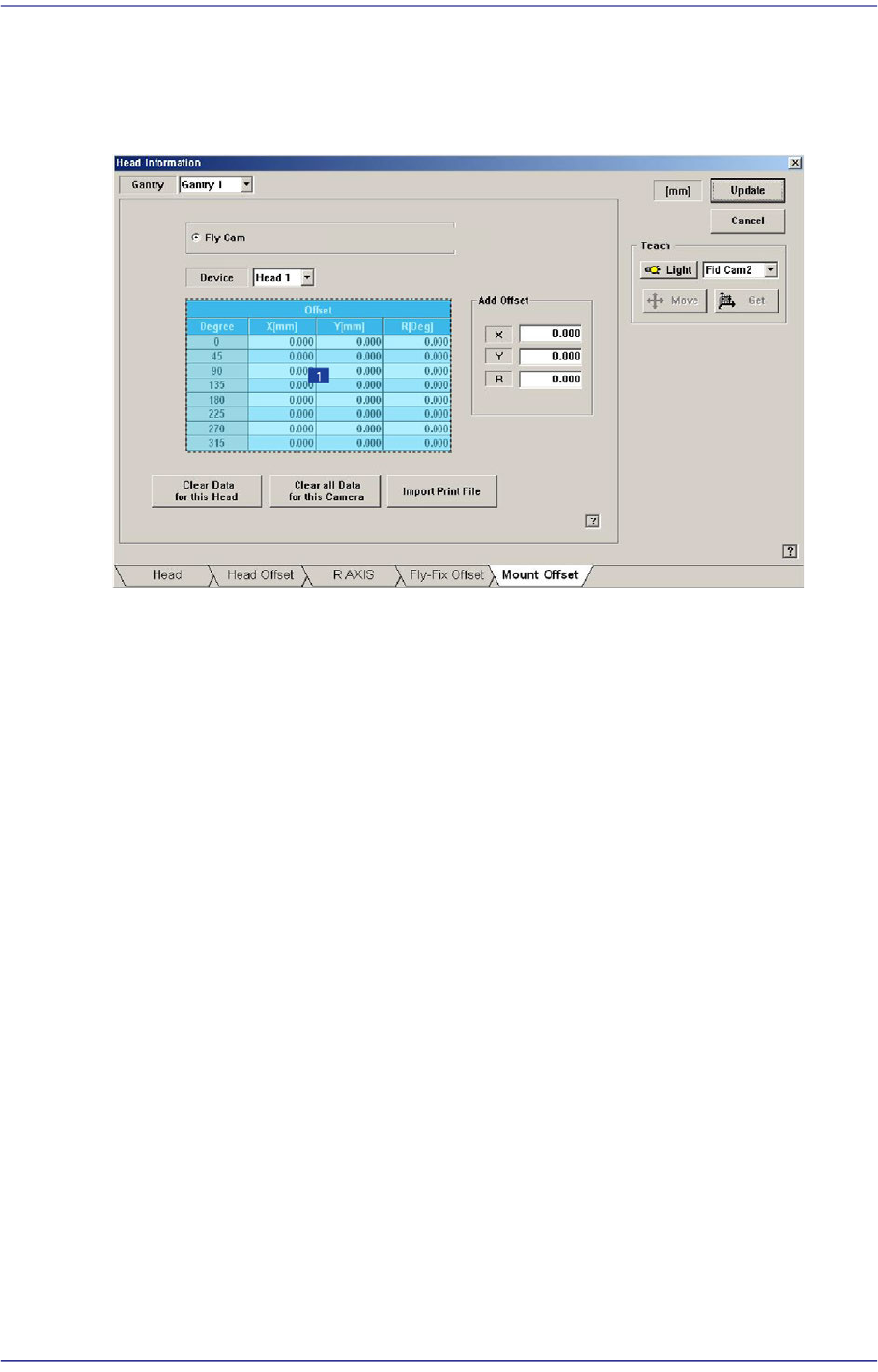
14.1.5. “Mount Offset” tab dialog box
Sets the placement offset for each head.
Figure14.5 “Mount Offset” tab dialog box
1: Grid group
<Fly Cam, Fix 1 Cam..> option button area
Sets the placement offset for each camera.
<Device> combo box
Sets the placement offset for each head.
<Grid> group
Sets the placement offset by degree at 45 degree interval.
<Degree> column
<Offset-X, Y, R> column
Sets the placement offset of X, Yand R.
<Clear data for this Head> button
Deletes placement offset data of the selected head.
<Clear all data for this Camera> button
Able to delete the placement offset data of all the heads corresponding to the selected
camera.
<Import Print file> button
Selecting the created Report Viewer Text file by clicking this button will apply the
offset extracted from the CPK Report Viewer to the placement offset of the current
machine.
14-10
Fast Flexible Placer SM481(L) PLUS Administrator’s Guide
<Add Offset> group
It is possible to apply X, Y and R placement offsets collectively to all heads.
This function is used at the factory. Users must not apply the offsets at their own
discretion.
<Update> button
Transmits the change data to the equipment and closes the dialog box.
<Cancel> button
Ignores the change data and closes the dialog box.
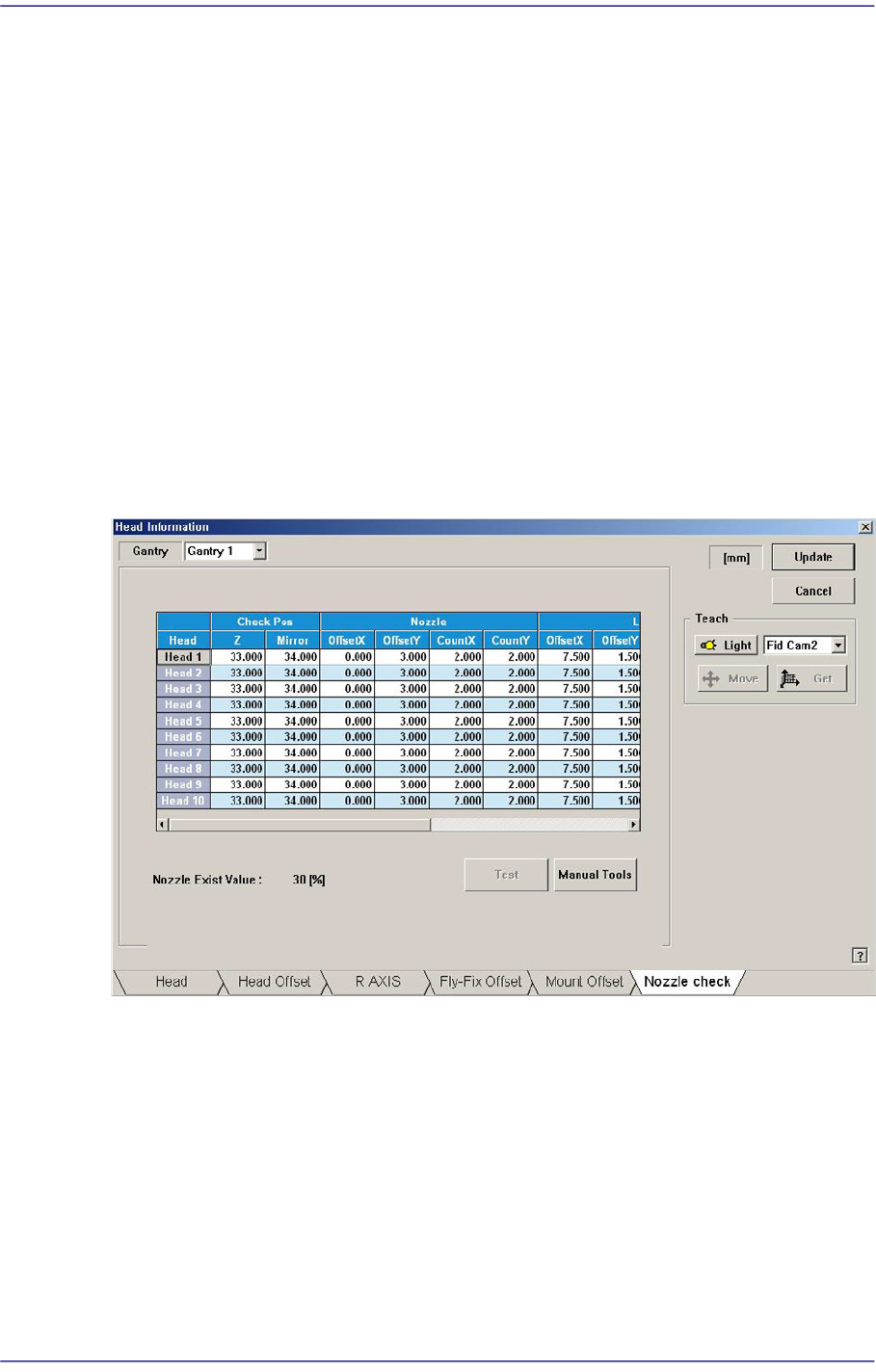
14.1.6. “Nozzle Check” tap dialog box
This nozzle-check function is used to check whether the nozzle is inserted in the nozzle-
holder of the head or not by using the fly-camera.
Figure14.6 “Nozzle Check” tab dialog box
Check Pos
Z
Refers to the height of the Z-axis of the corresponding head when checking the
existence of the nozzle. This is indicated by the distance from the top surface of
the PCB to the end of the head-spindle. Therefore, the nozzle inserted in the
nozzle-holder must be removed before performing setup of the Z-axis.
Mirror
Refers to the position of the mirror axis when checking whether the nozzle is
mounted or not. This is indicated as degree.