Hanwha SM481 PLUS Series Administrator’s Guide Eng.pdf.pdf - 第33页
Preface xix About Warranty The warranty is issued to cover the following mac hine faults and malfunctions. However , the contents of the warranty stipulated at the time of purchase take preceden c e over the above covera…
Fast Flexible Placer SM481(L) PLUS Administrator’s Guide
xviii
to the driving systems such as motor. It is used to put the machine into the standby
status after power-up. ‘EMG (emergency stop)’ switch can be pressed to release
the standby state.
RESET Button (Blue Color)
Used to stop production in a machine that has paused automatic production or to
release the error in a machine that has been paused due to an error. Pressing this
Button in a machine to which an error has occurred will change the state of the
machine from 'FREEZE' or 'EMER' to 'IDLE'. The ‘Reset’ Button cannot be
activated during automatic operation of this machine.
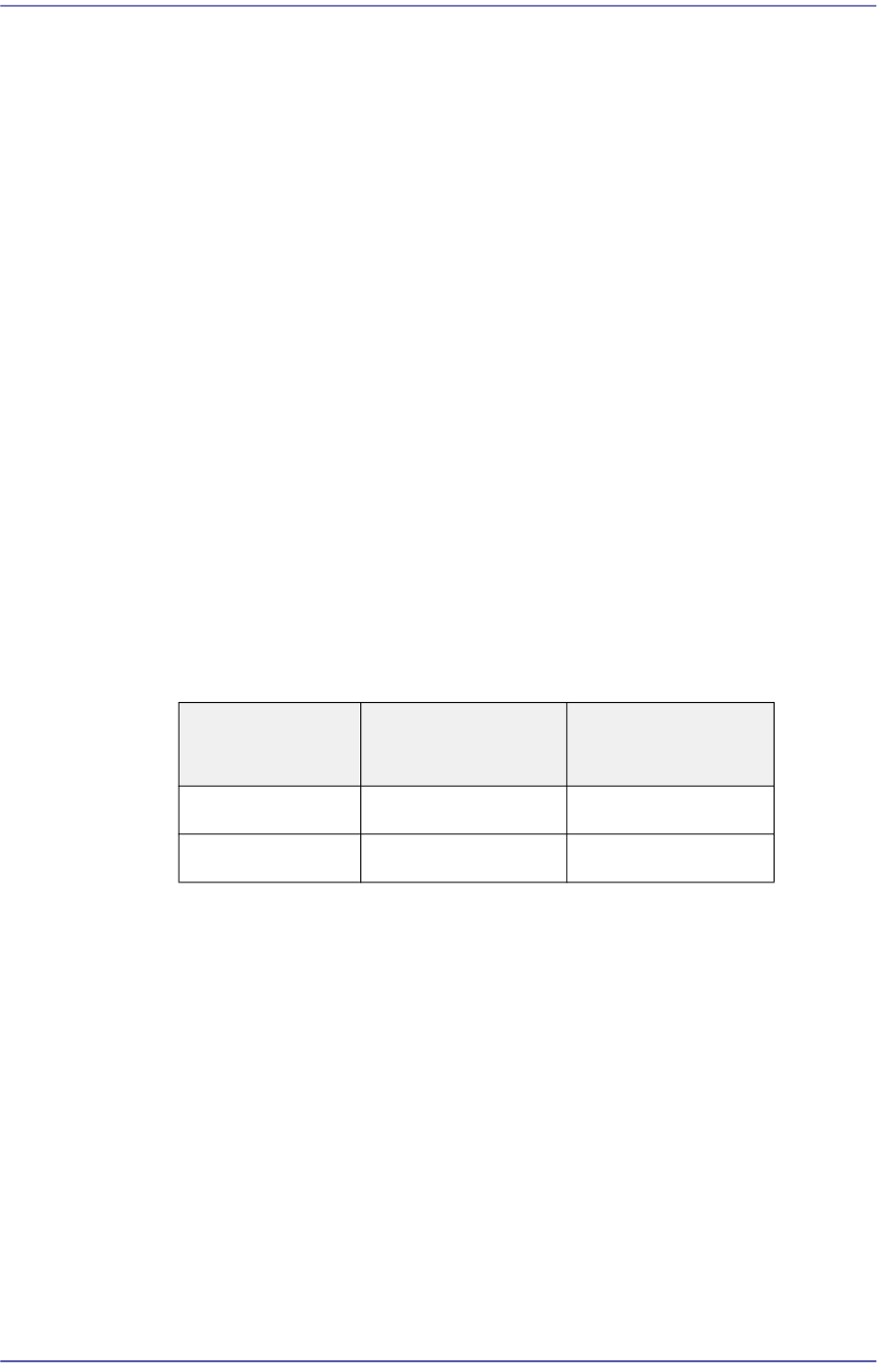
F/R SELECTS Button
It is the Button that determines which one of the front operation panel and rear
operation panel will have the control authority. Whether or not the corresponding
operation panel has the control authority depends on the status of this Button.
When initializing the machine, the front is set to have right for control by default.
(Front side by default.)
If the select Button is pressed and maintained for a second, the LED Button is
turned on and the right for control is transferred to the rear side. It takes 0.3~1
seconds to change the right for control from the front OP panel to the rear OP
panel. The same applies when changing the right for control reversely.
The same applies for the rear side. The following table shows this briefly.
Feeder change Button
The Button used to replace the feeders on the front and rear feeder base. When this
Button is pressed, the head unit of the machine come to the safety zone for easy
feeder change.
EMG (Emergency Stop) Switch
This is an emergency stop switch. Operation of this machine is immediately
suspended if this switch is pressed in case of an emergency.
Supply of all powers except for the power to a computer is ceased. The emergency
stop status can be released by turning the ‘EMG’ switch in the direction of the
arrow and pressing the RESET Button.
Right for control
Front panel select
Button LED status
Rear panel select
Button LED status
Front On Off
Rear On Off
Preface
xix
About Warranty
The warranty is issued to cover the following machine faults and malfunctions.
However, the contents of the warranty stipulated at the time of purchase take
precedence over the above coverage.
What is covered by
the warranty
If any part of the machine fails to function properly under normal
conditions of usage due to defects in material or workmanship, it will
be repaired by Hanwha Precision Machinery Co., Ltd. at no charge for
either parts or labor.
Time period of the
warranty
The term of this warranty shall expire for any of the following cases:
24 months after delivery from the fac
tory
24 months after installation
What is not
covered by the
warranty
Any of the following cases are not covered by this warranty:
Data lost due to HDD damage. (Please back up the data
periodically.)
Malfunction of the system due to the execution of a program
regardless of machine operation, as well as data damage due to
infection by any computer viruses.
Damage due to due to long-term use or defe
cts due to the wear
arising from normal use (natural fading of coating and plating,
wearing-out of parts, etc.).
Delicate changes which do not affect the functional quality (such
as noise from a controller, sound of a rotating motor, etc.).
Defects due to ambient conditions (moisture, impurities, dust on
the machine, oil mist, etc.).
When failure occurs to the machine due to customer's mistake.
Def
ects resulting from the following cases are also not covered by
this warranty:
Natural disasters such as earthquake, typhoon, flood and
lightning strike, or accident, fire, etc.
Modification which was not approved by our company or agents.
F
ailure to back up the data stored in the machine.
Use of parts or lubricants other than those designated.
Insufficient or defective maintenance or inspectio
n.
Adjustments performed by persons other than designated agents.

Fast Flexible Placer SM481(L) PLUS Administrator’s Guide
xx
About virus protection
For the safe use of the machine, the machine system shall be maintained normally through
virus protection.
Basic items to be observed for virus protection are as follows:
Install the anti-virus program (TrustLine) provided by us so that any virus can be
treated by performing a virus check periodically. When installing the program,
contact our C/S (STS) or local agent.
Run the anti-virus program and check for viruses without fail before starting the
machine and preparing production. Running the anti-virus program during
production may affect the performance of the machine.
Update the anti-virus program engine periodically. Use a PC without a virus as an
update server when updating the anti-virus program engine for the machine
system.
For the corresponding PC, update the anti-virus program engine periodically
through the Internet and perform configuration in the ant-virus program to update
the anti-virus program engine of the machine by sharing the folder in which the
updated file is saved with the machine system.
When loading a PCB file or saving it in the system using storage media including
USBs, perform an anti-virus check first on the corresponding storage media and
check for any problems.
When using a shared folder in the machine system as necessary, set the password
for the shared folder without fail.