Operating Instructions_VF335_en.pdf - 第109页
5|Commissioning 5.4 Preparing the machine for operation After checking all the functions, you can prepare the machine for operation. For this purpose, open the start dialog: Preheating Soldering module Exit Infeed Infe…

5|Commissioning
f) In the [Switch functions] frame, click on the button to laterally fix the board.
Then, click on the
button to fix the board above / below.
ð Once the board has been fixed, the buttons turn yellow.
g) After guaranteeing all the functions, you can disable the stoppers and fixations,
and move the board out of the machine.
Ersa GmbH Operating Instructions_VF335_en|Rev. 14|30/11/2017 108/695
5|Commissioning
5.4 Preparing the machine for operation
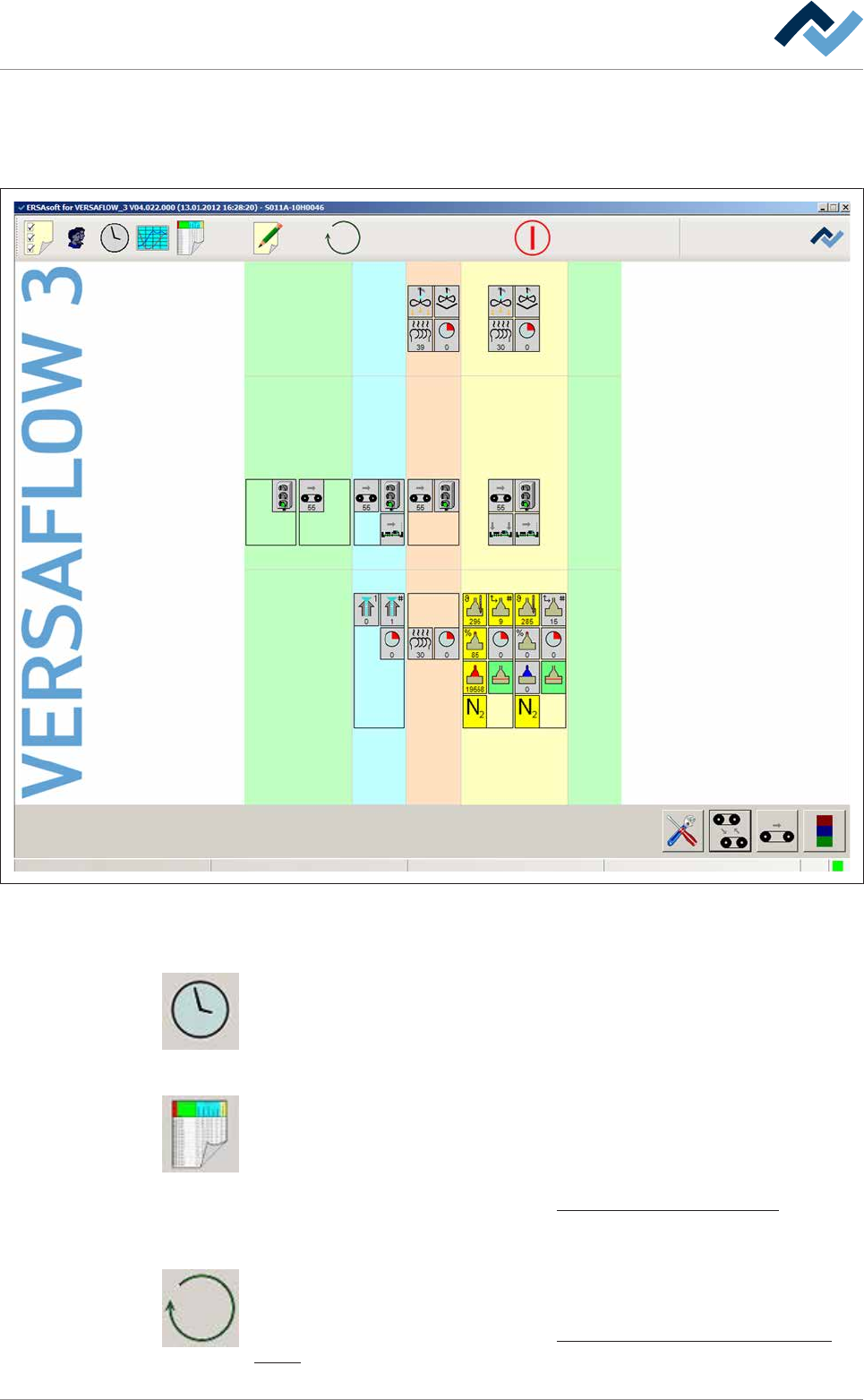
After checking all the functions, you can prepare the machine for operation. For
this purpose, open the start dialog:
Preheating Soldering module ExitInfeed Infeed unit
Solder pot
user: none
Flux unit
Maintenance mode
Fig.19: The start dialog
Fixing the switch-on and switch-off times
Weekly timer. Click on this button to open the [Weekly timer] dialog. In this dialog,
you can determine the current time as well as the switch-on and switch-off times
for the machine.
Searching for and editing a soldering program
Edit soldering program. Click on this button to open the [Edit soldering program]
dialog. In this dialog, you can create soldering programs or edit and change existing
soldering programs. Several soldering programs can be combined into a library to
improve clarity.
With respect to this, please read Chapter The soldering program editor [
}164].
Change the operation mode, start a soldering program
Click on this button to change the operating mode of the machine or select a sol-
dering program.
With respect to this, please read Chapter Selecting and starting a soldering pro-
gram [}215].
Ersa GmbH Operating Instructions_VF335_en|Rev. 14|30/11/2017 109/695
5|Commissioning
5.5 Recurring commissioning
Recurring commissioning describes the machine activation if no power failure has
taken place, no emergency STOP button has been pressed and the control software
is active. Before a recurring commissioning, the machine is in the [Voltage supply
OK] operating mode .
5.5.1 Activation via weekly timer
The weekly timer automatically puts the machine in the [Maintenance mode] oper-
ating mode. For this function, the following requirements must be fulfilled:
– All emergency STOP pushbuttons must be released.
– Switch-on and switch-off times must be set and enabled.
– In the start dialog of the control software, the
button must be displayed in
red (machine release enabled).
NOTE
Operational readiness
At the specified time, the machine is ready for operation. The infeed is not released
automatically; it remains blocked. The machine is in the [Maintenance mode] operat-
ing mode.
Ersa GmbH Operating Instructions_VF335_en|Rev. 14|30/11/2017 110/695