Operating Instructions_VF335_en.pdf - 第219页
6|Function description Within the Op tion [blu e RESET butto n] Main switch ON Electro nic OFF Electro nic Init Powe r OFF V oltage supply OK V oltage supply OK Check eme rgency-stop Check eme rgency-stop Movemen t OFF…

6|Function description
6.12 Machine operating modes
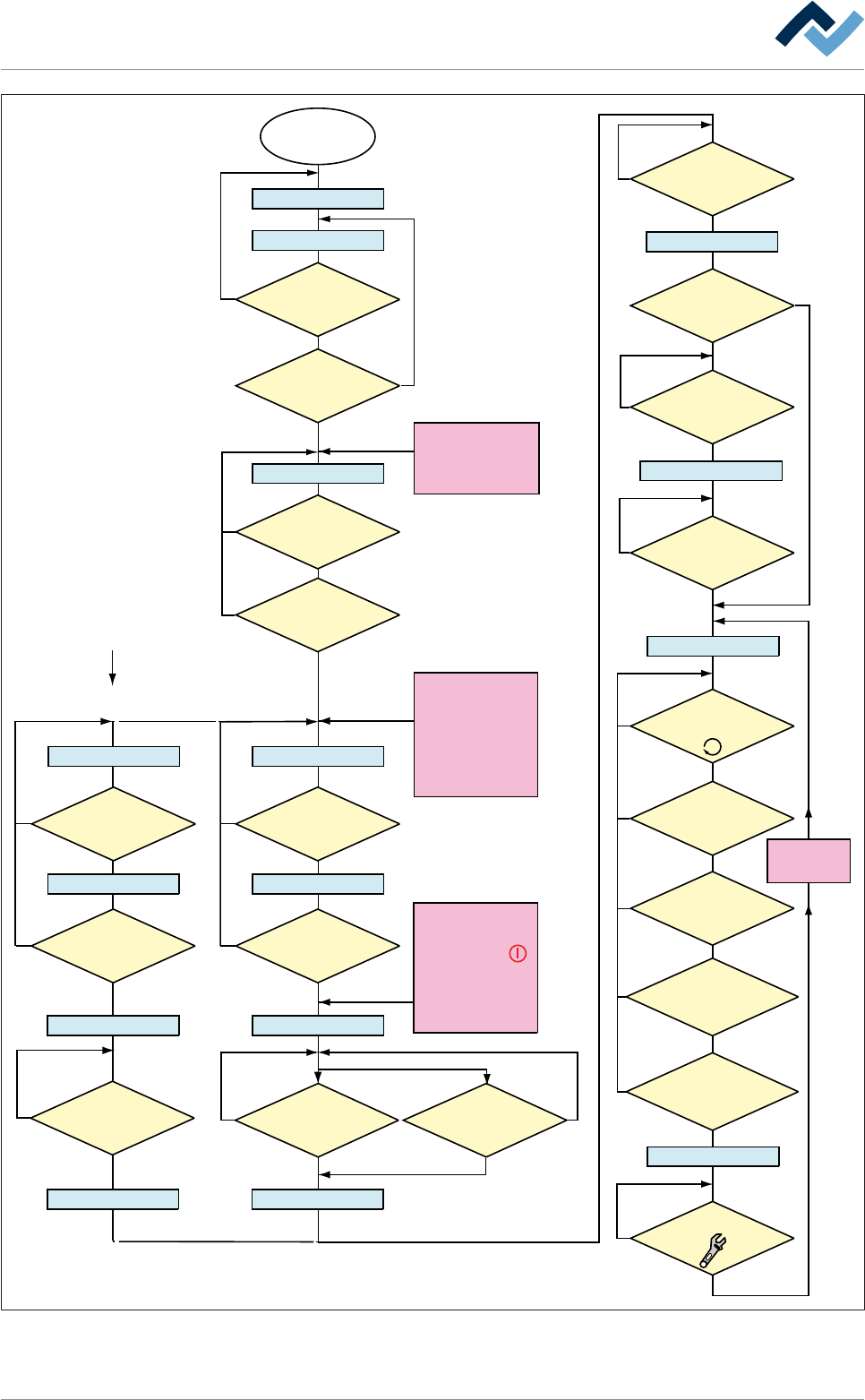
The machine operating modes are shown on the next page.
Ersa GmbH Operating Instructions_VF335_en|Rev. 14|30/11/2017 218/695
6|Function description
Within the Option
[blue RESET button]
Main switch
ON
Electronic OFF
Electronic Init
Power OFF
Voltage supply OKVoltage supply OK
Check emergency-stopCheck emergency-stop
Movement OFF Movement OFF
Maintenance mode
Button
[Movement ON] pressed?
No
NoNo
No
No
No
Yes
Yes
Yes
Referencing off all
servo axes OK?
No PCB inside the
machine?
No
Yes
NO message is
pending which prevents the
change to [Automatic]
No
Yes
Has the operator
selected a soldering program?
No
Yes
Yes
No
Yes
Yes
Yes
Has a pre-activate
point been reached, e.g.
[Heating]?
No
Yes
Weekly timer
in ON phase?
Has the blue
RESET button been
pressed?
No
Yes
Yes
Emergency-off OK?
No
Emergency-off OK?
No
Yes
Exhaust air OK?
The following condition also
directly results in
[Voltage supply OK]:
- Emergency-off pushed
OR emergency-off
error
- Weekly timer in OFF
phase AND machine
empty
No error for
[Electronic OFF]
pending?
CAN initializ
ing AND PLC
initializing OK?
Button [Automatic]
pressed?
No
No
Movement ON
Button
[Movement ON] pressed?
No
Yes
Movement ON
Machine Init
Referencing servo axes
Internal: PLC OK?
Referencing
Servo axes OK?
No
Yes
Yes
Yes
No
Yes
Has the
operator started the
referencing of the Servo
axes?
No
Are servo axes
availabe?
No
Supply
voltage OK?
Button
[Maintenance] pressed?
The following condition also
directly results in [Power Off]:
- The
visualization
software version is
outdated.
The following condition also
directly results in
[Movement OFF]:
- The [Movement Off]
key has been pushed
- An error is pending which
results in [Movement off];
e.g. optional CAN device
not configured
The dialog
[...................]
is displayed
Automatic
Flussdiagramm: Die blauen Rechtecke definieren die Betriebsarten der Maschine. Diese Betriebsarten
werden auch in der Statusleiste der Bedienoberfläche angezeigt.
Ersa GmbH Operating Instructions_VF335_en|Rev. 14|30/11/2017 219/695
6|Function description
6.12.1 Changing the operating mode
The most important operating modes of the machine are displayed as rectangles in
the flowchart. The text within these rectangles is always displayed in the status bar
of the start dialogue. There you can always read the current operating mode.
The status bar can be found at the lower edge of the screen:
user: none Automatic mode Library Soldering program
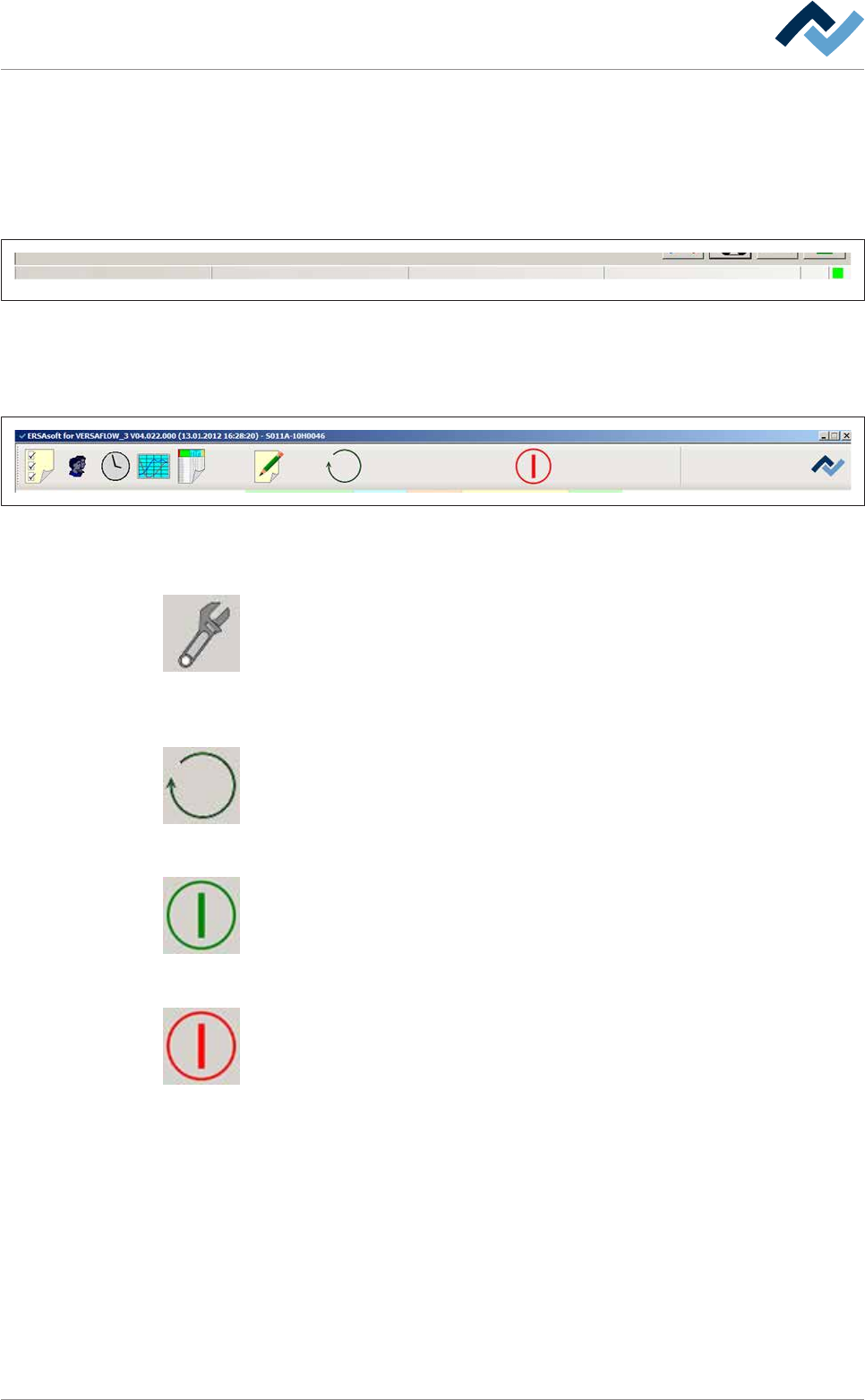
Fig.52: The status bar displays the currently logged in user and the current operating mode of the machine. In addition, in auto-
matic mode the library and the currently active soldering program are displayed.
The buttons for the operating modes are visible in the top toolbar of the start dia-
logue.
Preheating Soldering module ExitInfeed Infeed unit
Solder pot
user: none maintenance mode
Flux unit
Fig.53: Top toolbar
If the machine is in the [Automatic mode] operating mode:
This button is only visible in the [Automatic mode] operating mode. By clicking on
this button, you can stop an active soldering program and set the machine to the
[Maintenance mode]operating mode.
If the machine is in the [Maintenance mode] operating mode:
Click on this button to change the operating mode of the machine or select a sol-
dering program.
If the machine is in the [Movement off] operating mode:
If the green symbol is displayed, the machine is in the [Movement off] operating
mode: Click on this button to switch to the [Maintenance mode] operating mode:
If the machine is in the [Maintenance mode] operating mode:
When the red symbol appears, the machine is in the [Maintenance mode] operat-
ing mode. By clicking on this button, you can switch to the [Movement off] operat-
ing mode.
Ersa GmbH Operating Instructions_VF335_en|Rev. 14|30/11/2017 220/695