Operating Instructions_VF335_en.pdf - 第194页
6|Function description 6.9.12.2 Soldering module data set (single pot) You can enter the nozzle target positions in the form of coordinates in the re- gisters. If you enter coordinates, these are always considered targ…
6|Function description
NOTE
Using the area spray head
If you are working with the area spray head, the document [268447] is available. The
document can be found in the data carrier [product_data_selective], which is included
in the delivery scope.
Ersa GmbH Operating Instructions_VF335_en|Rev. 14|30/11/2017 193/695
6|Function description
6.9.12.2 Soldering module data set (single pot)
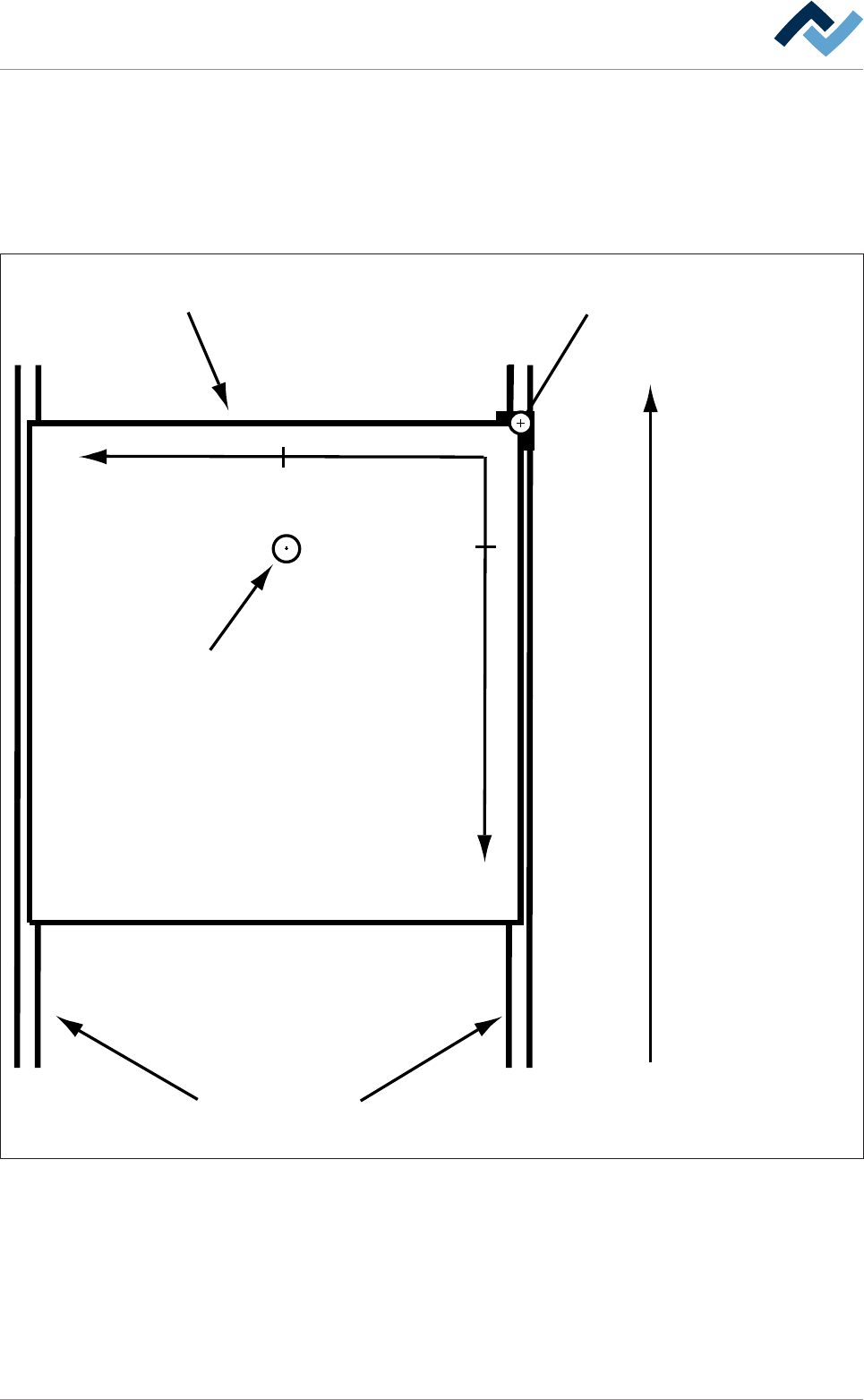
You can enter the nozzle target positions in the form of coordinates in the re-
gisters. If you enter coordinates, these are always considered target coordinates
starting from the barrier (= point of origin). You can enter the coordinates in [mm]
with an accuracy of 1/10mm via the keyboard. Please also consider the following
drawing:
Transfer direction
Blocker (= zero-point)Board
Conveyor
+Y
+X
29,5
13,5
Tip
Fig.44: Entering soldering coordinates: In the example above, the nozzle is located at the end position [X = 13.5] / [Y = 29.5] (view
from above).
Ersa GmbH Operating Instructions_VF335_en|Rev. 14|30/11/2017 194/695

6|Function description
– The [Z while moving] register Here, enter the distance from the solder nozzle
to the PCB bottom side in [mm]. This distance is kept during the solder nozzle
positioning.
– The [Endposition X [mm]] register: Enter the end position of the nozzle in X dir-
ection in [mm].
– The [Endposition Y [mm]] register: Enter the end position of the nozzle in Y dir-
ection in [mm].
– The [Speed X/Y [mm/s]] register: Enter the travel speed of the nozzle in [mm/
s]. This is the speed at which the nozzle is moved to the X/Y end position.
– The [Endposition Z [mm]] register: Enter the distance from the solder nozzle to
the bottom side of the board in [mm]. This is the distance to which the solder
nozzle is lifted after reaching the end position [X/Y]. If a value is entered here,
the nozzle is lifted, and soldering takes place. If no value is entered here, no
soldering takes place. The nozzle is only positioned.
– The [Speed Z [mm/s]] register: Enter the travel speed of the nozzle in [mm/s].
This is the speed at which the nozzle is lifted to the [Endposition Z [mm]].
– The [Wave height [%]] register: Enter the height of the solder wave in [%]. This
value is maintained during positioning and soldering.
– The [Soldering time [s]] register: Enter the soldering time in [s]. If a value is
entered for the soldering time, the solder nozzle is moved to the X/Y/Z end po-
sition, and a spot is soldered for the [Soldering time [s]] time. If no value is
entered for the soldering time, the solder nozzle is moved to the X/Y/Z end po-
sition; during the travel movement, a path is soldered.
– The [Lower value [%]] register: Enter a value as a [%] here. This is the value by
which the height of the solder wave is lowered after the [Soldering time [s]]
has elapsed. The lowering speed is affected by the [Lowering time [s]].
– The [Lowering time [s]] register: Enter a value in [s] here. Within this time, the
height of the solder wave is set from the [Wave height [%]] value to the [Lower
value [%]] value.
Ersa GmbH Operating Instructions_VF335_en|Rev. 14|30/11/2017 195/695