Operating Instructions_VF335_en.pdf - 第217页
6|Function description NOTE Why cannot a soldering program be started? If a soldering program cannot be started, several causes are possible: ü The machine is in the [Maintenance mode] operating mode. ü Referencing of …
6|Function description
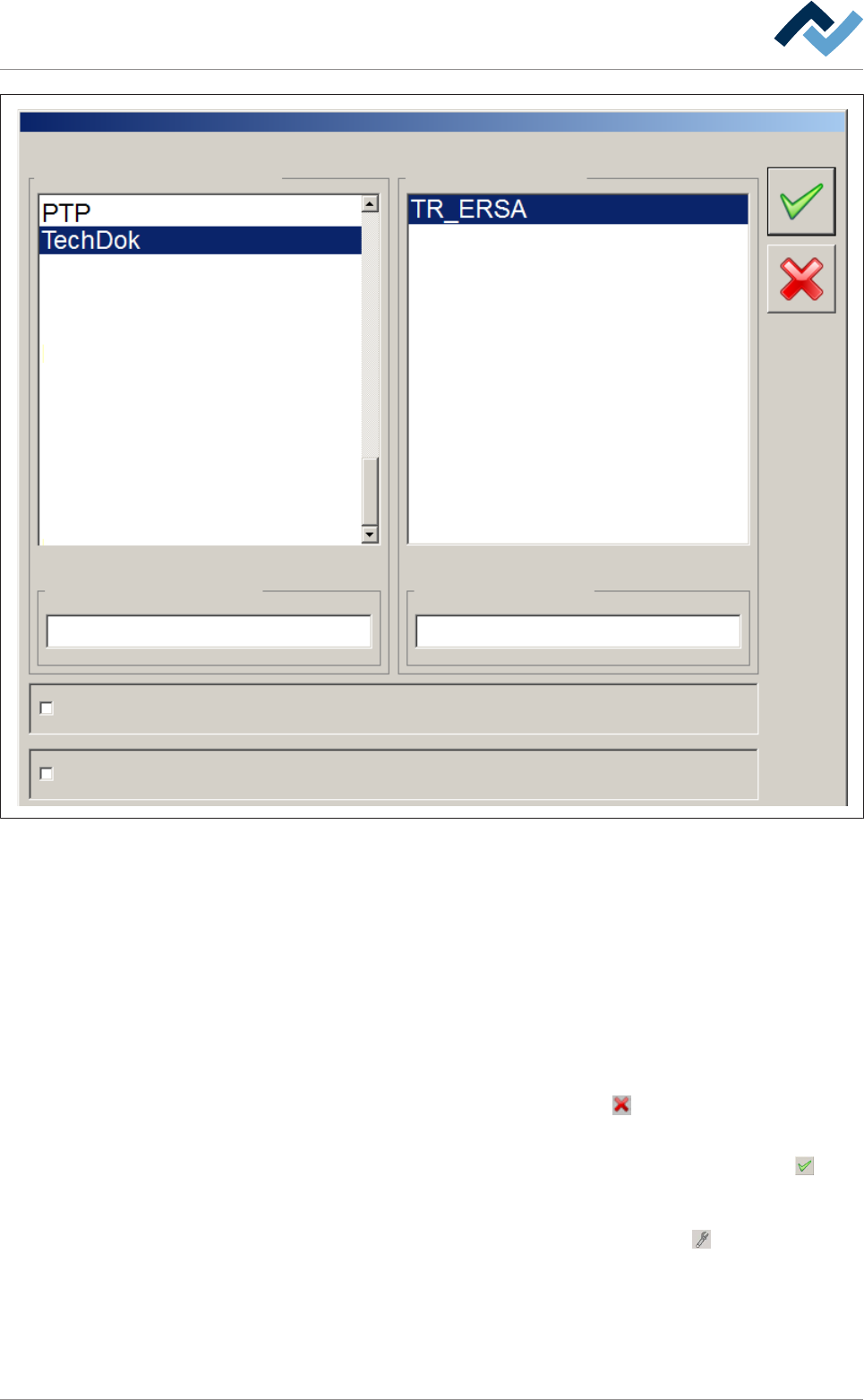
Libraries Programs
Libraries selection Program selection
Board simulation
Select soldering program
ec
Code mode
Filter soldering programmes
ü Using the filter function:
a) click on the [Program selection] input field and enter any desired character
string.
ð If you enter, for example, the character string [ec], all file names in which this
string is included, will be displayed in our example [TechDok].
ü Enabling a soldering programme:
a) highlight a library in the [Libraries] frame.
b) Highlight a soldering programme in the [Programs] frame.
c) Should the process be cancelled, click on the
button.
ð The dialogue closes.
d) If the soldering programme is to be selected and enabled, click on the
but-
ton.
ð The soldering programme is enabled and the dialogue closed. The machine
switches to the [Automatic mode] operating mode. The
button is displayed
in the top toolbar. The operating mode, the library and the selected soldering
programme are displayed in the status bar.
Ersa GmbH Operating Instructions_VF335_en|Rev. 14|30/11/2017 216/695
6|Function description
NOTE
Why cannot a soldering program be started?
If a soldering program cannot be started, several causes are possible:
ü The machine is in the [Maintenance mode] operating mode.
ü Referencing of a module is not OK.
ü The machine is not empty, there are still boards inside it.
ü The transition to [Automatic mode] is not allowed and will be prevented.
a) In this case, open the [Messages] dialog.
b) Eliminate the specified problems and acknowledge the messages.
c) Set the machine to the [Maintenance mode] operating mode.
d) Restart the soldering program.
NOTE
Why cannot the operation mode be changed / a soldering program be started?
If the [Moduleinfo] symbol appears within the symbols:
you cannot change the op-
eration mode and start a soldering program. Instead of this, the [Moduleinfo] edit dia-
log is displayed. This facilitates the search for the error cause:
ü To determine the error cause:
a) Open the appropriate help by clicking on the [Show] button
b) Remove the cause of the malfunction
c) Close the edit dialog
d) Open the [Messages] dialog, acknowledge the messages
e) Tray again to change the operation mode or to start the soldering program.
ð The process has now been completed.
NOTE
Simulation mode
If you enable the [Board simulation] checkbox and start a soldering program, the ma-
chine is operated in the simulation mode. In the status bar of the start dialog, the
[Auto + Simulation] text is displayed. Please note that all modules can work in this op-
eration mode, although there is no PCB inside the machine:
Ersa GmbH Operating Instructions_VF335_en|Rev. 14|30/11/2017 217/695

6|Function description
6.12 Machine operating modes
The machine operating modes are shown on the next page.
Ersa GmbH Operating Instructions_VF335_en|Rev. 14|30/11/2017 218/695