Operating Instructions_VF335_en.pdf - 第141页
6|Function description 6.5.8 The [Logging] editing dialog This dialog is used for logging various data of the machine. Settings General settings Profile User administration File path Logging User ersa Maintenance mode …
6|Function description
– [Help]: the whole documentation of the machine is contained in this directory.
ü Changing a file path:
a) Click on the relevant editing field and specify the path to the new storage loca-
tion.
ü Accept settings, close dialogs
a) Click on
to accept a setting.
b) Click on
to close a dialog.
NOTE
Regularly back up data!
– After commissioning, first back up data!
– Back up data on a quarterly basis!
– If the control PC is faulty, your data may be unusable. Back up data on an ex-
ternal disk once a year! Data is stored in the [Data storage] folder. With respect
to this, please read chapter [File path]!
– Document each data backup and store it in a safe place!
Ersa GmbH Operating Instructions_VF335_en|Rev. 14|30/11/2017 140/695
6|Function description
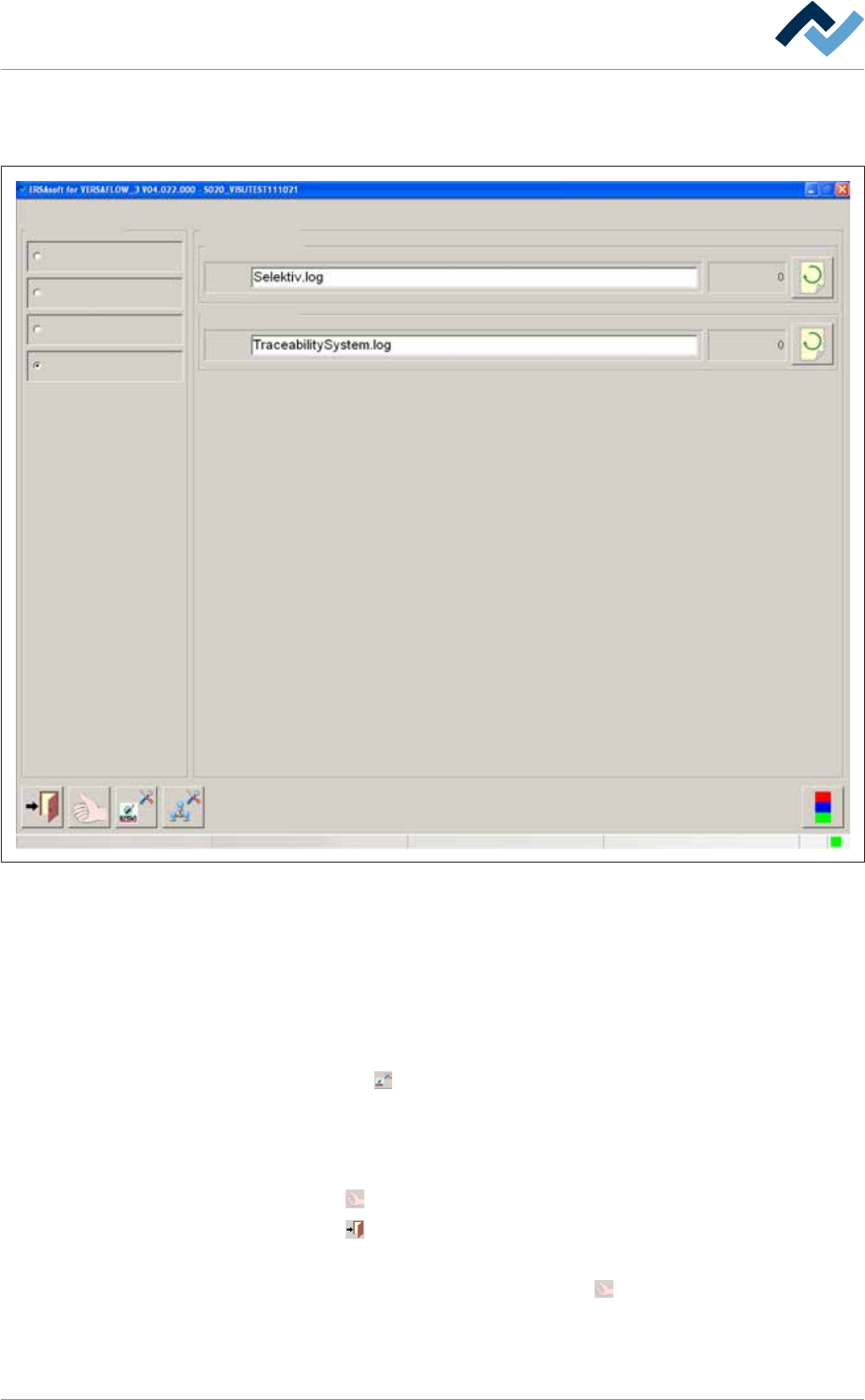
6.5.8 The [Logging] editing dialog
This dialog is used for logging various data of the machine.
Settings
General settings
Profile
User administration
File path
Logging
User ersa
Maintenance mode
File
File
Logging
ERSAsoft
Fig.25: The [Logging] editing dialog
Settings in the [ERSAsoft] frame
You can log visualization software data using the acquired data to perform, for ex-
ample, process analyses in case of production problems.
The [File] editing field
ü To log ERSA data
a) Click on the [File] editing field and enter a name for the log file.
b) Click on the
button.
ð A selection dialog box is displayed.
c) Specify the data to be logged. Enable the relevant check boxes.
ü Accept settings, close dialogs
a) Click on
to accept a setting.
b) Click on
to close a dialog.
ü As soon as the [Logging] editing dialog is displayed again:
a) Accept the setting again by clicking on the
button in the bottom toolbar,
otherwise no change will occur!
Ersa GmbH Operating Instructions_VF335_en|Rev. 14|30/11/2017 141/695
6|Function description
NOTE
Monitoring
As soon as the
button is displayed in yellow, data is being logged. If the button is
displayed in grey, no data is currently being logged:
Settings in the [Traceability system] frame
You can log traceability system data using the acquired data to document the
traceability of production parameters within a traceability system.
ü To log traceability system data
a) Proceed as described above in the [ERSAsoft] frame. After entering a name for
the log file, click on the
button.
Ersa GmbH Operating Instructions_VF335_en|Rev. 14|30/11/2017 142/695