Operating Instructions_VF335_en.pdf - 第274页
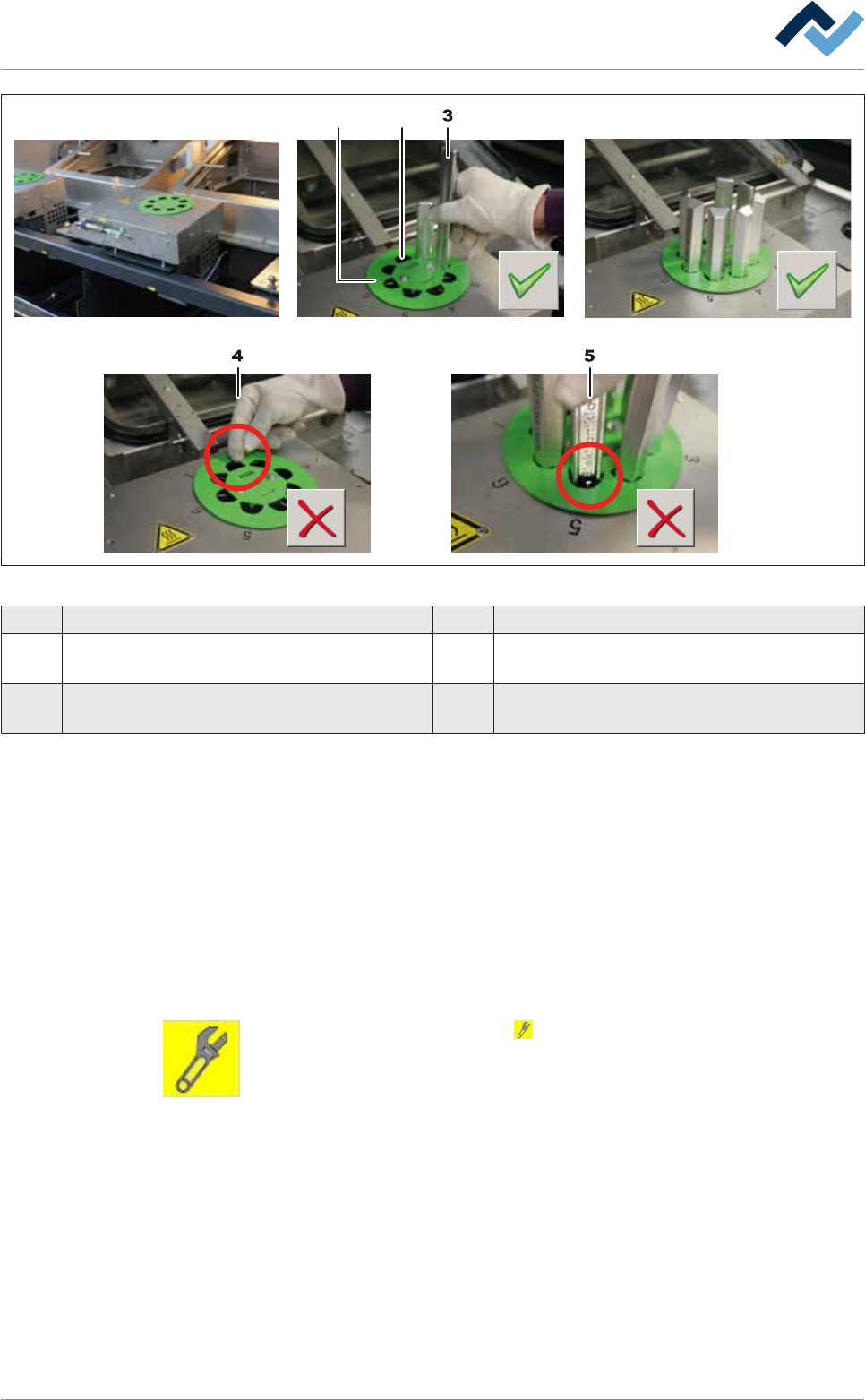
6|Function description 1 2 Fig.77: Fill the turret bar container 1 Coding disk 2 Discharge duct 3 Solder bar 4 Wrong: Do not insert solder bars in the discharge duct! 5 Wrong: Insert exclusively suitable solder bars i…
6|Function description
ü Filling the container:
ü The option has been set in the machine configuration.
ü You made sure that the solder bar and the solder pot have the same solder al-
loy.
ü The machine is in the operating mode [Maintenance mode] function.
ü A user logging into the system has respective rights.
a) Press the soldering module icon in the start dialog.
ð The [Soldering module] window appears.
b) In the [Switch functions] frame press the button to enable module mainten-
ance. When the module maintenance mode is active, this button turns yellow.
c) Open the hood on the soldering module.
Ersa GmbH Operating Instructions_VF335_en|Rev. 14|30/11/2017 273/695
6|Function description
1 2
Fig.77: Fill the turret bar container
1 Coding disk 2 Discharge duct
3 Solder bar 4 Wrong: Do not insert solder bars in the discharge
duct!
5 Wrong: Insert exclusively suitable solder bars
into the container!
a) Unpack the solder bars. Check the labels on every packaging. Do not mix up dif-
ferent solders!
ð If a coding disk (1) is mounted:
b) Make sure that the solder bars (3) fit perfectly in the recesses.
c) Insert a total of 7 solder bars into the container.
d) Note: Do not insert any solder bars into the discharge duct (2)! The bar would
fall immediately into the solder pot!
ð After filling the container:
e) Close the hood of the machine.
f) In the [Switch functions] frame press the button to deactivate module main-
tenance. When this mode is completed, the button turns grey.
g) Open the [Messages] input dialog and acknowledge all existing messages.
ð The process has now been completed.
Ersa GmbH Operating Instructions_VF335_en|Rev. 14|30/11/2017 274/695
6|Function description
Configure the settings for the solder feed
ü Enter the settings:
ü The machine is in the operating mode [Maintenance mode] function.
ü A user logging into the system has respective rights.
a) Press the soldering module icon in the start dialog.
ð The [Soldering module] window appears.
b) Click on the button in the lower toolbar.
Ersa GmbH Operating Instructions_VF335_en|Rev. 14|30/11/2017 275/695