Operating Instructions_VF335_en.pdf - 第155页
6|Function description Creating cyclic messages ü Creating a cyclic message: a) in the [Messages] dialogue of the [Text] column, click on a blank line and enter a descriptive message text, for example, conveyor chain l…
6|Function description
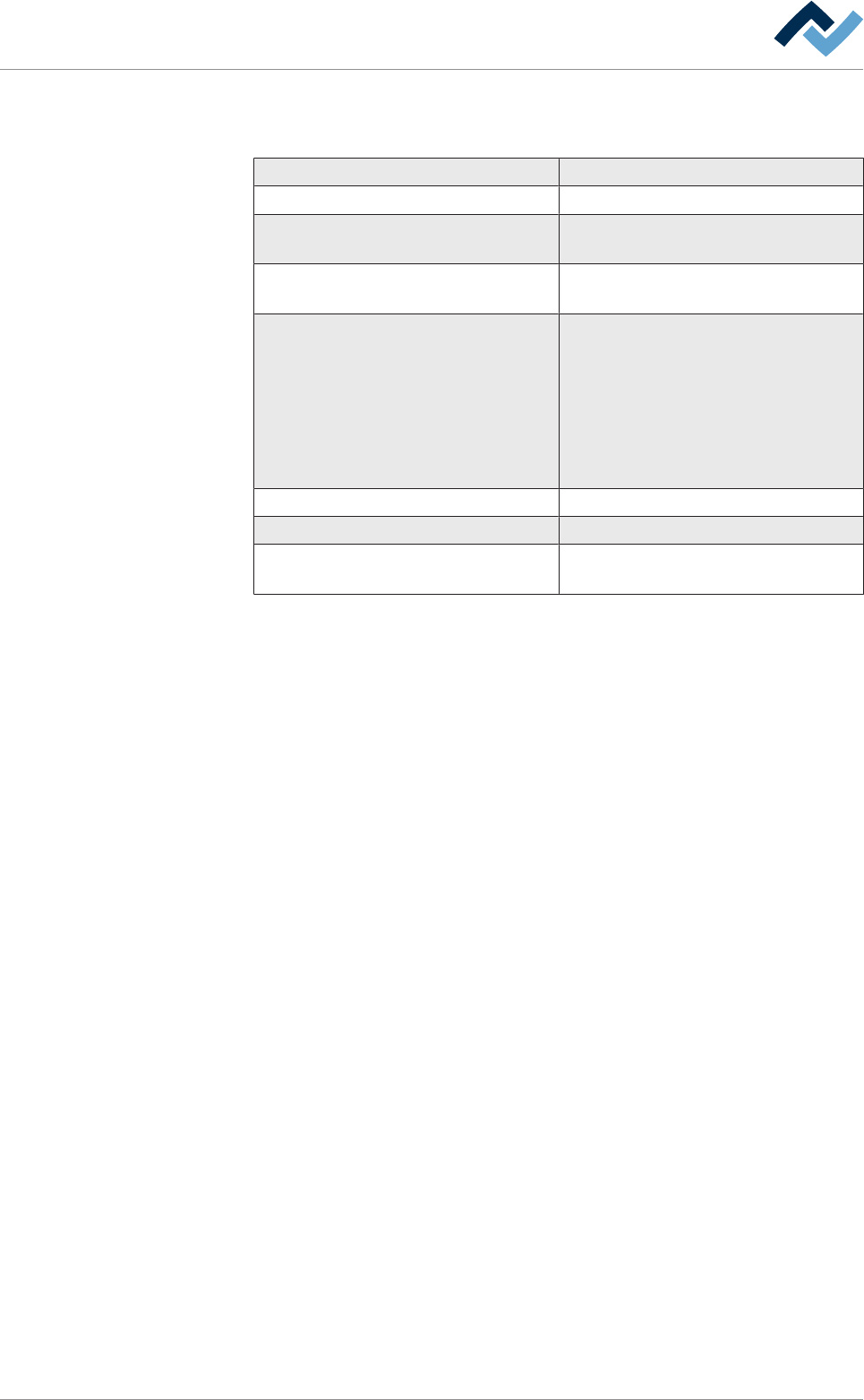
The detailed description of a cyclic message in the table
The [Cyclic messages] settings dialogue includes the following columns:
column description
[ID] cyclic message serial number
[Facility 1], [Facility 2], [Facility 3] Input of which part of the machine the
message refers to.
[Text] Entering an explanatory text for the
message.
[Interval] Indication of a time interval:
[daily]
[weekly]
[monthly]
[running time]
[Numbers of Boards]
[Time 1], [Time 2] Enter the reporting times.
[Active] This checkbox enables cyclic messages.
[Infeed stopper] Enable this checkbox to block PCB infeed
when the message appears.
Ersa GmbH Operating Instructions_VF335_en|Rev. 14|30/11/2017 154/695
6|Function description
Creating cyclic messages
ü Creating a cyclic message:
a) in the [Messages] dialogue of the [Text] column, click on a blank line and enter
a descriptive message text, for example, conveyor chain lubrication.
b) Enter descriptive locations, for example infeed, in the [Facility 1]...[Facility 3]
columns.
c) Set a time interval in the [Interval] column with the dropdown menu.
ð Depending on which interval is set in the [Interval] column, other columns
appear to the right, or the content of the columns to the right changes.
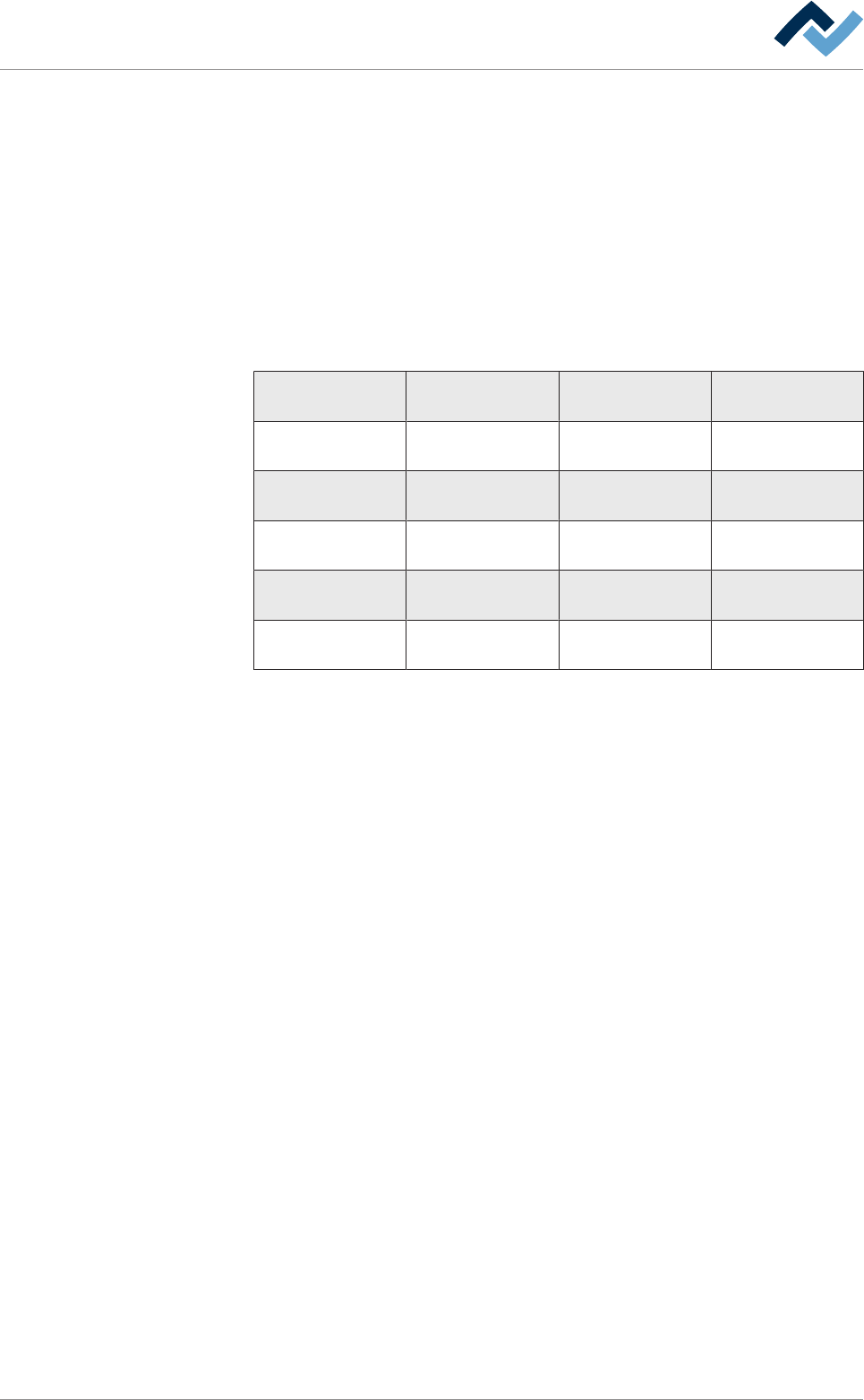
d) On this regard, please observe the following table:
Set interval Column 1 Descrip-
tion
Column 2 Descrip-
tion
Column 3 Descrip-
tion
[daily] [Hour on day] Column is not vis-
ible
Column is not vis-
ible
weekly] [Weekday] [Hour on day] Column is not vis-
ible
[monthly] [Day in month] [Hour on day] Column is not vis-
ible
[running time] [Hour on day] not
editable
[Hour of operation] Column is not vis-
ible
[Numbers of
Boards]
[Hour on day], not
editable
[Hour of operation],
not editable
[Boards after in-
feed]
Setting a message interval
a) Setting the desired interval.
b) Click on the [Active] checkbox to enable the message.
ð If the checkbox is not enabled, the message will not appear!
c) Click on the [Infeed stopper] checkbox to block the machine infeed when the
message appears.
ð If the checkbox is not enabled, the PCB will continue to be fed into the ma-
chine when the message appears.
ð You have created a cyclic message.
Deferring cyclic messages
You can specify how often each cyclic message may be ignored. This is useful, for
example, if the current production must not be interrupted.
ü Deferring a cyclic message:
a) Set a value in the [Max. number of resettings] column.
ð For example, if you set value [3], you can defer the message three times.
b) Enter a value in [h] in the [Period of resetting [h]] column.
ð If you set, for example, the value of [2h], the message re-appears after
[2h].
ð If the [Max. number of resettings] is reached, you can no longer defer the mes-
sage.
Ersa GmbH Operating Instructions_VF335_en|Rev. 14|30/11/2017 155/695
6|Function description
6.7.6 The [Messages] setting dialog
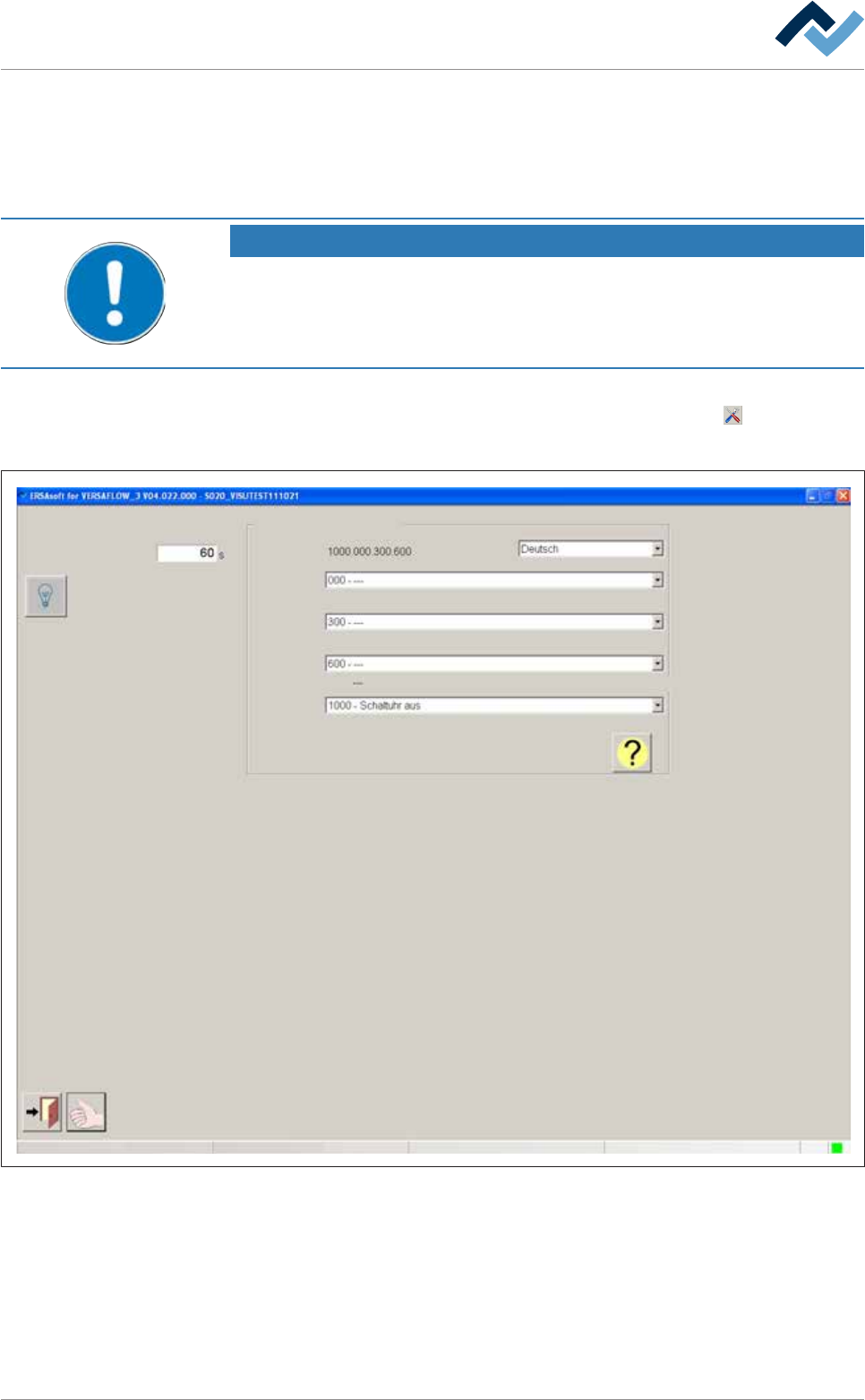
In this dialog, you can set how long the horn (optional) will sound if a new message
appears. In addition, you can test the lights and the horn of the signal lamp, look
for message texts, and display a help for the found message text.
NOTE
Are any changes possible?
The [Module properties] user rights are required to access this dialog. Settings can
only be displayed if no name and password are logged in. In this case, press the [ESC]
key on your keyboard, or click on the [Cancel] button when a password is required.
ü To open the [Messages] settings dialog:
a) In the [Messages] dialog, in the bottom toolbar, click on the
button,
ð The [Messages] settings dialog is opened:
User ersa
Messages Settings
Max duration signal horn on
Second language
Search for message text
Maintenance mode
Fig.30: The [Messages] settings dialog
Acoustic signal of a message
ü To set the horn signal time:
a) Click on the [Max duration signal horn on] input field.
b) Enter a value in seconds. The setting range is [0] ...[100000] seconds. If the
time entered is outside this range, an error message appears.
Ersa GmbH Operating Instructions_VF335_en|Rev. 14|30/11/2017 156/695