Operating Instructions_VF335_en.pdf - 第333页
8|Service and maintenance 8.6.10 Solder level monitoring: Check for proper operation This kind of maintenance work must be performed while the solder is liquid! There- fore, the following safety instructions must be st…
8|Service and maintenance
8.6.9 Checking the nitrogen flow to the solder level monitoring
12
Checking and setting the nitrogen flow
ü To check the nitrogen flow for monitoring the solder level:
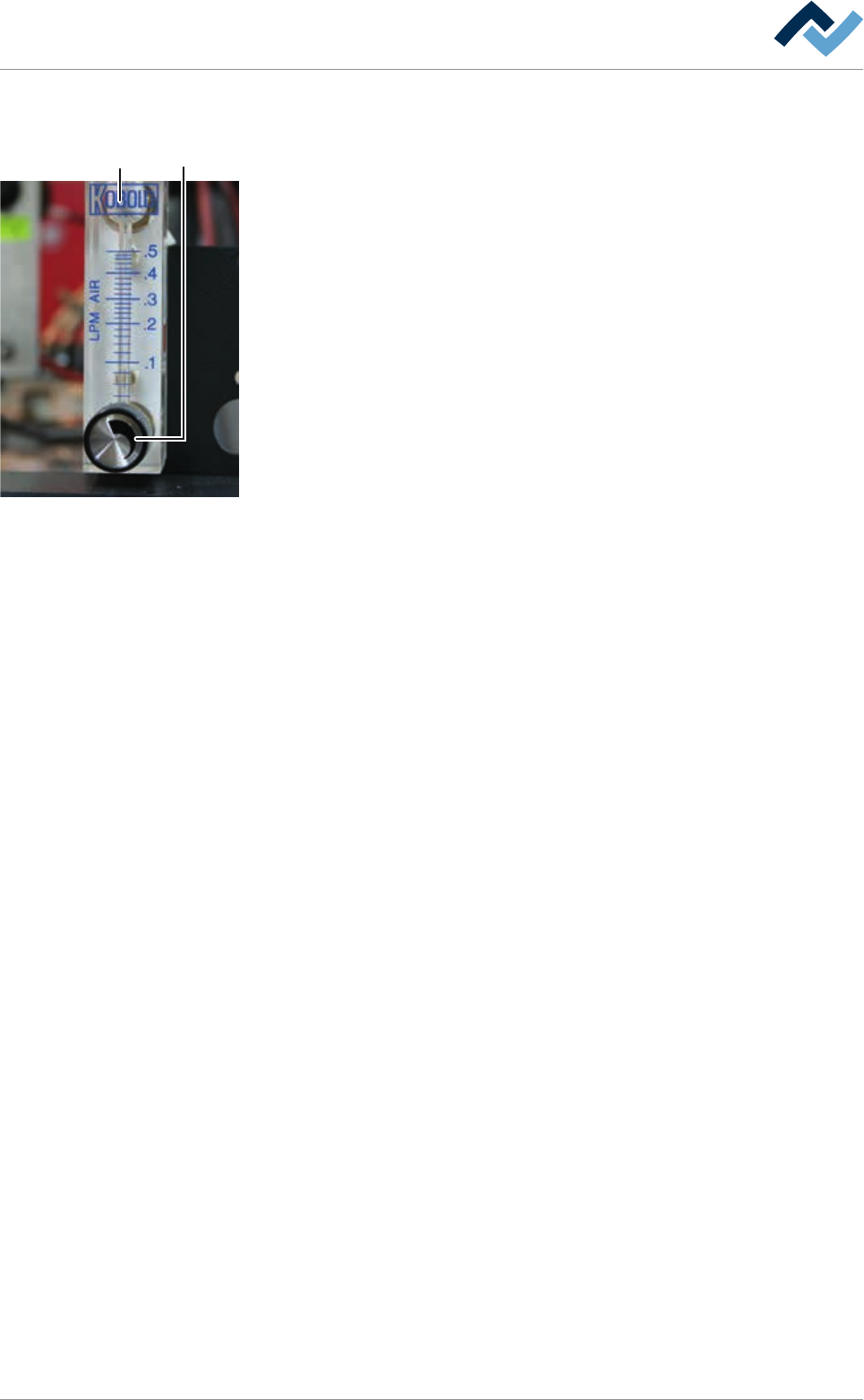
a) For each soldering module, a flow meter is available. The flowmeters (2) are
located above the soldering modules on the right side, behind the cover plate.
b) On the adjustment knob (1), set a value of at least 0.15 l/min.
c) Repeat the procedure with all available flow meters.
ð The process has now been completed.
Ersa GmbH Operating Instructions_VF335_en|Rev. 14|30/11/2017 332/695
8|Service and maintenance
8.6.10 Solder level monitoring: Check for proper operation
This kind of maintenance work must be performed while the solder is liquid! There-
fore, the following safety instructions must be strictly followed:
DANGER
Severe or fatal injury from hot machine!
The entire machine is hot during operation and contains liquid metal!
a) Service on the hot machine may only be carried out by specially trained staff,
qualified for this type of work! For these types of work, a company internal oper-
ating procedure for protective clothing is to be issued!
b) You should always take into account the possibility for metal to spray out!
c) Special care is required when refilling the pot and working on the pot!
NOTE
Use suitable protective equipment!
When performing any work on a hot pot, protective clothing must be worn:
a) Safety shoes
b) Face protection
c) Heat resistant gloves
d) Heat resistant apron.
1 2
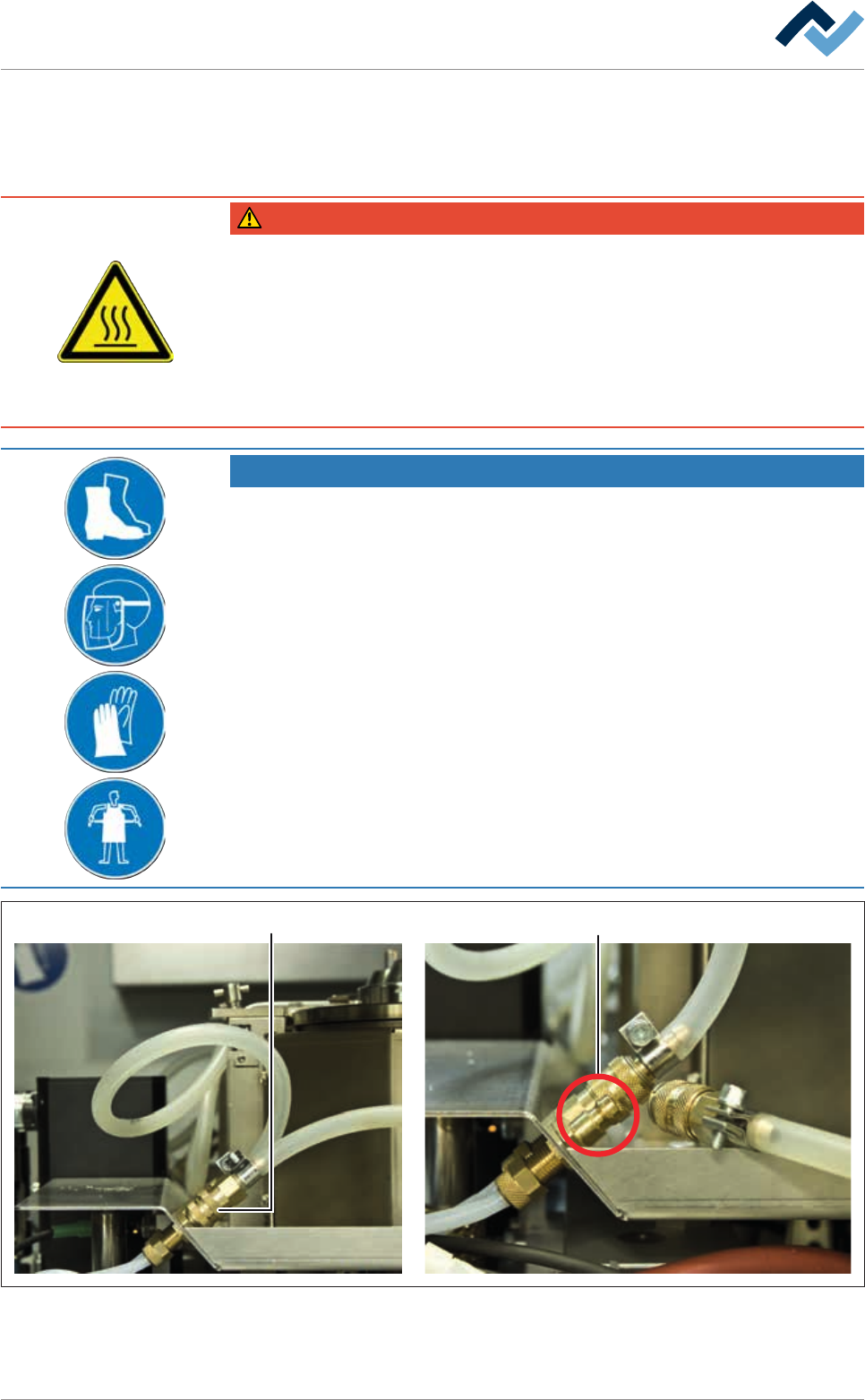
Fig.106: Checking the function of the solder level monitoring
ü Checking the function of the solder level monitoring:
Ersa GmbH Operating Instructions_VF335_en|Rev. 14|30/11/2017 333/695
8|Service and maintenance
a) In the start dialog, observe the button.
ð If the solder level is correct, this button is displayed in green.
b) Open the soldering module quick connector (1).
ð The
button must be displayed in red now.
c) Close the connection (2).
ð The
button is displayed in green. In this case, the correct functioning of
the solder level monitoring is ensured.
d) Connect the quick connector (1) again.
ð The process has now been completed.
8.6.11 Conveyor system: visual inspection
DANGER
Risk of injury due to gloves entrapment!
ü When working on the running conveyor system:
a) Let the machine cool down to room temperature!
b) Do not wear gloves!
c) Keep fingers away from moving parts (transport chains, gear wheels, gear racks)!
d) For the lubrication of the conveyor chains use a brush, a dosage bottle or a spray!
ü To inspect the conveyor system:
a) Switch off all conveyors.
b) let the machine cool down.
c) Check if the conveyor profiles are firmly seated and complete.
– Secure loose conveyor profiles.
– Replace missing or damaged conveyor profiles.
– Refasten loose screws and nuts.
a) Visual inspection of the conveyor chains. Smooth and soft running must be
guaranteed.
b) Clean all conveyor chains with a lint-free cloth.
ð The process has now been completed.
With regard to this, please read Chapters Cleaning agents used [
}300] and Tools
and auxiliary materials [}301].
Ersa GmbH Operating Instructions_VF335_en|Rev. 14|30/11/2017 334/695