Operating Instructions_VF335_en.pdf - 第196页
6|Function description Example of use Soldering program editor Set data Set data Flux unit Soldering unit 1 Set Hide Description Endposition X [mm] Endposition Y [mm] Speed X/Y [mm/s] mode Spray amount [%] Spray time […

6|Function description
– The [Z while moving] register Here, enter the distance from the solder nozzle
to the PCB bottom side in [mm]. This distance is kept during the solder nozzle
positioning.
– The [Endposition X [mm]] register: Enter the end position of the nozzle in X dir-
ection in [mm].
– The [Endposition Y [mm]] register: Enter the end position of the nozzle in Y dir-
ection in [mm].
– The [Speed X/Y [mm/s]] register: Enter the travel speed of the nozzle in [mm/
s]. This is the speed at which the nozzle is moved to the X/Y end position.
– The [Endposition Z [mm]] register: Enter the distance from the solder nozzle to
the bottom side of the board in [mm]. This is the distance to which the solder
nozzle is lifted after reaching the end position [X/Y]. If a value is entered here,
the nozzle is lifted, and soldering takes place. If no value is entered here, no
soldering takes place. The nozzle is only positioned.
– The [Speed Z [mm/s]] register: Enter the travel speed of the nozzle in [mm/s].
This is the speed at which the nozzle is lifted to the [Endposition Z [mm]].
– The [Wave height [%]] register: Enter the height of the solder wave in [%]. This
value is maintained during positioning and soldering.
– The [Soldering time [s]] register: Enter the soldering time in [s]. If a value is
entered for the soldering time, the solder nozzle is moved to the X/Y/Z end po-
sition, and a spot is soldered for the [Soldering time [s]] time. If no value is
entered for the soldering time, the solder nozzle is moved to the X/Y/Z end po-
sition; during the travel movement, a path is soldered.
– The [Lower value [%]] register: Enter a value as a [%] here. This is the value by
which the height of the solder wave is lowered after the [Soldering time [s]]
has elapsed. The lowering speed is affected by the [Lowering time [s]].
– The [Lowering time [s]] register: Enter a value in [s] here. Within this time, the
height of the solder wave is set from the [Wave height [%]] value to the [Lower
value [%]] value.
Ersa GmbH Operating Instructions_VF335_en|Rev. 14|30/11/2017 195/695
6|Function description
Example of use
Soldering program editor
Set data
Set data
Flux unit Soldering unit 1
Set
Hide
Description
Endposition X [mm]
Endposition Y [mm]
Speed X/Y [mm/s]
mode
Spray amount [%]
Spray time [s]
Z while moving [mm]
Endposition X [mm]
Endposition Y [mm]
Speed X/Y [mm/s]
Endposition Z [mm]
Speed Z [mm/s]
Wave height [%]
Soldering time [s]
Lower value [%]
Lowering time [s]
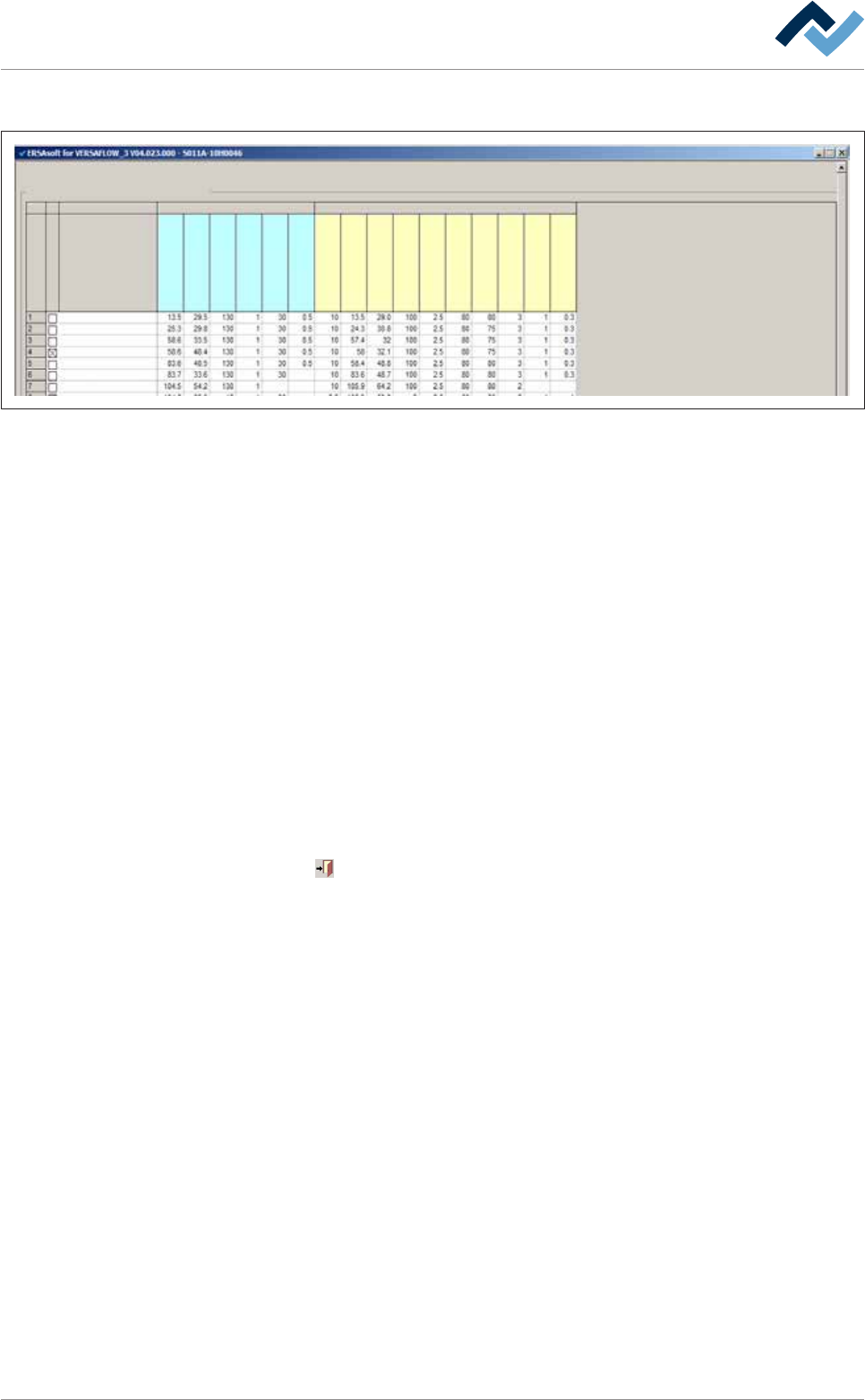
– Set number 1: Position [X = 13.5] / [Y = 29.0] is approached with the [Speed X/Y
[mm/s]] of 100 mm/s. In the process, the distance to the [Z while moving
[mm]] PCBs is 10 mm. The nozzle is then lifted to the [Endposition Z
[mm]Speed Z [mm/s]] = 80 mm/s and solders a spot with the [wave height
80%] for the [Soldering time [s]] of 3 seconds. Within the [Lowering time [s]] of
0.3 seconds, the height of the solder wave is reduced by the [Lower value [%]]
of 1%.
– Set number 4: This data set is hidden (the [Hide] checkbox is enabled). The
data set is therefore not processed.
– Sets number 7 and 8: Position [X = 105.9] / [Y = 64.2] is approached with the
[Speed X/Y [mm/s]] of 100 mm/s. In the process, the distance to the [Z while
moving [mm]] PCBs is 10 mm. The nozzle is then lifted on the [Endposition Z
[mm]] = 2.5 mm with the [Speed Z [mm/s]] = 50 mm/s, and solders a point with
the [wave height 80%] for the [Soldering time] of 2 seconds. The solder wave is
not lowered. Now, set number 8 is processed, the solder nozzle remains in the
position [Z while moving [mm]] = 2.5 mm. Position [X = 105.9] / [Y = 53.8] is ap-
proached with the [Speed X/Y [mm/s]] of 100 mm/s. During that process, a
path is soldered. Within the [Lowering time [s]] of 0.3 seconds, the height of
the solder wave is reduced by the [Lower value [%]] of 1%.
Click on
to close the dialog.
Ersa GmbH Operating Instructions_VF335_en|Rev. 14|30/11/2017 196/695
6|Function description
6.9.12.3 Soldering module data set (double pot)
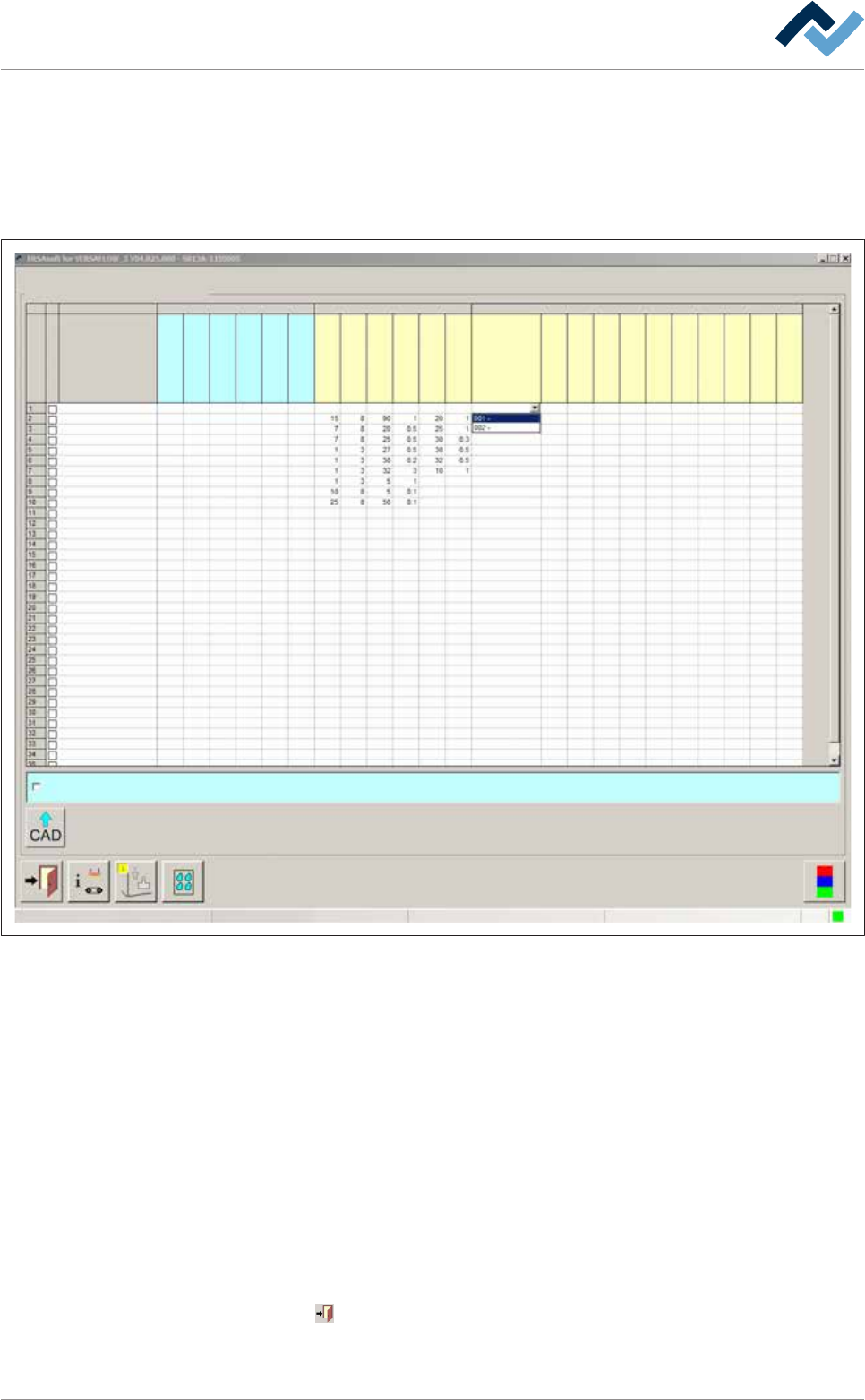
In this variant, two pots are located on the axis system. In addition, in the table of
coordinates, the [Tool] register appears again if both pots have been enabled in the
[General soldering program data] dialog.
Please observe the following picture:
Set data
Set dataSoldering program editor
Fluxer coordinates relate to nozzle 1
user: Service Maintenance mode
Set
Hide
Description
Endposition X [mm]
Endposition Y [mm]
Speed X/Y [mm/s]
mode
Spray amount [%]
Spray time [s]
Flux unit Soldering unit 1 Soldering unit 2
Solder pot 1
Solder pot 2
Endposition Z [mm]
Speed Z [mm/s]
Wave height [%]
Soldering time [s]
Lower value
Lowering time [s]
Tool
Z while moving [mm]
Endposition X [mm]
Endposition Y [mm]
Speed X/Y [mm/s]
Endposition Z [mm]
Speed Z [mm/s]
Wave height [%]
Soldering time [s]
Lower value
Lowering time [s]
Fig.45: Data sets: Soldering module 2 has two solder pots in this example.
Entering target coordinates
ü To enter target coordinates in case of a double pot:
a) In the [General soldering program data] dialog, enable both pots and then
open the [Set data] dialog.
b) Enter target coordinates and parameters in the table. With regard to this,
please read the Soldering module data set (single pot) [
}194] chapter.
ð An additional [Tool] register appears now in the table.
c) Click on a cell in the [Tool] register.
ð A dropdown menu appears in the cell.
d) Select the pot to be used for soldering in the dropdown menu.
ð The process has now been completed.
Click on
to close the dialog.
Also see
Ersa GmbH Operating Instructions_VF335_en|Rev. 14|30/11/2017 197/695