Operating Instructions_VF335_en.pdf - 第276页
6|Function description ð The [Soldering module] window appears: Settings Soldering unit 2 Solder pot 1 Monitorings user: none Maintenance mode Solder level maximum Solderbar feeder Solder level minimum Solder pot Prehe…
6|Function description
Configure the settings for the solder feed
ü Enter the settings:
ü The machine is in the operating mode [Maintenance mode] function.
ü A user logging into the system has respective rights.
a) Press the soldering module icon in the start dialog.
ð The [Soldering module] window appears.
b) Click on the button in the lower toolbar.
Ersa GmbH Operating Instructions_VF335_en|Rev. 14|30/11/2017 275/695
6|Function description
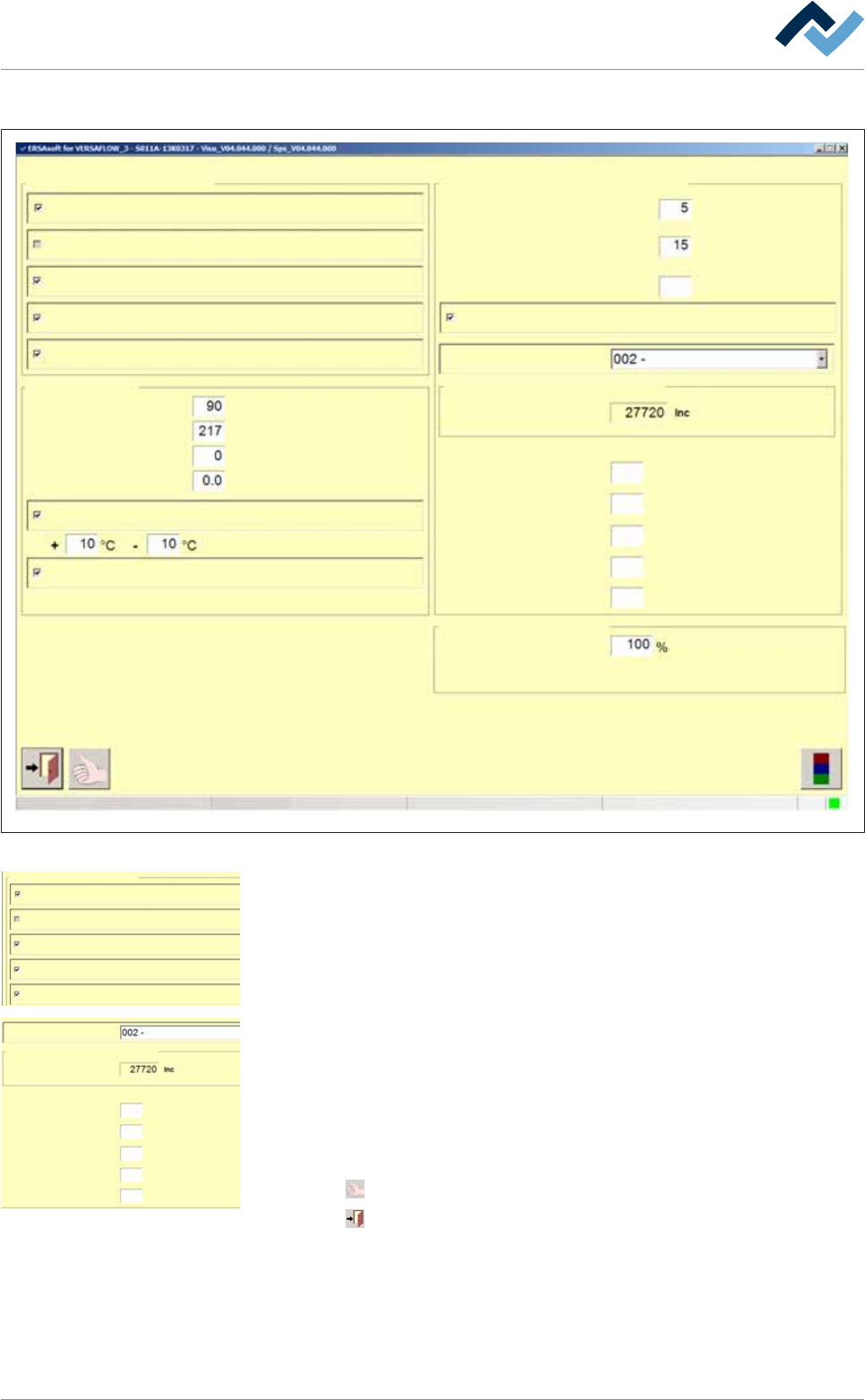
ð The [Soldering module] window appears:
Settings Soldering unit 2 Solder pot 1
Monitorings
user:
none
Maintenance mode
Solder level maximum
Solderbar feeder
Solder level minimum
Solder pot
Preheating time
Module tests
Numbers of Boards
Drive to test position without lowering
Mode gap for solder level
test
Max. duration
Supply
Backstroke
Break
s
Solder wire
75
Time until test
Wave power
Solderlevel ok
s
s
s
s
pcs
min
%
Wave height
min
Solder melting temperature
Standby temperature
Temperature correction
Tolerance message
Broken TC message
°C
°C
°C
Gap for single solder supply
Wave height test
Supply time
Actual value
Solder pot roll in/out
Maximum speed
60
2.0
0.5
2
33.0
Fig.78: The [Soldering module] setting dialog
Monitorings
Solder level maximum
Solderbar feeder
Solder level minimum
Solder wire
Wave height
c) In the [Monitorings] frame enable the following checkboxes:
ð [Solder level minimum]: It is crucial for the automatic test run.
ð [Solder wire]: It monitors whether a solder bar is available.
ð [Solderbar feeder]: It monitors the end positions of the automatic cylinders
on the solder feed.
Mode gap for solder level
test
Max. duration
Supply
Backstroke
Break
s
Solderlevel ok
s
s
s
s
Gap for single solder supply
Wave height test
Supply time
Actual value
60
2.0
0.5
2
33.0
d) In the [Module tests] frame from the [Mode gap for solder level test] drop-
down menu select [Gap for single solder supply].
e) In the [Supply time] frame enter the times for [Max. duration], [Supply], [Back-
stroke], [Solderlevel ok] and [Break] as per margin.
ð These values may be fine-tuned later.
ü Accept settings, close dialogs
a) Click on
to accept a setting.
b) Click on
to close a dialog.
Ersa GmbH Operating Instructions_VF335_en|Rev. 14|30/11/2017 276/695

6|Function description
Function
Note: Conditions to be observed to ensure that the solder feed function works
properly: The solder pot was fully inserted into the machine, all axes were refer-
ences, the solder pot is in its working position.
– In the [Automatic mode] operating mode the solder level is regularly tested ac-
cording to the settings of the [Module tests] frame. If the test indicates that
the solder level is too low, a sufficient time gap will be set between two pieces.
This gap will be used for solder feeding. If in the [Max. duration] input field you
entered for instance [60 seconds], the machine will create this gap. As soon as
the gap is available, a solder bar will transferred from the container into the
solder. The system will refer to the times set in the [Supply time] frame.
– If no more solder bars are available in the container, a message is displayed. In
this case, fill the container and acknowledge the message.
– If no more solder bars are available in the container and the solder level
[Solder level minimum] is fallen short of, a message is displayed, production is
interrupted and the machine infeed is blocked.
Ersa GmbH Operating Instructions_VF335_en|Rev. 14|30/11/2017 277/695