Operating Instructions_VF335_en.pdf - 第94页
5|Commissioning 5.2 Machine operating modes The machine operating modes are shown on the next page. Ersa GmbH Operating Instructions_VF335_en|Rev. 14|30/11/2017 94/695
5|Commissioning
5.1.1 Target readers group
These instructions are intended for people who use, adjust, operate or service the
machine.
DANGER
Personal injury or material damage due to inadequate maintenance and improper
operation of the machine!
ü Use only qualified personnel!
a) The machine transport, assembly, connection, commissioning, operation or main-
tainance by people who are not sufficiently qualified and informed can cause
severe damage to the machine or damage to people.
b) Such work may therefore only be performed by properly trained personnel! This
personnel must be able to recognize the hazards that can be caused by the sys-
tem mechanical, electrical or electronic equipment.
c) The people who carry out such work must know and have understood the con-
tents of these instructions.
d) Any person involved in the installation, commissioning, operation and/or main-
tenance of the machine must have read and understood the contents of the
"Safety instructions" chapter, as well as the chapters which are relevant for the
specific activity!
5.1.2 For your safety
WARNING
The machine malfunctioning is possible!
Personal injury or property damage due to improper commissioning or incorrect oper-
ation of the machine!
ü Commissioning must be performed by trained and qualified staff only.
a) Inspect the machine for visible defects!
b) Check all safety devices for proper operation!
c) Wear suitable protective clothing for all types of work!
d) During commissioning, ensure switching on and off processes and monitoring dir-
ections are in accordance with the operating instruction manual!
5.1.3 Supplementary documents
NOTE
Supplementary documents
Supplementary documentation and service instructions are available for the machine
single modules. These documents can be found on the data carrier [product_data_se-
lective]; data carrier included in the delivery. Please refer to these documents if this
instruction manual does not provide sufficient information on a certain subject.
Ersa GmbH Operating Instructions_VF335_en|Rev. 14|30/11/2017 93/695

5|Commissioning
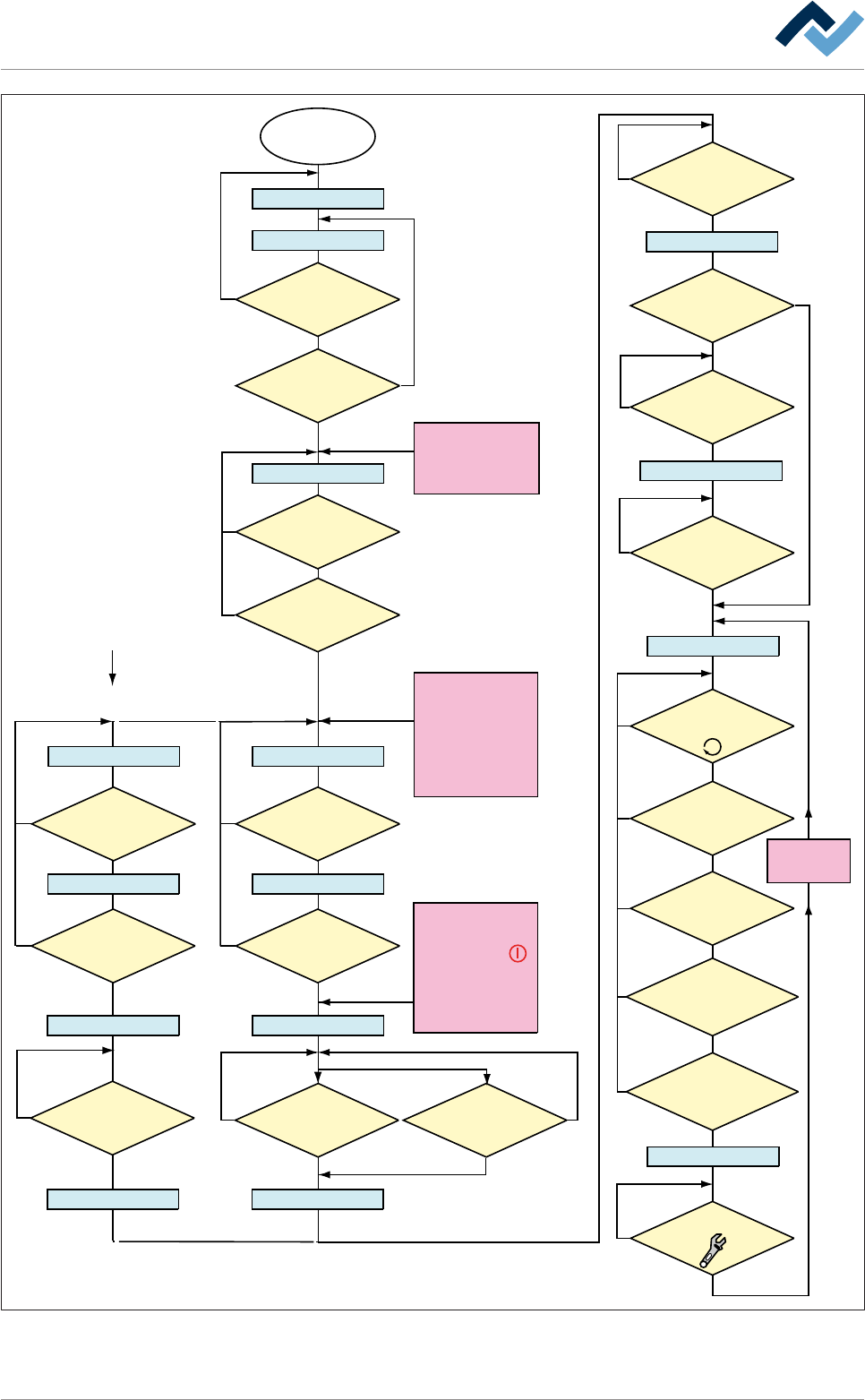
5.2 Machine operating modes
The machine operating modes are shown on the next page.
Ersa GmbH Operating Instructions_VF335_en|Rev. 14|30/11/2017 94/695
5|Commissioning
Within the Option
[blue RESET button]
Main switch
ON
Electronic OFF
Electronic Init
Power OFF
Voltage supply OKVoltage supply OK
Check emergency-stopCheck emergency-stop
Movement OFF Movement OFF
Maintenance mode
Button
[Movement ON] pressed?
No
NoNo
No
No
No
Yes
Yes
Yes
Referencing off all
servo axes OK?
No PCB inside the
machine?
No
Yes
NO message is
pending which prevents the
change to [Automatic]
No
Yes
Has the operator
selected a soldering program?
No
Yes
Yes
No
Yes
Yes
Yes
Has a pre-activate
point been reached, e.g.
[Heating]?
No
Yes
Weekly timer
in ON phase?
Has the blue
RESET button been
pressed?
No
Yes
Yes
Emergency-off OK?
No
Emergency-off OK?
No
Yes
Exhaust air OK?
The following condition also
directly results in
[Voltage supply OK]:
- Emergency-off pushed
OR emergency-off
error
- Weekly timer in OFF
phase AND machine
empty
No error for
[Electronic OFF]
pending?
CAN initializ
ing AND PLC
initializing OK?
Button [Automatic]
pressed?
No
No
Movement ON
Button
[Movement ON] pressed?
No
Yes
Movement ON
Machine Init
Referencing servo axes
Internal: PLC OK?
Referencing
Servo axes OK?
No
Yes
Yes
Yes
No
Yes
Has the
operator started the
referencing of the Servo
axes?
No
Are servo axes
availabe?
No
Supply
voltage OK?
Button
[Maintenance] pressed?
The following condition also
directly results in [Power Off]:
- The
visualization
software version is
outdated.
The following condition also
directly results in
[Movement OFF]:
- The [Movement Off]
key has been pushed
- An error is pending which
results in [Movement off];
e.g. optional CAN device
not configured
The dialog
[...................]
is displayed
Automatic
Flussdiagramm: Die blauen Rechtecke definieren die Betriebsarten der Maschine. Diese Betriebsarten
werden auch in der Statusleiste der Bedienoberfläche angezeigt.
Ersa GmbH Operating Instructions_VF335_en|Rev. 14|30/11/2017 95/695