DECAN_F2_Service(Eng_Ver1).pdf - 第253页
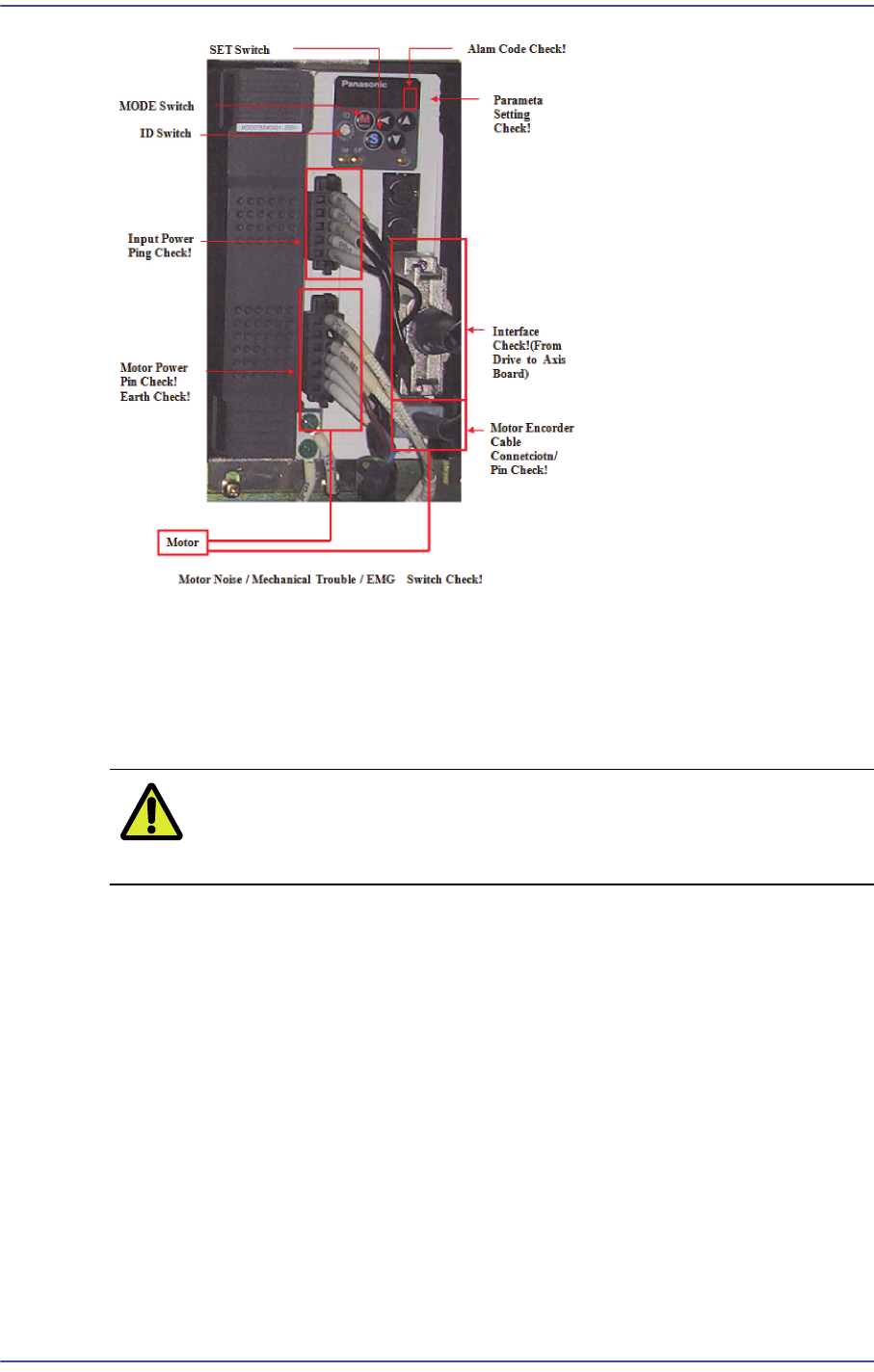
12-3 Motor Driver Check if the state of cable shield is normal. 7) The unmatched orig ins may be caused by serious dif fe rence between Z phase and Home sensor o r the defectiv e axis board . So check the connections o…
12-2
Fast & Flexible Chip Shooter DECAN F2 Service Manual
1) If the trouble related to servomotor occur, alarm code is indicated on LED of front
panel.
2) At this time, servo motor power is OFF. For the release of the alarm, it is required that
procedure 1 [EMG Alarm: EMG -> STOP -> RESET -> READY] or procedure 2
[General Alarm: STOP -> RESET -> READY] is performed.
Caution For alarms related to power, turn off power and turn on
power.
3) For alarm caused by OVERLOAD, normal clear is possible in 10 seconds or more. So,
press the ‘READY’ button to supply power to the servo motor in 10 seconds or more
after pressing the ‘RESET’ button.
4) If troubles are caused by cable connection for the terminal of servomotor and improper
wiring, ensure that checking wiring is performed after motor power is off.
5) If the servomotor without mechanical problem does not drive, check if the parameter
is normal. And then if the same trouble ouccur again, replace the mortor drive.
6) If the drive of motor is not stable and acceleration/deceleration is improper, the
following checks should be performed;
Check if servomotor has mechnical problem
Check if servomotor parameter setup is normal
Check if the primary input voltage is acceptable
12-3
Motor Driver
Check if the state of cable shield is normal.
7) The unmatched origins may be caused by serious difference between Z phase and
Home sensor or the defective axis board. So check the connections of axis board
cables.
8) The causes of noise are mainly noise, parameter, and bad connection of cable, etc.
except mechanical causes.
12-4
Fast & Flexible Chip Shooter DECAN F2 Service Manual
12.3. Servo Motor Driver Replacement
12.3.1. Required tools
Spanner
(+) shape tipped screw driver, (-) shape tipped screw driver
T Wrench or Hex Wrench
Motor Driver Data Cable (P-Motor): for Servo Motor
12.3.2. Driver replacement procedure
1) Press the <EMG> switch on the front side of the machine to cut off the power supply
to the motor. At this time, the power supply to the entire machine must remain turned
on or the power must be supplied to the corresponding motor driver.
2) Remove the rear cover of the machine by using a screw driver.
3) Back up the parameters saved in the previous driver by referring to Parameter
Download/Upload.
Caution The new driver contains the standard parameters the
setups of the manufacturer. However, they may be changed
in our factory for tuning.
4) If the parameters cannot be downloaded from the existing driver, download the
distributed standard parameters.
Caution When the parts are supplied for maintenance, the standard
parameters are downloaded in the driver.
Basically, the types of the parameters of the servo motor are classified as follows:
Classification by axis: X, Y, Z (1, 3, 5 / 2, 4, 6 ), Swing, Width (C/V)
5) Turn off the power supply to the machine again.
6) Disconnect the cable connected to the driver that needs to be replaced.
7) Replace the defective motor driver.
8) The assembling is performed in the reverse order of disassembling.
9) Check if the machine works properly after turning it on.