DECAN_F2_Service(Eng_Ver1).pdf - 第586页
18-66 Fast & Flexible Chip Shooter DECAN F2 Service Manual If calibration is performed without selecting either the <Automatic> check box or <Manual> check box, the nozzl e is changed automatically for th…
18-65
Machine Calibration
Head 11
X:-0.06mm~0.06mm, Y: -0.05mm~0.05mm
Head 12
X:-15.06mm~-14.94mm, Y: -0.05mm~0.05mm
Head 13
X:-30.06mm~-29.94mm, Y: -0.05mm~0.05mm
Head 14
X:-45.06mm~-44.94mm, Y: -0.05mm~0.05mm
Head 15
X:-60.06mm~-59.94mm, Y: -0.05mm~0.05mm
Head 16
X:-75.06mm~-74.94mm, Y: -0.05mm~0.05mm
Head 17
X:-90.06mm~-89.94mm, Y: -0.05mm~0.05mm
Head 18
X:-105.06mm~-104.94mm, Y: -0.05mm~0.05mm
Head 19
X:-120.06mm~-119.94mm, Y: -0.05mm~0.05mm
Head 20
X:-135.06mm~-134.94mm, Y: -0.05mm~0.05mm
18.3.10.5. Fly Camera Scale Calibration
This calibration is performed to find the scale and rotation offset of the fly-camera. In
order to calibrate the scale and rotation of the fly-camera, the ‘fix-camera calibration’ and
‘head Z-offset calibration’ must be performed in advance and the CN400 Nozzle must be
used.
The following is the procedure to calibrate the ‘Fly-Camera Scale Calibration’
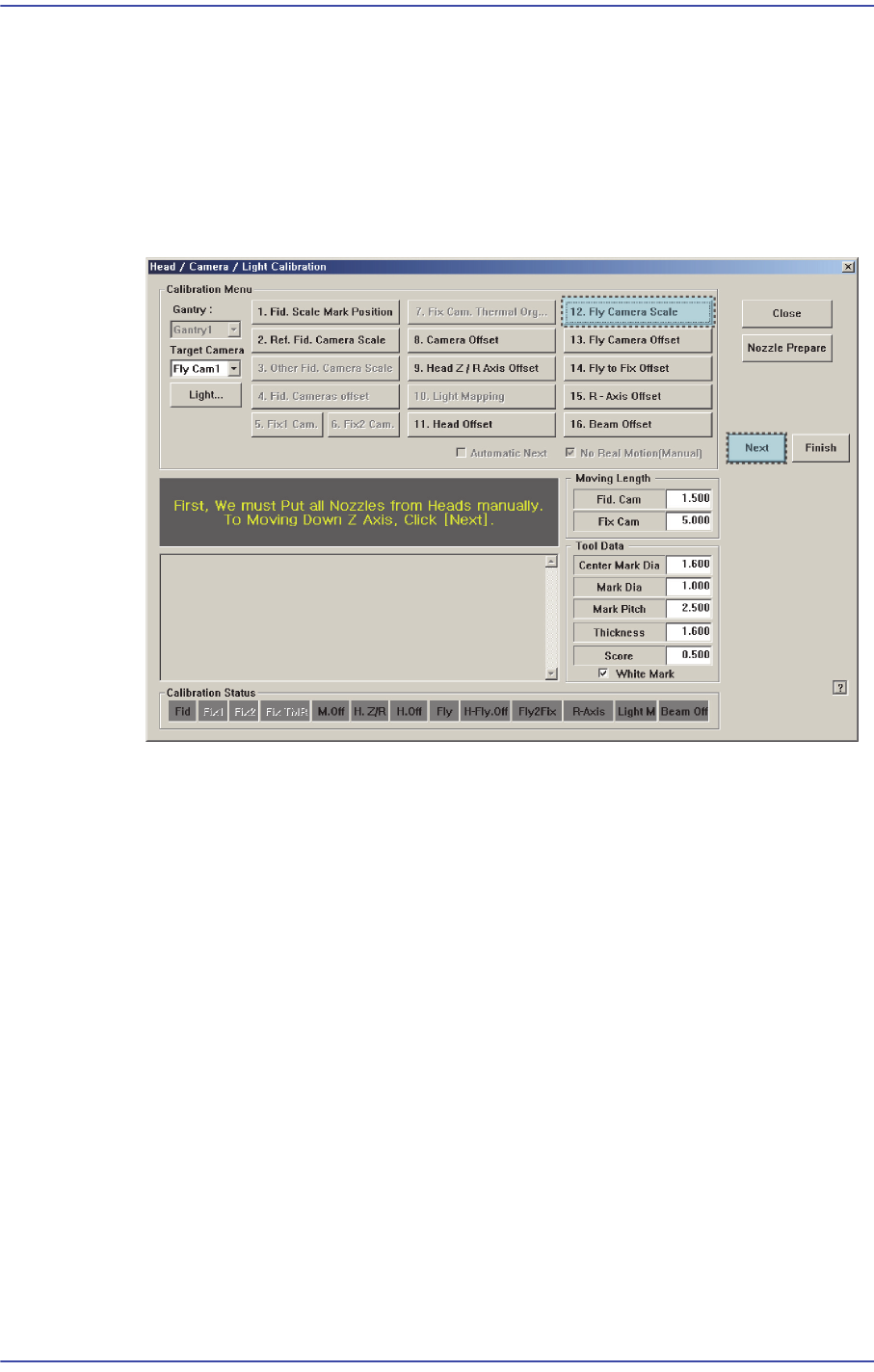
1. Click the <Nozzle Prepare> button and insert the CN400 nozzle into the No. 1 hole of
the ANC manually.
If the <10 Fly Camera Scale> is clicked after selecting the <Automatic Next> check
box, calibration is performed for the selected gantry automatically.
If calibration is performed after selecting the <No Real Motion [Manual]> check box,
the nozzle is inserted into each head manually. Click the <Next> button to move onto
the next step.
18-66
Fast & Flexible Chip Shooter DECAN F2 Service Manual
If calibration is performed without selecting either the <Automatic> check box or
<Manual> check box, the nozzle is changed automatically for the currently selected
nozzle. Click the <Next> button to move onto the next step.
2. If the <10. Fly Camera Scale> button is clicked, the message box “First, We must Put
all Nozzles From Heads on Manually. To Move down Z Axis, Click [Next]” appears in
the message box. Click the <Next> button to move down the Z axis of the head in
order to remove all nozzles inserted in the nozzle-holder of the head manually.
3. Then, after the head assembly moves to the designated position, move all Z-axes
down. At this time, remove all inserted nozzles manually.
4. Then the message “Next Attach the Calibration Tool to Head 1. Click [Next] for
Moving Down Head. After Moving, Attach the Tool to head Manually” appears. Click
the <Next> button after inserting the CN400 nozzle in the nozzle-holder of Head #1
manually.
5. The message “Move To Center Position of Calibration Tool. To Move, Click [Next].”
appears in the message window. Click the <Next> button to move the head assembly
to the calibration tool position on the ANC.
6. Then the message “Align Tool for Calibration! Then Click [Next]” appears. Click the
<Next> button.
7. Then the message “Up to Align Height and Mirror Close, Click [Next]” appears. Click
the <Next> button.
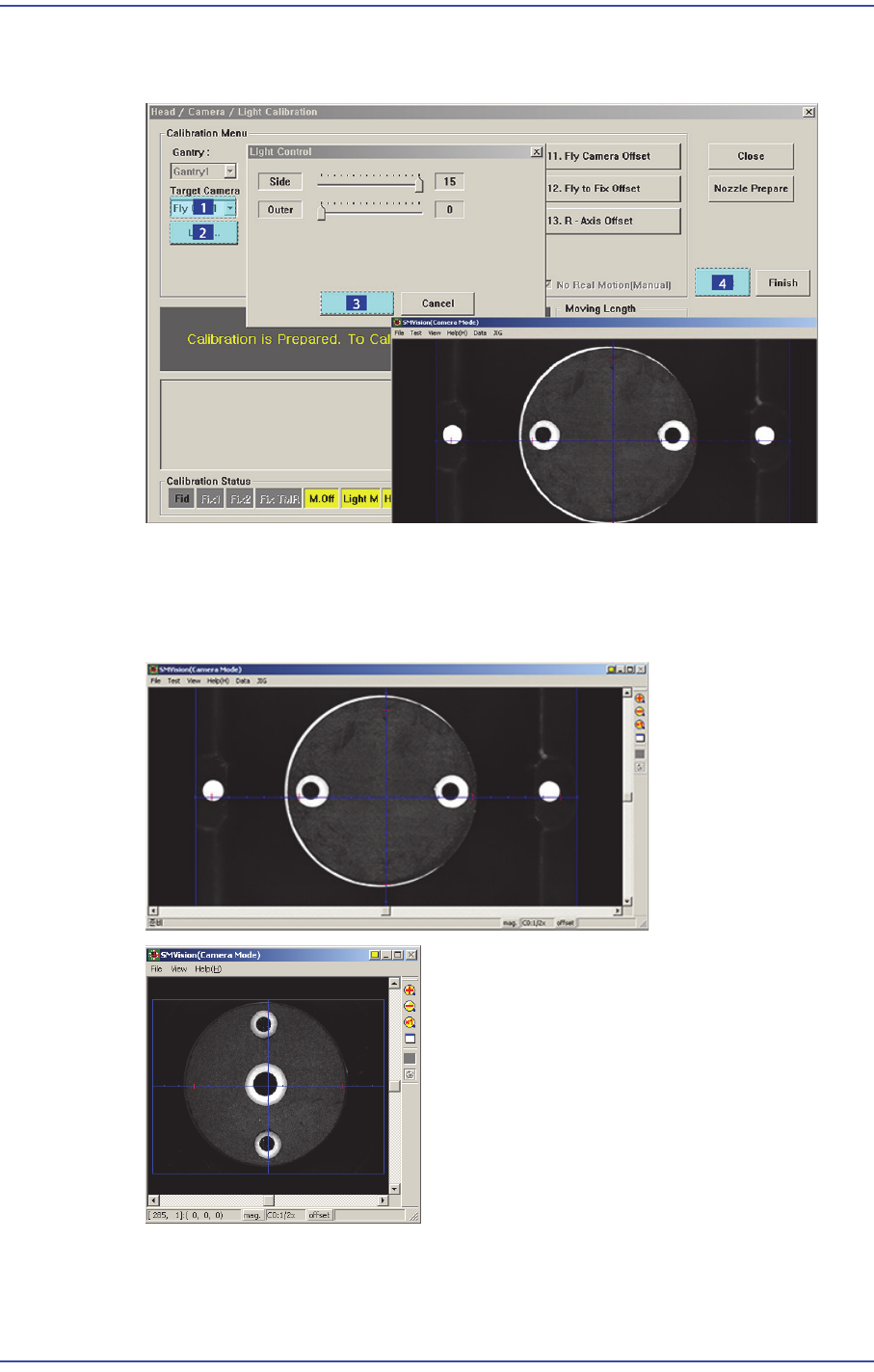
8. Then, the Head1 Pick the Calibration Tool and Z-axis of the Head 1 moves up to the
‘part-alignment height’ of the fly camera and the mirror is closed. and the message
“Calibration is Prepared. To Calibrate, Click [Next]” appears in the message box. At
this time, select the ‘Fly1 Cam’ in the <Target Camera> combo box. Click the
<Light…> button and adjust the brightness of the light in the ‘Light Control’ dialog
18-67
Machine Calibration
box so that the fiducial mark on the calibration tool that is seen in the ‘SMVision’
window can be seen clearly. Then click the <Next> button.
9. In order to perform calibration, recognize the 2 fiducial marks on the bottom surface
of the calibration tool using the fly camera and put the calibration tool on the
calibration tool position on the ANC. Next, recognize the 2 fiducial marks at the edge
of the top surface of the calibration tool.
10. The calibration is performed automatically. If it is completed, the calibration result is
displayed as shown in the following figure. Click the <Next> button.