DECAN_F2_Service(Eng_Ver1).pdf - 第462页
17-50 Fast & Flexible Chip Shooter DECAN F2 Service Manual Check the alarm code [Measures] Replace the motor drive. Replace the motor . Replace the cabl e with a normal axis cable. Check the cable co nnecti…
17-49
Troubleshooting
Check whether the power supply to the motor driver is appropriate. If it has no
problems, replace the motor driver and check whether the same problem occurs
[Measures]
Check whether the power supply is appropriate. If the problem occurs continuously,
replace the motor drive.
E0B0E The machine power supply has no problems but the power is not supplied to the motor
drive
[Cause]
The power supply line has a problem
[How to Check]
Check the main power supply
Check the status of CP2
Check the voltage between phases of the input voltage
[Measures]
Check the main power supply.
Check the status of CP2.
Check the voltage between phases of the input voltage.
E0B0C A Vibration or resonance occurs to a specific axis motor
[Cause]
Incorrect setup of the servo parameter and gain
Incorrect commutation offset value
[How to Check]
Modify the parameter and gain values related to noise and resonance
Measure the commutation offset value
Perform driver replacement test
[Measures]
Modify the parameter and gain values related to noise and resonance.
Modify the commutation offset value
Replace the motor drive.
E0B10 An Encoder related alarm occurred
[Cause]
An encoder related alarm occurred
[How to Check]
17-50
Fast & Flexible Chip Shooter DECAN F2 Service Manual
Check the alarm code
[Measures]
Replace the motor drive.
Replace the motor.
Replace the cable with a normal axis cable.
Check the cable connecting the ZMP board and driver.
E0B11 Overvoltage related alarm occurred
[Cause]
Voltage is high.
[How to Check]
1. Check the input power supply.
2. Check the main input power supply.
[Measures]
1. Check the input power supply.
2. Check the main input power supply.
E0B12 Undervoltage related alarm occurred
[Cause]
Voltage is low.
[How to Check]
1. Check the input power supply.
2. Check the main input power supply.
[Measures]
1. Check the input power supply.
2. Check the main input power supply.
17-51
Troubleshooting
17.3.8. Noise/ Vibration (E0C)
E0C00 Noise, vibration and shaking of the Z-axis/R-axis
[Cause]
Problem with the Z-axis belt tension
Working environment has been changed according to the workplace conditions
Defective cable pin work (defective green pin work of the R-axis motor power cable)
Defective R-Stepping Driver
Defective contact of the connector connecting the flat cable between the motor driver
and head
A crack occurred in the Right Head Board Bracket
Defective Z-axis offset and insufficient grease
[How to Check]
1. Adjust the Z belt tension.
2. Check the grease injection state.
3. Check the assembling state of the Z and R motor power cables and encoder cable
( Driver).
4. Check the Z offset setup and up/down and left/right movement.
[Measures]
Readjust the Z-axis belt tension using a head tension gauge.
Measurement value before adjustment: 110Hz ~ 130Hz
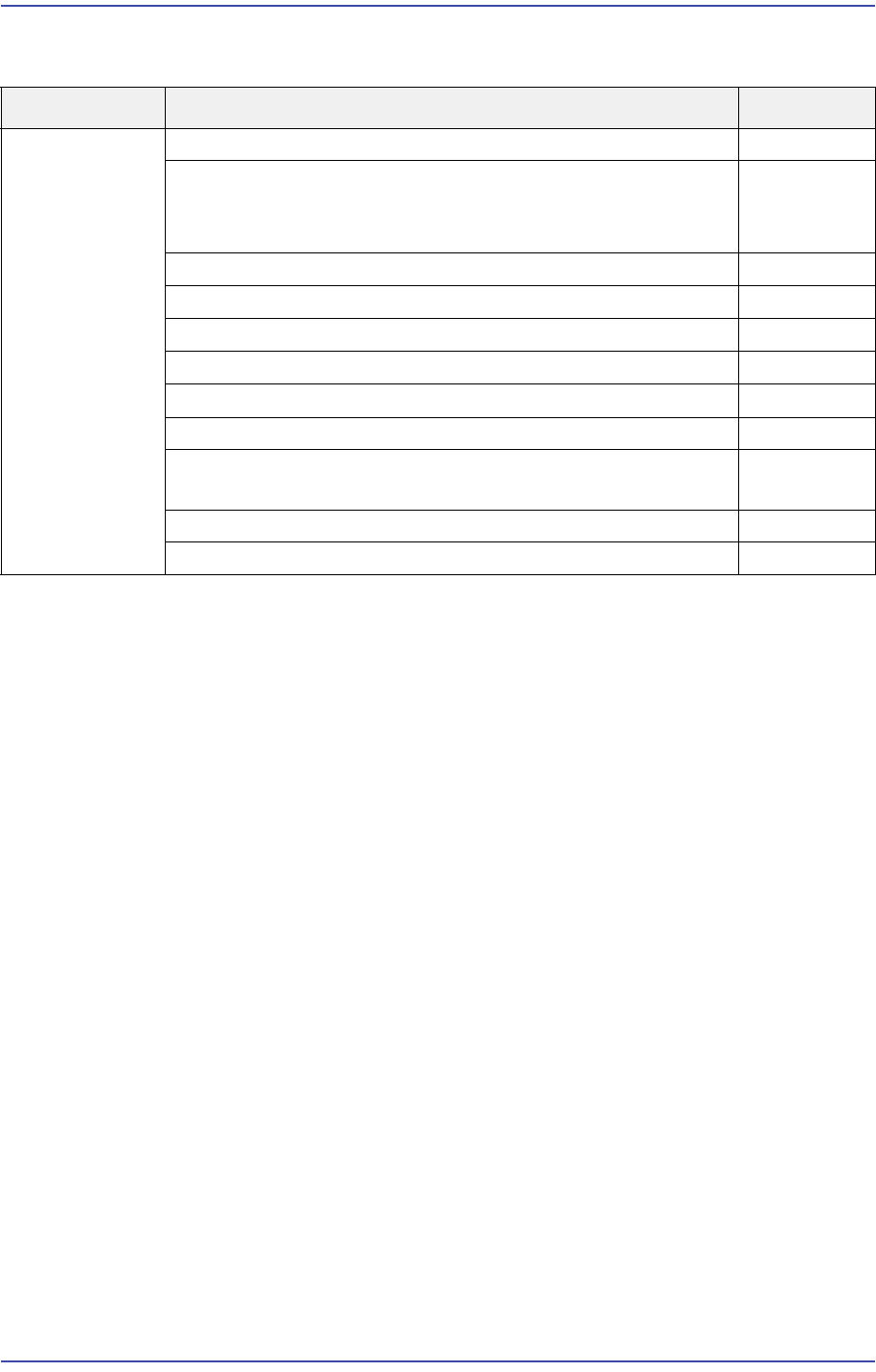
Cause Description Remarks
Noise and
vibration
Noise, vibration and shaking of the Z-axis/R-axis E0C00
Noise occurred to the X-axis
[Warm up the specific area in which vibration occurs and
press Ready button]
E0C01
Noise and vibration occurred to the Y-axis E0C02
Vacuum Generator Noise E0C03
Air leaks from the Air Regulator E0C04
Air leaks from the head E0C05
Vacuum Pump Noise E0C06
Air leaking noise from the feeder base E0C07
Vibration and noise is generated when operating the
conveyor belt
E0C08
Noise due to fan operation E0C09
Generation of other noise E0C0A