DECAN_F2_Service(Eng_Ver1).pdf - 第413页
17-1 Troubleshooting Chapter17. Troubleshooting 17.1. Data Needed to be Collected Wh en a Problem Occurs during Machine Operat ion Ref When a problem occurs, if there is C:\SmartCM(C:\SmartCM) directory BIN, all director…
17-1
Troubleshooting
Chapter17. Troubleshooting
17.1. Data Needed to be Collected When a Problem Occurs during Machine
Operation
Ref When a problem occurs, if there is C:\SmartCM(C:\SmartCM)
directory BIN, all directories excluding Vmeipl and RT Telemetry in
the case of problems with the machine, and a vision error image in the
case of vision error, it is easy to perform analysis
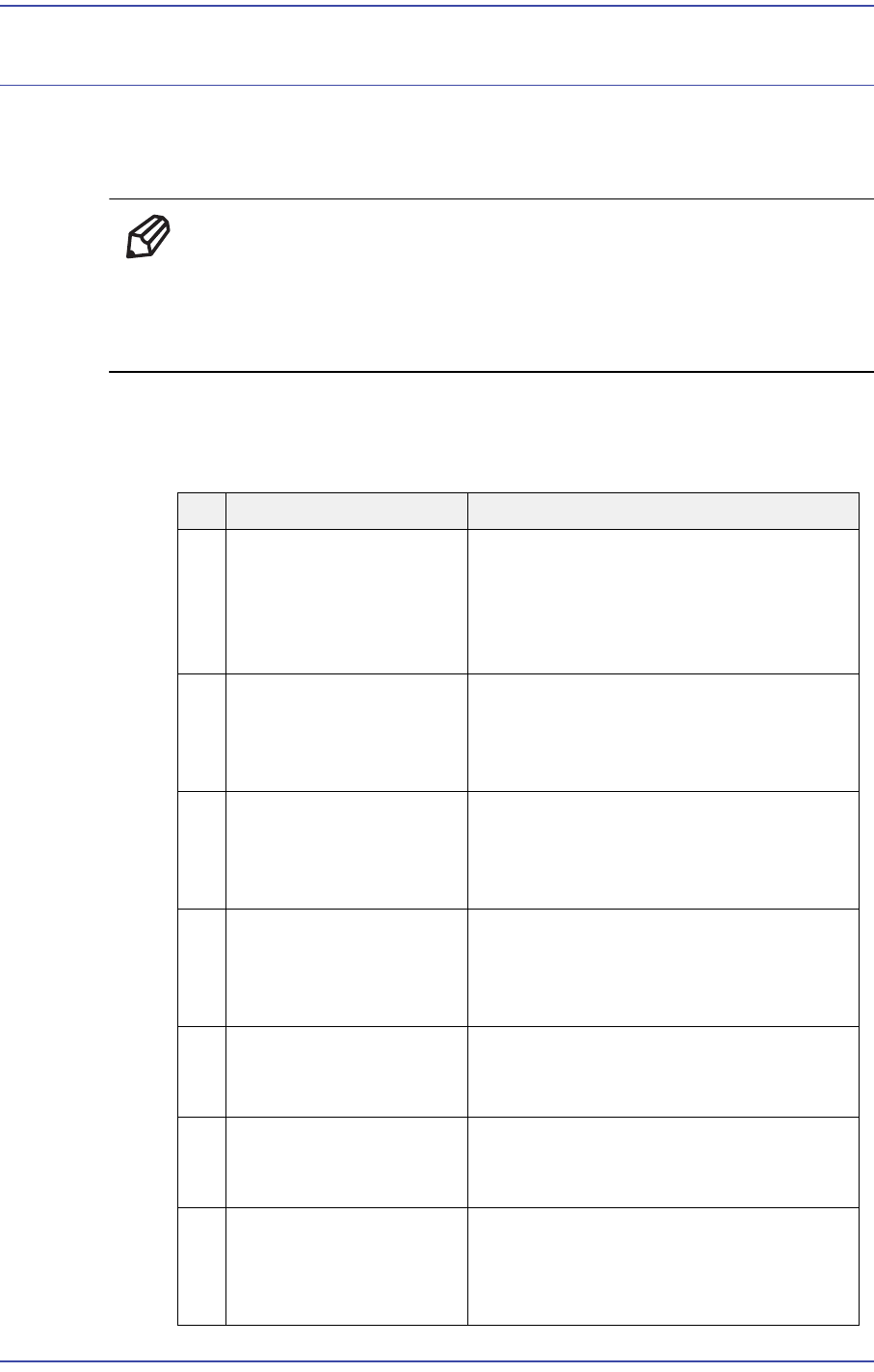
When a problem occurs with the machine, send the following data in a compressed file
format, such as *.ZIP, etc., immediately or as soon as possible.
NO Necessary File Data Description
1 PCB File in Use It is possible to reproduce the movement
with the PCB file to which a problem
occurs and examine whether the PCB
file itself has a problem or it has a
problem when changing data with OLP.
2 All Files in
C:\SmartCM\Log
(C:\SmartCM\Log)
Folder
It is possible to see the operational
activities performed by the operator and
to track the state of the MMI, RT and
Vision by time.
3 All Files in
C:\SmartCM\System
(C:\SmartCM\System)
Folder
It is possible for the user to try to
reproduce the performed operation
under the executed program
environment.
4 All Files in
C:\SmartCM\Temp
Folder
When an error related to the optimizer
occurs, it is possible to trace the PCB
before and after the optimizer and track
the cause of the error.
5 All Files in
C:\SmartCM\PdInfo
Folder
In case of a problem related to the dump
rate, this file is necessary additionally.
6 All Files in
C:\SmartCM\PartDB
Folder
When a problem occurs during part
registration in the Part DB, it is possible
to see it by reproducing it.
7 All Files in D:\SMBackup
Folder
From the system backup status before
and after work, it is possible to check
when a problem occurred or whether
abnormal operation occurred.
17-2
Fast & Flexible Chip Shooter DECAN F2 Service Manual
17.2. Necessary Data according to Problems
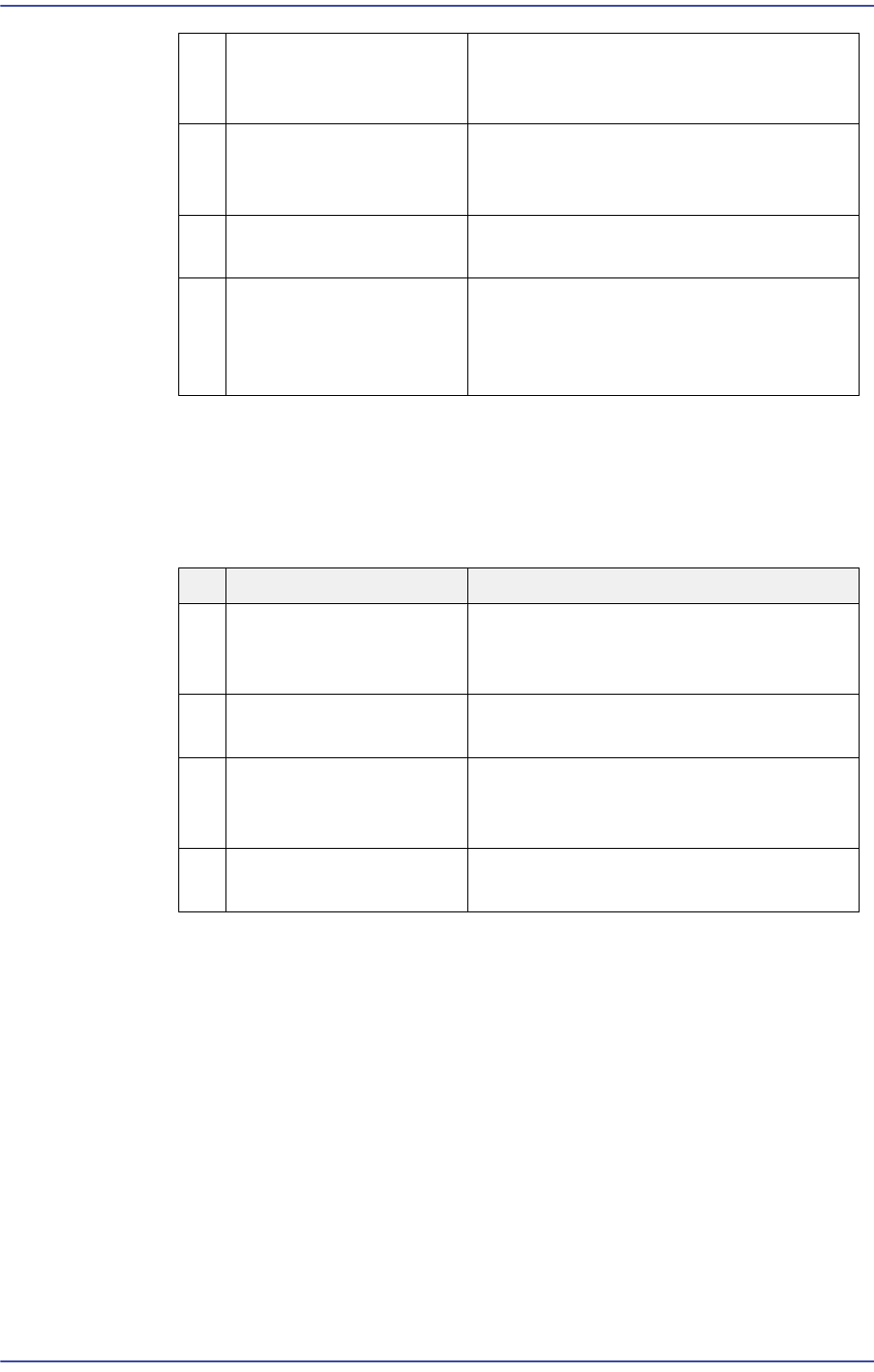
When the following problems occur, transmit the corresponding file.
8 All Files in D:\ErrVisFile
Folder
In case of a problem related to the vision
recognition, this file is necessary
additionally.
9 RT Telemetry File When the machine operates abnormally
during production and operation, this file
is necessary to analyze the problem.
10 Vision Error Image File Used to check any problem with the
recognition result.
11 Screen Capture File When an error message related to a
window occurs or an error occurs during
MMI screen manipulation, this file is
necessary to check the problem.
NO Necessary File Data Description
1 PCB, LOG, SYSTEM,
SMBACKUP, Screen
Capture, etc.
When an error occurred during MMI
programming or in use
2 PCB, LOG, SYSTEM,
RT Telemetry, etc.
When the machine exhibits a problem
during operation or production
3 PCB, LOG, SYSTEM,
PDInfo, Vision Error
Image, ErrVisFile, etc.
When the part dump rate increases and
a vision error occurs
4 PCB, LOG, SYSTEM,
TEMP, etc
When an error occurs before and after
the optimizer