DECAN_F2_Service(Eng_Ver1).pdf - 第493页
17-81 Troubleshooting Defective or damaged buzzer [How to Check] Replace the buzz er Replace the general I/O board and check whether the same problem occurs [Measures] Replace the buzzer or gene ral IO board. E11…
17-80
Fast & Flexible Chip Shooter DECAN F2 Service Manual
17.3.13. Abnormal signal light operation (E11)
E1100 Defective signal light
[Cause]
Defective signal light
[How to Check]
Check the signal light cable connection
Replace and test the general IO board
[Measures]
Replace the signal light.
E1101 The signal light extension cable is cut off
[Cause]
The signal light extension cable is cut off
[How to Check]
Check the signal light extension cable connection
[Measures]
Replace the signal light extension cable.
E1102 Defective Converyor I/F board
[Cause]
Defective general I/O board
[How to Check]
Check the signal light cable connection
Replace the general I/O board and check whether the same problem occurs
[Measures]
Replace the general IO board.
E1103 Defective or damaged buzzer
[Cause]
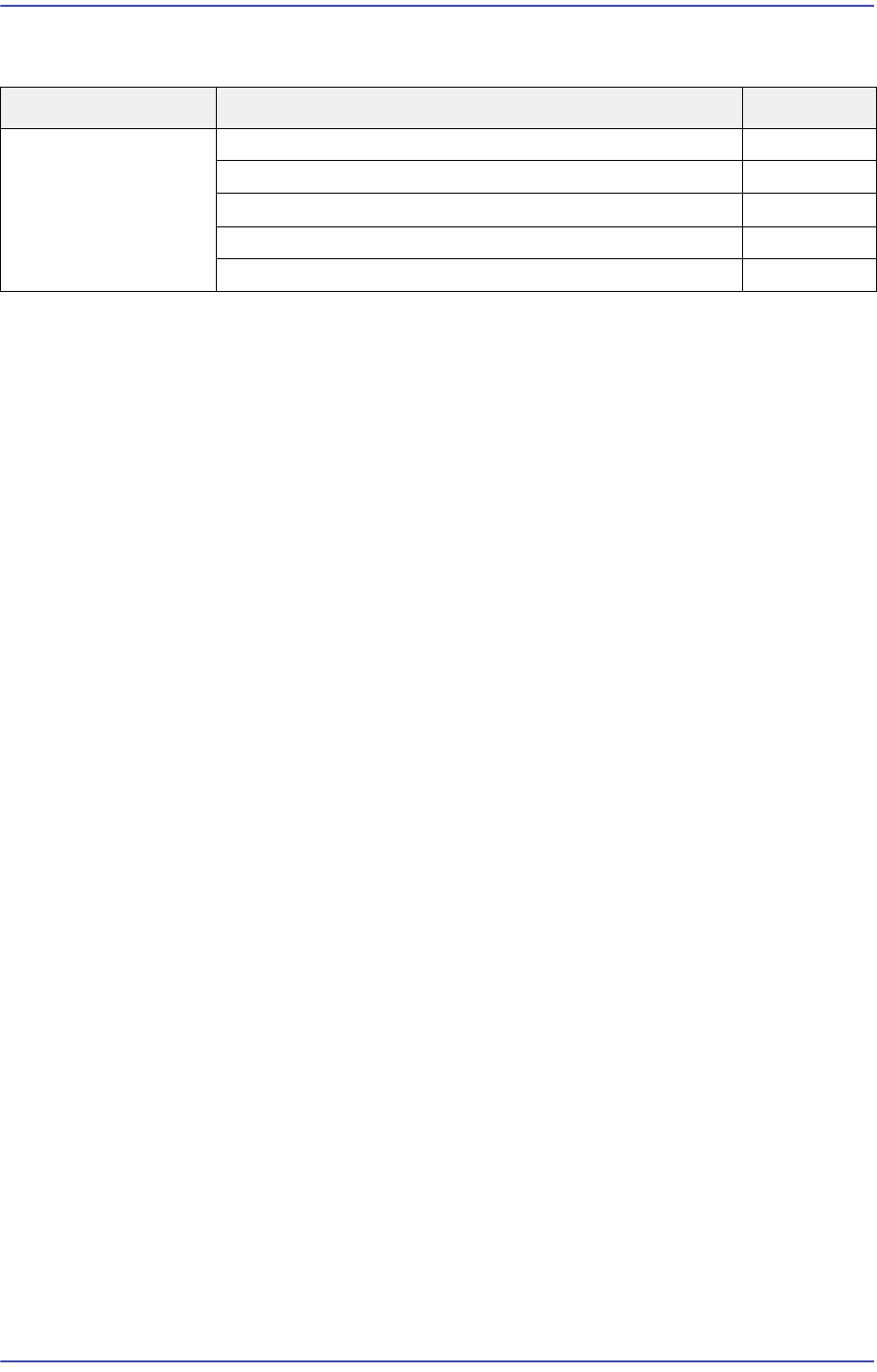
Cause Description Remarks
Abnormal signal
light operation
Defective signal light E1100
The signal light extension cable is cut off E1101
Defective Conveyor I/F board E1102
Defective or damaged buzzer E1103
Defective or damaged LED E1104

17-81
Troubleshooting
Defective or damaged buzzer
[How to Check]
Replace the buzzer
Replace the general I/O board and check whether the same problem occurs
[Measures]
Replace the buzzer or general IO board.
E1104 Defective or damaged LED
[Cause]
Defective or damaged buzzer
[How to Check]
Replace the corresponding lamp
Replace the general I/O board and check whether the same problem occurs
[Measures]
Replace the lamp.
17-82
Fast & Flexible Chip Shooter DECAN F2 Service Manual
17.3.14. Main power supply not applied (E12)
E1200 Short-circuit occurred because the main circuit breaker power cable(MS1~6) is not
secured properly
[Cause]
Short-circuit occurred because the main circuit breaker power cable(MS1~6) is not
secured properly
[How to Check]
Check whether the power supply is turned off when turning on the MCCB
Check the cause of the automatic turn-off of the power supply. (Check the assembling
state of the MCCB power cable)
Check the CP1, 2 and 3 in order
[Measures]
Reassemble the MCCB power cable.
Check the CP1, 2 and 3 in order.
E1201 Defective PC power supply
[Cause]
Defective PC power supply (internal short-circuit presumed)
[How to Check]
Check the input voltage (220V) of the PC power supply (when it is not applied, check
the MCCB and CP)
Check the output voltage (5V, 12V) of the PC power supply (when it is not outputted,
replace the power supply)
[Measures]
Replace the PC power supply unit.
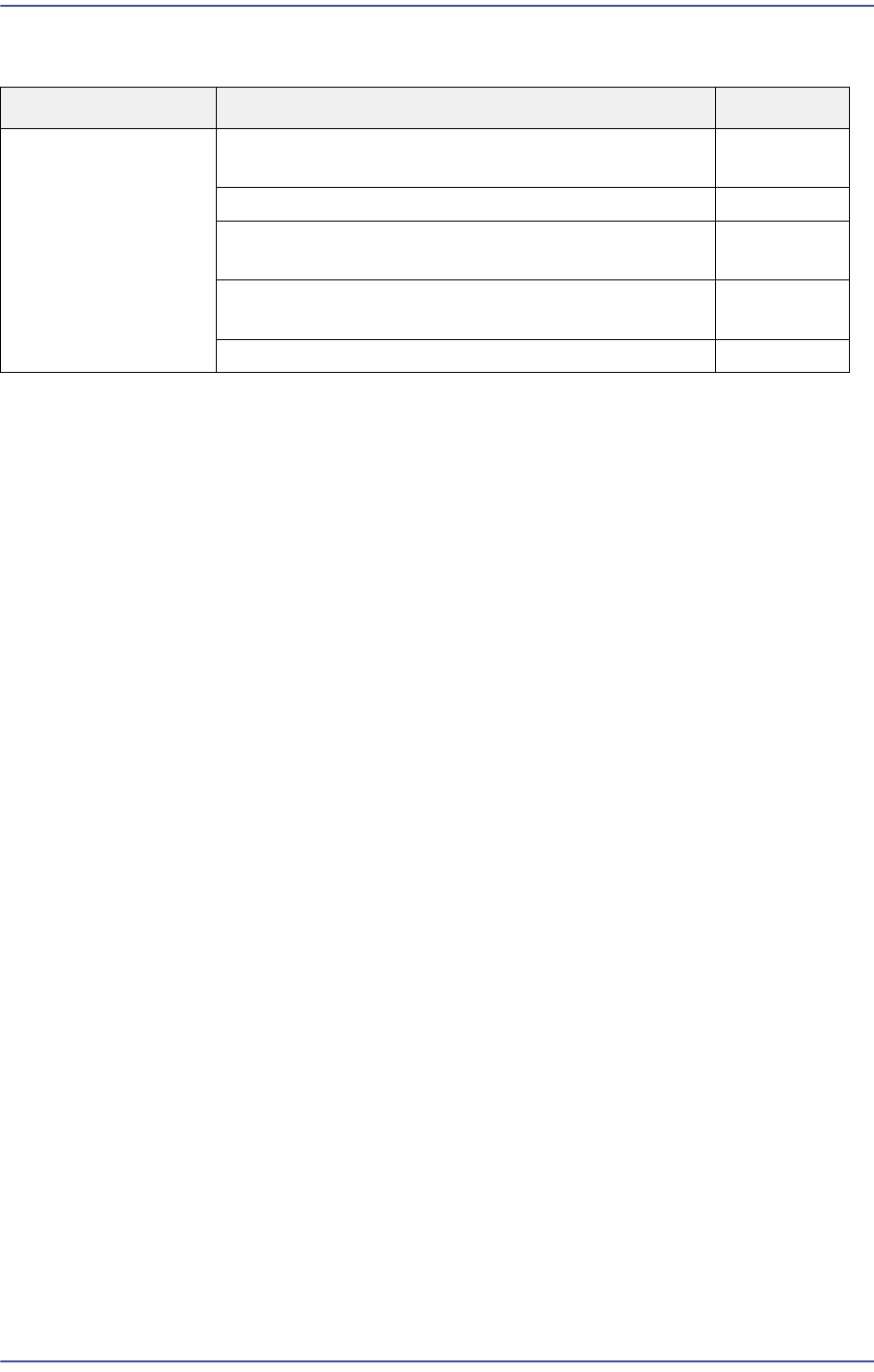
Cause Description Remarks
Main power supply
not applied
Short-circuit occurred because the main circuit
breaker power cable(MS1~6) is not secured properly
E1200
Defective PC power supply E1201
Leakage current occurred due to short-circuit
between ground wire and power supply cable
E1202
PC power supply unit is damaged after a power
outage occurred at the factory
E1203
Main power supply is not inputted E1204