DECAN_F2_Service(Eng_Ver1).pdf - 第506页
17-94 Fast & Flexible Chip Shooter DECAN F2 Service Manual Check whether the monitor cable is pr operly connecte d to the vision board Check whether the monitor cable pin is bent Replace the monitor [Measures] …
17-93
Troubleshooting
17.3.19. Abnormal monitor (E17)
E1700 Monitor screen does not appear
[Cause]
Monitor screen does not appear (‘No signal’ is not indicated)
[How to Check]
Check the monitor power and signal cable
Check the CPU box power supply (12V)
Replace the motor.
[Measures]
Check the monitor power supply and signal cable.
Check the CPU box power supply.
Replace the motor.
E1701 Although the system is booted, the screen does not appear on the monitor
[Cause]
Although the system is booted, the screen does not appear on the monitor
[How to Check]
Check whether the monitor cable is properly connected to the vision board.
Replace and check the monitor cable.
Replace the monitor.
[Measures]
Check whether the monitor cable is properly connected to the vision board.
Replace and check the monitor cable.
Replace the monitor.
E1702 Although the system is booted, the monitor screen is discolored
[Cause]
Although the system is booted, the monitor screen is discolored
[How to Check]
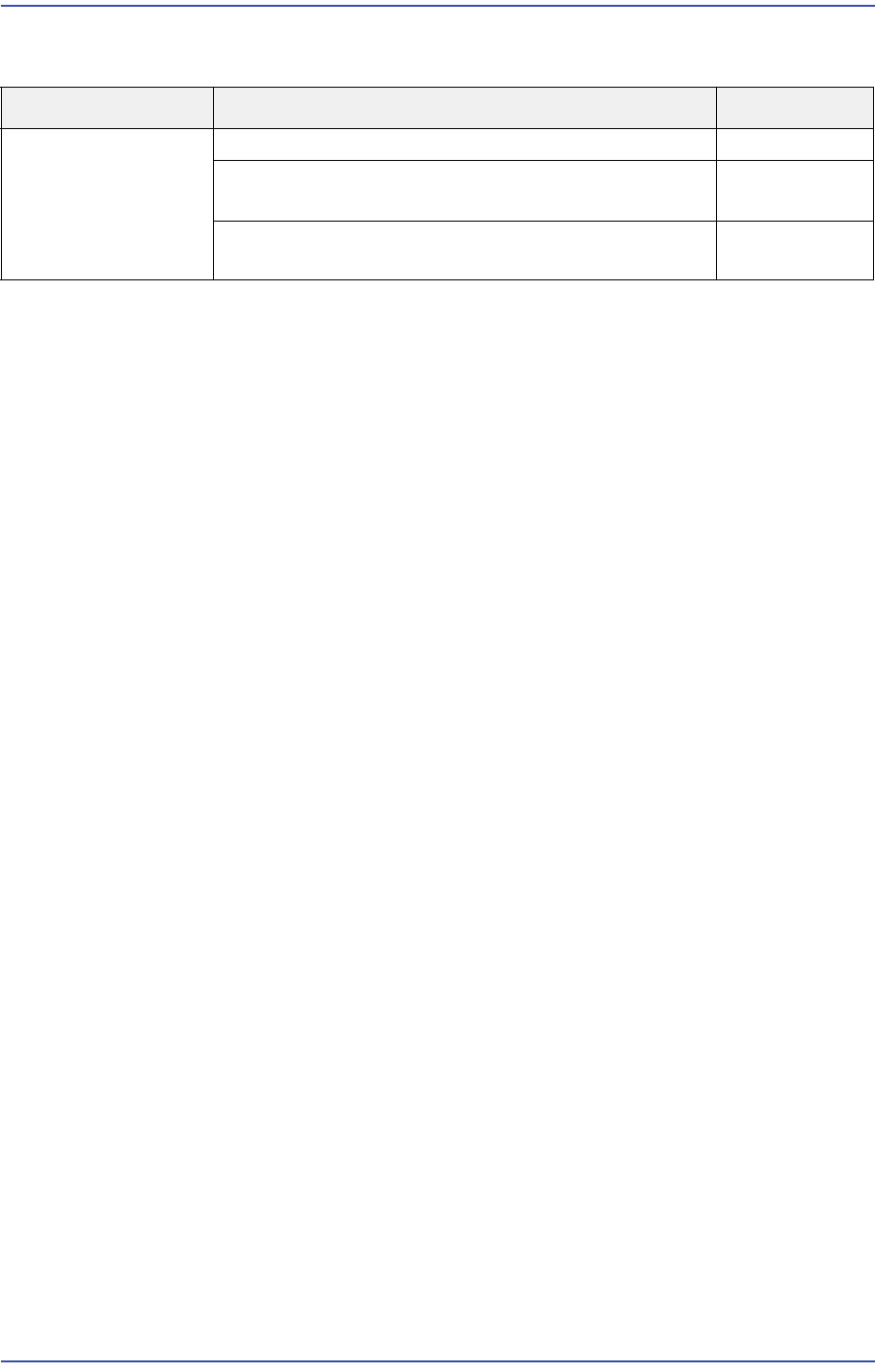
Cause Description Remarks
Abnormal monitor Monitor screen does not appear E1700
Although the system is booted, the screen does not
appear on the monitor
E1701
Although the system is booted, the monitor screen is
discolored
E1702
17-94
Fast & Flexible Chip Shooter DECAN F2 Service Manual
Check whether the monitor cable is properly connected to the vision board
Check whether the monitor cable pin is bent
Replace the monitor
[Measures]
Check whether the monitor cable is properly connected to the vision board.
Check whether the monitor cable pin is bent.
Replace the monitor.
17-95
Troubleshooting
17.3.20. Abnormal Operation of Docking Cart (E18)
E1800 Abnormal power supply of the docking cart
[Cause]
Defective fuse in the Feeder Power Board
Short-circuit inside the feeder base
The D-CART Inner I/F Cable assembly is defective.
[How to Check]
Check the Docking Control Board and cable connection.
After replacing the board, check whether the same problem occurs.
[Measures]
Replace the Docking Control Board.
Solder to connect the short-circuited cable inside the feeder base.
E1801 Defective Up/Down feeder base movement
[Cause]
The solenoid valve has a problem.
Defective Speed Controller setting
Defective cylinder
[How to Check]
Check the solenoid valve.
Check the Speed Controller setting.
Check the cylinder.
[Measures]
Replace the solenoid valve, Speed Controller and cylinder.
E1802 Abnormal operation of the position sensor
[Cause]
The sensor is defective or contaminated.
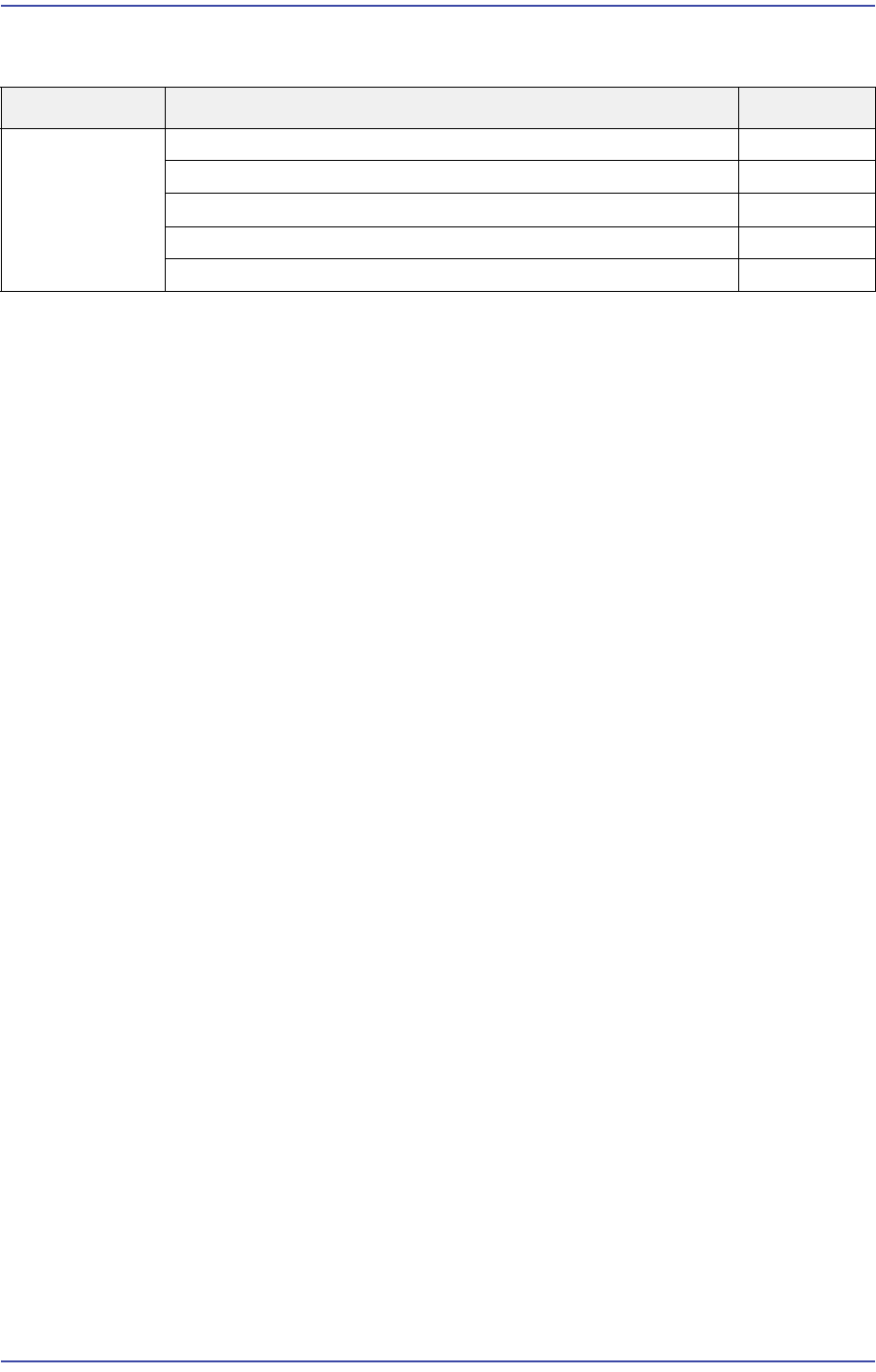
Cause Description Remarks
Abnormal
Operation of
Docking Cart
Abnormal power supply of the docking cart E1800
Defective Up/Down feeder base movement E1801
Abnormal operation of the position sensor E1802
Collision occurred when transferring the machine E1803
Problem with the button to clear docking E1804