DECAN_F2_Service(Eng_Ver1).pdf - 第480页
17-68 Fast & Flexible Chip Shooter DECAN F2 Service Manual 17.3.10. Errors related to feeder base and ANC (E0E) E0E00 The feeder part $P clamp cleared the [Open Err or] Some of the feeder slots does not work (Index s…
17-67
Troubleshooting
3. Check that under what situation, the alarm occurs.
4. Check the operation state of the Servo Driver, Coupling, Motor and Ball Screw in
order.
[Measures]
Replace the X-axis Servo Driver.
E0D0C Homing error (Index Mark Error) occurred
[Cause]
Defective contact of the Twin AXIS Board
[How to Check]
1. Check the status of the movement in the X direction in the Ready Off state. (Check
for any problems with the movement)
2. Perform a homing operation test in the Ready On state.
3. Check that under what situation, the alarm occurs.
4. Check the operation state of the Servo Driver, Coupling, Motor and Ball Screw in
order.
[Measures]
Reassemble the Twin AXIS Board.
E0D0D Thermal Mapping Timing Error
[Cause]
A timeout error occurred while recognizing the fiducial.
[How to Check]
1. Check the state of the Mapping Fiducial Mark at the top of the conveyor.
2. Perform calibration.
3. Check the system constant data.
4. Check the Move Camera.
[Measures]
Perform calibration [Thermal, Gantry Mapping].
17-68
Fast & Flexible Chip Shooter DECAN F2 Service Manual
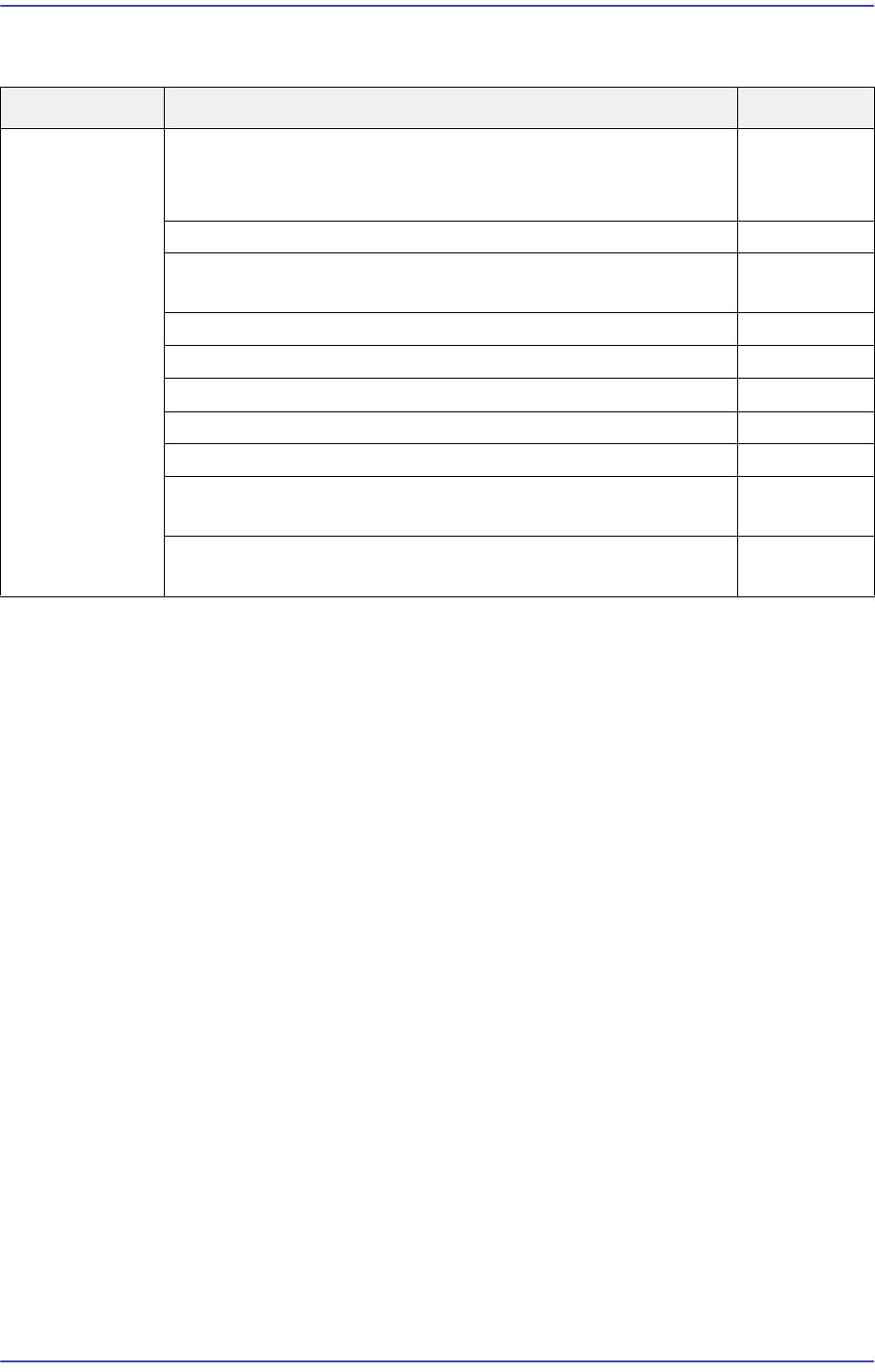
17.3.10. Errors related to feeder base and ANC (E0E)
E0E00 The feeder part $P clamp cleared the [Open Error] Some of the feeder slots does not
work (Index signal does not work)
[Cause]
The Feeder I/O Board U43 IC is damaged since a short-circuit occurred to the left and
right feeder boards.
The left and right feeder boards are defective.
The Feeder Input Ext. Board is defective.
The contact of the Feeder Input Ext. Board is defective.
[How to Check]
1. Test the manual operation of the slots experiencing a problem with the
corresponding feeder base and check I/O.
2. Check the Feeder Base Board slots.
3. Check the air fittings of the feeder base.
4. Check the Feeder I/O Board and Feeder Input Ext. Board.
[Measures]
Replace the Feeder I/O Board.
Replace the left and right feeder base board.
Replace the Feeder Input Ext. Board.
Reconnect the Feeder Input Ext. Board.
Cause Description Remarks
Errors related to
feeder base and
ANC
The feeder part $P clamp cleared the [Open Error]
Some of the feeder slots does not work (Index signal does
not work)
E0E00
The Feeder Unlock Sensor detected a part E0E01
An error occurred while changing a nozzle for the head#
(Alarm, PUT or GET error)
E0E02
Cannot open (close) the ANC shutter E0E03
Cannot mount a nozzle since there is no nozzle on the head E0E04
When the machine is turned on, feeders feed a part first E0E05
The feeder is not removed and installed smoothly E0E06
Failed to move up the front docking cart E0E07
Only one part in the vibration feeder is continuously picked
up
E0E08
The [Open Error] of the Feeder Part $P Clamp is cleared.
(Vibration feeder Index is defective.)
E0E09
17-69
Troubleshooting
E0E01 The Feeder Unlock Sensor detected a part
[Cause]
Defective setting of the Feeder Unlock Sensor
A part is detected by the Unlock Sensor while transferring the tray pallet since the tray
feeder level is high.
An error occurred to the Move Z setup. (Odd shaped materials for the 16mm feeder
are detected by the Unlock Sensor after pick up.)
A part jumps when it is fed.
Clearance exists between the feeder base and the 12mm SM feeder.
[How to Check]
1. Check the feeder setting (unlocked shutter, etc.).
2. Check the state of the Feeder Unlock Sensor (height and position).
1. Check the Rear Unlock Error when transferring out the tray feeder pallet.
2. Perform the leveling of the tray feeder again.
1. Check the specification of the part to which a Feeder Unlock Error occurs.
2. In the case of special parts, modify the Move Z value.
1. When feeding an odd-shaped part, check whether it jumps.
2. Control the feeding speed with the speed controller of the feeder.
1. When setting the feeder in the feeder base, check whether the feeder is locked.
2. Remove foreign material from the feeder base.
3. Check the Feeder Location Pin and its shape.
[Measures]
Readjust the height of the Feeder Unlock Sensor.
Perform the leveling of the tray feeder again.
Set the Move Z value again (4 8).
Control the feeding solenoid valve so that the part will not jump during feeding.
Replace the Location Pin.
E0E02 An error occurred while changing a nozzle for the head# (Alarm, PUT or GET error)
[Cause]
The head vacuum line is clogged [Vacuum pressure when there is no nozzle:
290mmHg]
The R-axis offset of the Nozzle Holder is incorrect (directional nozzle).
Defective Z-axis offset
The system data is damaged due to the initialization of the head offset.