DECAN_F2_Service(Eng_Ver1).pdf - 第496页
17-84 Fast & Flexible Chip Shooter DECAN F2 Service Manual 17.3.15. MPU-STOP (E13) E1300 A problem occurred to the communication between the RT board and vision board [Cause] A problem occurred to the communicatio …
17-83
Troubleshooting
E1202 Leakage current occurred due to short-circuit between ground wire and power supply
cable
[Cause]
Leakage current occurred due to short-circuit between ground wire and power supply
cable
[How to Check]
Check whether a short circuit occurred between each phase with a tester
[Measures]
Remove the power supply connector immediately and open the rear lower panel to
check whether a short circuit occurred between phases. Find the cause of the short
circuit to solve the problem and supply power to the machine again.
E1203 PC power supply unit is damaged after a power outage occurred at the factory
[Cause]
PC power supply unit is damaged after a power outage occurred at the factory
[How to Check]
Check the operation of the DC fan in the rack
Check the input and output of the power supply
Replace the PC power supply
[Measures]
Replace the PC power supply unit
E1204 Main power supply is not inputted
[Cause]
Main power supply is not inputted
[How to Check]
Check the input power at the MCCB
Check the output power from the AVR or power supply panel
Inform the customer of such problems and measures
[Measures]
Check the input power of the MCCB.
Check the output power from the AVR or power supply panel.
17-84
Fast & Flexible Chip Shooter DECAN F2 Service Manual
17.3.15. MPU-STOP (E13)
E1300 A problem occurred to the communication between the RT board and vision board
[Cause]
A problem occurred to the communication between the RT board and vision board
[How to Check]
Check the assembling and operation state of the NCIO board
Check the LAN cable assembling state
Check the assembling and operation state of the SBC board
Check the assembling and operation state of the RT board
Check the assembling and operation state of the ZMP board
Check the operation state of the base control board
Check the operation state of the general I/O board
[Measures]
Replace the LAN cable.
E1301 Problem occurred to the vision board, SBC board, back plane board, etc.
[Cause]
The SBC board is not properly connected to the vision board connector or the vision
board is not properly inserted into the back plane board slot
[How to Check]
Check the assembling and operation state of the NCIO board
Check the LAN cable assembling state
Check the assembling and operation state of the SBC board
Check the assembling and operation state of the RT board
Check the assembling and operation state of the ZMP board
Check the operation state of the base control board
Check the operation state of the general I/O board
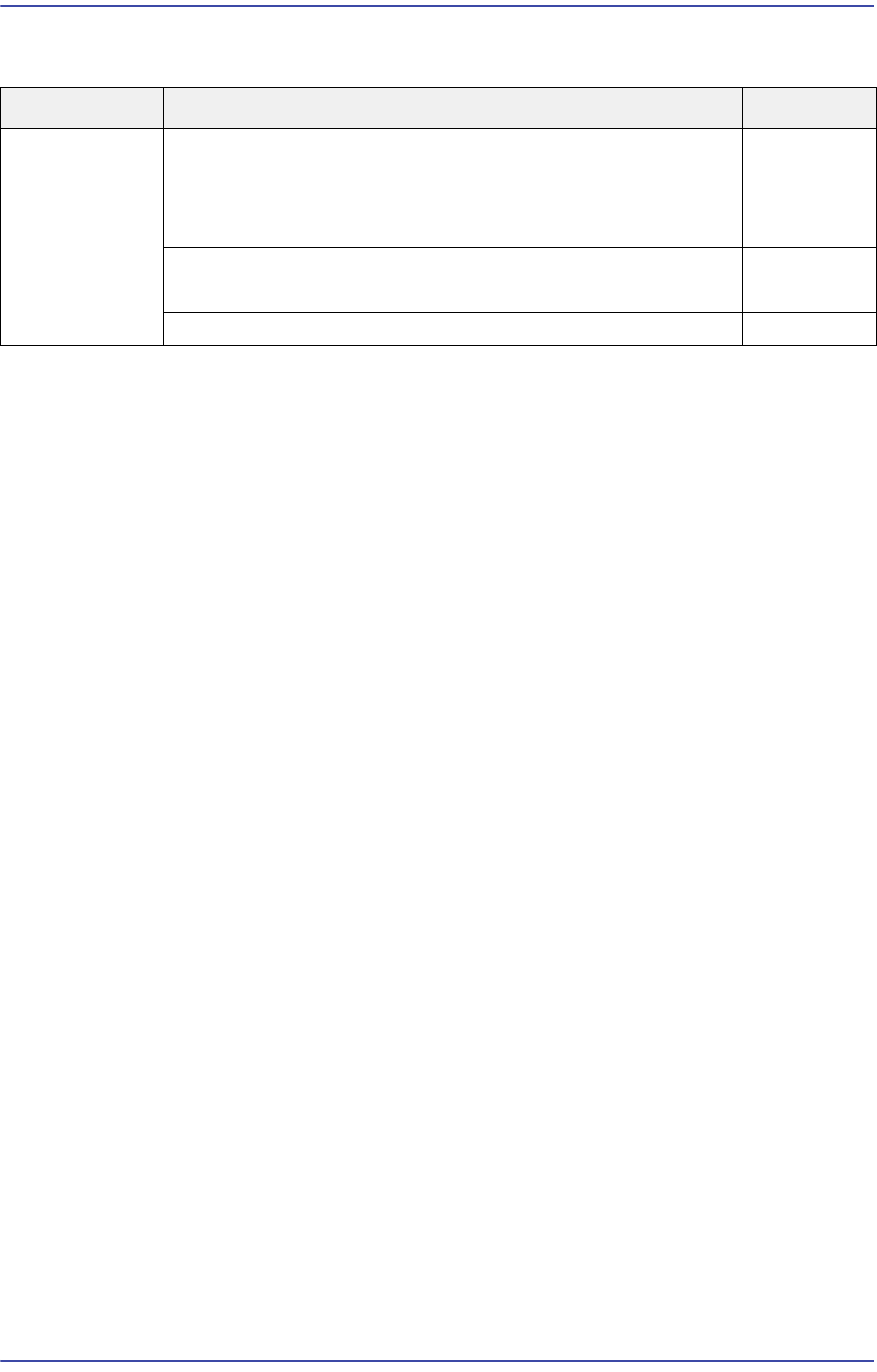
Cause Description Remarks
MPU-STOP
error
Problem with CAN communication with the PCI (defective
DPRAM cable)
(Applicable only to SM series machines excluding DECAN
F2, SLM, SM471 and SM48X)
E1300
Defective SBC Board contact
Defective SBC Board
E1301
The file is damaged after being infected by a virus E1302
17-85
Troubleshooting
[Measures]
Insert the SBC board into the vision board again.
E1302 Damage to the file due to infection by a virus
[Cause]
Damage to the file due to infection by a virus
[How to Check]
Perform a virus check using an anti-virus program
Reinstall the MMI
Reinstall the Windows and MMI
[Measures]
Perform virus treatment.
Perform HDD recovery and reinstall the MMI.