DECAN_F2_Service(Eng_Ver1).pdf - 第488页
17-76 Fast & Flexible Chip Shooter DECAN F2 Service Manual 4. Replace the SBC Board. 1. Check whether the MVME Board is defective. 2. Replace the MVME Board. 3. Replace the PMC NVRAM Board. 1. Check the Select Sw…
17-75
Troubleshooting
17.3.11. Defective operation of OP panel, teaching box and door switches (E0F)
E0F00 OP The OP Panel Switch does not work properly (LED not turned on, etc.)
[Cause]
The panel switch itself is defective.
[How to Check]
1. Check the OP Panel Switch input in the MMI.
2. Replace the corresponding switch and LED.
[Measures]
Replace the switch or LED.
E0F01 Front/Rear Teaching Box or OP Switch cannot be operated
[Cause]
The F/R Operate Board is defective.
The teaching box is defective.
The PMC NVRAM board is defective.
(Applicable only to SM series machines excluding DECAN F2, SLM, SM471 and
SM48X)
Defective contact of the F/R Operate Board
Defective contact of the CAN Conveyor Board connector
Defective contact of the NVRAM Board
(Applicable only to SM series machines excluding the DECAN F2, SLM, SM471 and
SM48X.)
[How to Check]
1. Check the Select Switch LED on the F/R panel (LED On/Off, I/O operation).
2. Check the teaching box operation state.
3. Replace the F/R Operate Board.
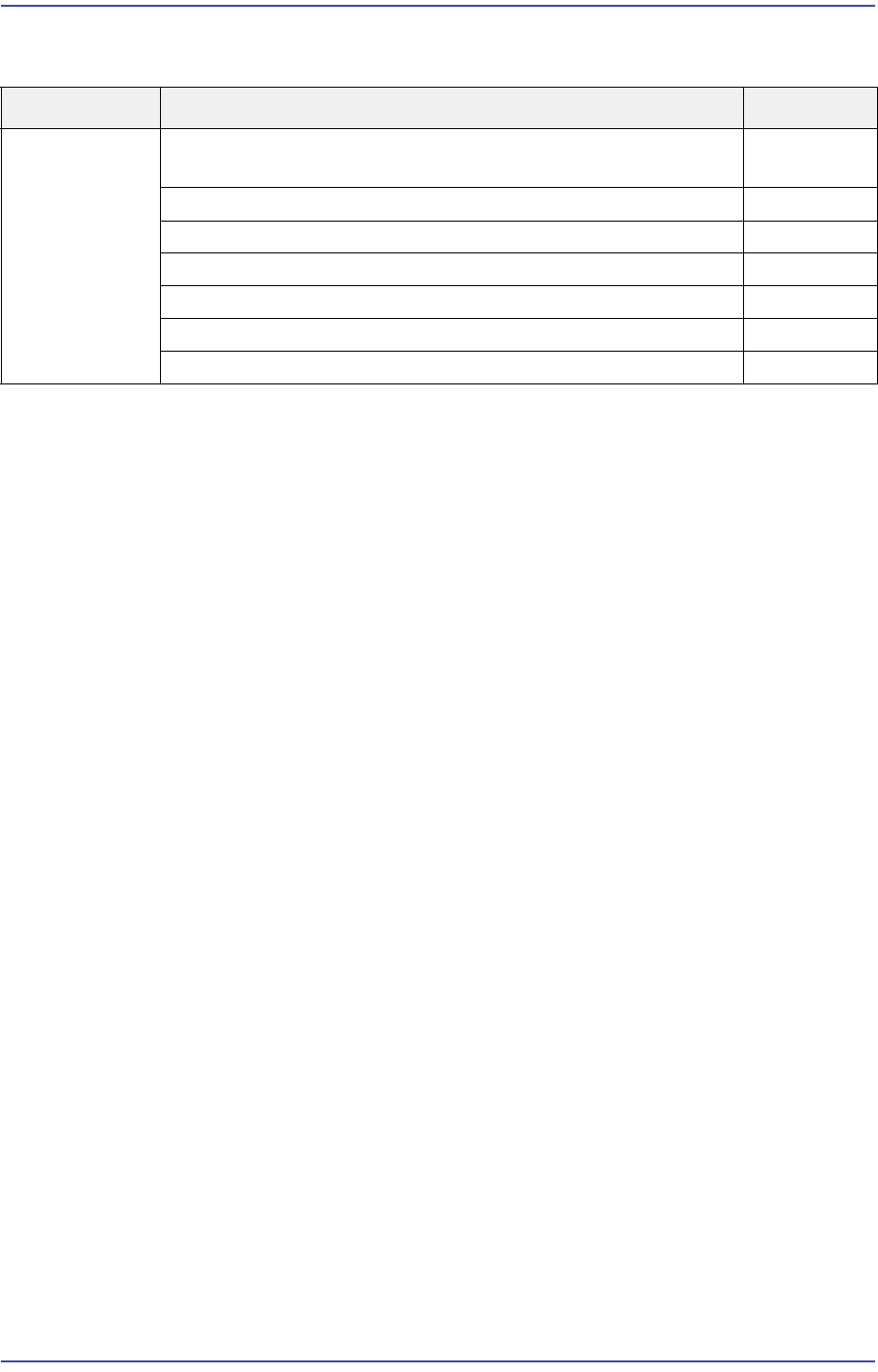
Cause Description Remarks
Defective
operation of
OP panel,
teaching box
and door
switches
The OP Panel Switch does not work properly (LED not turned
on, etc.)
E0F00
Front/Rear Teaching Box or OP Switch cannot be operated E0F01
F/R keyboard or mouse does not work E0F02
Recognition error of the keyboard, mouse and USB memory E0F03
The Motor Free switch of the teaching box is pressed E0F04
No response when opening the door E0F05
Ready Off when opening the door E0F06
17-76
Fast & Flexible Chip Shooter DECAN F2 Service Manual
4. Replace the SBC Board.
1. Check whether the MVME Board is defective.
2. Replace the MVME Board.
3. Replace the PMC NVRAM Board.
1. Check the Select Switch LED of the F/R panel (LED On/Off, I/O operation).
2. Check the teaching box operation state.
3. Replace the F/R Operate Board.
4. Replace the SBC Board.
1. 24V power supply of the CAN Conveyor Board.
- Check the input state (LED On)
- Replace the Power Supply #1.
2. Check and replace the CAN Conveyor Board.
1. Check whether the MVME Board is defective.
2. Replace the MVME Board.
3. Replace the PMC NVRAM Board.
[Measures]
Replace the F/R Operate Board.
Replace the teaching box.
Replace the PMC_NVRAM_Board.
Reassemble the F/R Operate Board.
Reassemble the CN28 connector of the CAN Conveyor Board.
Reassemble the NVRAM Board.
E0F02 F/R key board or mouse does not work
[Cause]
Defective contact of the USB cable (PC Rack, Front Cover)
Defective USB cable
Defective keyboard or mouse
Incorrect CMOS USB 2.0 setting
[How to Check]
1. Check the operation state of the F/R keyboard and mouse.
2. Check the CMOS USB setup.
3. Check the power supply and contact state of the external USB port.
[Measures]
17-77
Troubleshooting
Reassemble and replace the keyboard and mouse.
Check and replace the SBC Board.
Check and replace the USB cable between the SBC and OP panel.
E0F03 Recognition error of the keyboard, mouse and USB memory
[Cause]
Many recognition errors occurred since the USB cable is long.
Defective keyboard or mouse
Defective cable contact to the USB port inside the SBC board
[How to Check]
1. Check the operation state of the F/R keyboard and mouse.
2. Check the CMOS USB setup.
3. Check the power supply and contact state of the external USB port.
[Measures]
Reassemble and replace the keyboard and mouse.
Check and replace the SBC board.
Check and replace the USB cable between the SBC and OP Panel.
E0F04 The Motor Free switch of the teaching box is pressed
[Cause]
Defective contact of the teaching box cable connector at the rear of the OP panel
[How to Check]
1. Check the Select Switch LED of the F/R panel (LED On/Off, I/O operation).
2. Check the teaching box operation state.
[Measures]
After checking the phenomenon that the CN26 LED of the Conveyor I/F Board blinks,
reassemble the corresponding part.
E0F05 No response when opening the door
[Cause]
Defective door switch
[How to Check]
1. Check the switch operation in the I/O window.
2. Check the factory constant.
3. Check the state of the Override Key.
4. Check the switch contact.