DECAN_F2_Service(Eng_Ver1).pdf - 第31页
Preface xi 2) Door Lock switch If the door is open while this machine is ru nning, the door switch is activated and the system comes into the emergency stop status. The emergency stop status is released if the door is cl…
1-x
Fast & Flexible Chip Shooter DECAN F2 Service Manual
Operation of the safety interlock
This section describes the operation of safety interlocks manipulated to stop the machine
immediately under an emergency situation or for maintenance purposes.
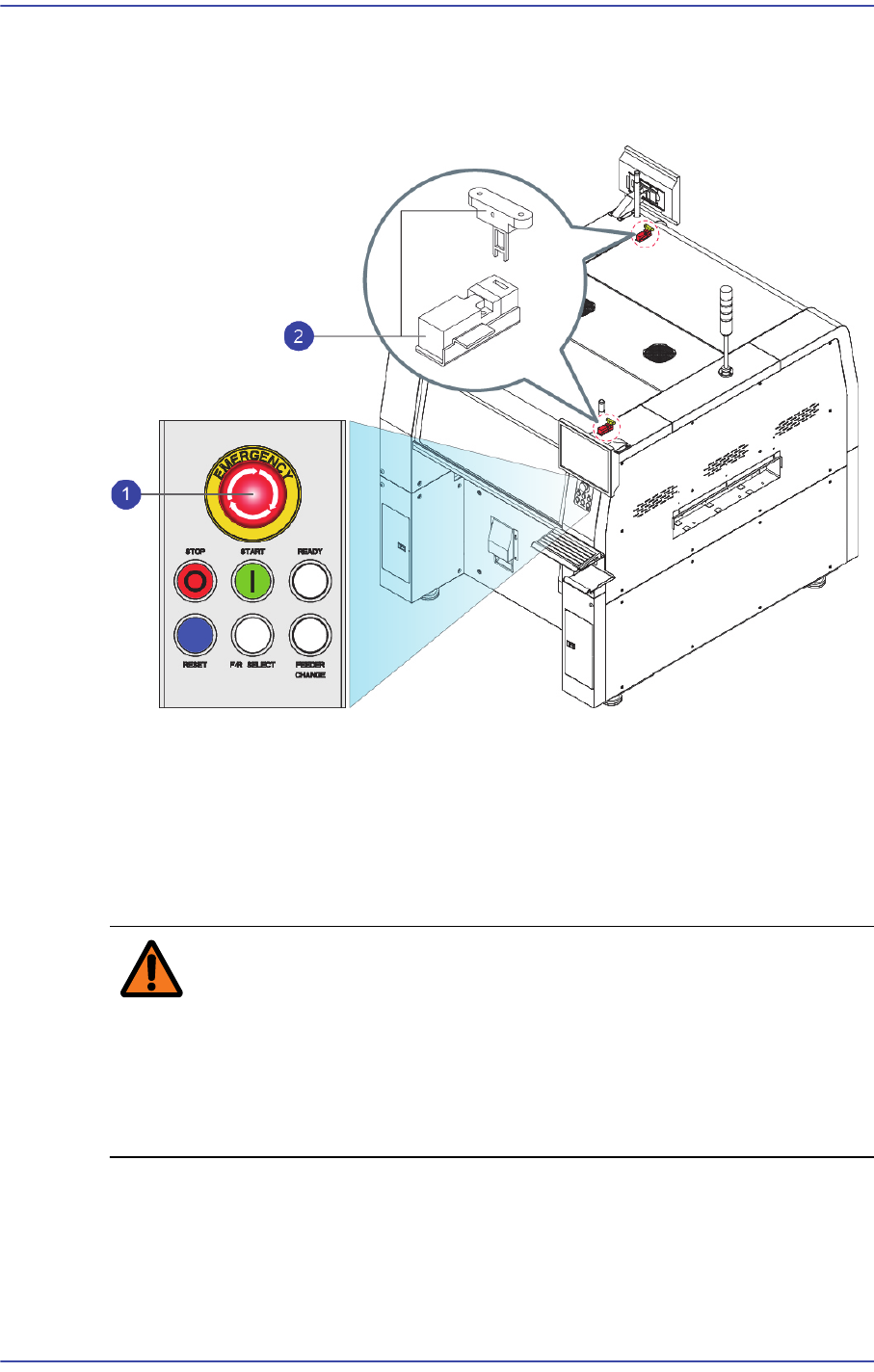
1) EMG (Emergency Stop) switch
This is an emergency stop switch. Operation of this machine is immediately suspended
if this switch is pressed in case of an emergency.
Supply of all powers except for the power to a computer is ceased. The emergency
stop status can be released by turning the ‘EMG’ switch in the direction of the arrow
and pressing the RESET button.
Warning When the emergency shutdown has been applied, the
power supply to all of the machine’s servo motors is turned
off. However, the power supply to other components and
devices remains turned on. Exercise care when taking
measures against an error for the section to which power is
supplied.
Preface
xi
2) Door Lock switch
If the door is open while this machine is running, the door switch is activated and the
system comes into the emergency stop status. The emergency stop status is released if
the door is closed. In order to resume the operation, press ‘READ’ button on the
operation panel to release the emergency status, then press ‘Start’ button.
Warning If the safety sensor of the door is cancelled arbitrarily, the
machine will not stop even though the door is opened
during operation, which could cause injury. The safety
sensor of the door must not be cancelled arbitrarily.
1-xii
Fast & Flexible Chip Shooter DECAN F2 Service Manual
About Warranty
The warranty is issued to cover the following machine faults and malfunctions.
However, the contents of the warranty stipulated at the time of purchase take
precedence over the above coverage.
What is covered by
the warranty
If any part of the machine fails to function properly under normal
usage due to defects in material or workmanship, it will be repaired by
Samsung Techwin Co.,Ltd. at no charge for either parts or labor.
Time period of the
warranty
The term of this warranty shall expire for any of the following cases.
25 months after shipment
2 years after completion of installation
What is not
covered by the
warranty
Any of the following cases are not covered by this warranty.
Data lost due to HDD damage. Back up is desirable.
Malfunction of the machine due to running applications, which are
not any part of the machine, or infected by any computer viruses.
Normal wear and tear due to long-term use or faults arising from
normal use (natural fading of coating and plating, wearing-out of
parts, etc.)
Delicate changes do not affect the functional quality of the product
(such as noise of an operating controller, sound of a rotating
motor, etc.)
Faults due to the ambient conditions (moisture, impurities, dust on
the machine, oil mist, etc.)
When a machine failure occurs due to a mistake made by the
customer
Faults resulting from the following cases are not covered by this
warranty as well.
Natural disasters such as earthquake, typhoon, flood, lightning
strike, etc., or accident, and fire
Reconstruction which is not approved by our company or agents
Not performing back up for the data stored in the machine
Use of parts or lubricating oil which are not designated
Insufficient or faulty maintenance or inspection.
Adjustments performed by persons other than designated agents