DECAN_F2_Service(Eng_Ver1).pdf - 第438页
17-26 Fast & Flexible Chip Shooter DECAN F2 Service Manual Set the PCB stop position the same as that of the existing machine and move the stopper . E0722 Timeout occurred during Msgdriver (MMI) communication [Caus…
17-25
Troubleshooting
[Measures]
Set the part dump angle to 90º
E071E The report is not outputted from the ‘Feeder Info.’ dialog box of the Utility menu
[Cause]
The printer is not set in the machine PC
[How to Check]
Check whether the printer is properly set in the PC
[Measures]
Install the printer driver so that the machine PC can use the printer.
E071F The machine pauses with the machine being changed into the 'Run-Ready' state
during
[Cause]
Defective RT and NCIO boards
[How to Check]
Check whether the same problem occurs while replacing the RT board and NCIO
board in order
[Measures]
Replace the RT board or NCIO board.
E0720 The machine pauses during production
[Cause]
The 'Coil Check' function is set for the Chip-Rect part
[How to Check]
Check whether the Chip-Rect part is properly set in the part editor
[Measures]
Disable the 'Coil Check' function for the Chip-Rect part.
E0721 Limitation occurred when exchanging a PCB file between machines
[Cause]
The stopper position of the machine is different from that of the PCB program file
copied from another machine
[How to Check]
Check whether the stopper position of the machine to be used is the same as the
stopper position of the machine from which the file has been copied
[Measures]
17-26
Fast & Flexible Chip Shooter DECAN F2 Service Manual
Set the PCB stop position the same as that of the existing machine and move the
stopper.
E0722 Timeout occurred during Msgdriver (MMI) communication
[Cause]
Defective Vision board
Defective LAN communication
[How to Check]
Replace the Vision board and check whether the same problem occurs
Check whether the Ethernet communication is properly made
[Measures]
Replace the PCI I/O board.
Connect the LAN cable properly or replace the cable.
E0723 A certain part is dumped even when a pickup error did not occur
[Cause]
Incorrect system constant setup
[How to Check]
Check the retry count of the pickup from the Common Data in the part editor and
check that the No. 9 System Constant is 5
[Measures]
Change the system constant. (No. 9: Change the OPT SIG PART EMPTY from 7 to 5.)
E0724 Timeout occurred during Msgdriver (MMI) communication (Applicable only to SM
series machines excluding the SM471 machines.)
[Cause]
The PCI IO board is defective. (Applicable only to SM series machines excluding the
DECAN F2, SLM, SM471 and SM48X.)
The cable connecting the CAN Master board and PCI I/O board is defective.
(Applicable only to SM series machines excluding the DECAN F2, SLM, SM471 and
SM48X.)
[How to Check]
Replace the PCI I/O board and check whether the same problem occurs.
Check whether the DPRAM cable is correctly connected. If its connection has no
problems, replace the cable and check whether the same problem occurs.
[Measures]
Replace the PCI I/O board.
17-27
Troubleshooting
Replace the DPRAM cable assembly.
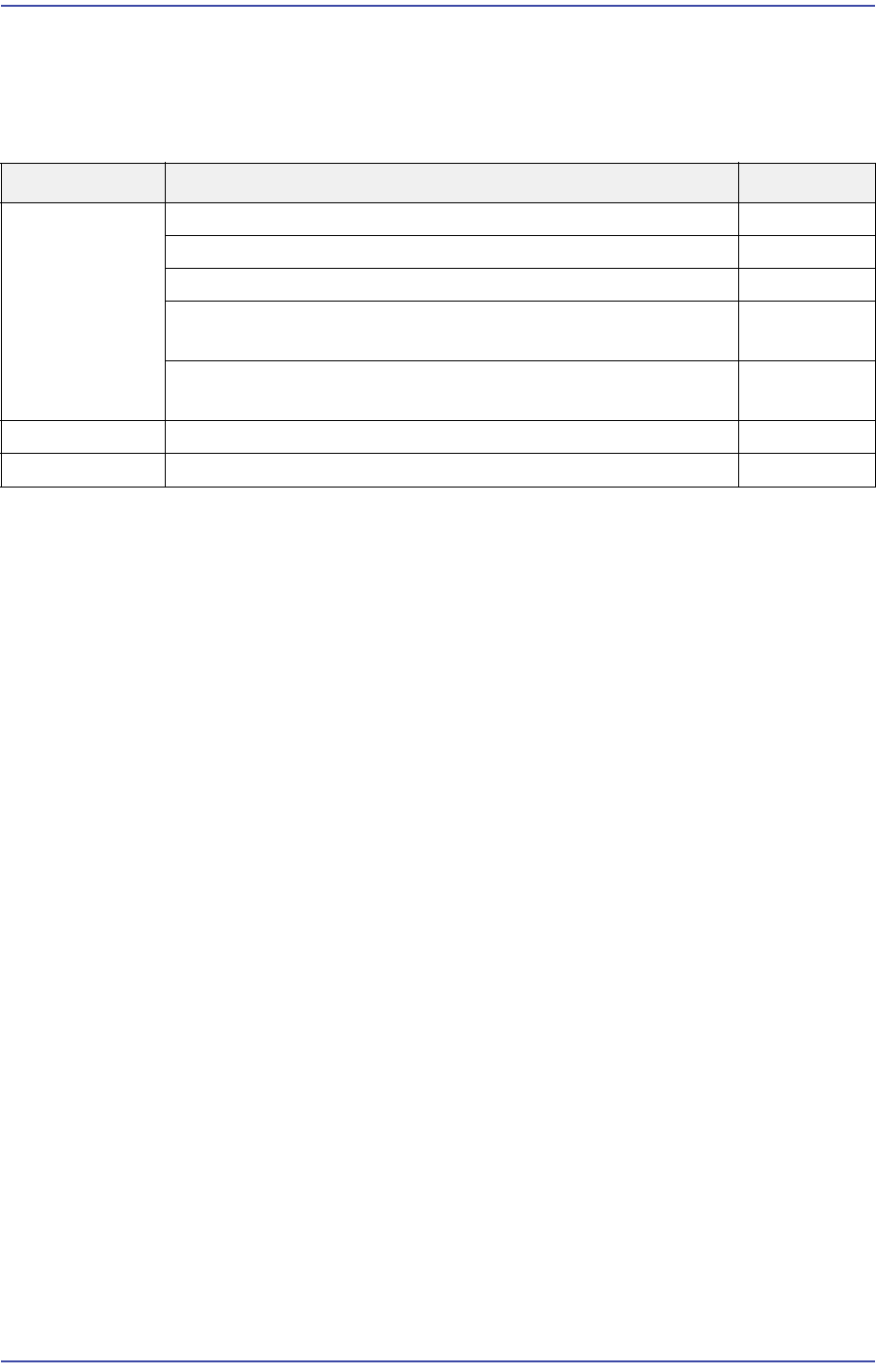
17.3.4. Error related to conveyor (E08)
E0800 An alarm related to the motor axis occurred
[Cause]
Defective motor power cable and encoder cable
Defective servo motor
Defective motor pulley assembly(As the motor pulley set screw is loosened, the origin
point is changed)
Overload occurred due to chips and foreign materials on/around the ball screw of the
width adjustment axis
The home sensor and limit sensor are damaged
The conveyor cable is cut off
The system file related to the conveyer origin is damaged
Defective connection between the base control board and NCIO board
The voltage supplied from the power supply unit is defective
The cables connected to the motor and board are defective or the base control board is
defective.
[How to Check]
Check whether the motor power cable and encoder cable are properly connected. If the
cable has a problem, replace it and check whether the same problem occurs
Check whether the servo motor operates properly
Check whether the motor pulley is assembled properly
Check whether foreign materials exist on/around the ball screw and LM guide
Cause Description Remarks
Error related to
conveyor
An alarm related to the motor axis occurred E0800
The BUT Up/Down error occurred E0801
The stopper Up/Down error occurred E0802
Axis homing error – “AMP is not enabled.” (Occurs when the
machine is at Ready On state)
E0803
The error, “The motor or origin position is changed,”
occurred
E0804
A STEF or STXF-S follow-up error occurred E0805
Parts jump while placing them E0806