DECAN_F2_Service(Eng_Ver1).pdf - 第255页
12-5 Motor Driver Warning The adjustment of the parameters for the servo motor is not permitted in whatever case except when the driver parameter is distributed as Service Information. 12.4. Servo Motor Parameter 12.4.1.…
12-4
Fast & Flexible Chip Shooter DECAN F2 Service Manual
12.3. Servo Motor Driver Replacement
12.3.1. Required tools
Spanner
(+) shape tipped screw driver, (-) shape tipped screw driver
T Wrench or Hex Wrench
Motor Driver Data Cable (P-Motor): for Servo Motor
12.3.2. Driver replacement procedure
1) Press the <EMG> switch on the front side of the machine to cut off the power supply
to the motor. At this time, the power supply to the entire machine must remain turned
on or the power must be supplied to the corresponding motor driver.
2) Remove the rear cover of the machine by using a screw driver.
3) Back up the parameters saved in the previous driver by referring to Parameter
Download/Upload.
Caution The new driver contains the standard parameters the
setups of the manufacturer. However, they may be changed
in our factory for tuning.
4) If the parameters cannot be downloaded from the existing driver, download the
distributed standard parameters.
Caution When the parts are supplied for maintenance, the standard
parameters are downloaded in the driver.
Basically, the types of the parameters of the servo motor are classified as follows:
Classification by axis: X, Y, Z (1, 3, 5 / 2, 4, 6 ), Swing, Width (C/V)
5) Turn off the power supply to the machine again.
6) Disconnect the cable connected to the driver that needs to be replaced.
7) Replace the defective motor driver.
8) The assembling is performed in the reverse order of disassembling.
9) Check if the machine works properly after turning it on.
12-5
Motor Driver
Warning The adjustment of the parameters for the servo motor is not
permitted in whatever case except when the driver
parameter is distributed as Service Information.
12.4. Servo Motor Parameter
12.4.1. Required tools
Spanner
(+) shape tipped screw driver, (-) shape tipped screw driver
T Wrench or Hex Wrench
Motor Driver Data Cable : USB – mini USB Cable (AM03-000143)
PANATERM Software (PANATERM version 5.0.3.0 )
12.4.2. How to Set X axis, SW axis Parameters
1) Press the ‘EMG’ switch on the front of the machine to turn off the power supply to the
motor. At this time, all power supply lines to the machine must be turned on or power
must be applied to the corresponding motor driver.
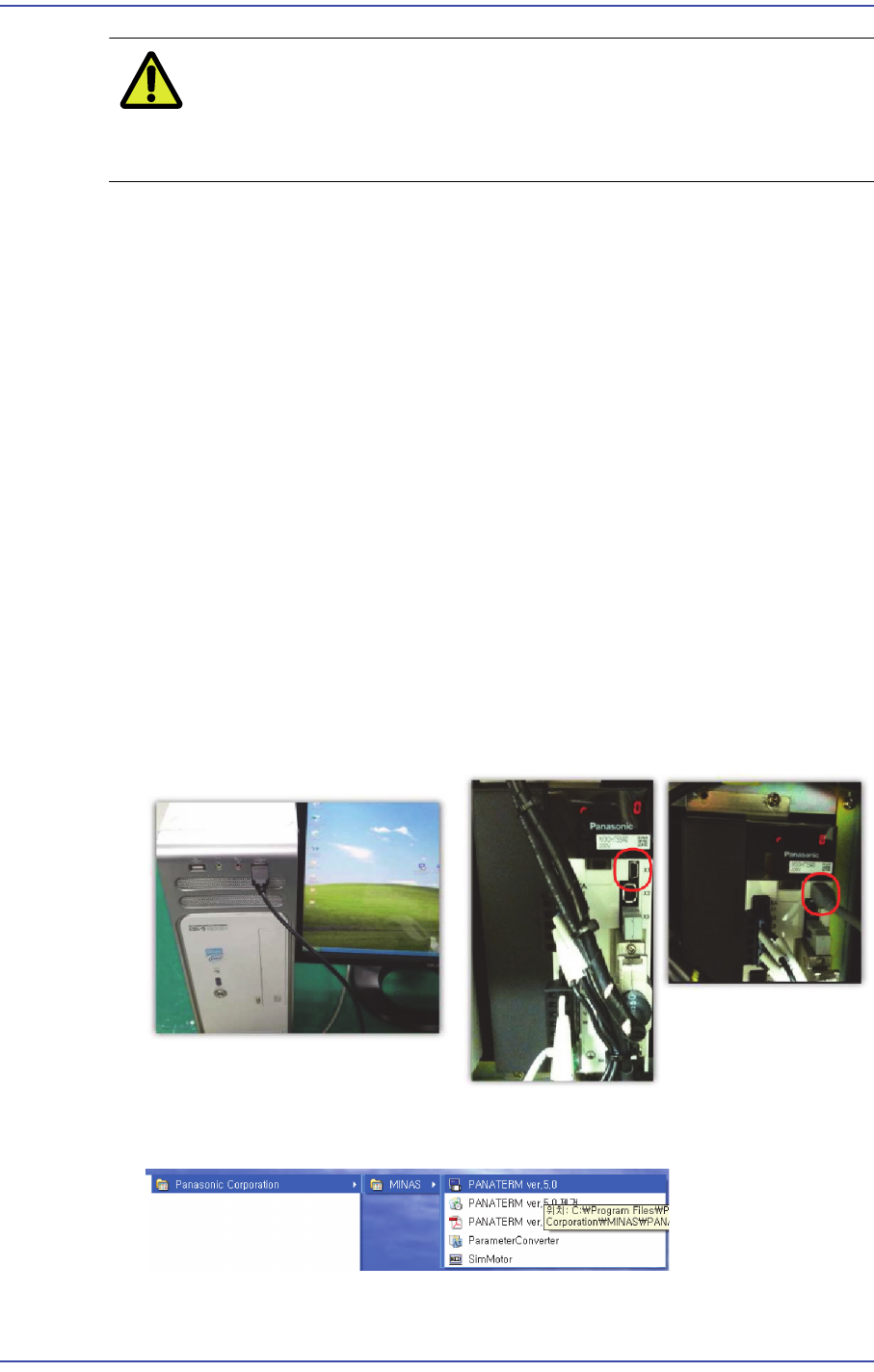
2) Connect the USB mini cable to the keyboard USB port and the X1 terminal of the Y1
motor amplifier.
3) Execute "Start >> Program >> Panasonic Corporation >>MINAS >>"PANATERM
ver.5.0".
12-6
Fast & Flexible Chip Shooter DECAN F2 Service Manual
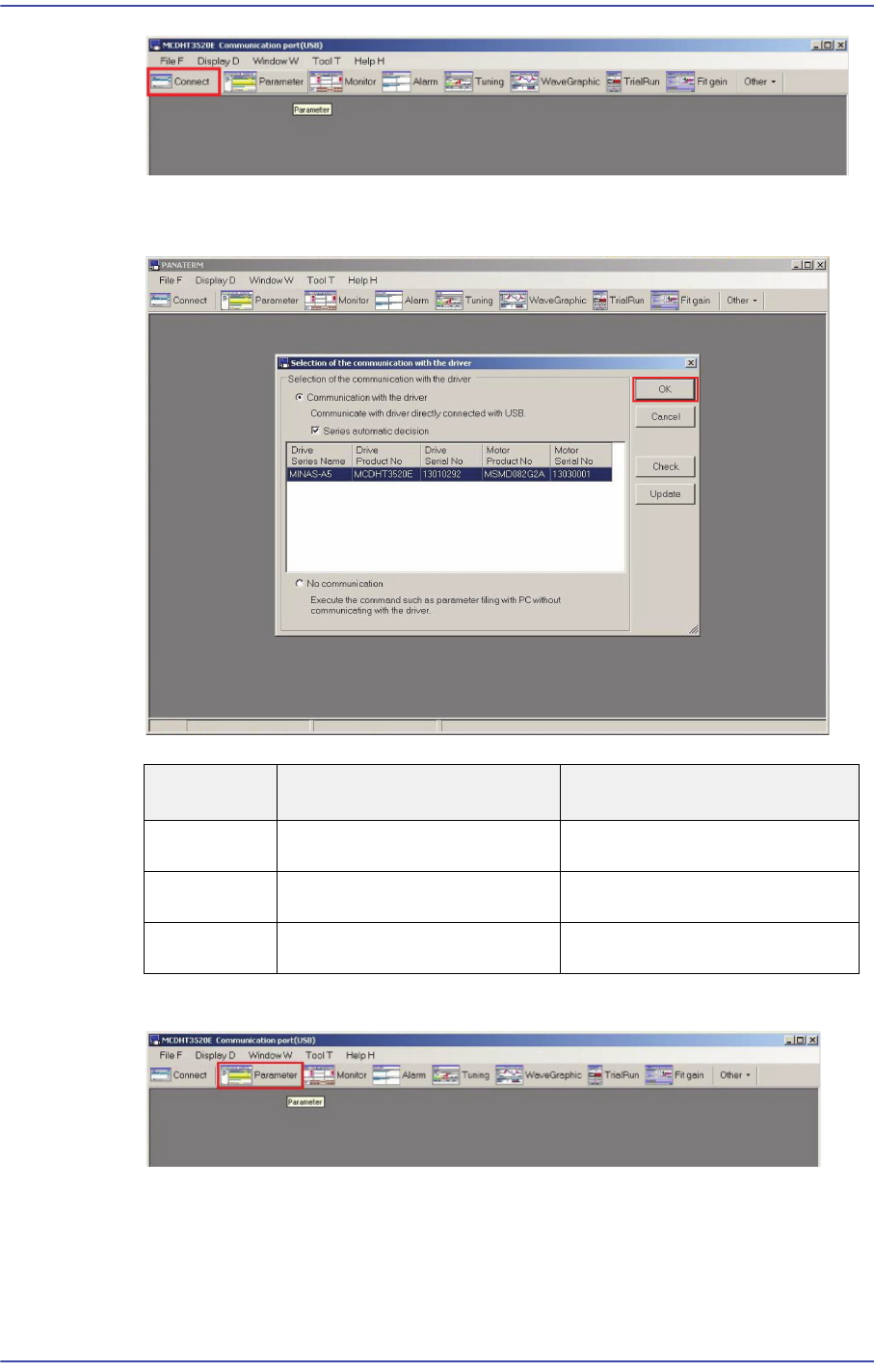
4) Executing ANATERM ver.5.0 will display the connected driver/motor information. If
the driver and motor information is correct, click ‘OK’.
5) Select MINAS-A5 in the Series setting window and click the ‘OK’ button.
6) A window showing the progress of connection to the driver is then displayed.
Distinction Driver Product No. Motor Product No.
X Axis
MCDKT3520E MSMD082G2A
Y Axis
MDDHT5540LA2 -
SW Axis
MADHT1505E MSMD5AZG2A