00195982-03_SM_SWS_EN.pdf - 第104页
5 Basic frame – X/Y unit 5.3 Replacing parts 104 Service Manual SIPLACE Wafer System (SWS) 11/2018 Removal using the example of H01 Removal for HO2 is identical. For information about wiring, see section 5.2.3 "Over…
5 Basic frame – X/Y unit
5.3 Replacing parts
Service Manual SIPLACE Wafer System (SWS) 11/2018 103
5.3.4.1 Checking the proximity switch
► Enable the proximity switch with a screwdriver.
► Go to the toolbar and select the button Service Settings => Motor settings.
► Select the button GallilMotion_axis0 and the tab Axis status.
► The displays shine:
– Forward Limit active
– Reverse Limit active
► Move the axis in both directions. Before the axis moves into the relevant end stop, the proxim-
ity switch must trigger and the relevant display light up.
5.3.5 Replacing the fork light barriers home position HO1 and HO2
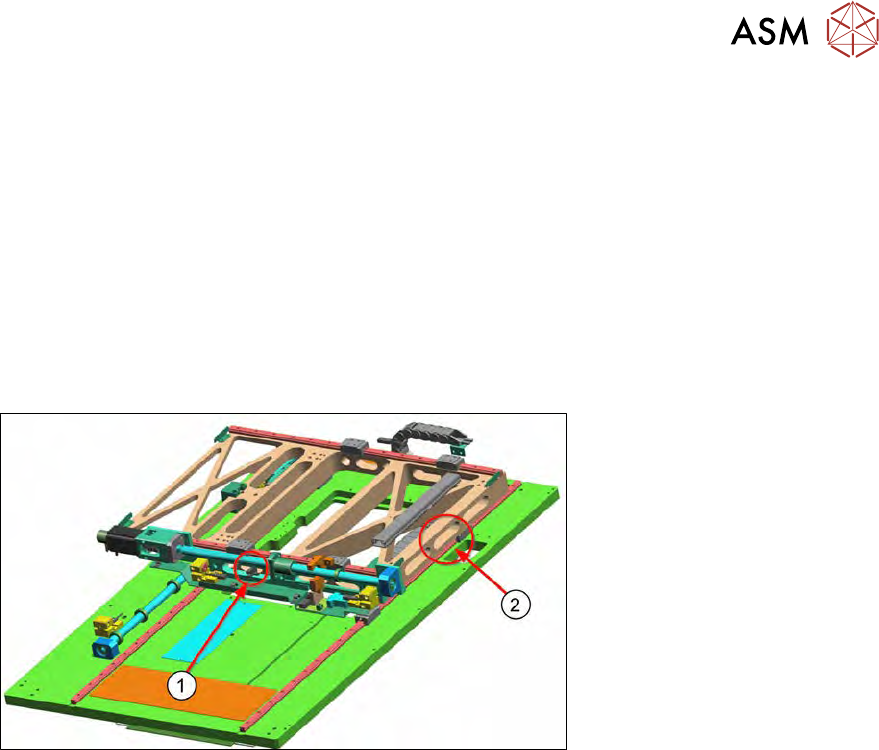
Fig.108:
1. Position of fork light barrier H01 for X axis
2. Position of fork light barrier H02 for Y axis
The fork light barrier HO1 (1) determines the basic position (home position) of the X axis. The cable
for the fork light barrier is connected to the adapter board for the wafer table.
The fork light barrier HO2 (2) determines the basic position (home position) of the Y axis. The cable
for the fork light barrier is connected to the adapter board for the wafer table.
5 Basic frame – X/Y unit
5.3 Replacing parts
104 Service Manual SIPLACE Wafer System (SWS) 11/2018
Removal using the example of H01
Removal for HO2 is identical.
For information about wiring, see section 5.2.3 "Overview of sensors" [}70].
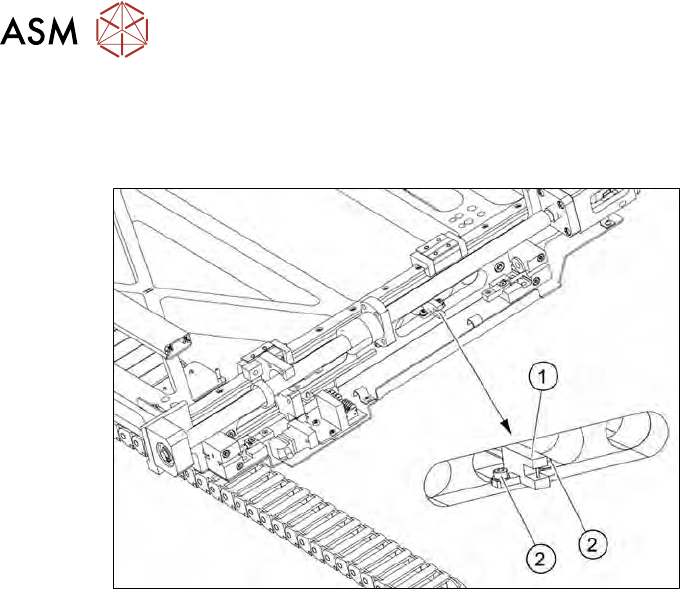
Fig.109:
► Remove the two screws (2) fastening the fork light barrier HO1 (1).
► Unthread the connection cable as far as the wafer table adapter board.
► Use the circuit diagram folder for help and mark the cables connected, if not already marked.
► Unplug all connections from the terminal strip.
► Fit the new fork light barrier
► Run the connection cable as far as the wafer table adapter board.
► Connect the connection cable to the relevant terminal strip.
► Fix and gather the cables together with cable ties, where necessary. Make sure that the
cables do not rub against any part or get trapped.
5 Basic frame – X/Y unit
5.3 Replacing parts
Service Manual SIPLACE Wafer System (SWS) 11/2018 105
5.3.6 Replacing the Y axis motor board
This motor board supplies the Y motor with voltages and receives the signals from the encoder.
For information about wiring, see section 5.3.1 "Replacing the Y motor with coupling" [}73].
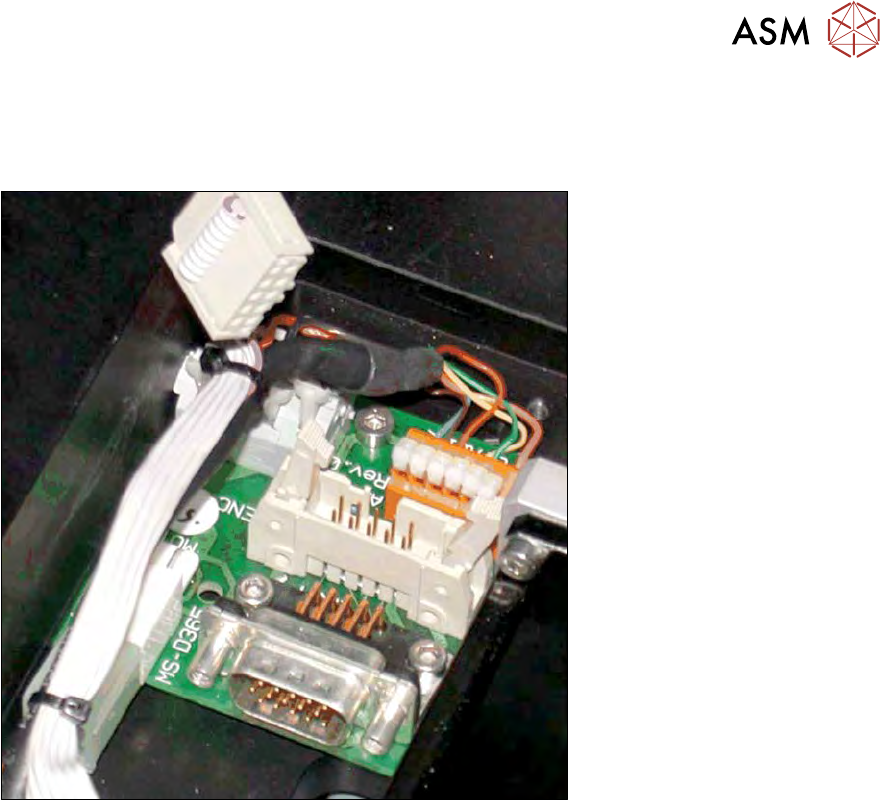
Fig.110:
► Remove the cover from the motor board.
► Use the circuit diagram folder for help and mark the cables connected, if not already marked
(see 5.3.1 "Replacing the Y motor with coupling" [}73]).
► Unplug the electrical connections and cable.
► Remove the three fastening screws and then remove the motor board.
► Fit the new motor board.
► Reconnect to the electricity supply.
► Fix and gather the cables together with cable ties, where necessary. Make sure that the
cables do not rub against any part or get trapped.
► Fit the cover on the motor board.