00195982-03_SM_SWS_EN.pdf - 第62页
4 SWS installation and removal for SIPLACE CA machines 4.2 Installing the SWS 62 Service Manual SIPLACE Wafer System (SWS) 11/2018 Move the SWS completely out of the placement machine ► Pull the SWS completely out of the…
4 SWS installation and removal for SIPLACE CA machines
4.1 Removing the SWS
Service Manual SIPLACE Wafer System (SWS) 11/2018 61
Disconnecting the connections
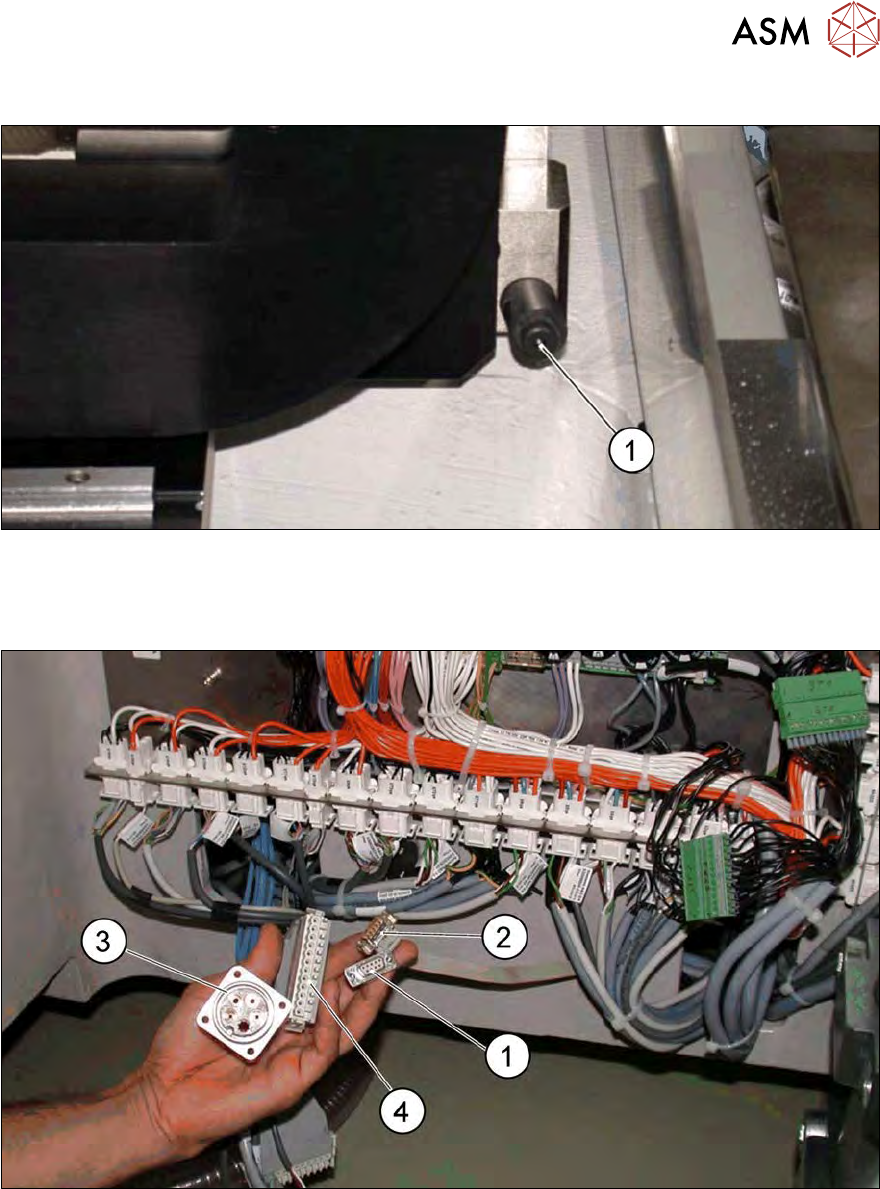
Fig.40: Bumper
► Lift the SWS with the fork lift/pallet jack and carefully pull it out of the location, as far as ap-
prox. 30cm before the bumper(1), so that you have enough room to disconnect the connec-
tions between the SWS and the SIPLACE CA.
Fig.41: Position of connection on the placement machine
1 CAN bus connection X1x5 2 CAN bus connection X1x6
3 Compressed air connection (modified dummy plug [03011592-01])
► Unplug the following connections from the SWS:
– CAN bus connections X1x6 and X1x5 (only required for 605.x station software)
– LAN connections (from 70x station software instead of CAN bus connections) for commu-
nication and map server (optional)
– Compressed air connection
– FFI communication interface W11 on FFI communication interface X1x3
4 SWS installation and removal for SIPLACE CA machines
4.2 Installing the SWS
62 Service Manual SIPLACE Wafer System (SWS) 11/2018
Move the SWS completely out of the placement machine
► Pull the SWS completely out of the placement machine.
► Fold out the SWS support foot.
► Carefully place the SWS down and remove the fork lift/pallet jack.
► Perform the required maintenance tasks and then refit the SWS.
4.2 Installing the SWS
► Position the gantries over the PCB conveyor, to prevent any damage to the placement heads
while fitting the SWS.
► Position the fork lift/pallet jack lengthwise under the SWS and open the forks until the SWS
contact surfaces sit evenly on the forks. The magazine lift structure must be facing the fork lift/
pallet jack.
Move the SWS into the placement machine
NOTICE
Connections on SWS when exposed
► Before moving the SWS back in, make sure that the following connections on the
SWS are accessible: CAN bus connection X1x5 and X1x6, network cable for LAN
connections, compressed air connection and FFI communication interface W11.
► Lift the SWS and align it to the placement machine. If the stroke path of the fork lift/pallet jack
is not far enough, you can use suitable wooden timbers or similar supports.
CAUTION
Fold the SWS screen outwards
► Before moving the SWS into the machine, fold its screen outwards so that it can not
hit the placement machine cover.
► Carefully push the SWS into the placement machine, as far as approx. 30 cm before the
bumper (see 4.1 "Removing the SWS" [}59]), so that you have enough room to connect the
SWS and placement machine connections.
Connecting the SWS to the SIPLACE CA
NOTICE
Connect the SWS to the placement machine
► Before performing alignment and final adjustments, connect the SWS to the place-
ment machine. Some connection points may no longer be accessible after installation.
Reconnect the following connections, which you disconnected before removing the SWS (see 4.1
"Removing the SWS" [}59]):
– Only for 605.x station software: CAN bus connections X1x6 and X1x5
– From 70x.x station software: the CAN bus loop must be closed
– Compressed air connection to compressed air connection
– FFI communication interface W11 to FFI communication interface X1x3
– From 70x.x station software: network cable for LAN connections
4 SWS installation and removal for SIPLACE CA machines
4.2 Installing the SWS
Service Manual SIPLACE Wafer System (SWS) 11/2018 63
Performing final adjustments to the SWS
► Use the fork lift/pallet jack to push the SWS carefully into the placement machine, as far as
the stop on the bumper.
► Now carefully lower the SWS with the fork lift/pallet jack until it sits evenly on the contact rails
of the placement machine.
CAUTION
Check the stable position of the SWS while lowering it
► Before fixing the SWS into place with screws, do not lower the fork lift/pallet jack too
far or it might tilt towards the magazine lift.
► There should always be a second person present to ensure that the SWS remains
stable while it is being lowered.
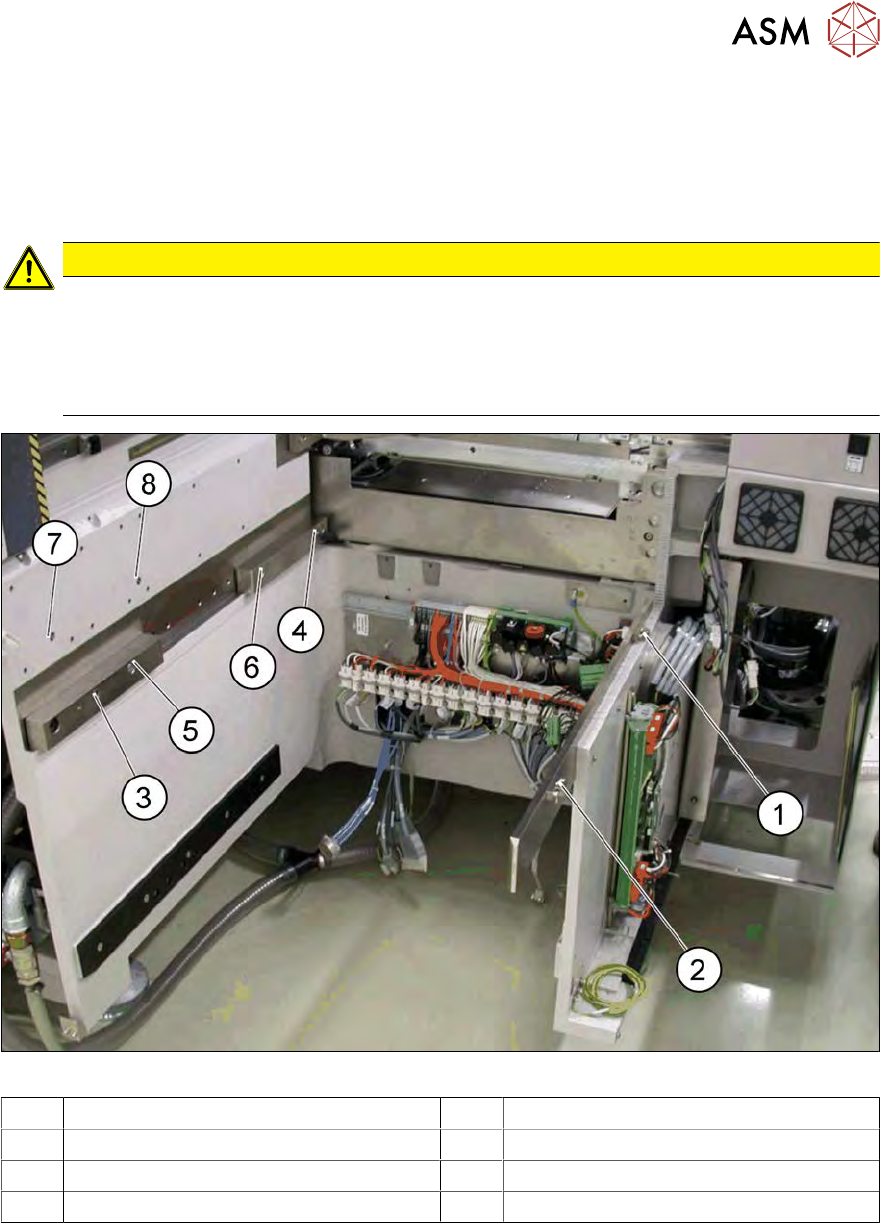
Fig.42: Positions of screws for SWS 12 on SIPLACE CA location
1 M8 2 M8
3 Fitting screw 4 M6 (with clamping claw)
5 M6 6 M8 for clamping claw
7 M6 for bracket 8 M6 for bracket