00195982-03_SM_SWS_EN.pdf - 第323页
12 Wafer stretcher 12.8 Setting the sag sensor IN 19 Service Manual SIPLACE Wafer System (SWS) 11/2018 323 Light beam interrupted when wafer foil sags too low Fig.456: ● The light beam from transmitter S (1) to receiver…
12 Wafer stretcher
12.8 Setting the sag sensor IN 19
322 Service Manual SIPLACE Wafer System (SWS) 11/2018
Fig.454:
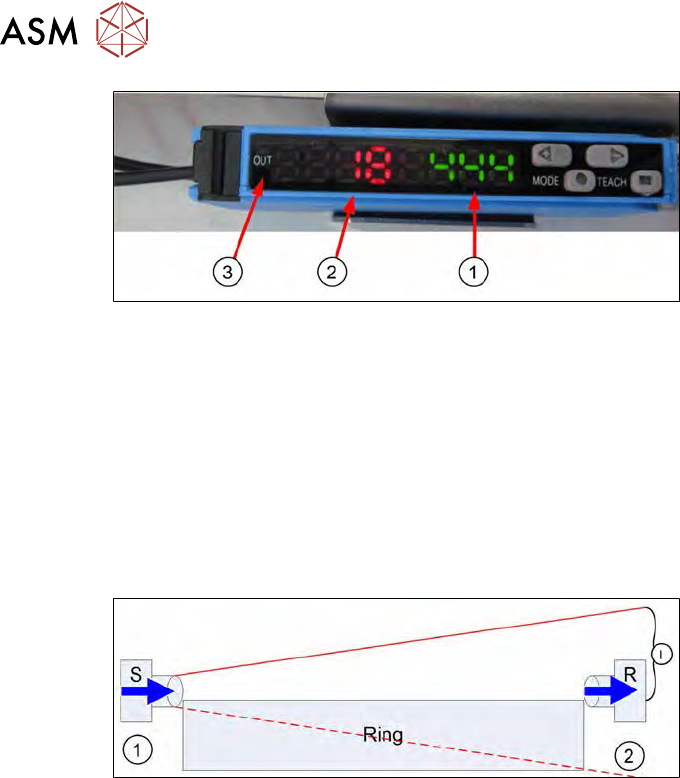
If the light intensity value at the receiver R (red display (2)) is less than the set switching threshold
value (green display (1)), then the following applies:
●
The light beam has been interrupted and there is a risk that the wafer foil will be tensioned on
the base unit.
●
No signal (OUT does not shine orange (3)) will be emitted and the wafer may not be pulled
into the wafer lift by the gripper.
12.8.1.3 Explanation of light intensity in connection with foil sag
Light beam not interrupted
Fig.455:
●
The transmitter S (1) and the receiver R (2) are fitted just above the expansion ring (ring).
●
The light beam from transmitter S (1) is not totally emitted as the clearance height for the
wafer change means the transmitter S (1) may not be too high.
●
For this reason, the whole light beam is not emitted from the transmitter and is deflected or
blocked by the expansion ring.
●
Due to the dispersion of the light beam, the receiver R (2) only receives a certain percentage
of the light intensity (I) compared to the amount of light emitted.
●
When the setting and alignment between the transmitter S (1) and receiver R (2) is optimal,
the light intensity value displayed on the analysis unit is maximum (absolute).
●
The aim when mechanically aligning the transmitter S to the receiver R is to achieve the
highest possible light intensity value.
●
This value is seen as 100%.
12 Wafer stretcher
12.8 Setting the sag sensor IN 19
Service Manual SIPLACE Wafer System (SWS) 11/2018 323
Light beam interrupted when wafer foil sags too low
Fig.456:
●
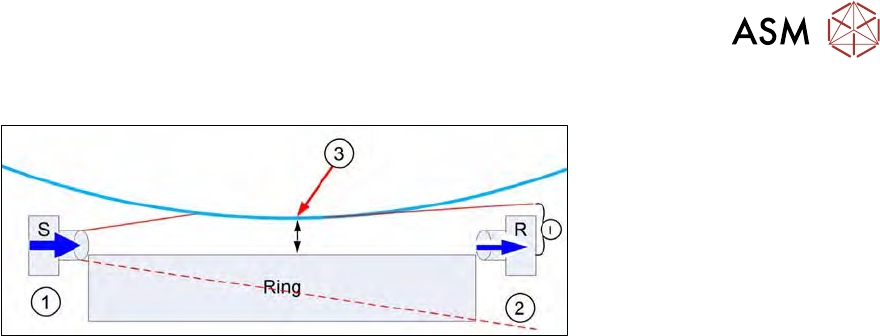
The light beam from transmitter S (1) to receiver R (2) is interrupted.
●
The wafer foil (3) sags down after completion of the stretching procedure.
●
Depending on how far down the foil sags, the light beam from transmitter S may be interrup-
ted.
●
The maximum permissible wafer foil sag is1mm.
●
If the wafer foil sags down more than this (= the foil is nearer than 1mm at the expansion
ring), the wafer may not be pulled into the wafer lift by the gripper.
●
Due to the interruption of the light beam, not all the light will reach the receiver R (2).
●
The receiver R (2) therefore receives a reduced light intensity (I).
●
When setting the switching threshold, you need to simulate a foil sag with a distance of 1 mm
from the foil to the expansion ring. This means a foil sag of approx. 9 mm!
●
With this simulated foil sag, a switching threshold is then calibrated at the Sensick WLL180T
analysis unit.
●
This value is shown as an absolute switching threshold value (green display) in the analysis
unit.
●
This means:
– If the wafer foil sags so much that the distance to the expansion ring is <1mm, the ana-
lysis unit will show a lower light intensity (red) than the switching threshold value (green).
→ OUT not enabled → change not permitted.
– If the wafer foil sags so much that the distance to the expansion ring is >1mm, the ana-
lysis unit will show a higher light intensity (red) than the switching threshold value (green).
→ OUT enabled → change permitted.
12.8.2 Mechanically setting the sag sensor IN19
12.8.2.1 Materials and equipment needed
●
1x dismantled expansion plate
or
1x stable plate or square material, length <500mm (may not sag)
●
2x 1mm plate with dimensions L=200mm, B=30mm, D=1mm
or
2x folded paper with the dimensions L=200mm, B=30mm, D=1mm
●
1x measuring scale
●
1x Allen key 3mm (T handle or other)
●
1x shortened Allen key 3mm for removing the transmitter screws from above
●
1x feeler gauge or plate, 0.1mm
12 Wafer stretcher
12.8 Setting the sag sensor IN 19
324 Service Manual SIPLACE Wafer System (SWS) 11/2018
12.8.2.2 Preparatory tasks
► Move the table to the change position (GUI function).
► Move the expansion plate upwards (GUI function).
► Lower the expansion ring. → expansion ring in lowest position (GUI function).
► Make sure that the die ejector has been lowered.
► Switch off the SWS and the SIPLACE CA.
► Dismantle and remove the SWS.
► Remove the two expansion plates.
► Reconnect the SWS to the power supply.
► An air connection is not needed.
► Switch the SWS on.
The following tasks can be performed in emergency OFF mode.
12.8.2.3 Adjusting (aligning) the sag sensor
Fig.457:
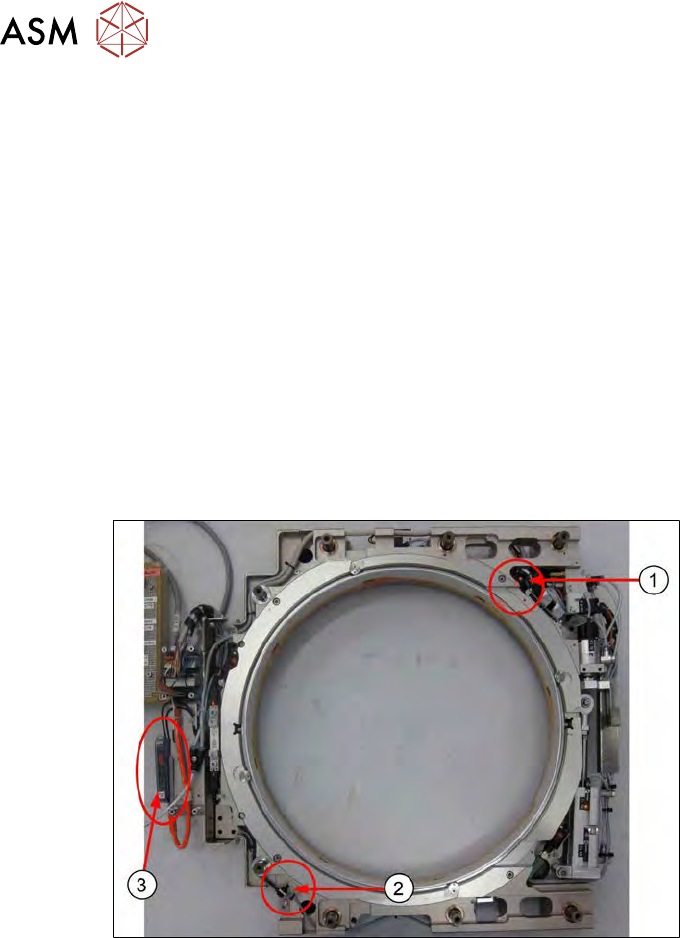
The sag sensor assembly is present as shown in the diagram. The expansion plates have been
dismantled.
1. Transmitter S
2. Receiver R
3. Sensick WLL180T analysis unit