00195982-03_SM_SWS_EN.pdf - 第327页
12 Wafer stretcher 12.8 Setting the sag sensor IN 19 Service Manual SIPLACE Wafer System (SWS) 11/2018 327 Fig.462: ● The analysis unit now shows a light intensity value ( our example shows 360 red). ● The switching thr…
12 Wafer stretcher
12.8 Setting the sag sensor IN 19
326 Service Manual SIPLACE Wafer System (SWS) 11/2018
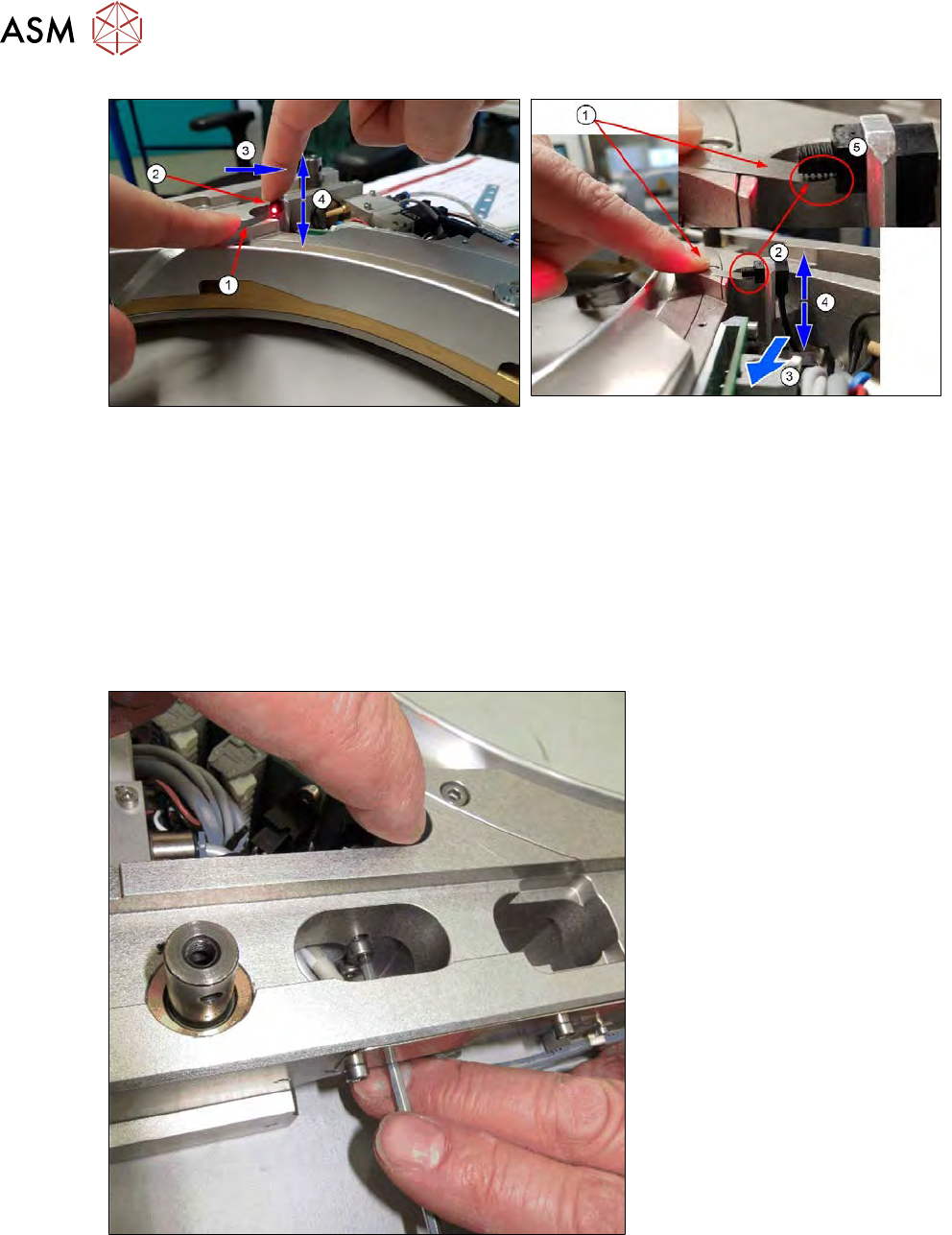
Fig.460:
► You should, where possible, enlist the help of a second person for the following steps.
► Press the feeler gauge 0.1mm (1) with the finger onto the reference surface. The end of the
feeler gauge should be under the transmitter S (2).
► With the other finger, press the transmitter in the direction shown (3) (left when viewed from
the outside). While doing so, adjust the height of the transmitter S (4), until the transmitter S
(2) is slightly set against the feeler gauge or with a very narrow gap to it.
ð The important thing is that the transmitter only very slightly touches the feeler gauge (1)
and that the feeler gauge is not bent downwards!
ð A tiny gap between the feeler gauge and the transmitter S is also acceptable (5).
Fig.461:
► A second person should now tighten the screws on transmitter S.
► If needed, use the shortened Allen key if you are unable to access the screw from the side.
► After the setting, check with the feeler gauge.
●
Due to their mechanical construction, transmitter S and receiver R are not totally flush.
●
By pressing transmitter S towards the left, you reach the best starting point for preadjustment
purposes.
12 Wafer stretcher
12.8 Setting the sag sensor IN 19
Service Manual SIPLACE Wafer System (SWS) 11/2018 327
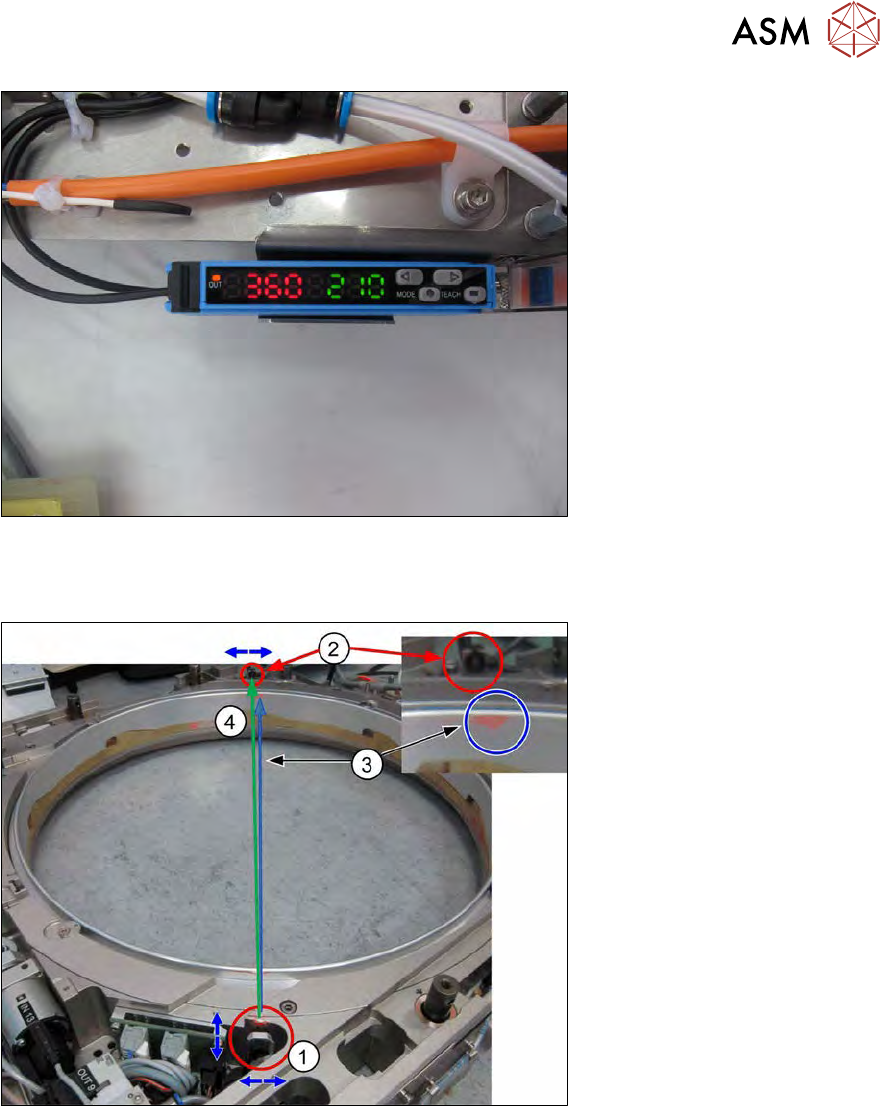
Fig.462:
●
The analysis unit now shows a light intensity value ( our example shows 360 red).
●
The switching threshold value is still from the old calibration (in our example 210 green).
Fig.463:
●
The transmitter S (1) emits a light beam (3 blue).
●
The light beam (3 blue) does not meet the receiver R (2) is an optimum way.
●
Only a fraction of the light intensity from the emitted beam (in our case 360) arrives at the
receiver R (2).
●
One can also recognize the position and light dispersion of the light beam on the expansion
ring.
●
This dispersion is normal as the light spreads out with increasing distance (dispersion in-
creases), meaning that the light intensity is reduced, the greater the distance.
●
This means that the whole light beam will never reach the receiver.
In the following steps, the receiver R (2) and the transmitter S (1) are aligned so that the greatest
possible light intensity reaches the receiver R. This is shown by the highest possible value (red) at
the analysis unit (green light beam (4)).
12 Wafer stretcher
12.8 Setting the sag sensor IN 19
328 Service Manual SIPLACE Wafer System (SWS) 11/2018
The transmitter S has already been moved to the best starting position with the help of the feeler
gauge.
The alignment is conducted by turning the receiver R to the side, until the highest value can be
read on the analysis unit. To do so, proceed as follows:
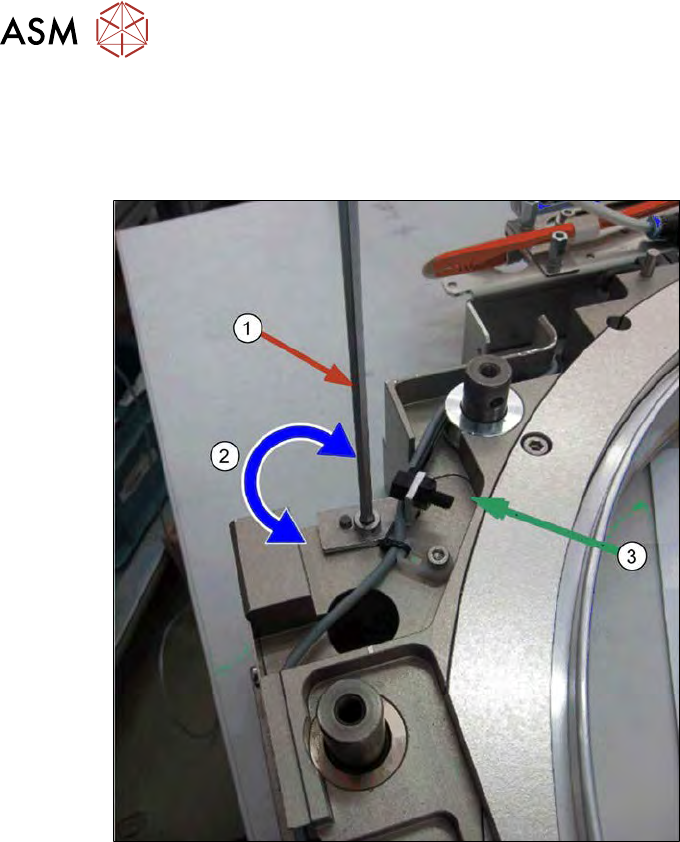
Fig.464:
► Remove the screw (1) fastening the receiver R.
► Turn the receiver R around the rotary axis (2), until it receives the maximum amount of the
light beam from the transmitter S.
► An optimum alignment between the receiver R and the transmitter S is shown by the greatest
possible light intensity at receiver R (=highest possible value (red) at the analysis unit).
► Turn the receiver until you reach the maximum value and then tighten the fastening screw (1).
– When tightening the screw fastening the receiver R, the value on the analysis unit will re-
duce, as the receiver pin presses the receiver R down, altering the alignment.
– A 10% reduction in intensity, compared to the maximum value is acceptable.