00195982-03_SM_SWS_EN.pdf - 第63页
4 SWS installation and removal for SIPLACE CA machines 4.2 Installing the SWS Service Manual SIPLACE Wafer System (SWS) 11/2018 63 Performing final adjustments to the SWS ► Use the fork lift/pallet jack to push the SWS c…
4 SWS installation and removal for SIPLACE CA machines
4.2 Installing the SWS
62 Service Manual SIPLACE Wafer System (SWS) 11/2018
Move the SWS completely out of the placement machine
► Pull the SWS completely out of the placement machine.
► Fold out the SWS support foot.
► Carefully place the SWS down and remove the fork lift/pallet jack.
► Perform the required maintenance tasks and then refit the SWS.
4.2 Installing the SWS
► Position the gantries over the PCB conveyor, to prevent any damage to the placement heads
while fitting the SWS.
► Position the fork lift/pallet jack lengthwise under the SWS and open the forks until the SWS
contact surfaces sit evenly on the forks. The magazine lift structure must be facing the fork lift/
pallet jack.
Move the SWS into the placement machine
NOTICE
Connections on SWS when exposed
► Before moving the SWS back in, make sure that the following connections on the
SWS are accessible: CAN bus connection X1x5 and X1x6, network cable for LAN
connections, compressed air connection and FFI communication interface W11.
► Lift the SWS and align it to the placement machine. If the stroke path of the fork lift/pallet jack
is not far enough, you can use suitable wooden timbers or similar supports.
CAUTION
Fold the SWS screen outwards
► Before moving the SWS into the machine, fold its screen outwards so that it can not
hit the placement machine cover.
► Carefully push the SWS into the placement machine, as far as approx. 30 cm before the
bumper (see 4.1 "Removing the SWS" [}59]), so that you have enough room to connect the
SWS and placement machine connections.
Connecting the SWS to the SIPLACE CA
NOTICE
Connect the SWS to the placement machine
► Before performing alignment and final adjustments, connect the SWS to the place-
ment machine. Some connection points may no longer be accessible after installation.
Reconnect the following connections, which you disconnected before removing the SWS (see 4.1
"Removing the SWS" [}59]):
– Only for 605.x station software: CAN bus connections X1x6 and X1x5
– From 70x.x station software: the CAN bus loop must be closed
– Compressed air connection to compressed air connection
– FFI communication interface W11 to FFI communication interface X1x3
– From 70x.x station software: network cable for LAN connections
4 SWS installation and removal for SIPLACE CA machines
4.2 Installing the SWS
Service Manual SIPLACE Wafer System (SWS) 11/2018 63
Performing final adjustments to the SWS
► Use the fork lift/pallet jack to push the SWS carefully into the placement machine, as far as
the stop on the bumper.
► Now carefully lower the SWS with the fork lift/pallet jack until it sits evenly on the contact rails
of the placement machine.
CAUTION
Check the stable position of the SWS while lowering it
► Before fixing the SWS into place with screws, do not lower the fork lift/pallet jack too
far or it might tilt towards the magazine lift.
► There should always be a second person present to ensure that the SWS remains
stable while it is being lowered.
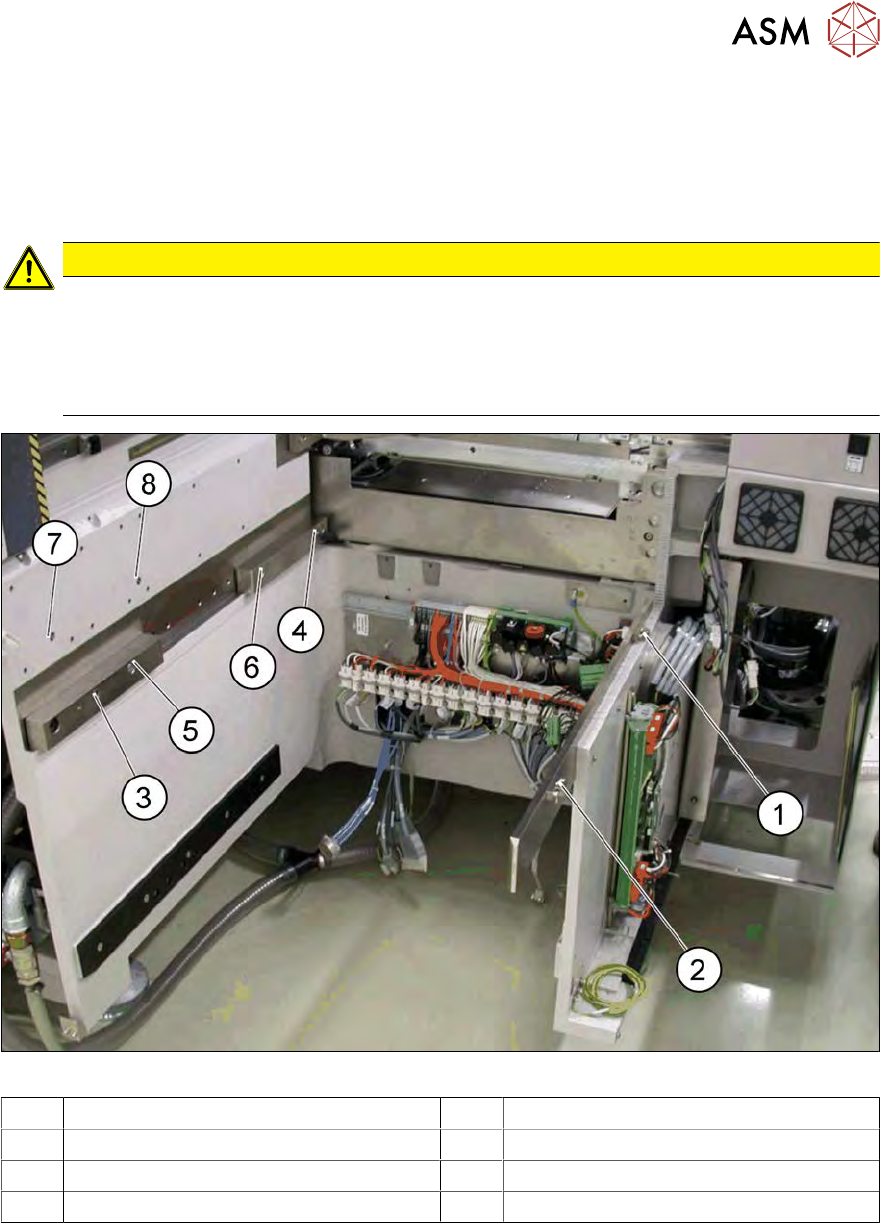
Fig.42: Positions of screws for SWS 12 on SIPLACE CA location
1 M8 2 M8
3 Fitting screw 4 M6 (with clamping claw)
5 M6 6 M8 for clamping claw
7 M6 for bracket 8 M6 for bracket
4 SWS installation and removal for SIPLACE CA machines
4.2 Installing the SWS
64 Service Manual SIPLACE Wafer System (SWS) 11/2018
For installation, you need the following screws which you removed before:
●
3x M8
●
2x M6
●
4x M6 for bracket (2 on location, 2 on wafer table)
●
1 x fitting screw
NOTICE
Observe the specified order
During final installation, always observe the following order of screws.
► Loosely fasten the back clamping claw (6) with an M8 screw.
► Insert the remaining screws and loosely tighten these.
NOTICE
Correct positioning of the SWS
The correct position of the SWS is set by the fitting screw and the contact rails on the
placement machine.
► Tighten the M6 screws (4 and 5) one after the other with a torque of 10Nm.
► Tighten the M8 screws (1, 2 and 6) one after the other with a torque of 18Nm.
► Tighten the fitting screw (3) with a torque of 13‑14Nm.
► Tighten M6 screws (7) and (8) fastening the fixture bracket for the wafer table.
► Tighten the two M6 screws fastening the fixture bracket for the wafer table.
► Remove the fork lift/pallet jack.
► After final adjustments, connect the SWS to the power supply.