00195982-03_SM_SWS_EN.pdf - 第373页
15 Calibration 15.3 Calibration die handling - flip unit Service Manual SIPLACE Wafer System (SWS) 11/2018 373 15.3.2 Calibration of the SWS – flip head Precondition ● The Setup mode is active after the cable connections…
15 Calibration
15.3 Calibration die handling - flip unit
372 Service Manual SIPLACE Wafer System (SWS) 11/2018
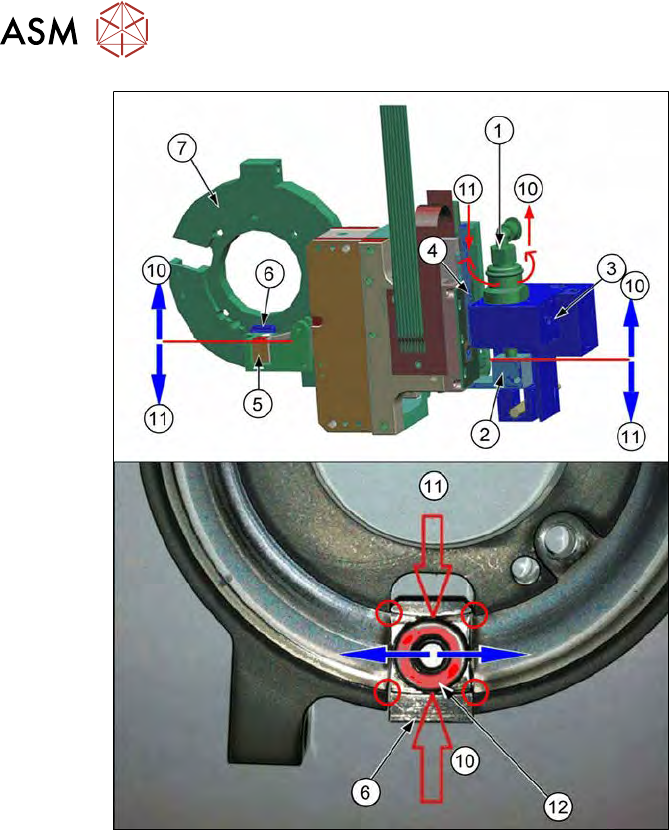
Fig.534:
► Rotate the rotary axis of the flip head manually over the complete range, so that both ball
bearings (12) of both flip head Z axes are moving over the edges (red circles) between race-
way (7) and actuator (6).
► Now adjust the height of the Z axis holding cylinder (1) by rotating it.
► The height adjustment directly influences the position of the raceway (7) with respect to the
actuator (6).
► The connection is:
– Holding cylinder (1)
– Clamp (fear hook) [00385090-xx] (2)
– Z motor (4)
– Z axis actuator (5)
– Actuator (6)
– Ball bearing of the Z axis flip head (12)
► If you rotate the Z axis holding cylinder (1):
– Counter clockwise (direction 10) → the ball bearing of the Z axis flip head (12) moves up
(direction 10)
– Clockwise (direction 11) → the ball bearing of the Z axis flip head (12) moves down (dir-
ection 11)
► Always rotate the rotation axis of the flip head manually over the complete range and adjust
the Z axis holding cylinder upward or downward until the ball bearing (12) moves over the
edges without hitting them (red circles).
► In this position, lock the Z axis holding cylinder using the grub screw (3) or the locknut.
► Reconnect the tube for the air supply to the holding cylinder.
15 Calibration
15.3 Calibration die handling - flip unit
Service Manual SIPLACE Wafer System (SWS) 11/2018 373
15.3.2 Calibration of the SWS – flip head
Precondition
●
The Setup mode is active after the cable connections at the mounting plate have been
changed (see 15.2.4 "Changing the cables at the mounting plate to allow for setup
mode" [}364]).
●
The yellow window Setup mode is active is displayed in the GUI.
●
Password for Setup mode → SetupTools.
Tools required
●
Teflon tape (local source → plumbing workers / hardware store) → no ASM part number.
15.3.2.1 Entering calibration menu – flip head
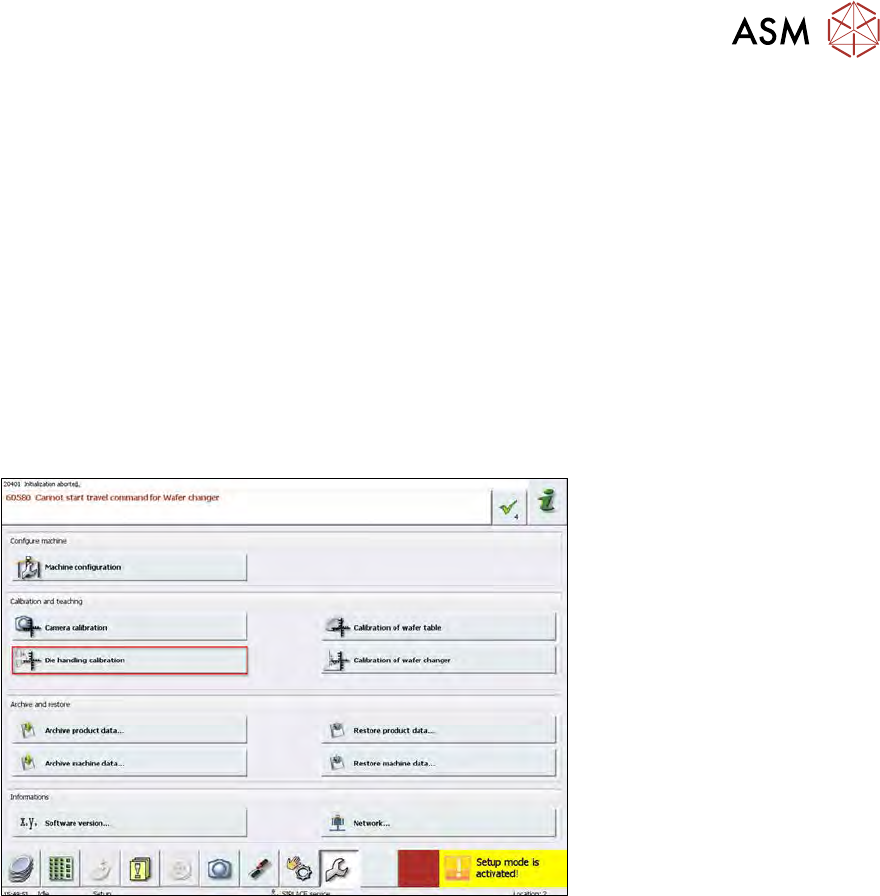
Fig.535:
► Choose Service in the bottom menu bar.
► Choose Die handling calibration.
Before starting the calibration, the holding cylinder for the flip Z axis and the Die Attach
transfer X motor (optional) must be adjusted! →Check that based on the previous chapters.
It is especially important to calibrate the flip rotation axis before calibrating the Z axis (cali-
bration 15.3.2.2 "Calibration – flip head rotation axis" [}374]). Otherwise, the automatic cali-
bration result for the Z axis will not be accurate.
When calibrating the flip head, proceed in the sequence that is described in the following!
You have to switch through different menus during the calibration!
15 Calibration
15.3 Calibration die handling - flip unit
374 Service Manual SIPLACE Wafer System (SWS) 11/2018
15.3.2.2 Calibration – flip head rotation axis
NO RISK OF SERIOUS INJURIES
► Setup mode not activated!
Machine covers are closed!
This calibration detects the zero point of the flip head rotation axis.
After this calibration, the ball bearing of the Z axis is positioned exactly in the center of the Z axis
actuator!
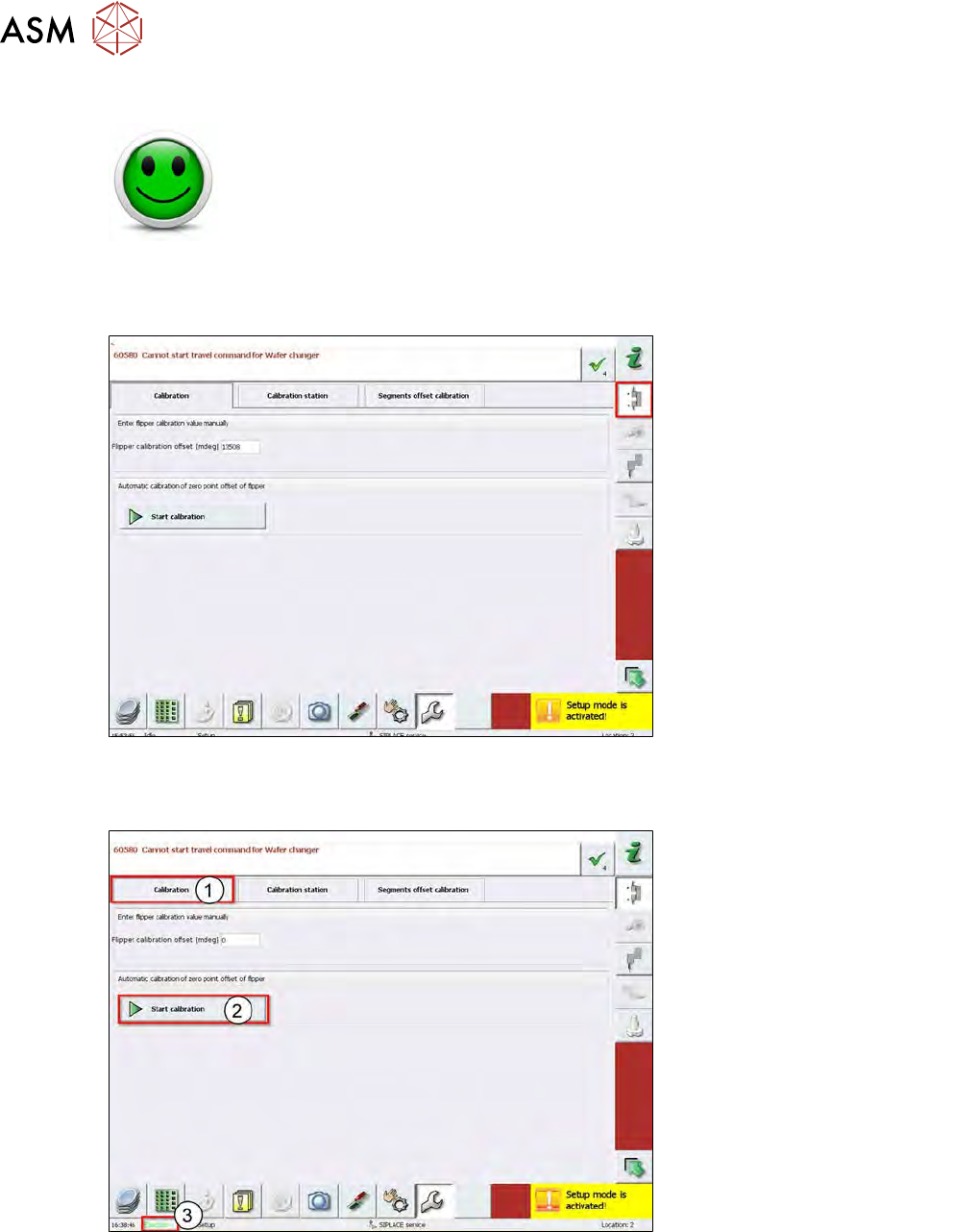
Fig.536:
► Choose Service calibration flipper on the right menu bar.
Usually, this button is active when you enter this menu.
Fig.537:
► Choose Calibration for the flip head rotation axis (1).
► Choose Start calibration (2).
ð The automatic calibration sequence starts.
► During the calibration, the status Execute is active (3).
► After successful calibration, the status changes to Ready.