00195982-03_SM_SWS_EN.pdf - 第211页
9 Wafer change system 9.2 Gripper Service Manual SIPLACE Wafer System (SWS) 11/2018 211 9.2.8 Dismantling the gripper for location 2/4 Fig.273: Dismantling the gripper for location 2/4 ► Remove the screws (2) fastening …
9 Wafer change system
9.2 Gripper
210 Service Manual SIPLACE Wafer System (SWS) 11/2018
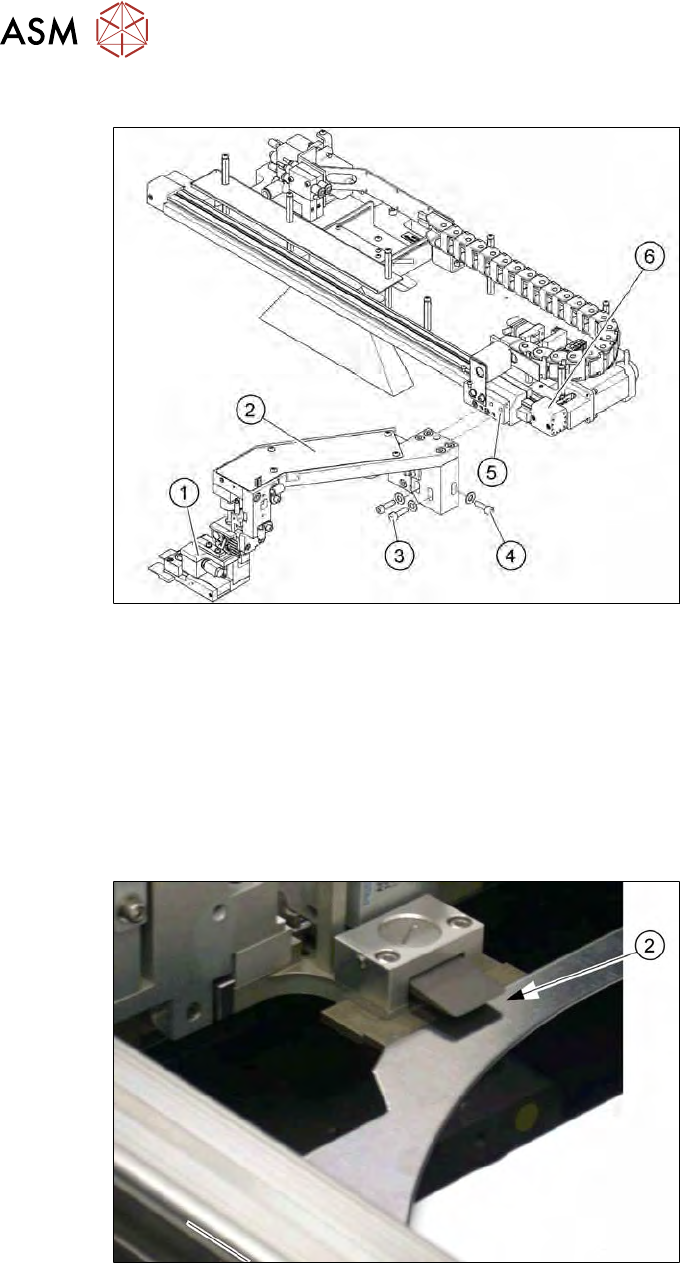
9.2.7 Dismantling the gripper for location 1/3
Fig.271: Dismantling the gripper for location 1/3
► Remove the screws (3) and (4) fastening the gripper (1) and then carefully placed the gripper
in the SWS. Loosen or open the cable ties to reach a suitable position, if needed.
► Unplug the pneumatic connections at the couplings provided.
► Unthread the connection cable as far as the conversion board on the gripper arm.
► If there is no marking present on the cables: use the circuit diagram folder for help and mark
the cables connected.
► Unplug all connections from the terminal strip.
► Fit the new gripper and check the height.
Fig.272: Setting the gripper height (location 1/3)
► The gripper clamp must be able to reliably pick up a wafer frame and clamp it into place.
► You can correct the height with the help of the fastening screws in the slotted holes.
9 Wafer change system
9.2 Gripper
Service Manual SIPLACE Wafer System (SWS) 11/2018 211
9.2.8 Dismantling the gripper for location 2/4
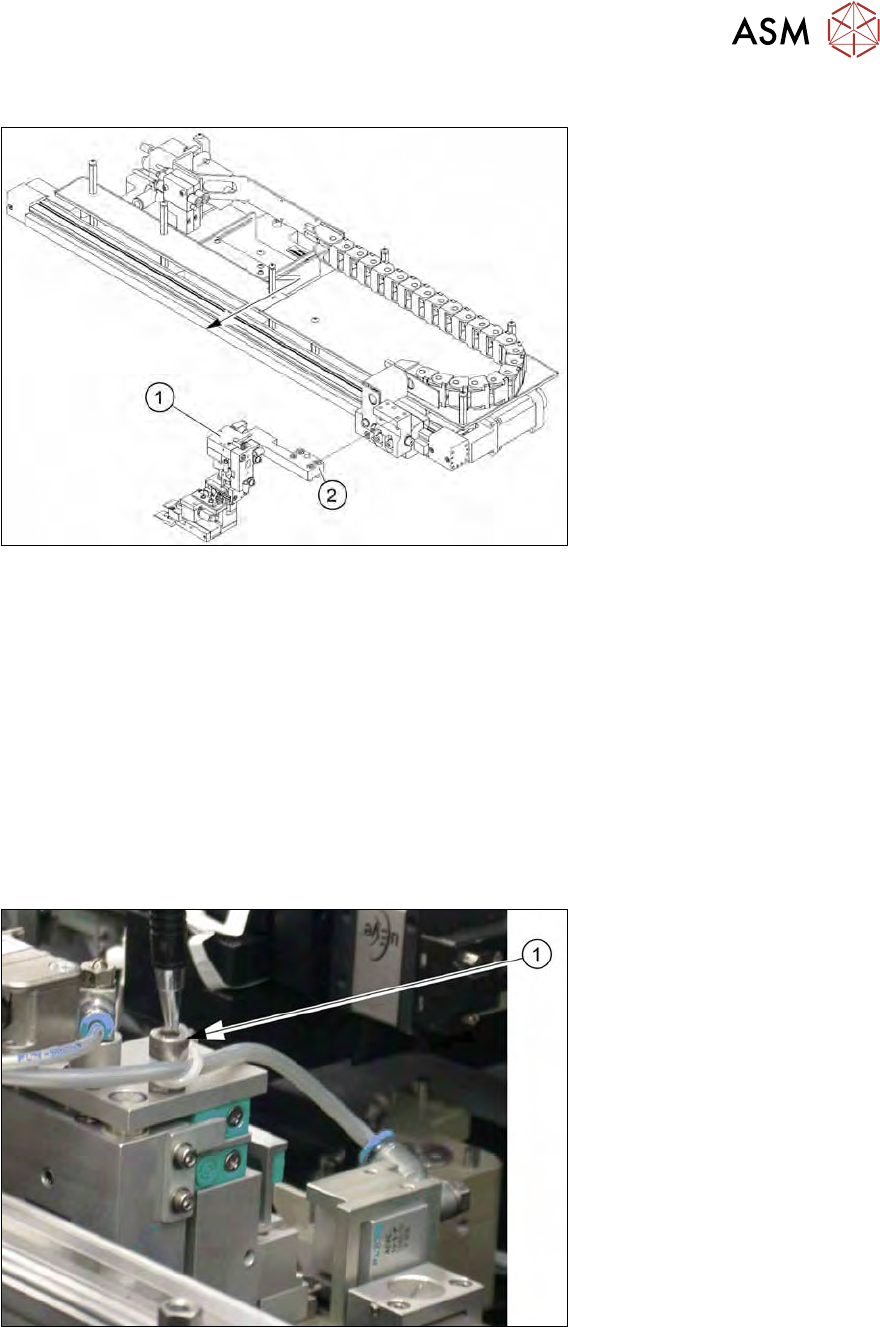
Fig.273: Dismantling the gripper for location 2/4
► Remove the screws (2) fastening the gripper (1).
► Place the gripper carefully into the SWS. Loosen or open the cable ties to reach a suitable
position, if needed.
► Unplug the pneumatic connections at the couplings provided.
► Unthread the connection cable as far as the conversion board on the gripper arm.
► If there is no marking present on the cables: use the circuit diagram folder for help and mark
the cables connected.
► Unplug all connections from the terminal strip.
► Fit the new gripper and check the height.
► The gripper clamp must be able to reliably pick up a wafer frame and clamp it into place (see
9.2.7 "Dismantling the gripper for location 1/3" [}210]).
Fig.274: Setting the gripper height (variant 2,4)
► Use the adjusting screw (1) to correct the height.
9 Wafer change system
9.2 Gripper
212 Service Manual SIPLACE Wafer System (SWS) 11/2018
9.2.9 Replacing the toothed belt axis
WARNING
Only for experienced service technical from ASM Assembly Systems GmbH & Co.KG
Replacement of the toothed belt axis and the corresponding settings required may only be
performed by experienced service technicians from ASM Assembly Systems GmbH &
Co.KG. Incorrect assembly of the toothed belt axis could lead to damage to the SWS.
► Dismantle the two proximity switches and remove from the toothed belt axis (see9.2.4 "Repla-
cing the proximity switch on the toothed belt axis" [}204]).
Follows the instructions described there. However, the electrical connections do not need to
be unplugged.
► Dismantle the gripper and place the gripper carefully into the SWS.
See also 9.2.7 "Dismantling the gripper for location 1/3" [}210]
or 9.2.8 "Dismantling the gripper for location 2/4" [}211]
► Loosen or open the cable ties to reach a suitable position, if needed.
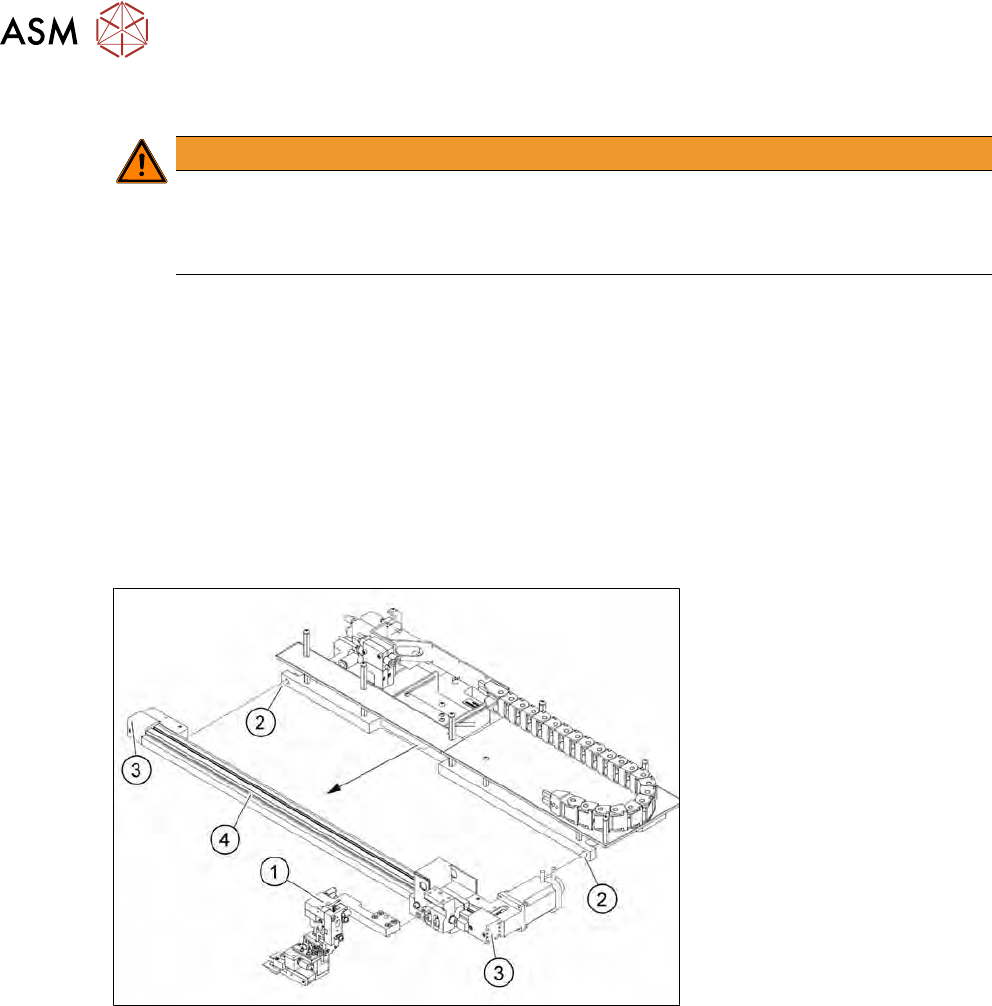
► Remove both screws (2) (see diagram in 9.2.9 "Replacing the toothed belt axis" [}212]) used
to fit the toothed belt axis assembly to the frame.
► Tilt the complete toothed belt axis forwards.
Fig.275: Take toothed belt axis assembly off the frame
► Remove the four (2x2) screws (3) fastening the toothed belt axis and then remove the toothed
belt axis itself.
► Fit the new toothed belt axis (4) with the complete toothed belt axis in its original position.
► Fit the gripper (1).