00195982-03_SM_SWS_EN.pdf - 第165页
7 Die ejector 7.5 Mechanical adjustment of the die ejector unit in the Z direction (focus) Service Manual SIPLACE Wafer System (SWS) 11/2018 165 7.5.2 Replacing the vacuum on the die ejector Switching on and off The sole…
7 Die ejector
7.5 Mechanical adjustment of the die ejector unit in the Z direction (focus)
164 Service Manual SIPLACE Wafer System (SWS) 11/2018
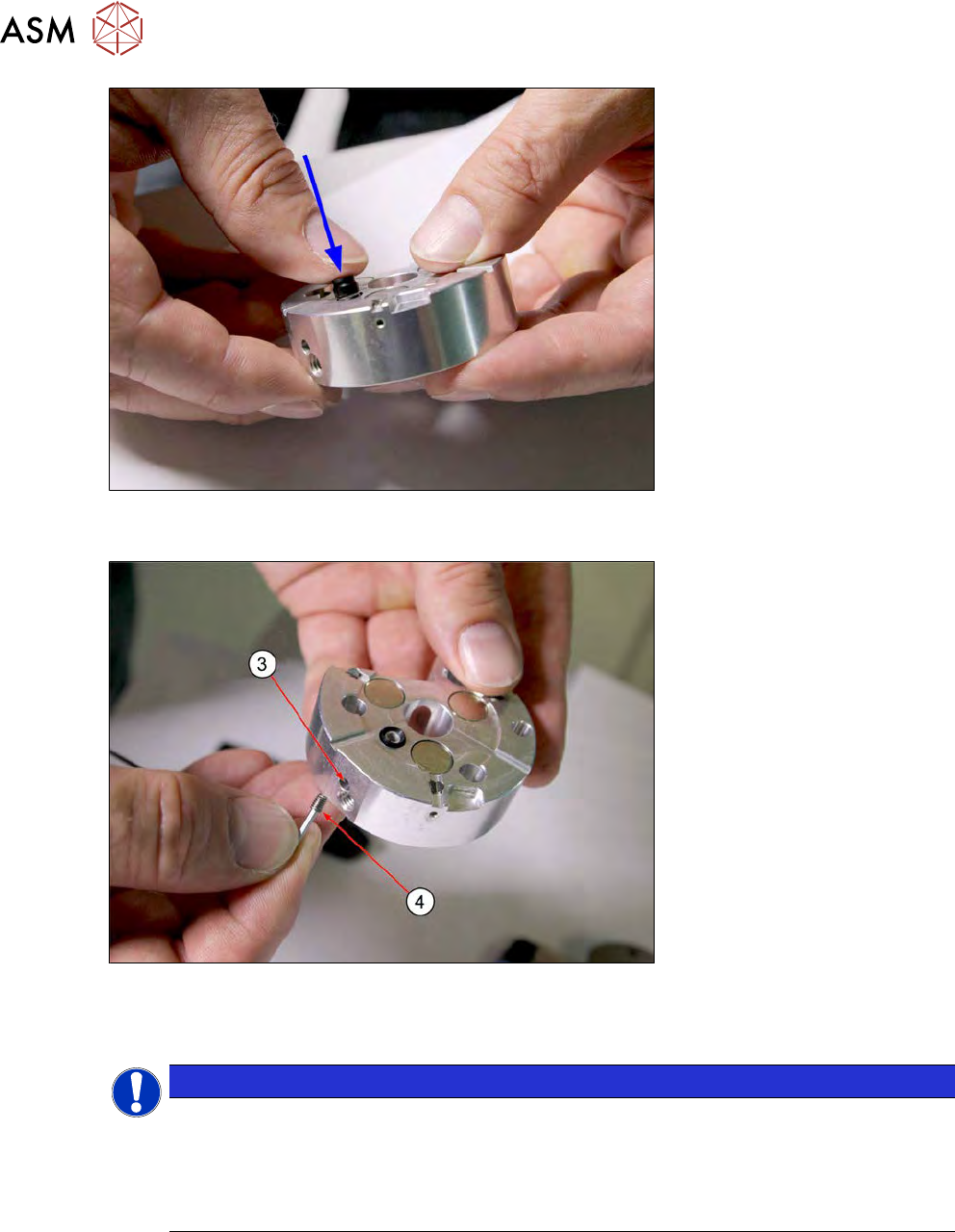
Fig.212:
► Place the new sealing unit incl. O-ring into place and push down as far as the stop.
Fig.213:
► Screw the grub screw (4) into the threaded hole provided (3) and fix the sealing unit into place
(tighten with care).
NOTICE
Old needle ejector unit with bayonet fastening
► If the side Allen screw on the centering unit is difficult to access, you may need to
remove the four screws fastening the lock ring and remove this ring.
► Place the lock ring back and fix into place, before tightening the Allen screw on the
side.
► Complete the die ejector.
7 Die ejector
7.5 Mechanical adjustment of the die ejector unit in the Z direction (focus)
Service Manual SIPLACE Wafer System (SWS) 11/2018 165
7.5.2 Replacing the vacuum on the die ejector
Switching on and off
The solenoid valve switches the vacuum for suction and ejection of the foil on the die ejector on
and off.
► Approach the solenoid valve.
► In the toolbar, select the button Manual Settings
.
► Go to the Manual Settings view and select the button Manual Subsystems
and then
select IOs (see 14.2 "Manual settings" [}358]).
► Select the Die ejectortab .
●
Vacuum ejection unit switches the vacuum on and off.
Replacing the solenoid valve
► Unplug the pneumatic and electrical connections on the solenoid valve (OUT10).
► Remove the fastening screws and then remove the solenoid valve.
► Fit the solenoid valve and restore the pneumatic and electrical connections.
► Check the solenoid valve for functionality and air-tightness:
– Switching on and off
– Check needle unit for air-tightness.
7.5.3 Solenoid valve for moving the Z axis up and down
Switching on and off
The solenoid valve switches the lifting cylinder for moving the Z axis up and down.
► Approach the solenoid valve.
► In the toolbar, select the button Manual Settings
.
► Go to the Manual Settings view and select the button Manual Subsystems
and then
select IOs (see 14.2 "Manual settings" [}358]).
► Select the Die ejectortab .
●
DO07 Ejector unit upmoves the Z axis up.
●
DO08 Ejector unit downmoves the Z axis down.
Two proximity switches monitor the two end positions at the Z axis top and bottom.
► Check the input signals for the proximity switch:
– DI05 Ejection unit down
– DI06 Ejection unit up
Replacing the solenoid valve
► Unplug the pneumatic and electrical connections on the solenoid valves OUT7 and OUT 8.
► Remove the fastening screws and then remove the solenoid valve.
► Fit the solenoid valve and restore the pneumatic and electrical connections.
► Check the solenoid valve for functionality.
– Switching on and off
7 Die ejector
7.5 Mechanical adjustment of the die ejector unit in the Z direction (focus)
166 Service Manual SIPLACE Wafer System (SWS) 11/2018
7.5.3.1 Replacing the proximity switch
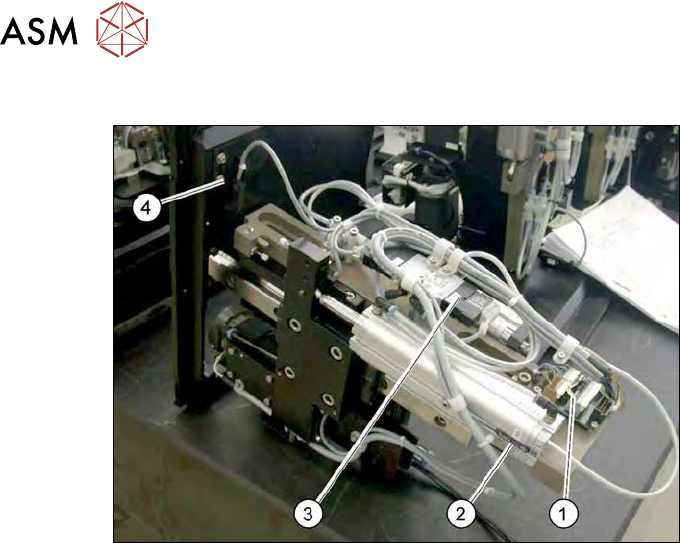
Fig.214: Proximity switch and AD board on the die ejector
1. AD board
2. Proximity switch for the bottom position
3. Solenoid valve
4. Proximity switch for the top position
The proximity switch (2) for the bottom Z axis position is located on the cylinder.
The proximity switch (4) for the top Z axis position is located on the die ejector base plate.
► Mark the original installation position of the proximity switch with a pen.
► Remove the screw on the relevant proximity switch.
► Unthread the connection cable as far as the AD board (1).
► If there is no marking present: use the circuit diagram folder for help and mark the cables con-
nected.
► Unplug all connections from the terminal strip.
► Fit the new proximity switch to the marked position.
► Fit the new proximity switch.
► Run the connection cable to the AD board (1).
► Connect the connection cable to the relevant terminal strip.
► Make sure that the cables do not rub against any part or get trapped. Fix and gather the
cables together with cable ties, where necessary.
► Check the input signals for the proximity switch.