00195982-03_SM_SWS_EN.pdf - 第347页
13 BoxPC, GALIL cards and axis control 13.3 Replacing the servo amplifier for the axes Service Manual SIPLACE Wafer System (SWS) 11/2018 347 13.3.1 Removing the servo amplifier AMP-19540 from the SWS frame Removal of the…
13 BoxPC, GALIL cards and axis control
13.3 Replacing the servo amplifier for the axes
346 Service Manual SIPLACE Wafer System (SWS) 11/2018
13.3 Replacing the servo amplifier for the axes
All axes and motors in the SWS are driven by the servo amplifier.
There are two different types of servo amplifier (motor amplifier) which are used:
●
AMP-19540 → for 4 motors
●
AMP-19520 → for 2 motors
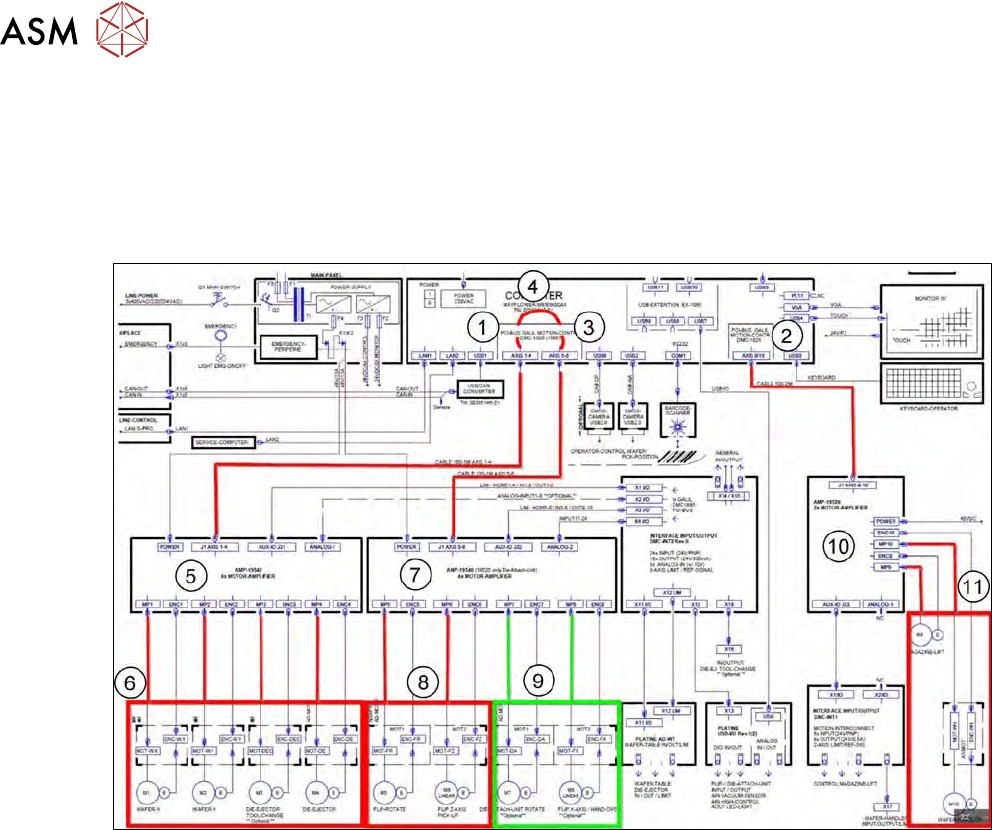
Fig.495:
Motor amplifier AMP-19540 (5) for the axes:
●
Wafer table X (6)
●
Wafer table Y (6)
●
Die ejector tool change (6)
●
Die ejector (6)
Motor amplifier AMP-19540 (7) for the axes:
●
Flip rotate (rotate axis flip unit) (8)
●
Flip Z axis pick up (8)
●
Die attach unit rotate (9) → optional
●
Flip X axis/hand over (9) → optional
As the die attach module is an option, older modules only feature one AMP-19520 for two axes.
When retrofitting this options, you need to fit one AMP-19540 for four axes.
In newer modules, the problematic retrofitting of the AMP means that one AMP-19540 for 4 axes
has become the standard.
However, there are still SWS with AMP-19520 for the axes (8) present at some customer sites:
●
Motor amplifier AMP-19520 (10) for the axes:
– Magazine lift (11)
– Wafer handler (gripper) (11)
In this case, one AMP-19520 for two axes is adequate, as this is fitted in the base of the wafer lift
tower and no additional optional axes will be added.
13 BoxPC, GALIL cards and axis control
13.3 Replacing the servo amplifier for the axes
Service Manual SIPLACE Wafer System (SWS) 11/2018 347
13.3.1 Removing the servo amplifier AMP-19540 from the SWS frame
Removal of the AMP-19520 servo amplifier from the wafer lift base is not described separately. The
procedure is the same.
The description shows removal of the AMP-19540 for AXIS1-4. This card is the most difficult to
access.
► Dismantle and remove the SWS from the machine (see 4.1 "Removing the SWS" [}59]).
► Fold the wafer lift out to one side (see 4.3 "Swinging up the magazine lift" [}65]).
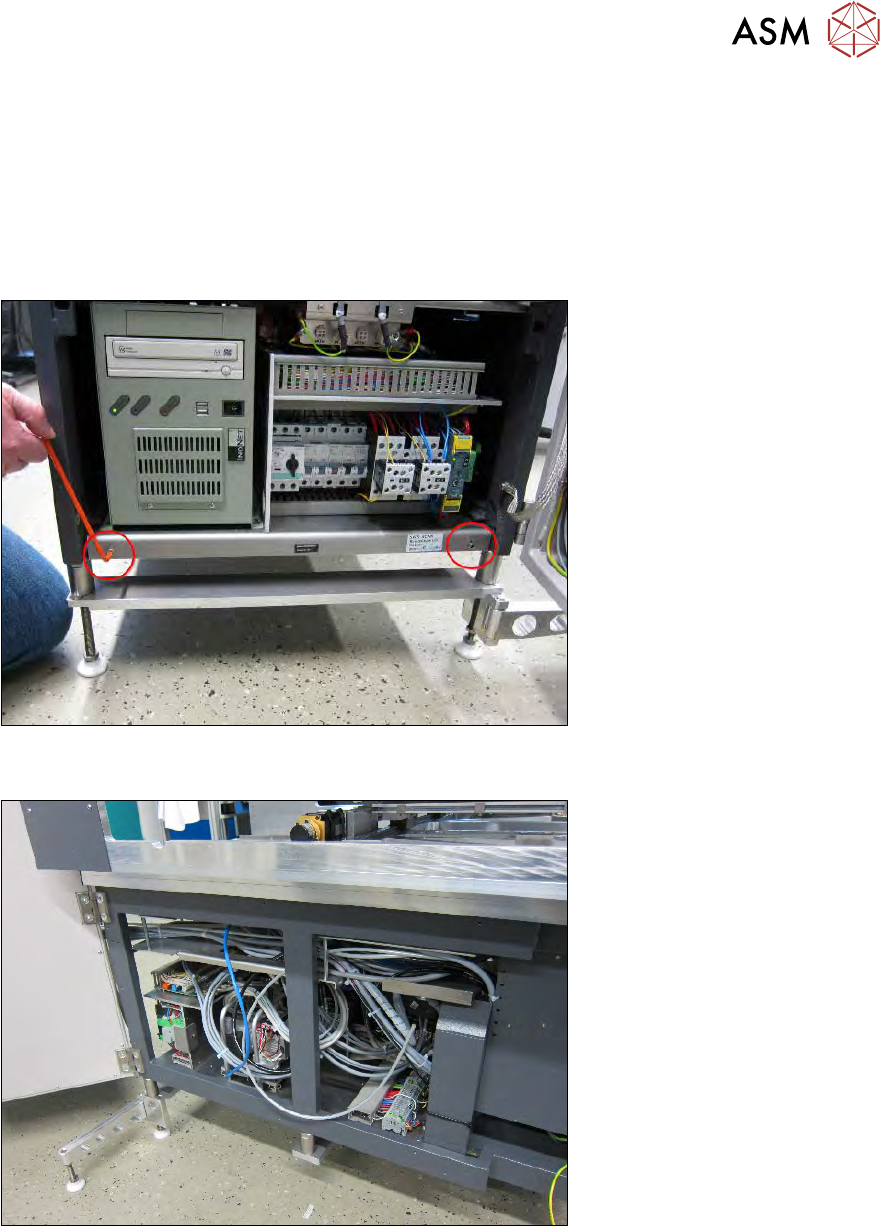
Fig.496:
► Remove the two Allen screws on the base plate (where the BoxPC is fitted).
Fig.497:
► Remove the right side panel.
13 BoxPC, GALIL cards and axis control
13.3 Replacing the servo amplifier for the axes
348 Service Manual SIPLACE Wafer System (SWS) 11/2018
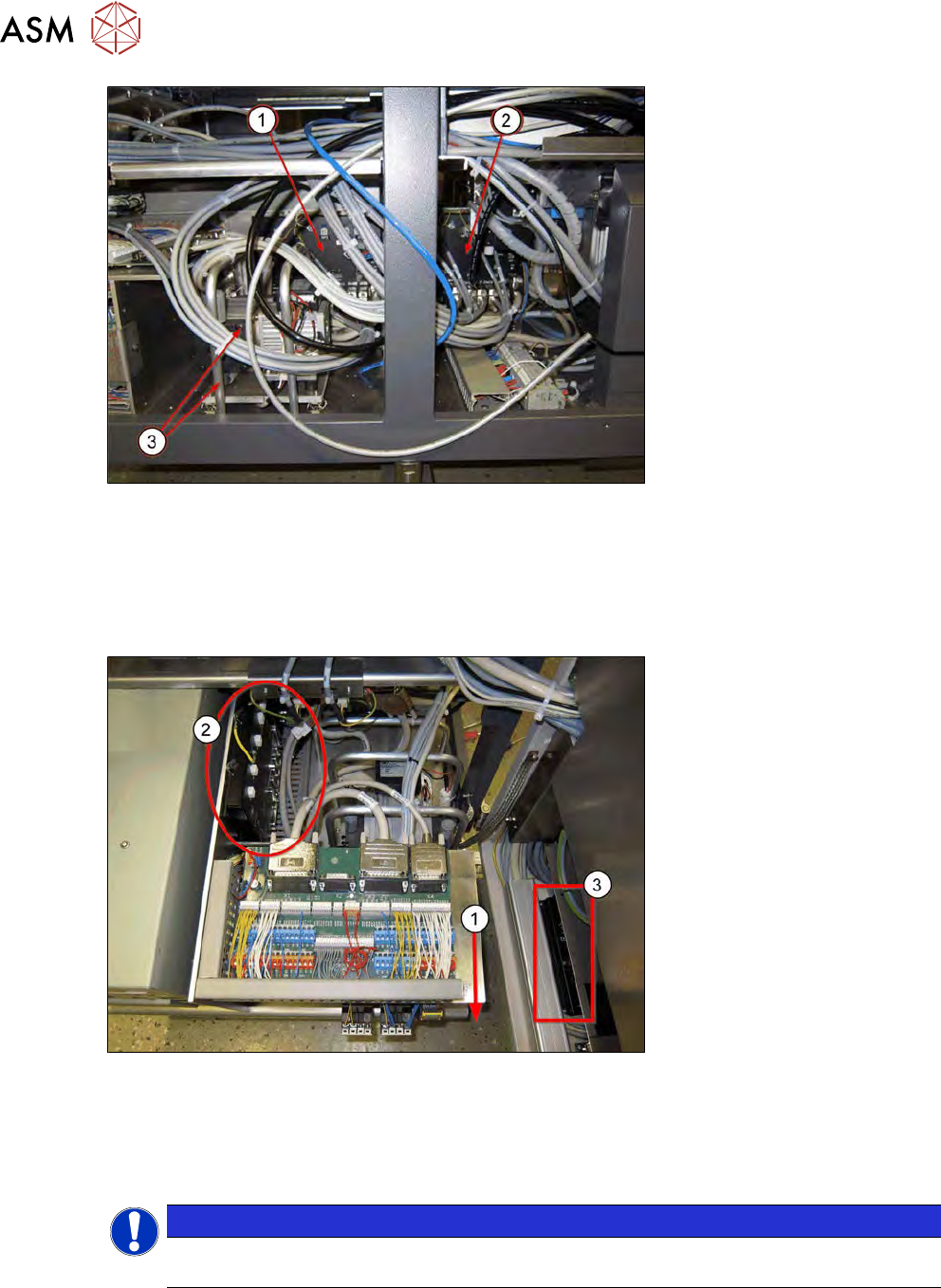
Fig.498:
► Access to the GALIL cards AMP-19540 AXIS1-4 (1) and AMP-19540 AXIS5-8 is obstructed
and therefore difficult to achieve.
TIP: to make removal of the AMP-19540 AXIS1-4 GALIL card easier (1), you can also remove the
vacuum pump and protective bracket(3).
The removal without dismantling the vacuum pump is described below.
Fig.499:
► Pull the base plate towards the front (1).
Make sure that it does not tilt too much and that the back cable of the unit is not tensioned ex-
cessively.
► Remove all cables from the AMP-19540 AXIS1-4 GALIL card (2).
NOTICE
In the diagram you can see the AMP-19520 GALIL card for the wafer lift and wafer changer
axes in the tower (3).