00195982-03_SM_SWS_EN.pdf - 第160页
7 Die ejector 7.5 Mechanical adjustment of the die ejector unit in the Z direction (focus) 160 Service Manual SIPLACE Wafer System (SWS) 11/2018 7.5.1.4 Checking the needle ejection unit for air-tightness ► In the toolba…
7 Die ejector
7.5 Mechanical adjustment of the die ejector unit in the Z direction (focus)
Service Manual SIPLACE Wafer System (SWS) 11/2018 159
7.5.1.3 Setting the needles with the calibration standard [03080191-xx]
Tools
●
Needles as wear part
●
Calibration standard for die ejector with bayonet fastening [03080191-xx]
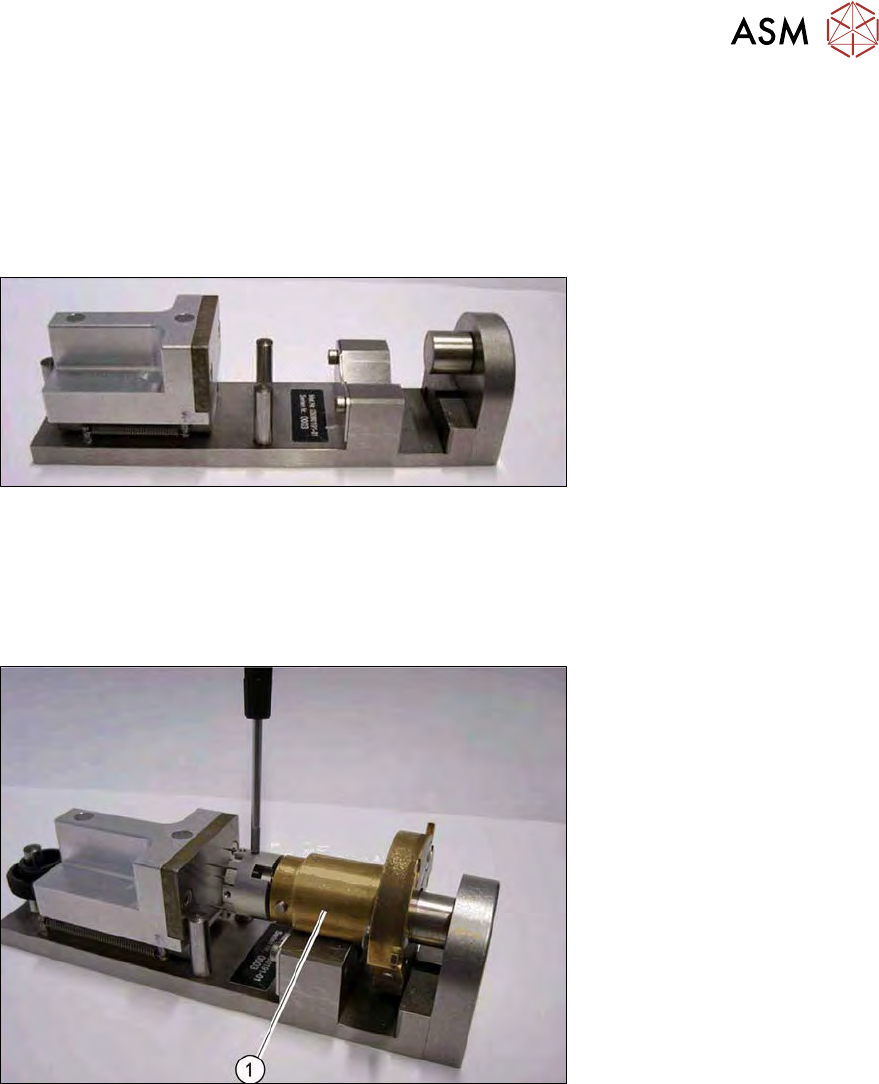
The needles are all set at a defined height and common level with the help of the calibration
standard for the die ejector.
Fig.203: Calibration standard for die ejector with bayonet fastening [03080191-xx]
Procedure
► Remove the black cap on the needle unit.
► Carefully insert all needles into the segments and align the needles roughly in one line.
► Loosely tighten the grub screws. You must still be able to move the needles.
Fig.204: Calibration standard for die ejector
► Place the needle unit into the calibration standard for the die ejector (1).
► Place the ejection part into the device. The central bolt of this device must be against the ejec-
tion plunger and the bronze part must be flexibly against the radius nib.
► Turn the ejection part (bronze) into the required position.
► Press the bronze part slightly down into the prisms of the device.
► Push the ejection needles into the required holes (the threaded pin must be released).
► Move the spring-back adjusting slide in the direction of the stop bolt and hold it in place.
► Push the ejection needles in the direction of the setting surface (use tweezers) and pull the
ejection needle tightly into place with the threaded pins (torque 10Nm).
7 Die ejector
7.5 Mechanical adjustment of the die ejector unit in the Z direction (focus)
160 Service Manual SIPLACE Wafer System (SWS) 11/2018
7.5.1.4 Checking the needle ejection unit for air-tightness
► In the toolbar, select the button Service Settings => Main vacuum control system (see
14.1 "SWS GUI - service settings" [}357]).
► The Main vacuum should be between 740 and 840 mbar.
► Place a piece of foil onto the ejection system, so that all openings are closed.
► Now switch on the vacuum at the die ejector.
► Enable Vacuum valve ejection unit opened.
ð Suction will be applied to the foil by the ejection system.
ð The Main vacuum should reach the value previously shown, if possible (i.e. no losses).
Troubleshooting in the event of leakages
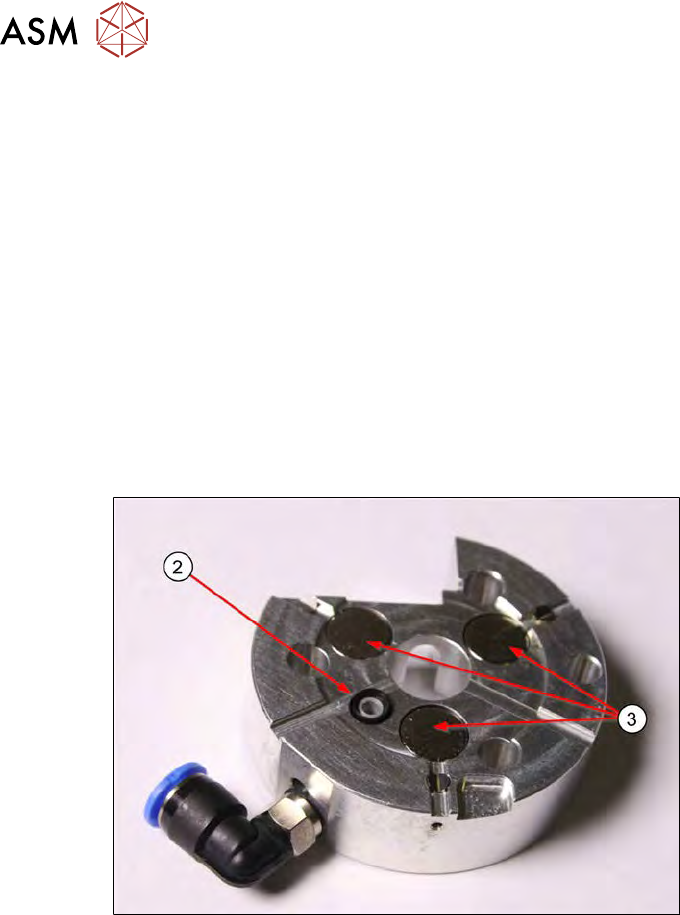
► Switch the vacuum on at the die ejector (software) and check the suction force at the sealing
lip with your finger(2).
► Check whether the vacuum inlet cable is free of bends/folds.
Fig.205:
► Perform a sight check of the sealing lip (2) for possible damage and replace, if necessary (see
7.5.1.5 "Replacing the sealing unit and the O-ring on the die ejector centering unit" [}162]).
► Check the magnets (3) for foreign bodies.
7 Die ejector
7.5 Mechanical adjustment of the die ejector unit in the Z direction (focus)
Service Manual SIPLACE Wafer System (SWS) 11/2018 161
Fig.206:
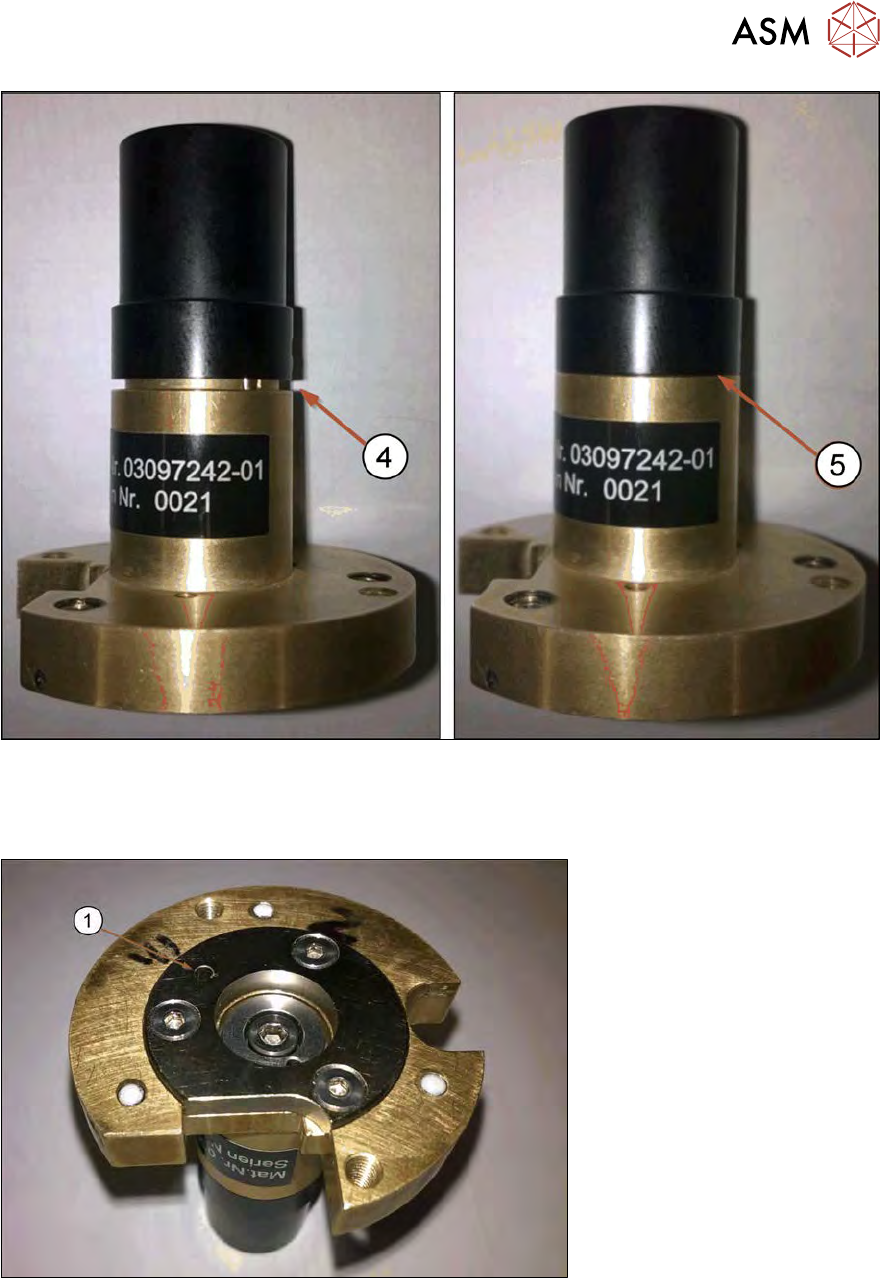
► Check the black cap. This must be seated fully on the base unit of the ejection system.
(4) Gap → vacuum leakage → bad
(5) No gap → good
Fig.207:
► Check the polished sealing surface and the ejection system vacuum hole(1) for damage or
dirt.