00195982-03_SM_SWS_EN.pdf - 第206页
9 Wafer change system 9.2 Gripper 206 Service Manual SIPLACE Wafer System (SWS) 11/2018 9.2.4.1 Setting the position of the proximity switch ► Switch on the SWS and check the input signals for the proximity switch. ► Go …
9 Wafer change system
9.2 Gripper
Service Manual SIPLACE Wafer System (SWS) 11/2018 205
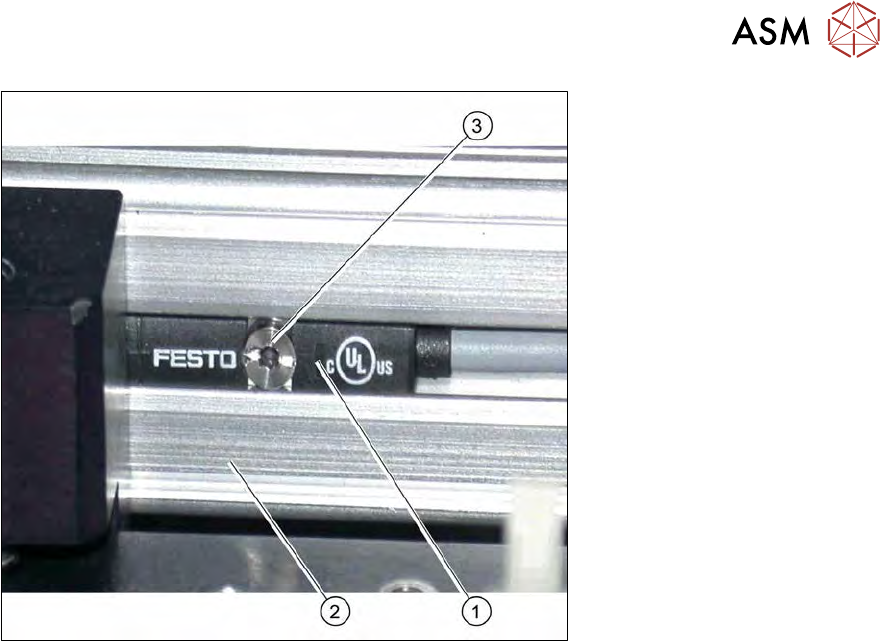
Fig.266: Proximity switch on the toothed belt axis
1. Proximity switch
2. Toothed belt axis
3. Fastening screw
Removal/installation
► Mark the original installation position of the proximity switch with a pen. Check the rough
assembly dimensions (see above)
► Remove the screw fastening the relevant proximity switch:
► Unthread the connection cable as far as the wafer table adapter board (see5.2.1 "Basic frame
– design and spare parts [00386774-xx] (example SWS 1/3)" [}68]).
► If there is no marking present on the cables: use the circuit diagram folder for help and mark
the cables connected.
► Unplug all connections from the terminal strip.
► Fit the new proximity switch to the marked position and measure the assembly dimensions
(see above).
► Run the connection cable as far as the wafer table adapter board.
► Connect the connection cable to the relevant terminal strip.
► Fix and gather the cables together with cable ties, where necessary. Make sure that the
cables do not rub against any part or get trapped.
9 Wafer change system
9.2 Gripper
206 Service Manual SIPLACE Wafer System (SWS) 11/2018
9.2.4.1 Setting the position of the proximity switch
► Switch on the SWS and check the input signals for the proximity switch.
► Go to the toolbar and select the button Service Settings → Motor settings (see 14.1 "SWS
GUI - service settings" [}357]).
Active for the Forward Limit proximity switch:
► Select the button GallilMotion_axis8
and then the tab Axis status.
► Move the axis in the mechanical end stop.
► Before the axis reaches the mechanical end stop (approx. 5 mm before), the proximity switch
should trigger (LED shines).
ð The display shines:
– Reverse Limit active
This ensures that the maximum travel range can be used although the axis is not able to
move into the end stop.
Active for the Reverse Limit proximity switch:
► Select the button GallilMotion_axis8
and then the tab Axis status.
► Move the axis into the pickup position in order to remove a wafer from the cassette. The grip-
per must be able to reached the wafer reliably and to clamp. The proximity switch must then
be moved approx. 5 mm further in this position and should then trigger (LED shines).
ð The display shines:
– Forward Limit active
This ensures that the wafer can be reliably picked up although the axis is not able to move
into the end stop.
9 Wafer change system
9.2 Gripper
Service Manual SIPLACE Wafer System (SWS) 11/2018 207
9.2.5 Replacing the motor with coupling for wafer handling
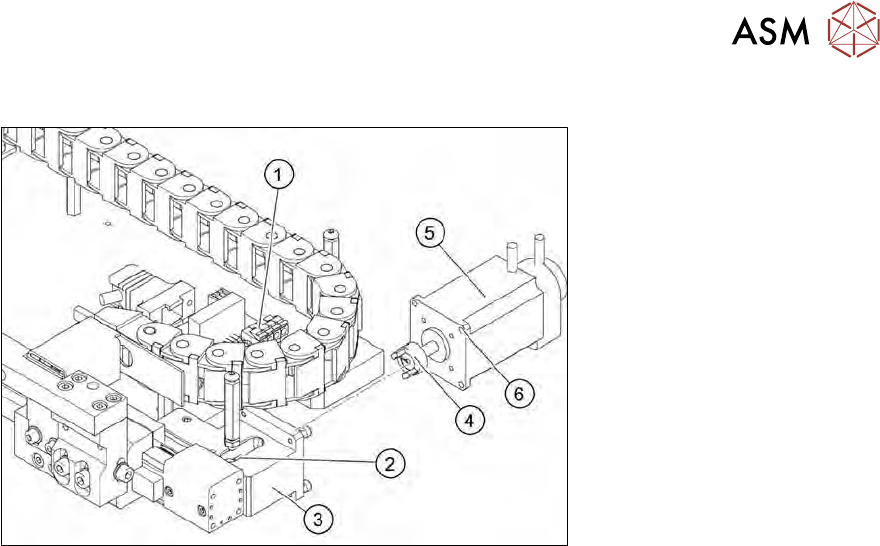
Fig.267: Motor with coupling for wafer handling
The motor moves the gripper into the removal and processing position with the help of the toothed
belt axis.
Removal
► Remove the cover from the motor board (1).
► If there is no marking present on the cables: use the circuit diagram folder for help and mark
the cables connected.
► Open the cable ties and cable clips and unthread the motor cable and the flat ribbon cable for
the encoder as far as the motor board (1).
► Unplug the cable from the motor board.
► Move the toothed belt axis so that you can see the coupling through the opening (2) on the
motor flange (3).
► Remove the four screws (6) fastening the motor to the motor flange (3).
► Pull out the motor (5) with the coupling (4).
► Check the coupling (4) for damage and replace if necessary.
Installation
► Push the motor with coupling onto the drive shaft. While doing this, turn the coupling into the
position needed so that it can engage with its counterpart.
► Tighten the four fastening screws (6) on the motor flange.
► Connect the motor and encoder cables to the motor board.
► Fix and gather the cables together with cable ties, where necessary. Make sure that the
cables do not rub against any part or get trapped.
► Fit the cover on the motor board.