00195982-03_SM_SWS_EN.pdf - 第311页
12 Wafer stretcher 12.7 Wafer stretcher - configuration changes Service Manual SIPLACE Wafer System (SWS) 11/2018 311 12.7.3.3 Removing the 8" wafer support Removing the downholder plate See also the sections 12.4 &…
12 Wafer stretcher
12.7 Wafer stretcher - configuration changes
310 Service Manual SIPLACE Wafer System (SWS) 11/2018
12.7.3.2 Preparations
► Perform the measures in accordance with section 12.3 "Preparatory measures for working on
the wafer stretcher" [}278].
► Finish all ongoing processes in the SWS module.
► Move the wafer table to the change position.
► From the view, select Manual Operation -> Wafer Handling Systems -> Go to Change Po-
sition.
► Open the clamp.
► From the view, select Manual Operation -> Wafer Handling Systems -> Open Wafer
Clamp.
ð The clamping ring will open and the expansion ring will move downwards.
► Open the expander.
► From the view, select Manual Operation -> Wafer Handling Systems -> Release Ex-
pander.
ð The downholder plate will move upwards.
► From the view, select Production -> Miscellaneous and click the red "off" button there.
ð Shut down the SWS GUI and Linux properly.
► Switch off the SWS at the main switch.
CAUTION
Avoid damage to the gripper
When working on the wafer support, the gripper could be damaged.
► Push the gripper towards the wafer lift and out of the working area for the wafer sup-
port.
12 Wafer stretcher
12.7 Wafer stretcher - configuration changes
Service Manual SIPLACE Wafer System (SWS) 11/2018 311
12.7.3.3 Removing the 8" wafer support
Removing the downholder plate
See also the sections 12.4 "Removing the wafer stretcher" [}279] and 12.6 "Fitting the wafer
stretcher" [}293].
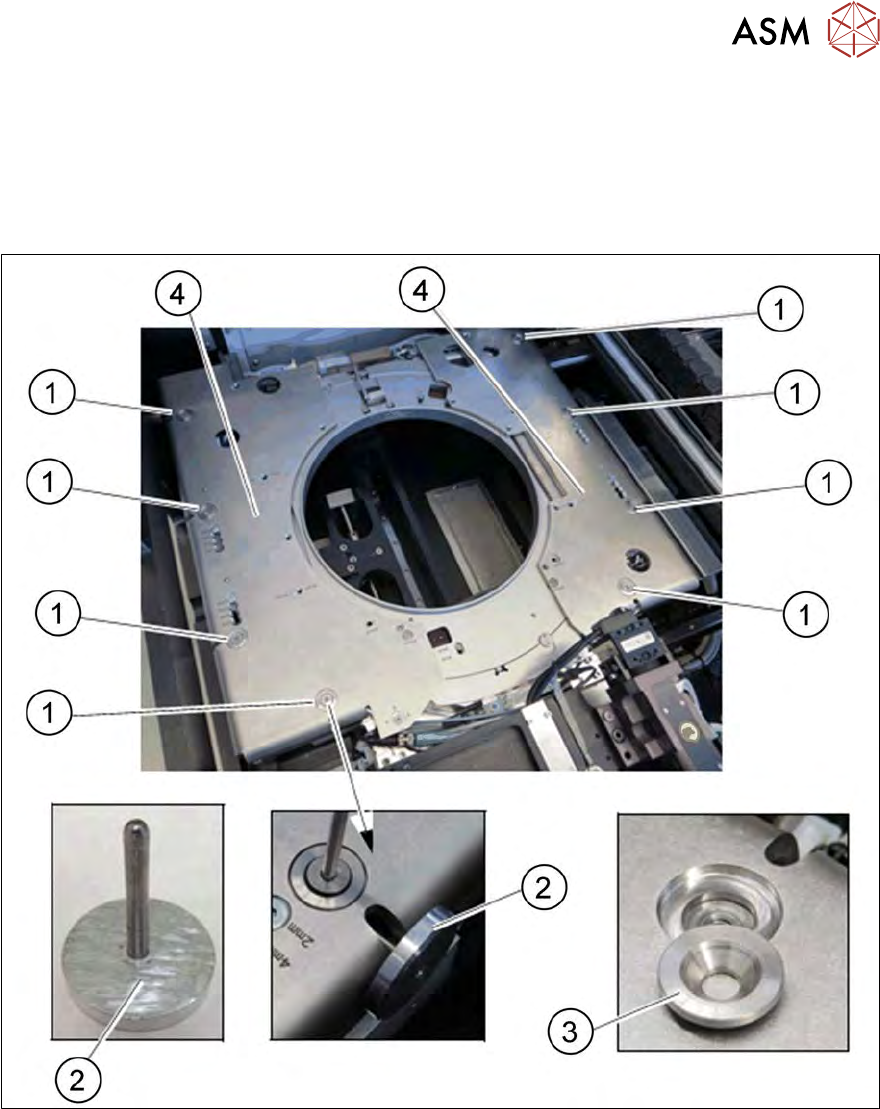
The downholder plate for the relevant wafer support needs to be replaced.
Fig.440: Wafer support - removing the downholder plate
► Insert the auxiliary tool for fixing the lifting piston (2) into the opening and fix the lifting piston
inside with it.
► Remove the four screws (1) on each of the two downholder plates(4), one after the other.
► Remove the conical fixing disk (3). Make sure that you do not lose it as you will need it later
on for refitting.
► Remove the two downholder plates (4).
12 Wafer stretcher
12.7 Wafer stretcher - configuration changes
312 Service Manual SIPLACE Wafer System (SWS) 11/2018
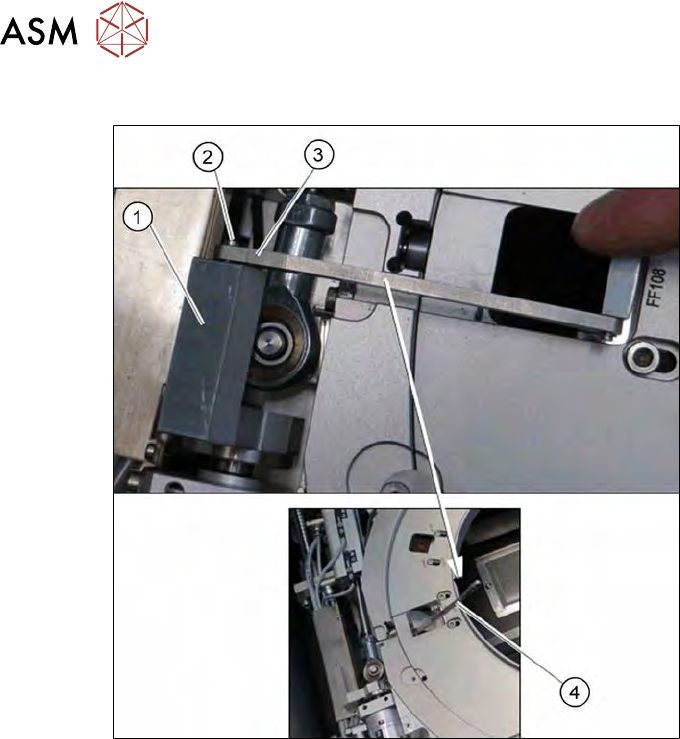
Releasing the clamp
Fig.441:
► Remove the circlip on the shaft (2) of the clamp (1).
► Unhook the clamp, so that the clamping lever (3) is free (4).