00195982-03_SM_SWS_EN.pdf - 第213页
9 Wafer change system 9.2 Gripper Service Manual SIPLACE Wafer System (SWS) 11/2018 213 9.2.9.1 Aligning the height of the toothed belt axis on the lift Fig.276: Aligning the height of the toothed belt axis on the lift …
9 Wafer change system
9.2 Gripper
212 Service Manual SIPLACE Wafer System (SWS) 11/2018
9.2.9 Replacing the toothed belt axis
WARNING
Only for experienced service technical from ASM Assembly Systems GmbH & Co.KG
Replacement of the toothed belt axis and the corresponding settings required may only be
performed by experienced service technicians from ASM Assembly Systems GmbH &
Co.KG. Incorrect assembly of the toothed belt axis could lead to damage to the SWS.
► Dismantle the two proximity switches and remove from the toothed belt axis (see9.2.4 "Repla-
cing the proximity switch on the toothed belt axis" [}204]).
Follows the instructions described there. However, the electrical connections do not need to
be unplugged.
► Dismantle the gripper and place the gripper carefully into the SWS.
See also 9.2.7 "Dismantling the gripper for location 1/3" [}210]
or 9.2.8 "Dismantling the gripper for location 2/4" [}211]
► Loosen or open the cable ties to reach a suitable position, if needed.
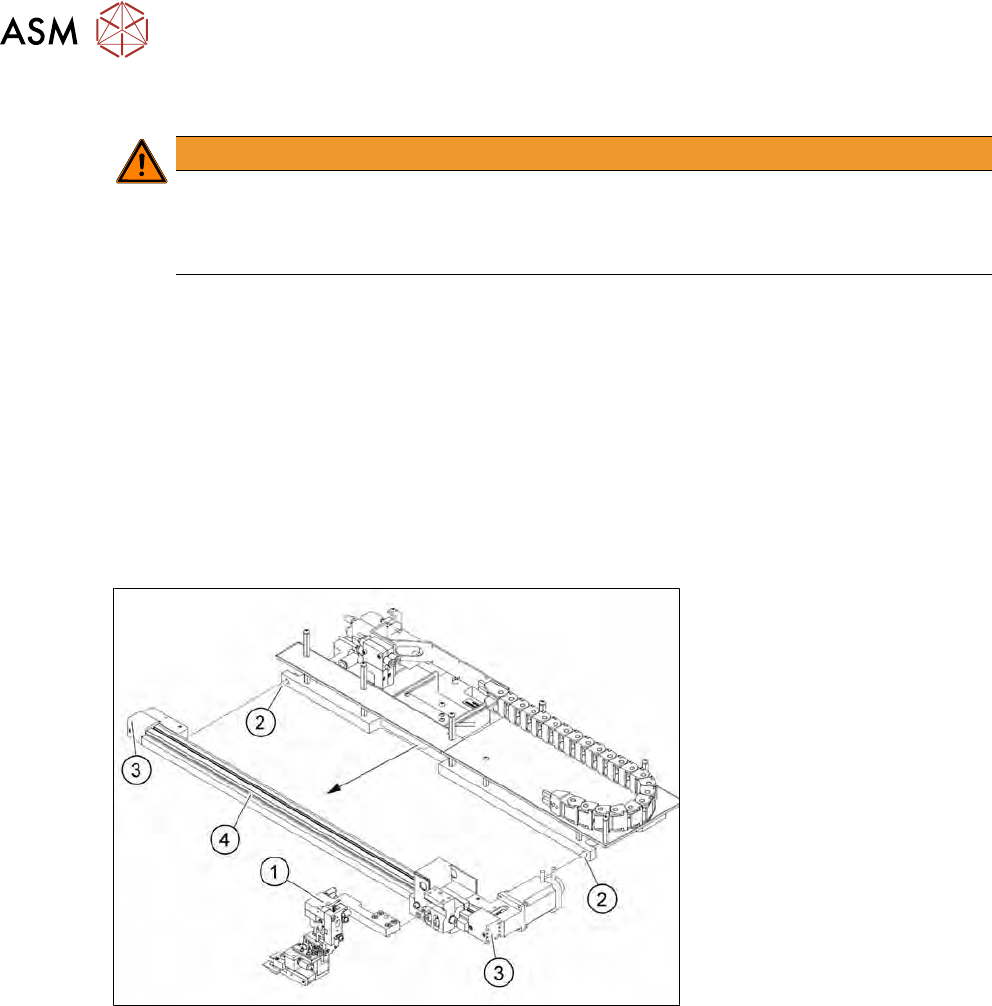
► Remove both screws (2) (see diagram in 9.2.9 "Replacing the toothed belt axis" [}212]) used
to fit the toothed belt axis assembly to the frame.
► Tilt the complete toothed belt axis forwards.
Fig.275: Take toothed belt axis assembly off the frame
► Remove the four (2x2) screws (3) fastening the toothed belt axis and then remove the toothed
belt axis itself.
► Fit the new toothed belt axis (4) with the complete toothed belt axis in its original position.
► Fit the gripper (1).
9 Wafer change system
9.2 Gripper
Service Manual SIPLACE Wafer System (SWS) 11/2018 213
9.2.9.1 Aligning the height of the toothed belt axis on the lift
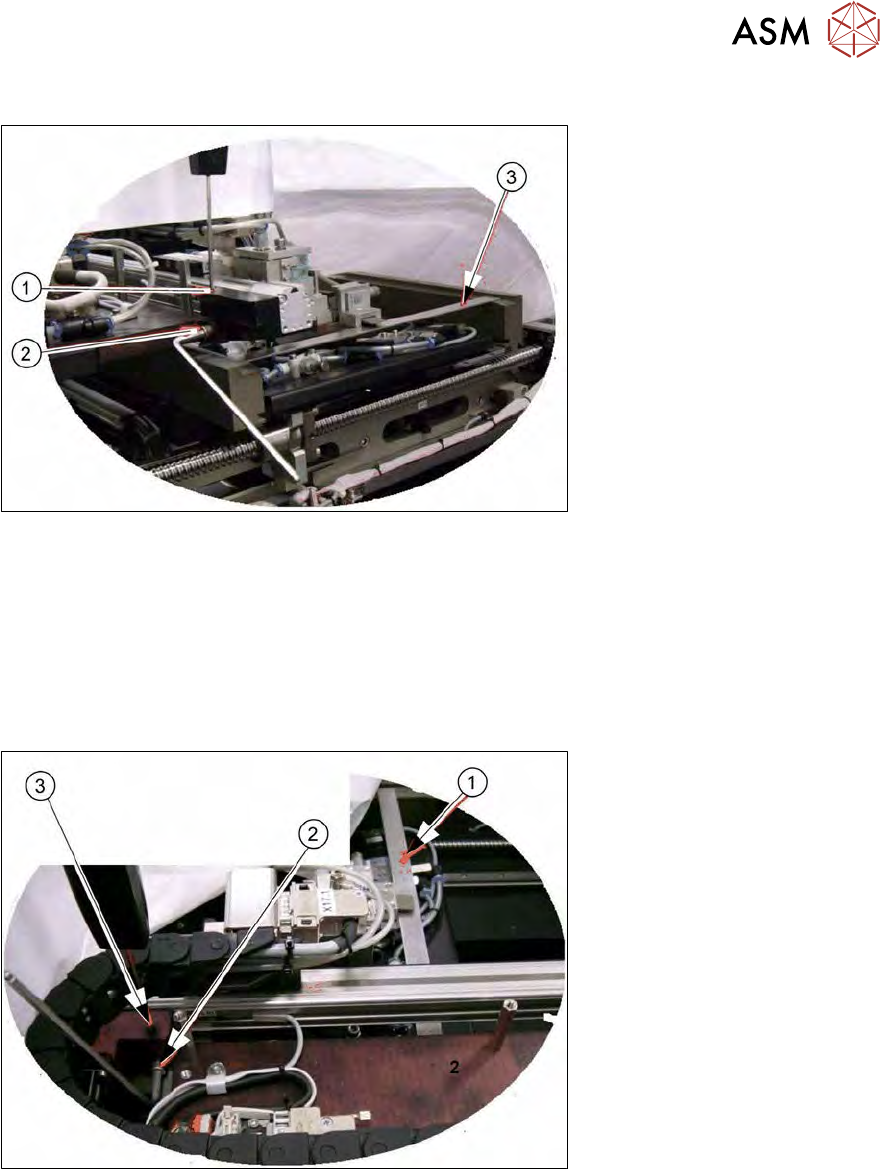
Fig.276: Aligning the height of the toothed belt axis on the lift
► Move the gripper in the direction of the wafer lift and then move it downwards.
► Insert the auxiliary rail (3) (e.g. a stable strip of metal).
► Remove the fastening screw (2) and adjust the height of this with the setscrew (1).
► The auxiliary rail (3) must lie flush on the wafer support rail. Then tighten the fastening screw
(2).
9.2.9.2 Aligning the height of the toothed belt axis at the changer
Fig.277: Aligning the height of the toothed belt axis at the changer
► Move the gripper to the "home position" and then move it downwards.
► Insert the auxiliary rail (1) (e.g. a stable strip of metal). The auxiliary rail must lie flush on the
wafer support rail.
► Remove the screw (2).
► Adjust the height with the setscrew (3).
► Fix the screw.
9 Wafer change system
9.2 Gripper
214 Service Manual SIPLACE Wafer System (SWS) 11/2018
9.2.10 Replace the wafer changer completely
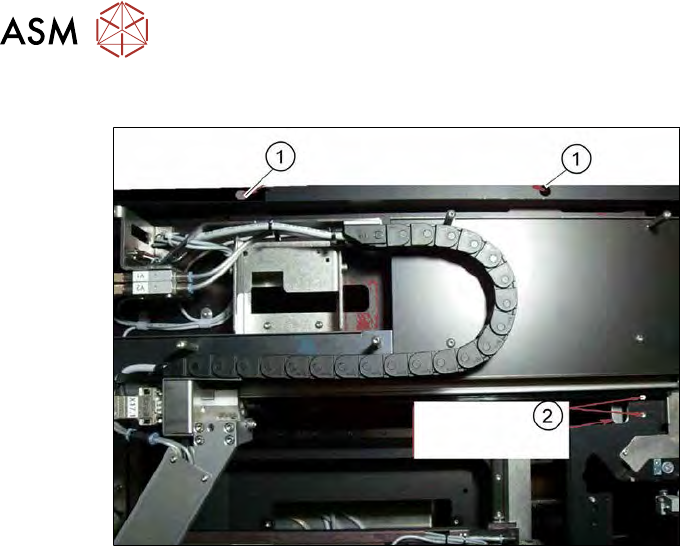
Fig.278: Replace the wafer changer completely
► Remove the cover plates.
► Remove the two fastening screws (1).
► Remove the screws (2) on the fixing plate (holder between flip unit and wafer changer, ac-
cessible from below).
► Disconnect the electrical connection cable.
► Disconnect the pneumatic connections.
► Replace the complete wafer changer unit.
► Define the following settings:
– 9.2.9.1 "Aligning the height of the toothed belt axis on the lift" [}213]
– 9.2.9.2 "Aligning the height of the toothed belt axis at the changer" [}213]