00195982-03_SM_SWS_EN.pdf - 第309页
12 Wafer stretcher 12.7 Wafer stretcher - configuration changes Service Manual SIPLACE Wafer System (SWS) 11/2018 309 12.7.3 Converting wafer supports from 8" wafer stretchers to 12" wafer stretchers In order t…
12 Wafer stretcher
12.7 Wafer stretcher - configuration changes
308 Service Manual SIPLACE Wafer System (SWS) 11/2018
12.7.2.2 Settings
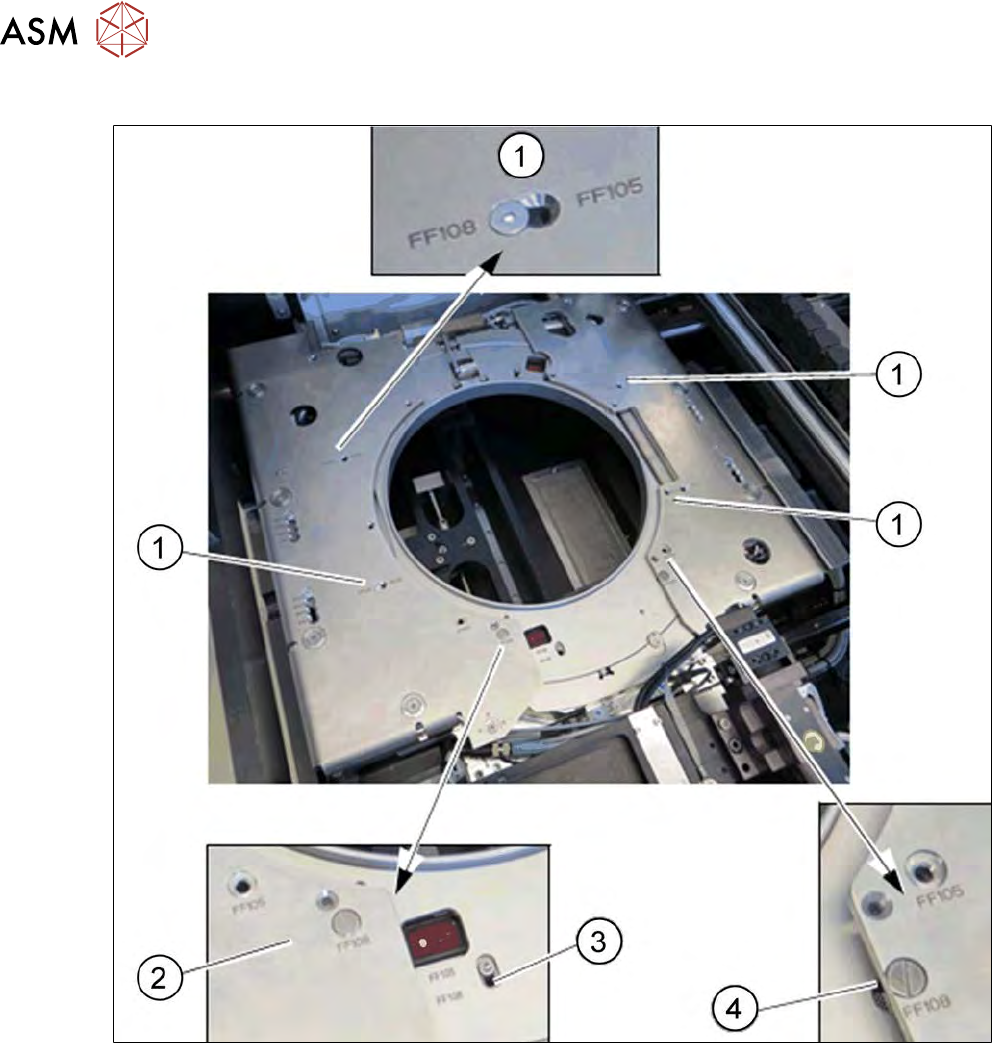
Fig.438: Wafer support - setting the frame width
► Remove the screws at the four positions (1) and fit these in the required place (FF105 or FF
108).
► Remove the screw at this position (2) and fit it in the required place (FF105 or FF 108).
► Remove the screw at this position (3) and fit it in the required place (FF105 or FF 108).
► Remove the screw at this position (4) and fit it in the required place (FF105 or FF 108).
12 Wafer stretcher
12.7 Wafer stretcher - configuration changes
Service Manual SIPLACE Wafer System (SWS) 11/2018 309
12.7.3 Converting wafer supports from 8" wafer stretchers to 12" wafer stretchers
In order to process the different wafer sizes (8" and 12") on the SIPLACE SWS wafer stretcher, you
need to convert the SIPLACE SWS wafer stretcher.
You can order the SIPLACE SWS wafer stretcher in the following configurations:
●
[00519717-xx] 12" wafer expander
and optional
[03079734-xx] 8" retrofit kit
or
●
[00519719-xx] 8" wafer expander
and optional
[00519720-xx] 12" retrofit kit
The conversion from an 8" to a 12" wafer support is described below (see also 12.7.3.4 "Difference
when converting the 12" to the 8"" [}319]).
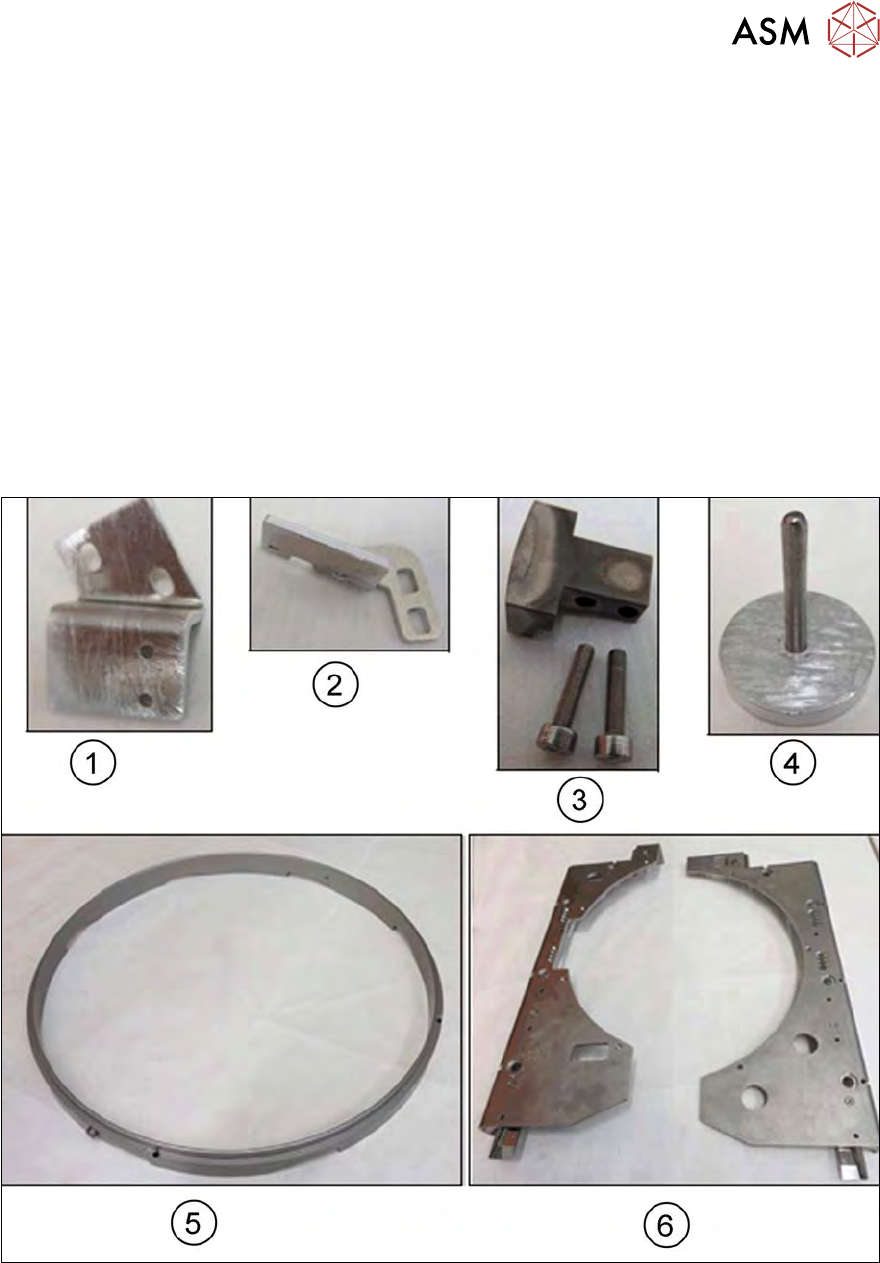
12.7.3.1 Retrofit kit parts: 12" wafer expander
Fig.439:
1. Mounting bracket for sensor 1 (including 2 x M3x6 screws)
2. Mounting bracket for sensor 2 (including 2 x M3x6 screws)
3. Block with fastening screws for clamp
4. The auxiliary tool for fixing the lifting piston [03121551-xx] is supplied and and will in future be
included in the SWS service box.
5. Lifting ring
6. Downholder plate, right and left
12 Wafer stretcher
12.7 Wafer stretcher - configuration changes
310 Service Manual SIPLACE Wafer System (SWS) 11/2018
12.7.3.2 Preparations
► Perform the measures in accordance with section 12.3 "Preparatory measures for working on
the wafer stretcher" [}278].
► Finish all ongoing processes in the SWS module.
► Move the wafer table to the change position.
► From the view, select Manual Operation -> Wafer Handling Systems -> Go to Change Po-
sition.
► Open the clamp.
► From the view, select Manual Operation -> Wafer Handling Systems -> Open Wafer
Clamp.
ð The clamping ring will open and the expansion ring will move downwards.
► Open the expander.
► From the view, select Manual Operation -> Wafer Handling Systems -> Release Ex-
pander.
ð The downholder plate will move upwards.
► From the view, select Production -> Miscellaneous and click the red "off" button there.
ð Shut down the SWS GUI and Linux properly.
► Switch off the SWS at the main switch.
CAUTION
Avoid damage to the gripper
When working on the wafer support, the gripper could be damaged.
► Push the gripper towards the wafer lift and out of the working area for the wafer sup-
port.