00195982-03_SM_SWS_EN.pdf - 第320页
12 Wafer stretcher 12.8 Setting the sag sensor IN 19 320 Service Manual SIPLACE Wafer System (SWS) 11/2018 12.8 Setting the sag sensor IN 19 12.8.1 General information about the sag sensor 12.8.1.1 Sag sensor assembly st…
12 Wafer stretcher
12.7 Wafer stretcher - configuration changes
Service Manual SIPLACE Wafer System (SWS) 11/2018 319
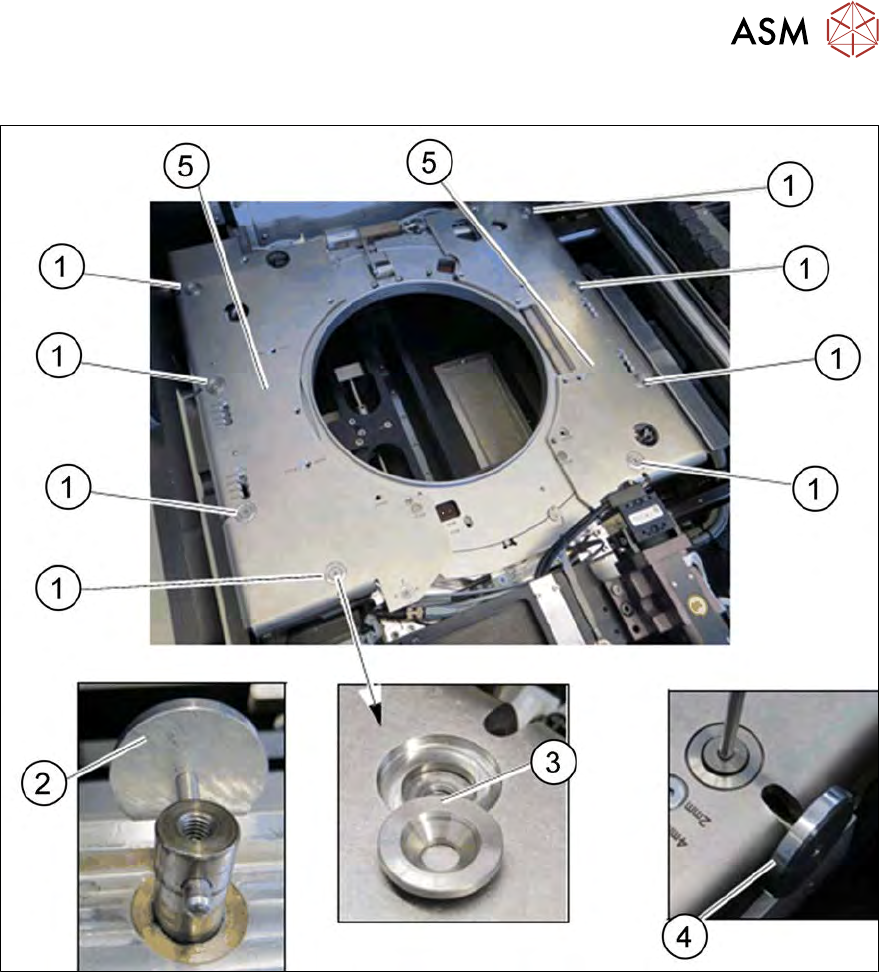
Fitting the downholder plates
Fig.450: Wafer support - removing the downholder plate
► Use the auxiliary tool (2) to align the lifting piston, so that the openings point outwards.
► Place the downholder plates form the 12" retrofit kit onto the wafer support.
► Place the conical fixing disks (3) into the holes provided.
► Loosely tighten the downholder plates with the screws.
► Insert the auxiliary tool (4) into the opening and fix the lifting piston inside with it.
► Tighten the four screws (1) on each of the two downholder plates(5), one after the other.
12.7.3.4 Difference when converting the 12" to the 8"
The sensors need to be removed from the wafer support and fitted to the 8" expansion plates (see
12.7.3.3.3 "Removing the lifting ring for the 8" wafer stretcher" [}313]).
The block needs to be removed from the clamp and hooked up in place of the clamping lever (see
12.7.3.3.2 "Releasing the clamp" [}312]).
12 Wafer stretcher
12.8 Setting the sag sensor IN 19
320 Service Manual SIPLACE Wafer System (SWS) 11/2018
12.8 Setting the sag sensor IN 19
12.8.1 General information about the sag sensor
12.8.1.1 Sag sensor assembly structure
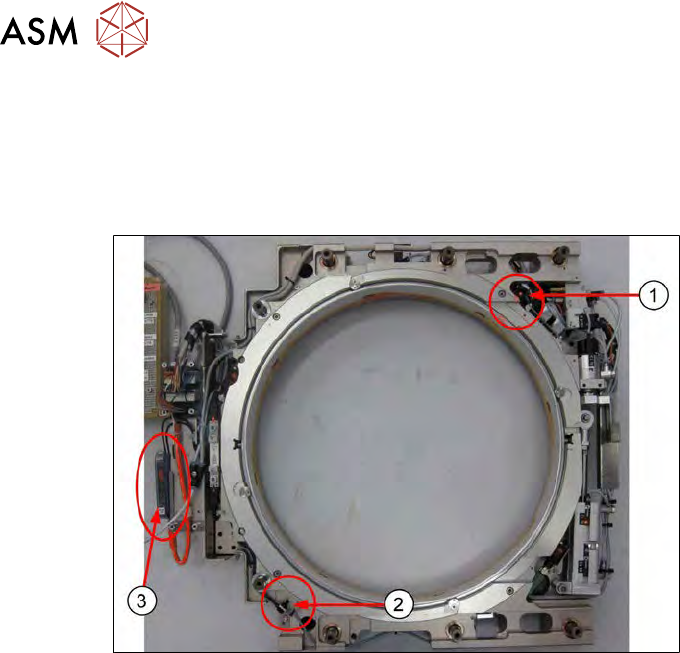
Fig.451:
The sag sensor assembly consists of:
1. Transmitter S
2. Receiver R
3. Sensick WLL180T analysis unit
12 Wafer stretcher
12.8 Setting the sag sensor IN 19
Service Manual SIPLACE Wafer System (SWS) 11/2018 321
12.8.1.2 Sag sensor assembly function
The transmitter S emits a light beam which is received by the receiver R.
The value shown on the analysis unit depends on the intensity of the light beam sent by the trans-
mitter S to the receiver R.
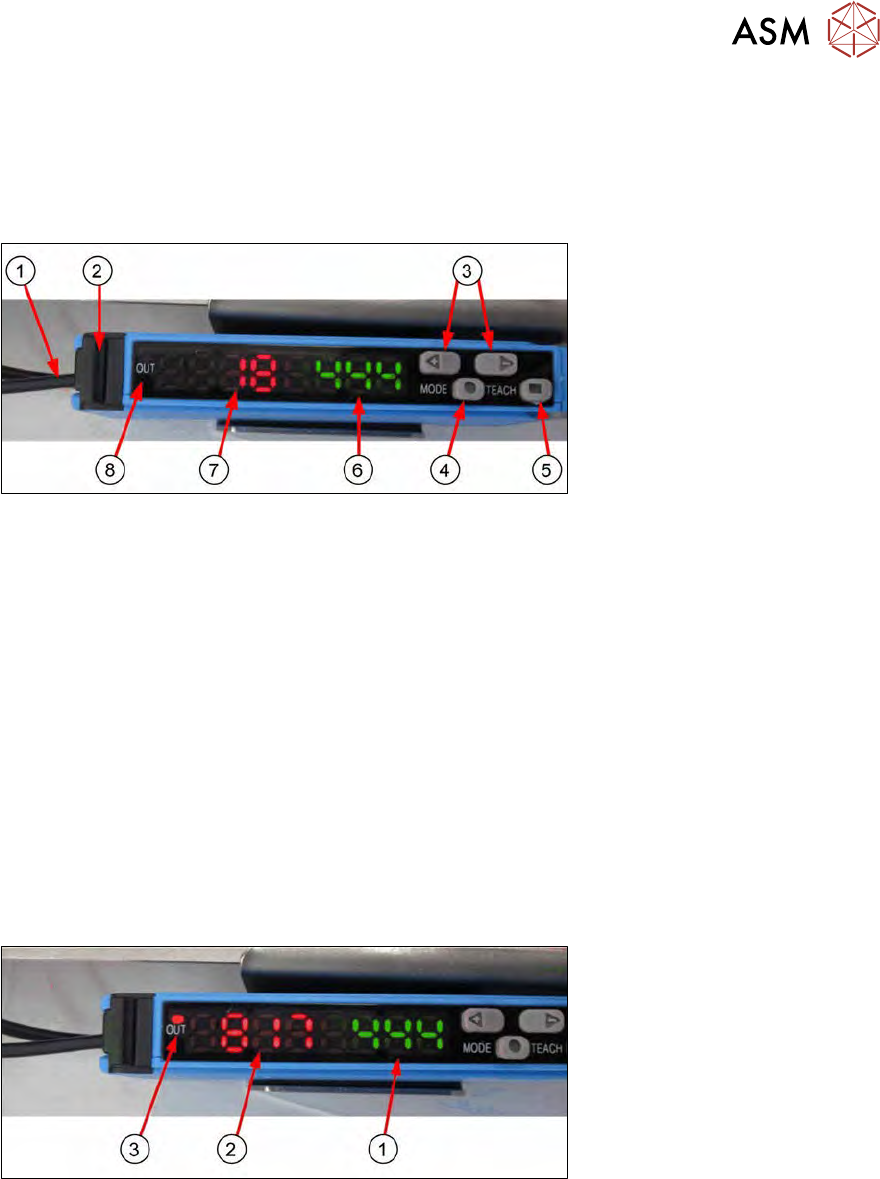
The following functions are on the analysis unit Sensick WLL180T:
Fig.452:
1. Fiber optic cable from transmitter S and receiver R
2. Fiber optic cable lock
3. Selection button (+ / -)
4. Mode button
5. Teach button
6. Set switching threshold value (green)
This value must be taught.
If the light intensity received is under this switching threshold value, no signal will be emitted.
7. Light intensity display at receiver (red)
This value shows how much light intensity sent by the transmitter S actually arrives at the
receiver R.
It is assumed that the transmitter S and receiver R are optimally set for the installation condi-
tions, so that these values can be taken as absolute.
8. OUT signal
Fig.453:
If the light intensity value at the receiver R (red display (2)) is greater than the set switching
threshold value (green display (1)), then the following applies:
●
The light beam has not yet been interrupted properly and there is no risk that the wafer foil will
be tensioned on the base unit.
●
A signal (OUT shines orange (3)) will be emitted and the wafer may be pulled into the wafer
lift by the gripper.