00195982-03_SM_SWS_EN.pdf - 第122页
7 Die ejector 7.3 Replacing spare parts 122 Service Manual SIPLACE Wafer System (SWS) 11/2018 Fig.135: ► Shut down the SWS software. ► Switch off the SWS on main switch. ► Dismantle and remove the SWS (see 4.1 "Rem…
7 Die ejector
7.3 Replacing spare parts
Service Manual SIPLACE Wafer System (SWS) 11/2018 121
Item Item no. Spare part
1 03098367-xx
03098236-xx
Z axis die ejector (2/4), magnetic
Z axis die ejector (1/3), magnetic
2 00385741-xx Dual light barrier board 27.5 x14mm
3 00387580-xx Sealing unit
4 03050539-xx Solenoid valve MHE3-M1H-3/2G-1/8
5 00384600-xx AD-MOT Rev.0 Sub-D board = angled
6 03027512-xx Proximity switch SME-8F-DS-24V-K2.5-OE
7 00386142-xx AD board 12-pin connector pin strip 55x35mm MS-E543
8 03075723-xx Solenoid valve CPE10
9 00385053-xx Proximity switch NBN4-F29-E2
00201141-xx O-Ring 3x1mm
10 00387919-xx Omega spring
7.3 Replacing spare parts
7.3.1 Preparatory tasks
To remove the complete die ejector unit from the SWS, proceed as follows:
► Remove the ejection system.
See 7.6 "Converting the bayonet needle ejector unit (old version) to the magnetic needle
ejector unit (current version)" [}168]
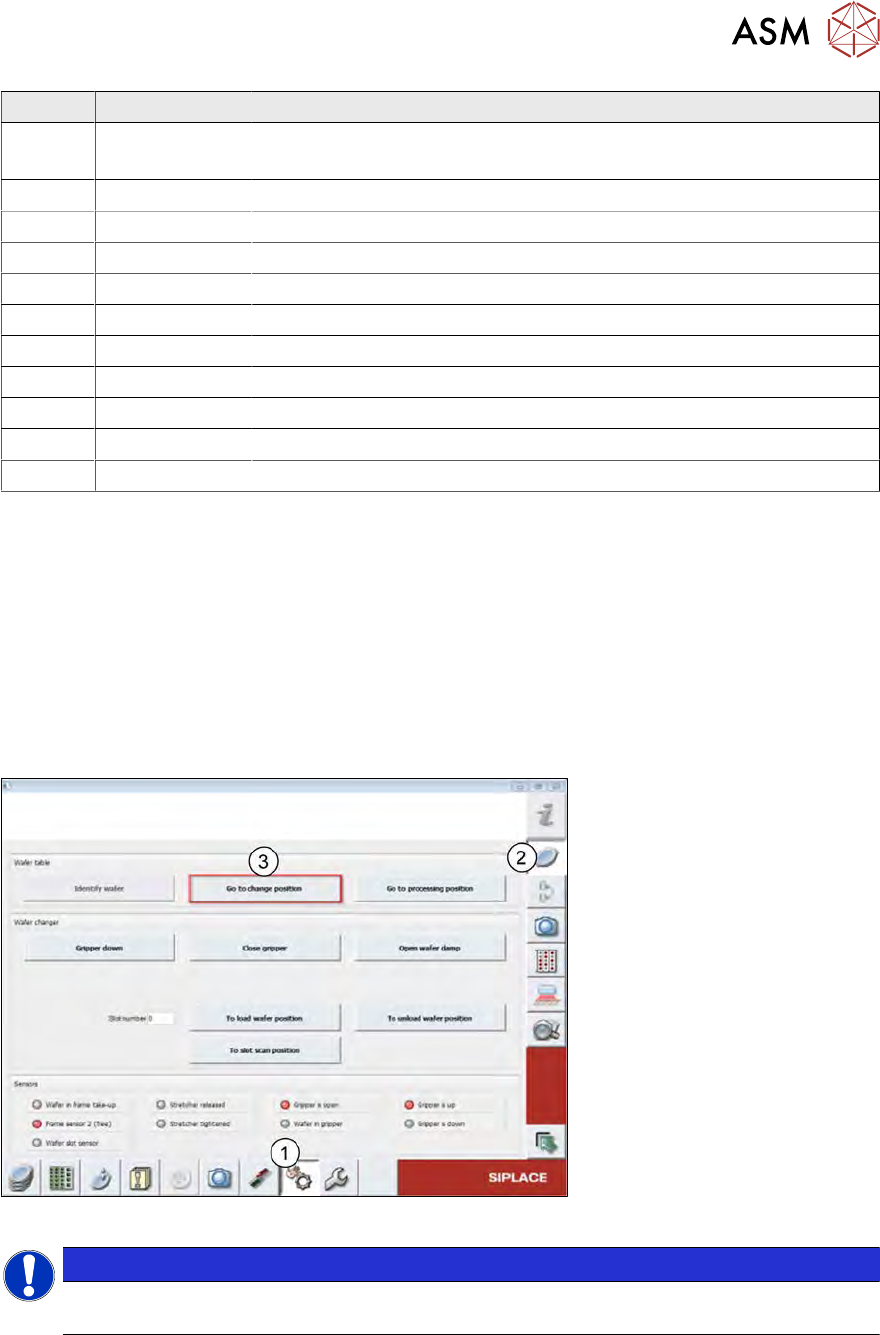
► Move the wafer table to the change position so that you have access to the base plate of the
die ejector.
Fig.134:
NOTICE
The wafer table should, if possible, be moved with the software (see diagram). This is the
only guarantee that the die ejector is then in a low and secure position.
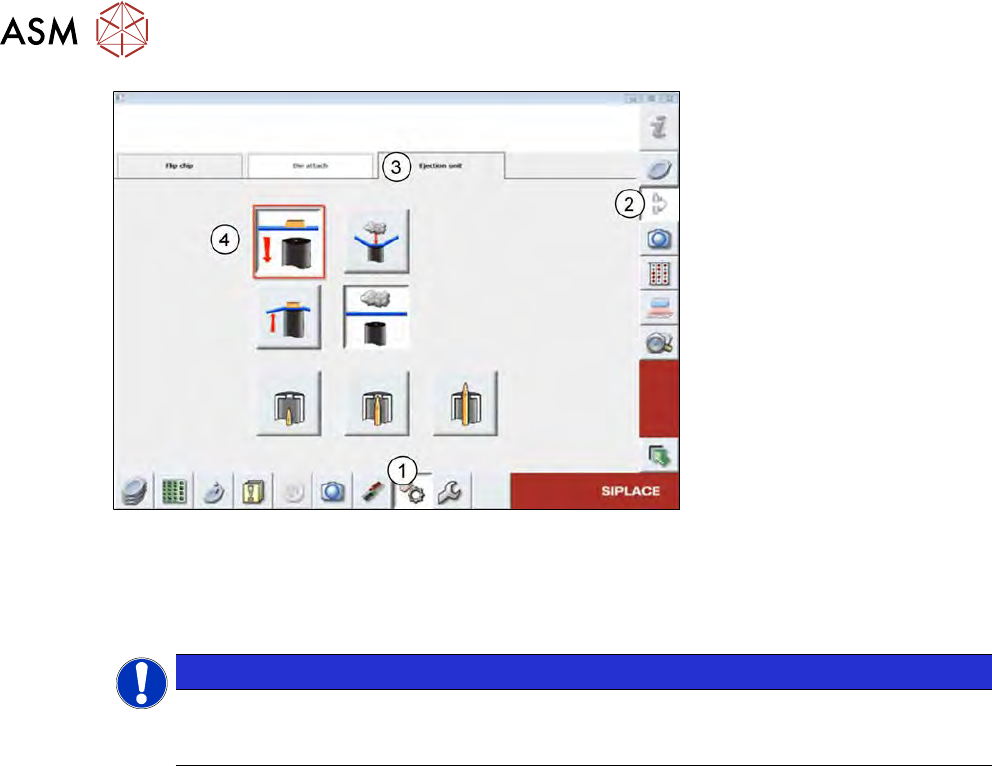
► However, if the die ejector is in the top position, it will need to be moved with the software to
the secure, lower position:
7 Die ejector
7.3 Replacing spare parts
122 Service Manual SIPLACE Wafer System (SWS) 11/2018
Fig.135:
► Shut down the SWS software.
► Switch off the SWS on main switch.
► Dismantle and remove the SWS (see 4.1 "Removing the SWS" [}59]).
NOTICE
► If, after removal of the SWS from the CA machine, you still find that the die ejector is
in the "top" position, read this section 17.1 "Moving the Z axis for die ejector down-
wards in the switched off and removed SWS" [}471]).
7.3.2 Removing the complete die ejector unit from the SWS
Necessary tools
●
Standard hexagonal screwdriver set
●
T Allen key, size 5
●
Small screwdriver
Preconditions
●
SWS removed from machine-
●
SWS disconnected from the power supply
7 Die ejector
7.3 Replacing spare parts
Service Manual SIPLACE Wafer System (SWS) 11/2018 123
Procedure
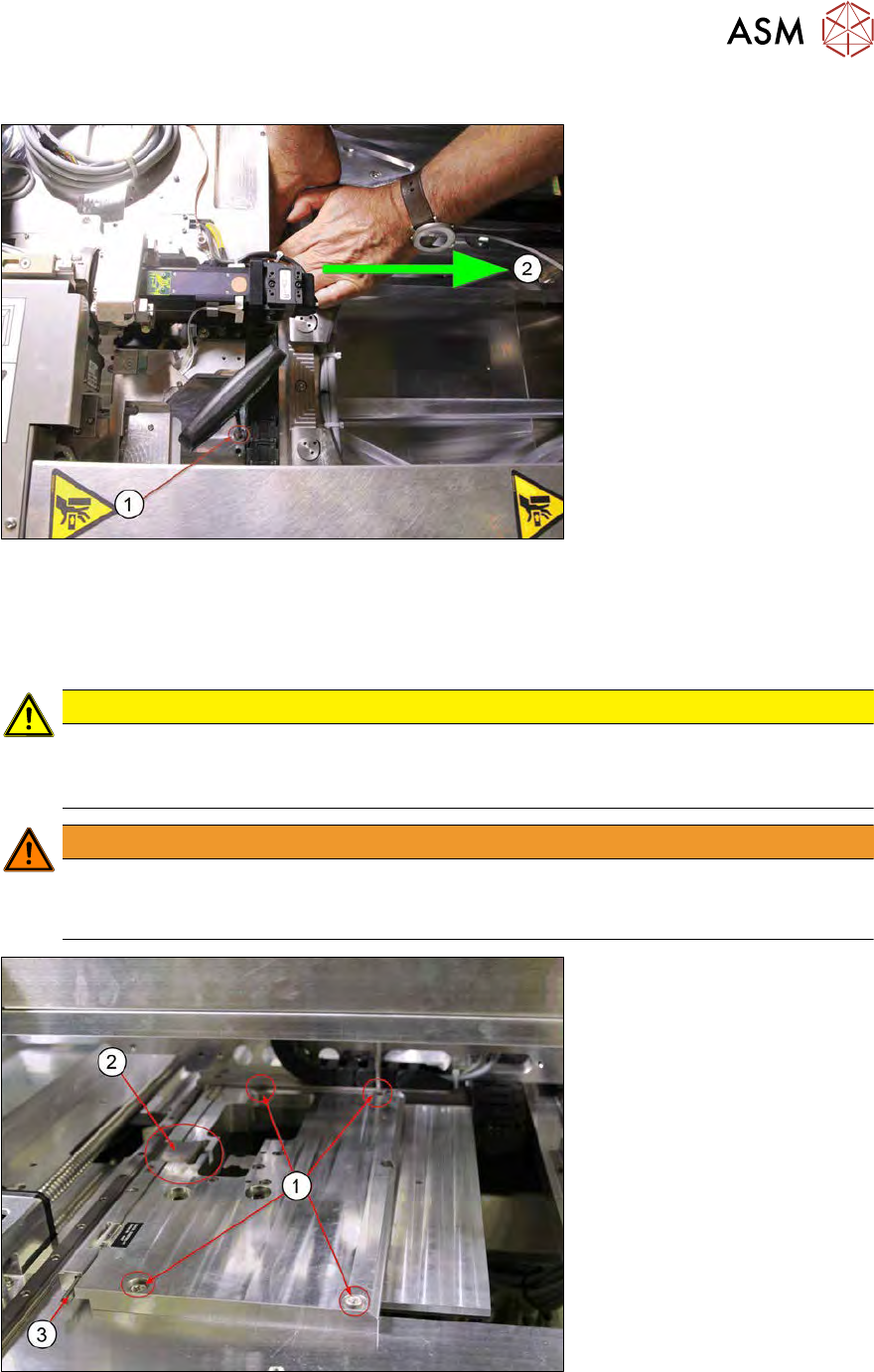
Fig.136:
► In the change position, the wafer table still covers two of the fastening screws(1) for the die
ejector base plate.
You need to manually push the wafer table towards the wafer lift(2), until the screws are ac-
cessible.
CAUTION
Die ejector lowered?
► Before pushing the wafer table, make sure that the die ejector has really been
lowered.
WARNING
Risk of injury to hands
When manually pushing the wafer table, there is always a risk of injury by trapping the
hands.
Fig.137:
► Remove the four screws(1) fastening the die ejector base plate (Allen key5).
The omega spring pulls the base plate against the eccentric shaft(3) X direction. Remove the
omega spring (2) as follows: