00195982-03_SM_SWS_EN.pdf - 第277页
12 Wafer stretcher 12.2 Detailed description of "wafer stretching" procedure Service Manual SIPLACE Wafer System (SWS) 11/2018 277 Fig.381: ● The heating (heater) is still active and warms the wafer foil. ● Th…
12 Wafer stretcher
12.2 Detailed description of "wafer stretching" procedure
276 Service Manual SIPLACE Wafer System (SWS) 11/2018
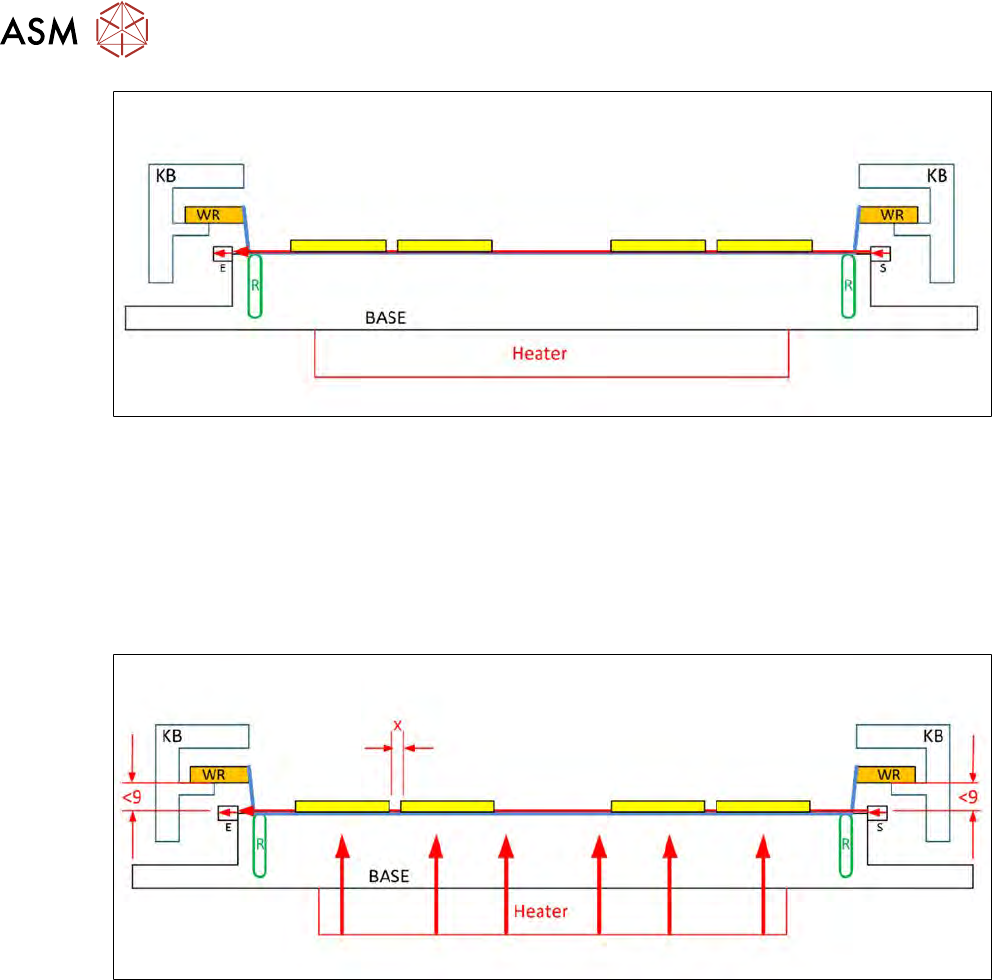
Fig.379:
●
The sag sensor IN19 (S = transmitter / E = receiver) is switched on.
●
The light beam is sent from the transmitter to the receiver.
●
If a light is received by the receiver, this means that the foil is not sagging so much that it
would rub against the base (BASE) when the wafer frame is pulled back in the wafer lift,
thereby breaking the wafer foil!
●
The top diagram shows that the light beam has been interrupted due to excessive sagging of
the wafer foil.
Fig.380:
●
The heating (heater) is switched on.
●
This warms the wafer foil, which then shrinks together again.
●
This reduces the stretch.
●
The space between the dies is reduced (X).
●
The wafer foil sag is also reduced.
●
If the sag is still more than 9 mm, the sag sensor IN 19 will not emit a signal.
12 Wafer stretcher
12.2 Detailed description of "wafer stretching" procedure
Service Manual SIPLACE Wafer System (SWS) 11/2018 277
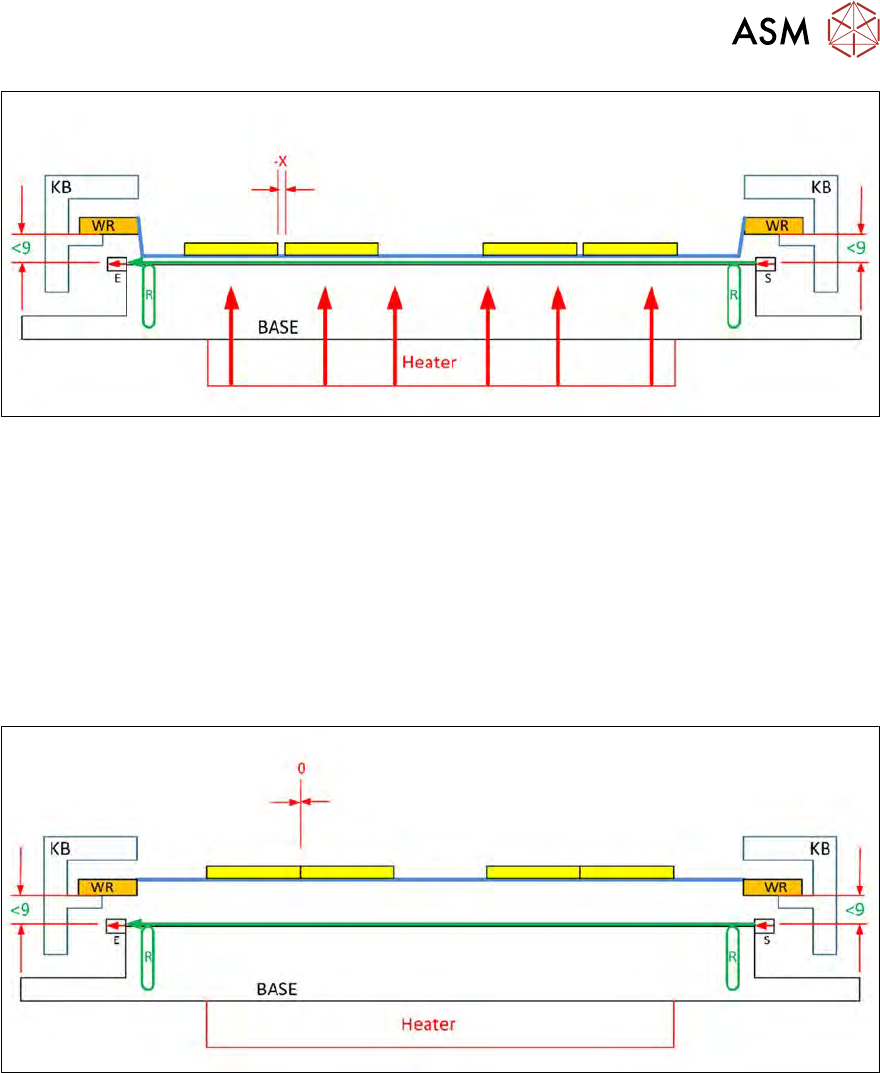
Fig.381:
●
The heating (heater) is still active and warms the wafer foil.
●
This increasingly shrinks together.
●
The space between the dies is reduced (-X).
●
The sagging wafer foil now no longer interrupts the light beam from the transmitter (S) of the
sag sensor.
●
The light arrives at the receiver (E).
●
The receiver (E) emits the IN19 signal indicating that the wafer foil is no longer sagging.
●
The wafer frame can now be changed in the wafer lift without the risk of the base being
touched.
Fig.382:
●
In an ideal case, the wafer foil will have shrunk back to its original stretch state.
●
The space between the dies is now near to 0.
12 Wafer stretcher
12.3 Preparatory measures for working on the wafer stretcher
278 Service Manual SIPLACE Wafer System (SWS) 11/2018
12.3 Preparatory measures for working on the wafer stretcher
► Finish all ongoing processes on the SWS.
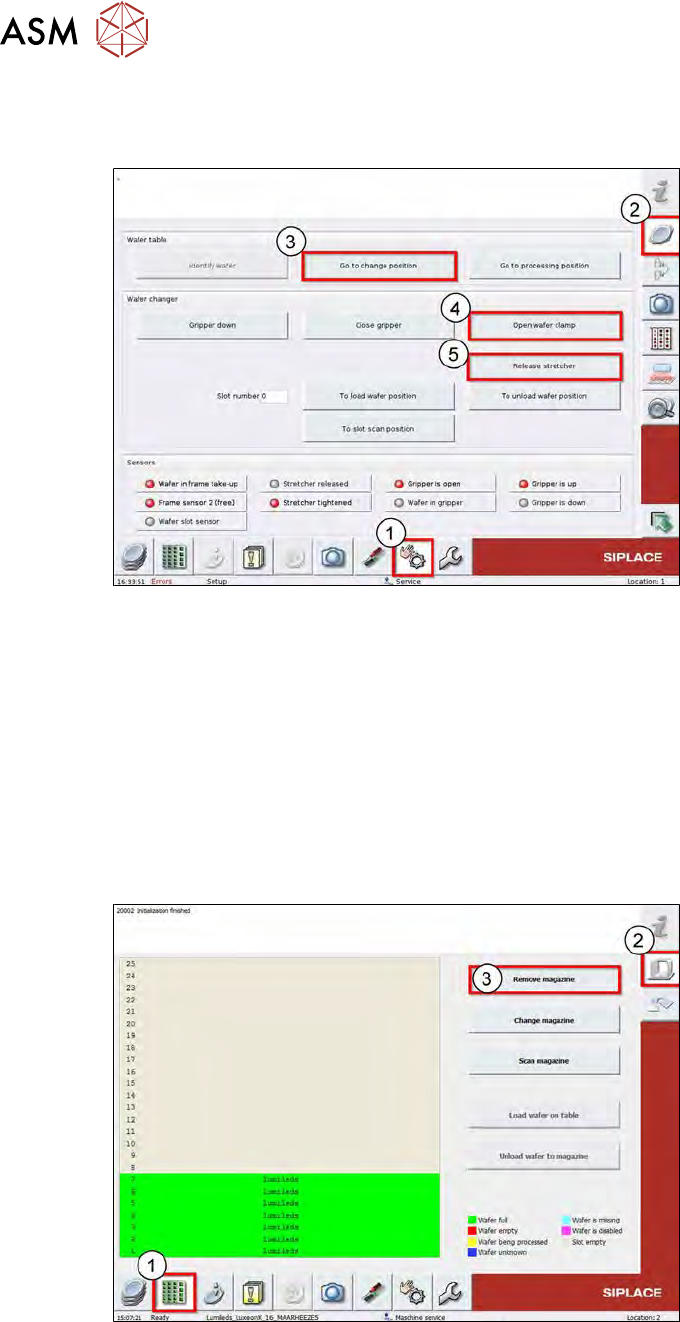
Fig.383:
► Switch over to the Manual Operation (1) view.
► Select Wafer-Handling-Systems (2).
► Use the Go to change position (3) button to move the wafer table to the change position.
ð The wafer table moves to the change position.
► Use the Open wafer clamp (4) button to open the clamp on the wafer changer.
ð The wafer changer clamping ring will open and the expansion ring (stretcher) will move
downwards.
► Use the Release Stretcher (5) button to open the expander.
ð The expander will open and the downholder plate will move upwards.
Fig.384:
► Switch over to the Product (1) menu.
► Select the Setup_Magazin (2) menu.
► Select Remove Magazin (3).
ð The wafer magazine will be moved to the removal position, giving you access to the wafer
lift lock!