00195982-03_SM_SWS_EN.pdf - 第476页
17 Tips and tricks 17.3 Wafers are recognized in the wrong slot of the magazine 476 Service Manual SIPLACE Wafer System (SWS) 11/2018 17.3 Wafers are recognized in the wrong slot of the magazine Error description ● Scali…
17 Tips and tricks
17.2 Wafer changer calibration problems
Service Manual SIPLACE Wafer System (SWS) 11/2018 475
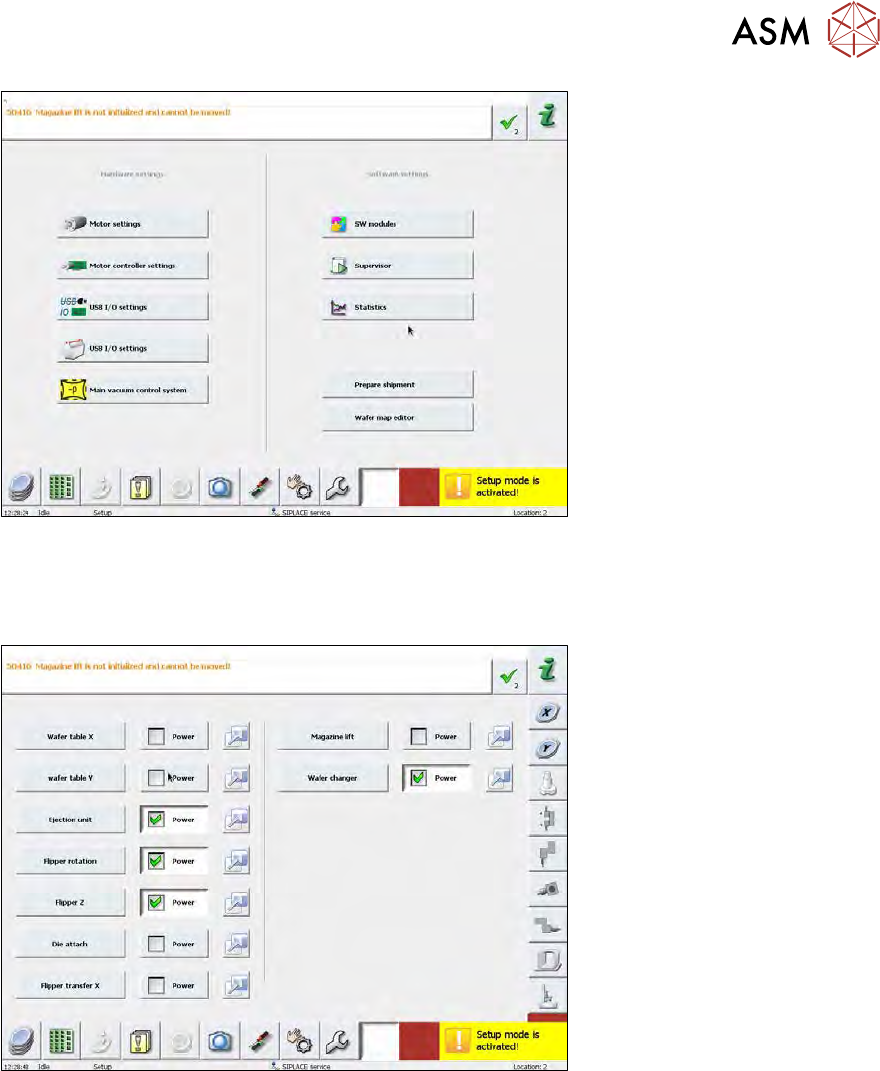
Fig.743:
► An additional button (without icon) will now appear at the bottom right of the main view, next to
the service button. Select this additional button.
► Then select the Motor settings button.
Fig.744:
► Now select the blue initialization button, next to the Magazine lift.
ð The lifting axis will now be referenced. After this the lifting axis will be active.
Since the lifting axis can now be addressed and moved, you can also calibrate the wafer changer
(see 15.4.3 "Calibration wafer changer menu" [}405]).
17 Tips and tricks
17.3 Wafers are recognized in the wrong slot of the magazine
476 Service Manual SIPLACE Wafer System (SWS) 11/2018
17.3 Wafers are recognized in the wrong slot of the magazine
Error description
●
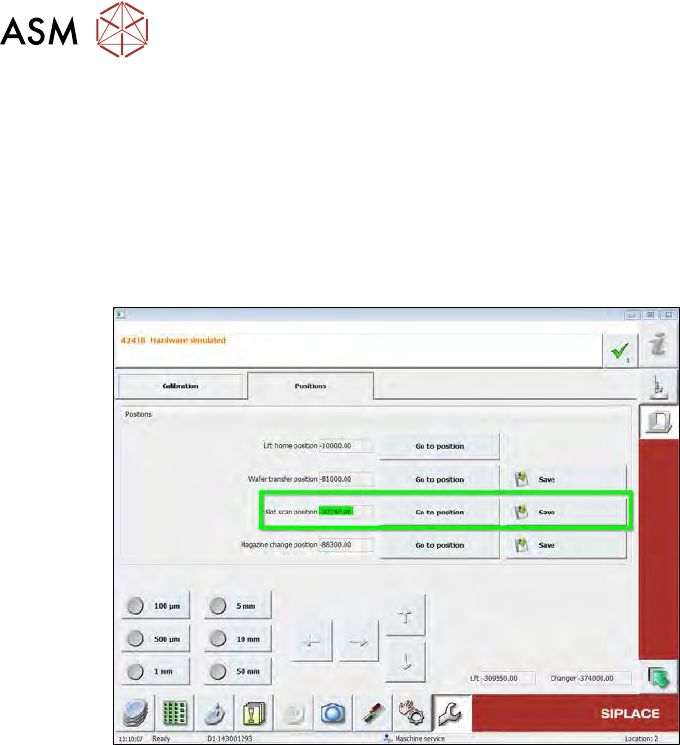
Scaling factor "distance magazine plate-slot" appears to be too small.
e.g. wafer in slot 25 is recognized at slot 10 or wafer at slot 10 is recognized at slot 2.
●
When the slot is approached again, another value is addressed and saved.
Procedure
Fig.745:
► Check the clamping screw on the coupling of the wafer lift drive.
If this has loosened, the motor axis or coupling will slip and the values of the rotary encoder
for the motor will no longer match the real distances moved by the spindle.

18 Appendix
18.1 Specification: emergency STOP
Service Manual SIPLACE Wafer System (SWS) 11/2018 477
18 Appendix
18.1 Specification: emergency STOP
18.1.1 Switching elements
●
Emergency STOP switching device (K3) 3TK28-21-1CB30 / DC24V / autostart / 3S / 1Ö
●
Emergency STOP mushroom-head pushbutton / d = 40mm / rotary release / 1S / 2Ö
●
Relay 24VDC (K4) to reset emergency STOP with program (set output 1)
●
Control lamp for on/off function emergency STOP
●
Relay 24VDC (K5) feeder presence - signal > set output 16
●
2 power contactors (K1, K2), coil 24VDC / switching capacity 25A / with additional unit
●
1 time relay unit release-delayed (500ms), can be attached to power contactor K1
External SWS service box [03075503‑xx] (connection at connector X1x3)
●
Emergency STOP mushroom-head pushbutton / d = 40mm / rotary release / 1Ö
●
Start button with lamp (white= operating display) to reset the emergency STOP
●
Relay 24VDC / 1S for external emergency STOP latching function
18.1.2 External connection to SIPLACE
X113 = location-1
X123 = location-2
X133 = location-3
X143 = location-4
Wago connector, 12 pin, type 721-612
●
Pin-1 = ground external >> PE feeder
●
Pin-2 = +24V / external
●
Pin-3 = SIPLACE emergency STOP loop input
●
Pin-4 = SIPLACE emergency STOP loop output
●
Pin-5 = SWS emergency STOP loop output
●
Pin-6 = SWS emergency STOP loop input
●
Pin-7 = feeder presence signal (+24V / external from K5)
●
Pin-8 = no function
●
Pin-9 = emergency STOP message (+24V / external) from feeder to SIPLACE > input
●
Pin-10 = no function
●
Pin-11 = no function
●
Pin-12 = no function
18.1.3 Input/output checklist
●
Input 1 = 1 > emergency STOP mushroom-head pushbutton SWS = not pressed
●
Input 16 = 1 > emergency STOP loop SWS for switching device K3 is closed
●
Input 1 = 0 / IN16 = 0 > emergency STOP activation from die feeder (internal)
●
Input 1= 1 / IN16 = 0 > emergency STOP activation from SIPLACE (external)
●
Input 15 = 1 > contactor K1/K2 = on, 48VDC control for motor amplifier = OK
●
Output 1 = K4 (on/off 150 ms) > reset emergency STOP > start SWS
●
Output 16 = 1 > K5 = on, feeder present signal to the SIPLACE