00195982-03_SM_SWS_EN.pdf - 第204页
9 Wafer change system 9.2 Gripper 204 Service Manual SIPLACE Wafer System (SWS) 11/2018 9.2.3 Replacing spare parts 9.2.3.1 Requirements/preparations The SWS can stay in the placement machine for all work to the gripper.…
9 Wafer change system
9.2 Gripper
Service Manual SIPLACE Wafer System (SWS) 11/2018 203
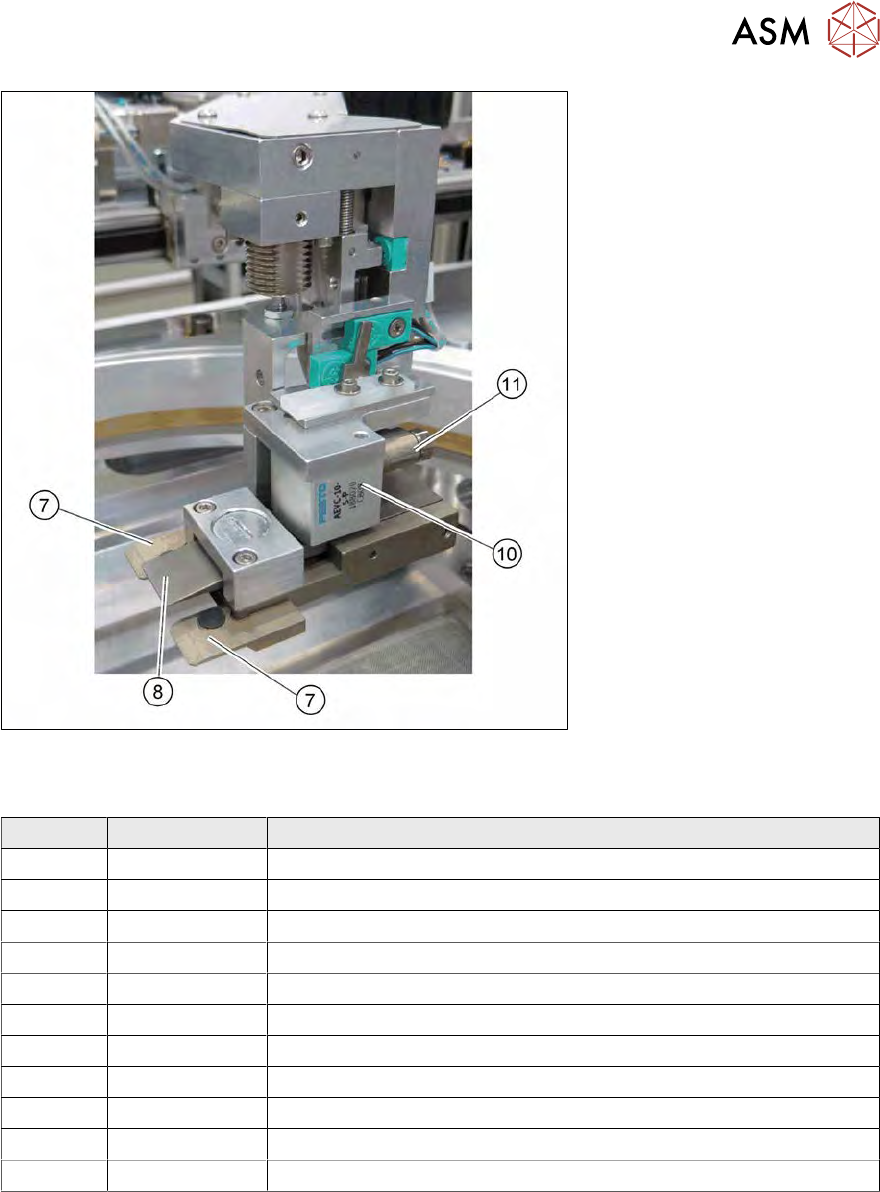
Fig.264: Spare parts on the gripper (for location 1/3)
Spare parts on the gripper
Item Item no. Designation
1 00385526-xx Toothed belt axis DGE-12-439
2 00384850-xx Solenoid valve CPE10-M1BH-3GL-QS-4
3 00384600-xx Board AD-MOT Rev.0 Sub-D = angled (under the cover)
4 00385452-xx Brushless cybermotor - wafer handler
5 03106449-xx Elastomer coupling without play d4,d6
6 03093951-xx Barcode scanner VB12-220-S-R (option)
7 00384823-xx Clamps, lower
8 00386153-xx Flexible clamps for gripper
9 00384901-xx Compression spring
10 00384879-xx Short-stroke cylinder AEVC-10-5-P
11 03095116-xx Proximity switch inductive
9 Wafer change system
9.2 Gripper
204 Service Manual SIPLACE Wafer System (SWS) 11/2018
9.2.3 Replacing spare parts
9.2.3.1 Requirements/preparations
The SWS can stay in the placement machine for all work to the gripper.
► Switch off the machine and the SWS at the main switch and disconnect these from the mains
power supply.
Observe the section 1.2 "Preparatory work..." [}15].
► Remove the large, black gripper cover (see 9 "Wafer change system" [}191]).
9.2.3.2 Tools
●
Standard tooling
●
Cable tie
●
Detailed circuit diagrams folder
9.2.4 Replacing the proximity switch on the toothed belt axis
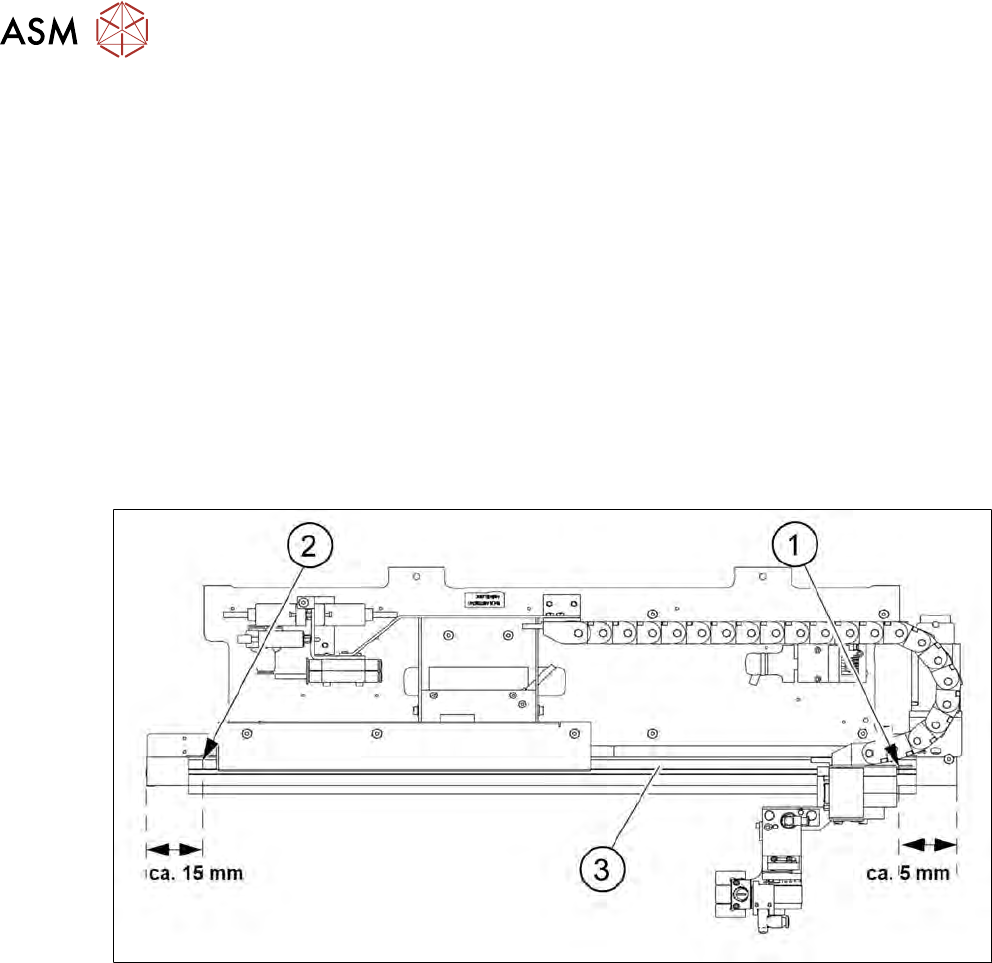
Fig.265: Position of proximity switch on the toothed belt axis
The two proximity switches monitor the front and back end position stops for the toothed belt axis
of the gripper.
The two proximity switches (1) and (2) are located on the inside, on the toothed belt axis (3). The
cable for the relevant proximity switch is connected to the wafer table adapter board (see 5.2.1 "Ba-
sic frame – design and spare parts [00386774-xx] (example SWS 1/3)" [}68]).
1. Proximity switch for Forward Limit
2. Proximity switch for Reverse Limit
3. Toothed belt axis
9 Wafer change system
9.2 Gripper
Service Manual SIPLACE Wafer System (SWS) 11/2018 205
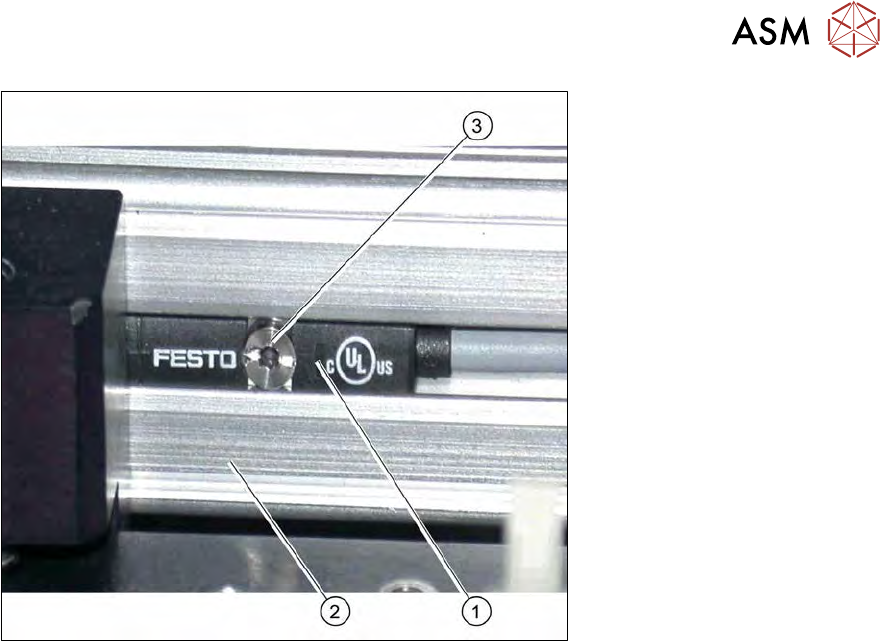
Fig.266: Proximity switch on the toothed belt axis
1. Proximity switch
2. Toothed belt axis
3. Fastening screw
Removal/installation
► Mark the original installation position of the proximity switch with a pen. Check the rough
assembly dimensions (see above)
► Remove the screw fastening the relevant proximity switch:
► Unthread the connection cable as far as the wafer table adapter board (see5.2.1 "Basic frame
– design and spare parts [00386774-xx] (example SWS 1/3)" [}68]).
► If there is no marking present on the cables: use the circuit diagram folder for help and mark
the cables connected.
► Unplug all connections from the terminal strip.
► Fit the new proximity switch to the marked position and measure the assembly dimensions
(see above).
► Run the connection cable as far as the wafer table adapter board.
► Connect the connection cable to the relevant terminal strip.
► Fix and gather the cables together with cable ties, where necessary. Make sure that the
cables do not rub against any part or get trapped.