00195982-03_SM_SWS_EN.pdf - 第214页
9 Wafer change system 9.2 Gripper 214 Service Manual SIPLACE Wafer System (SWS) 11/2018 9.2.10 Replace the wafer changer completely Fig.278: Replace the wafer changer completely ► Remove the cover plates. ► Remove the t…
9 Wafer change system
9.2 Gripper
Service Manual SIPLACE Wafer System (SWS) 11/2018 213
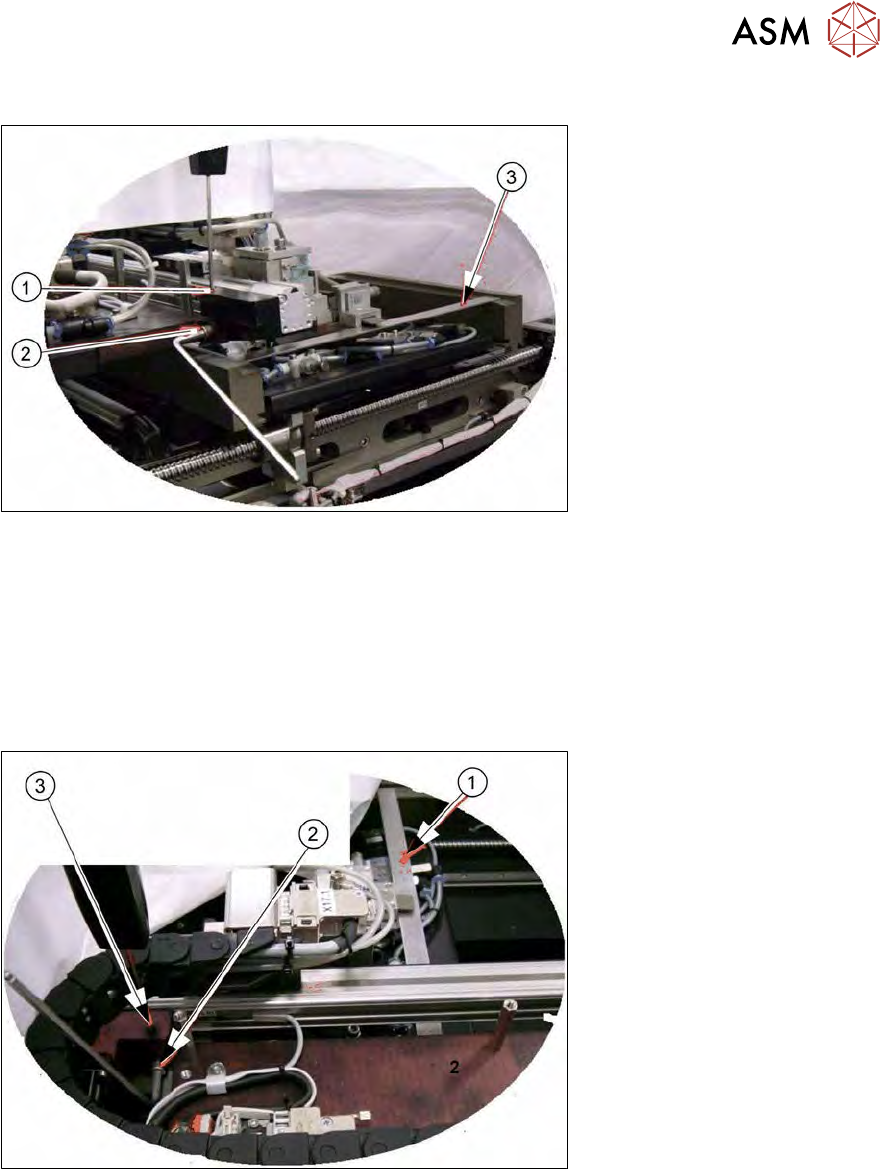
9.2.9.1 Aligning the height of the toothed belt axis on the lift
Fig.276: Aligning the height of the toothed belt axis on the lift
► Move the gripper in the direction of the wafer lift and then move it downwards.
► Insert the auxiliary rail (3) (e.g. a stable strip of metal).
► Remove the fastening screw (2) and adjust the height of this with the setscrew (1).
► The auxiliary rail (3) must lie flush on the wafer support rail. Then tighten the fastening screw
(2).
9.2.9.2 Aligning the height of the toothed belt axis at the changer
Fig.277: Aligning the height of the toothed belt axis at the changer
► Move the gripper to the "home position" and then move it downwards.
► Insert the auxiliary rail (1) (e.g. a stable strip of metal). The auxiliary rail must lie flush on the
wafer support rail.
► Remove the screw (2).
► Adjust the height with the setscrew (3).
► Fix the screw.
9 Wafer change system
9.2 Gripper
214 Service Manual SIPLACE Wafer System (SWS) 11/2018
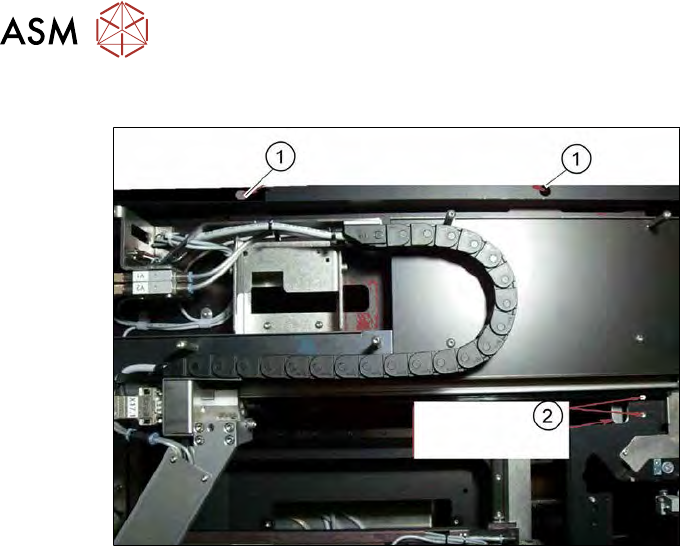
9.2.10 Replace the wafer changer completely
Fig.278: Replace the wafer changer completely
► Remove the cover plates.
► Remove the two fastening screws (1).
► Remove the screws (2) on the fixing plate (holder between flip unit and wafer changer, ac-
cessible from below).
► Disconnect the electrical connection cable.
► Disconnect the pneumatic connections.
► Replace the complete wafer changer unit.
► Define the following settings:
– 9.2.9.1 "Aligning the height of the toothed belt axis on the lift" [}213]
– 9.2.9.2 "Aligning the height of the toothed belt axis at the changer" [}213]
10 Option Die Attach Unit SWS
10.1 Installing the Option Die Attach Unit SWS
Service Manual SIPLACE Wafer System (SWS) 11/2018 215
10 Option Die Attach Unit SWS
10.1 Installing the Option Die Attach Unit SWS
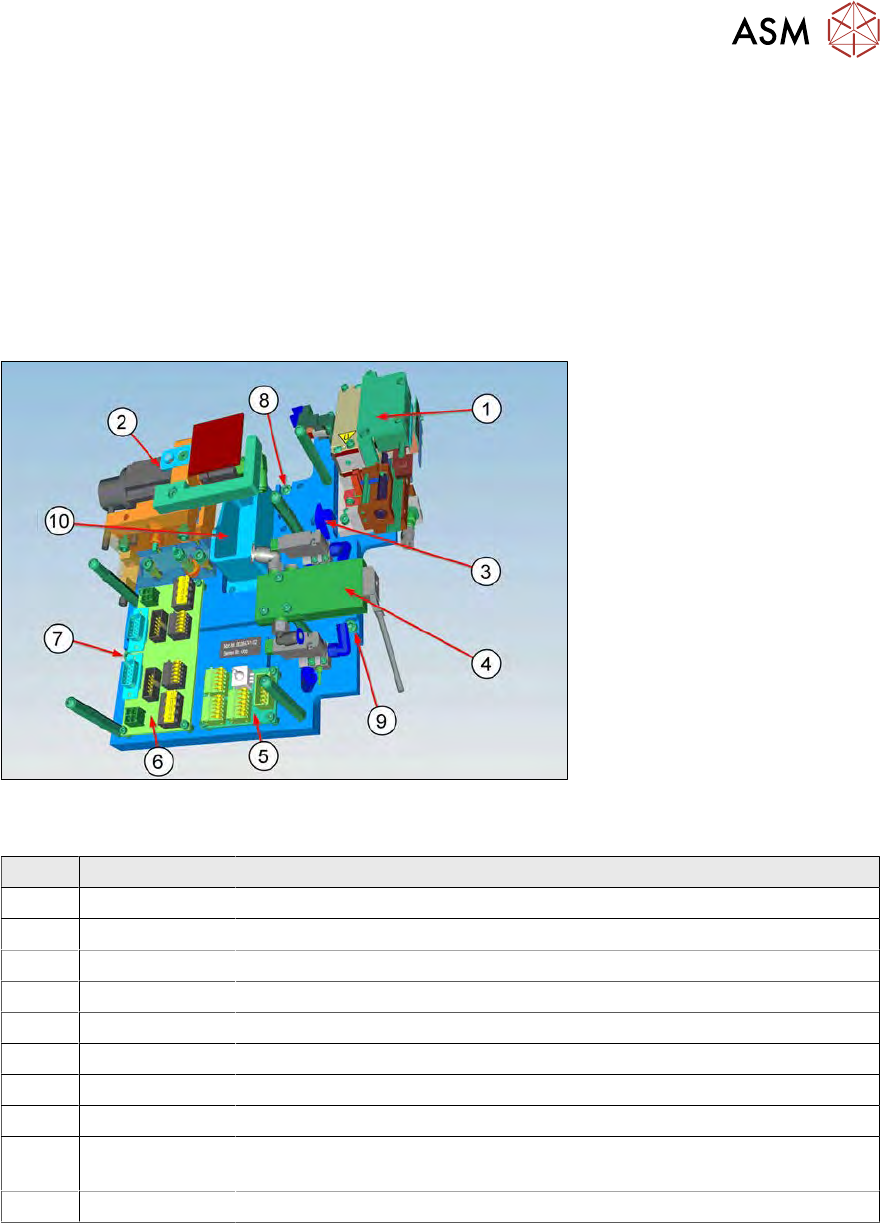
10.1.1 Description of the Die Attach Unit SWS
The Die Attach Unit SWS is delivered as a module assembly.
Item number module assembly [00384741-xx] Die Attach Unit SWS
Retrofit kit [00519728-xx] Die Attach Unit SWS
Fig.279:
The Die Attach Unit SWS is delivered as an assembly with the following mounted single parts:
Item Item no. Designation
1 00385866-xx Crank lifting unit
2 00385955-xx Cyber motor brushless
3 Storing location for the crank filling piece
4 03068603-xx Solenoid valve
5 00385749-xx Board AD-DA Rev.0 → Wired with sensors
6 00379104-xx Board AD-MOT2 Rev.0 → Wired with motors
7 03042562-xx M5x16 fastening screw
8 03042562-xx M5x16 fastening screw
9 03042562-xx M5x16 fastening screw (under the solenoid valve [03068603‑xx] → turn
away!)
10 00385562-xx Reject box right complete
The two boards [00385749-xx] (5) and [00379104-xx] (6) are already wired with the sensors and
motors.
When installing the Die Attach Unit SWS all you have to do is to connect the boards to the SWS.
The cables lie prepared at the installation position.