00195982-03_SM_SWS_EN.pdf - 第263页
11 Extension groups 11.1 Wafer supports Service Manual SIPLACE Wafer System (SWS) 11/2018 263 11.1.3.9 Replacing the screw-in cylinder for the downholder CAUTION Only for experienced service technicians from ASM Assembly…
11 Extension groups
11.1 Wafer supports
262 Service Manual SIPLACE Wafer System (SWS) 11/2018
11.1.3.7 Replacing the diffuse mode sensor
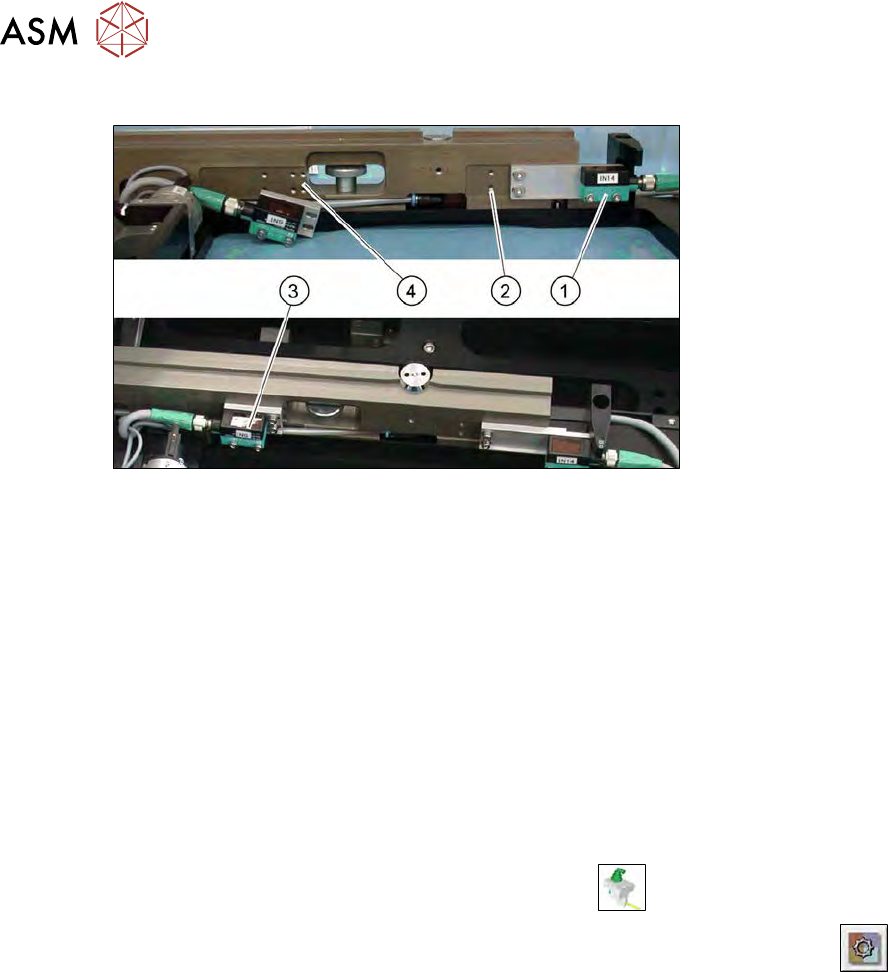
Fig.356: Diffuse mode sensor
The diffuse mode sensor IN14 (1) recognizes whether there is a wafer frame in the table. This dif-
fuse mode sensor is active if there is a wafer frame in the table.
The diffuse mode sensor IN9 (3) recognizes that a wafer frame has been moved across and is now
ready to be processed. This diffuse mode sensor is not active if there is a wafer frame in the table.
There are two possible positions for the different frame sizes. There are various drilled holes
provided (2) and (4) at the relevant installation positions for the diffuse mode sensor.
► Open the cable gland on the diffuse mode sensor.
► Remove the two screws holding the mounting plate.
► Fit the new diffuse mode sensor onto the mounting plate.
► Fit the unit so that it is flush and horizontal at the relevant installation position.
► Reconnect the cable.
► Check the input signals for the proximity switch.
► In the toolbar, select the button Manual Settings
.
► Go to the Manual Settings view and select the button Manual Subsystems
and then
select IOs (see 14.2 "Manual settings" [}358]).
► Select the Wafertabletab.
► Check the input signals for the proximity switch.
– DI09 Wafer on table Back input
– DI14 Wafer on table
11.1.3.8 Calibrating the wafer support
► Calibrate the wafer support after you have completed tasks on it.
During calibration, the wafer camera moves over the pin on the wafer support rail, measures
and saves this position.
11 Extension groups
11.1 Wafer supports
Service Manual SIPLACE Wafer System (SWS) 11/2018 263
11.1.3.9 Replacing the screw-in cylinder for the downholder
CAUTION
Only for experienced service technicians from ASM Assembly Systems GmbH &
Co.KG
Replacement of the screw-in cylinder for the downholder and the corresponding settings re-
quired may only be performed by experienced service technicians from ASM Assembly
Systems GmbH & Co.KG. Incorrect assembly could lead to the SWS malfunctioning.
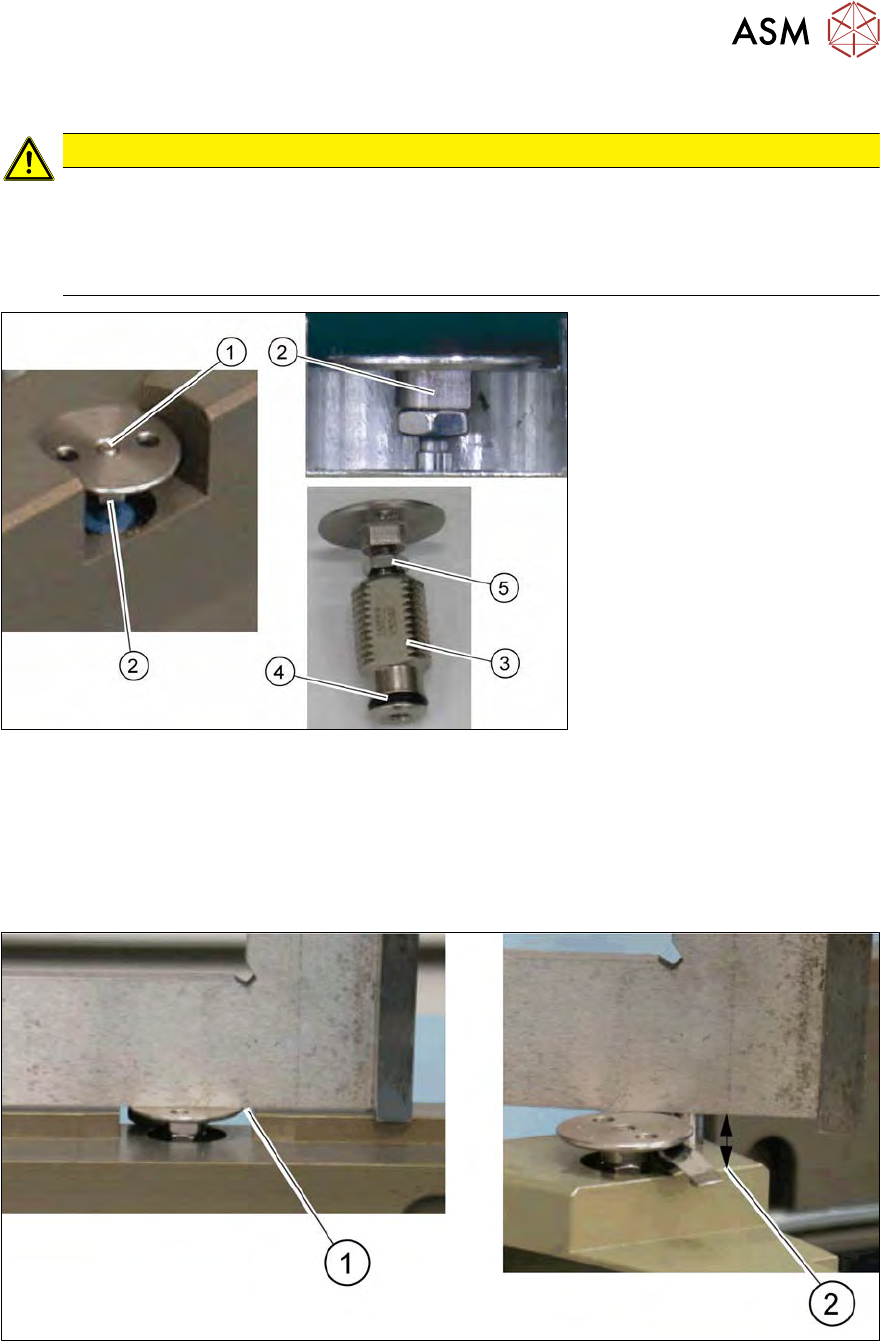
Fig.357: Downholder
► From above, loosen the grub screw (1) on the downholder.
► Unscrew and remove the downholder (3) assembly with the nut. Pay attention to the black
O‑ring (4). Replace this with a new one, if necessary.
► Screw in the new downholder and fix (lock) the height with a lock nut(5).
Setting the downholder height
Fig.358: Downholder - setting the height
●
Position (1): mushroom-shaped tool flush from the lower edge of the support strip to the top
edge of the mushroom-shaped tool
●
Position (2): distance of 5 mm from the lower edge of the support strip to the upper edge of
the mushroom-shaped tool when projected
11 Extension groups
11.2 Linear dipping unit (LDU)
264 Service Manual SIPLACE Wafer System (SWS) 11/2018
11.2 Linear dipping unit (LDU)
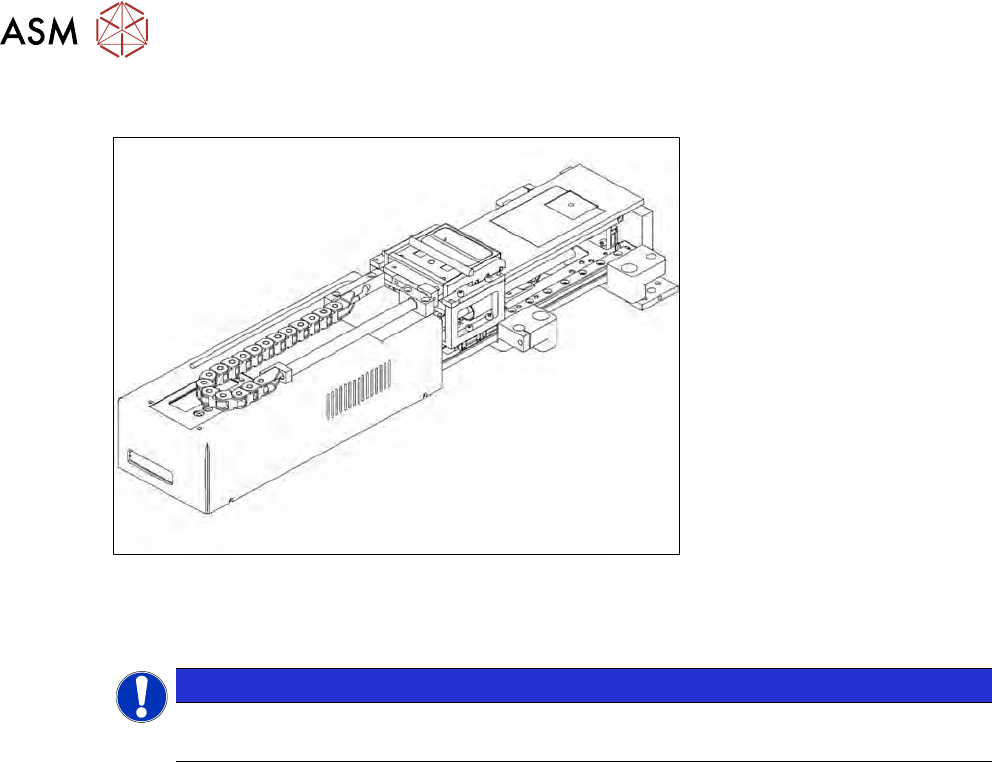
Fig.359: Linear dipping unit (LDU)
●
Linear dipping unit SWS12 (1/3) [03073446-xx]
●
Linear dipping unit SWS12 (2/4) [00386344-xx]
NOTICE
Service manual LDU-X
For details about the service work on the LDU, please refer to the LDU-X service manual.