00195982-03_SM_SWS_EN.pdf - 第324页
12 Wafer stretcher 12.8 Setting the sag sensor IN 19 324 Service Manual SIPLACE Wafer System (SWS) 11/2018 12.8.2.2 Preparatory tasks ► Move the table to the change position (GUI function). ► Move the expansion plate upw…
12 Wafer stretcher
12.8 Setting the sag sensor IN 19
Service Manual SIPLACE Wafer System (SWS) 11/2018 323
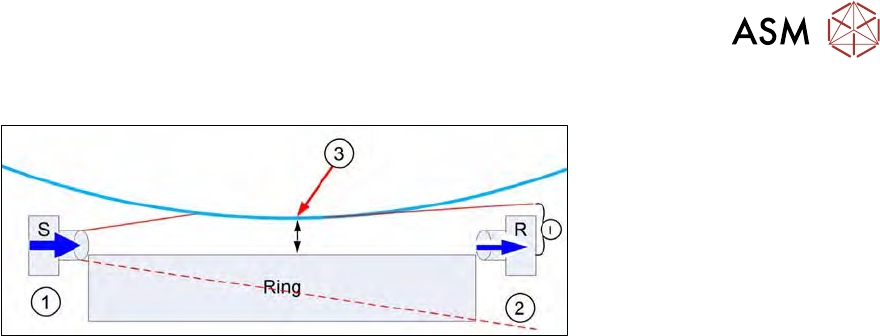
Light beam interrupted when wafer foil sags too low
Fig.456:
●
The light beam from transmitter S (1) to receiver R (2) is interrupted.
●
The wafer foil (3) sags down after completion of the stretching procedure.
●
Depending on how far down the foil sags, the light beam from transmitter S may be interrup-
ted.
●
The maximum permissible wafer foil sag is1mm.
●
If the wafer foil sags down more than this (= the foil is nearer than 1mm at the expansion
ring), the wafer may not be pulled into the wafer lift by the gripper.
●
Due to the interruption of the light beam, not all the light will reach the receiver R (2).
●
The receiver R (2) therefore receives a reduced light intensity (I).
●
When setting the switching threshold, you need to simulate a foil sag with a distance of 1 mm
from the foil to the expansion ring. This means a foil sag of approx. 9 mm!
●
With this simulated foil sag, a switching threshold is then calibrated at the Sensick WLL180T
analysis unit.
●
This value is shown as an absolute switching threshold value (green display) in the analysis
unit.
●
This means:
– If the wafer foil sags so much that the distance to the expansion ring is <1mm, the ana-
lysis unit will show a lower light intensity (red) than the switching threshold value (green).
→ OUT not enabled → change not permitted.
– If the wafer foil sags so much that the distance to the expansion ring is >1mm, the ana-
lysis unit will show a higher light intensity (red) than the switching threshold value (green).
→ OUT enabled → change permitted.
12.8.2 Mechanically setting the sag sensor IN19
12.8.2.1 Materials and equipment needed
●
1x dismantled expansion plate
or
1x stable plate or square material, length <500mm (may not sag)
●
2x 1mm plate with dimensions L=200mm, B=30mm, D=1mm
or
2x folded paper with the dimensions L=200mm, B=30mm, D=1mm
●
1x measuring scale
●
1x Allen key 3mm (T handle or other)
●
1x shortened Allen key 3mm for removing the transmitter screws from above
●
1x feeler gauge or plate, 0.1mm
12 Wafer stretcher
12.8 Setting the sag sensor IN 19
324 Service Manual SIPLACE Wafer System (SWS) 11/2018
12.8.2.2 Preparatory tasks
► Move the table to the change position (GUI function).
► Move the expansion plate upwards (GUI function).
► Lower the expansion ring. → expansion ring in lowest position (GUI function).
► Make sure that the die ejector has been lowered.
► Switch off the SWS and the SIPLACE CA.
► Dismantle and remove the SWS.
► Remove the two expansion plates.
► Reconnect the SWS to the power supply.
► An air connection is not needed.
► Switch the SWS on.
The following tasks can be performed in emergency OFF mode.
12.8.2.3 Adjusting (aligning) the sag sensor
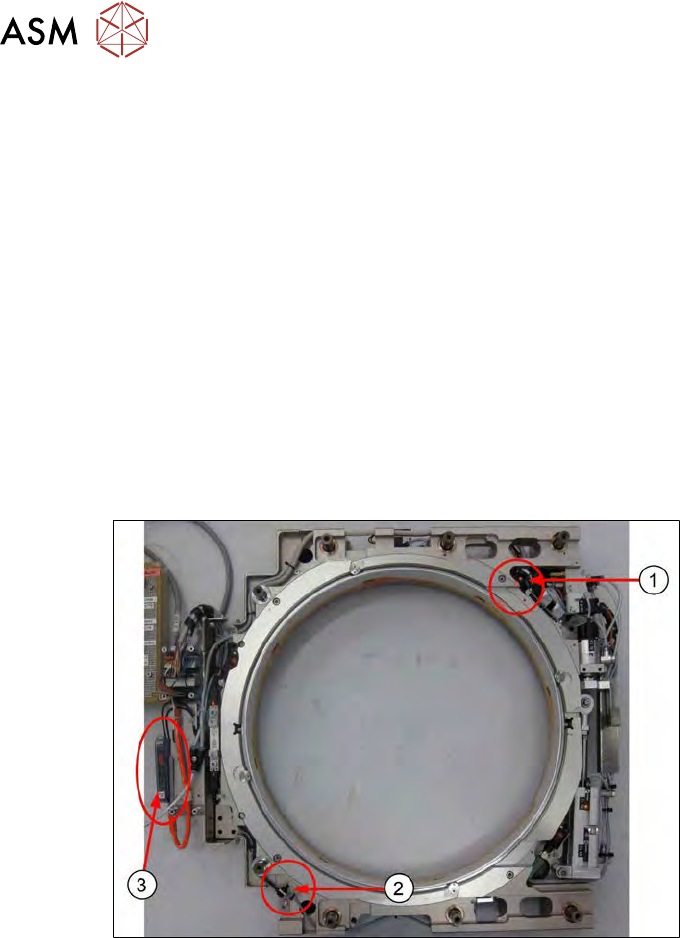
Fig.457:
The sag sensor assembly is present as shown in the diagram. The expansion plates have been
dismantled.
1. Transmitter S
2. Receiver R
3. Sensick WLL180T analysis unit
12 Wafer stretcher
12.8 Setting the sag sensor IN 19
Service Manual SIPLACE Wafer System (SWS) 11/2018 325
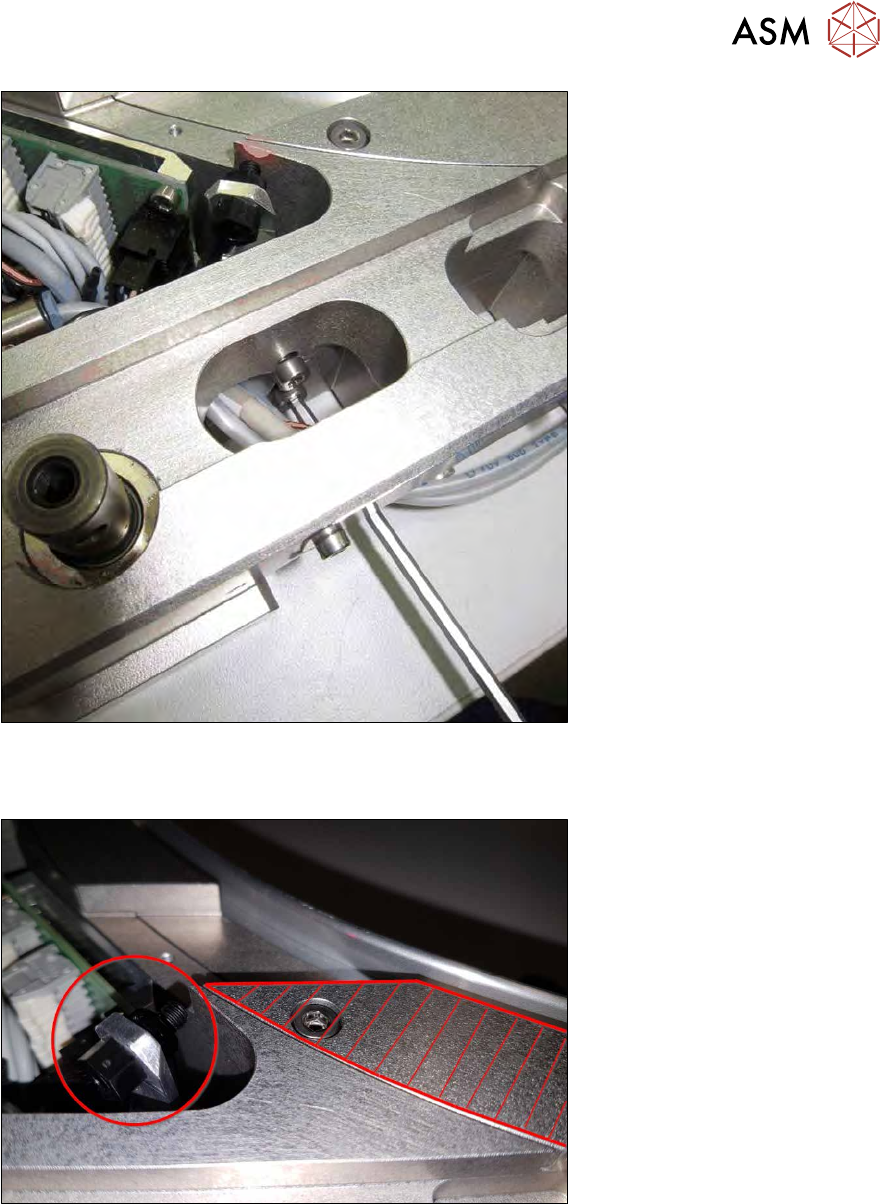
Fig.458:
► Remove both screws from the transmitter S.
If the screws cannot be accessed from the side, use a shortened Allen key from above.
Fig.459:
► Use the reference surface (shaded in red) to align the transmitter assembly height.