00195982-03_SM_SWS_EN.pdf - 第389页
15 Calibration 15.4 Calibration of the complete wafer handling Service Manual SIPLACE Wafer System (SWS) 11/2018 389 15.3.2.6 Calibration – calibration station (not used on SWS) Fig.564: Calibration station is a page wh…
15 Calibration
15.3 Calibration die handling - flip unit
388 Service Manual SIPLACE Wafer System (SWS) 11/2018
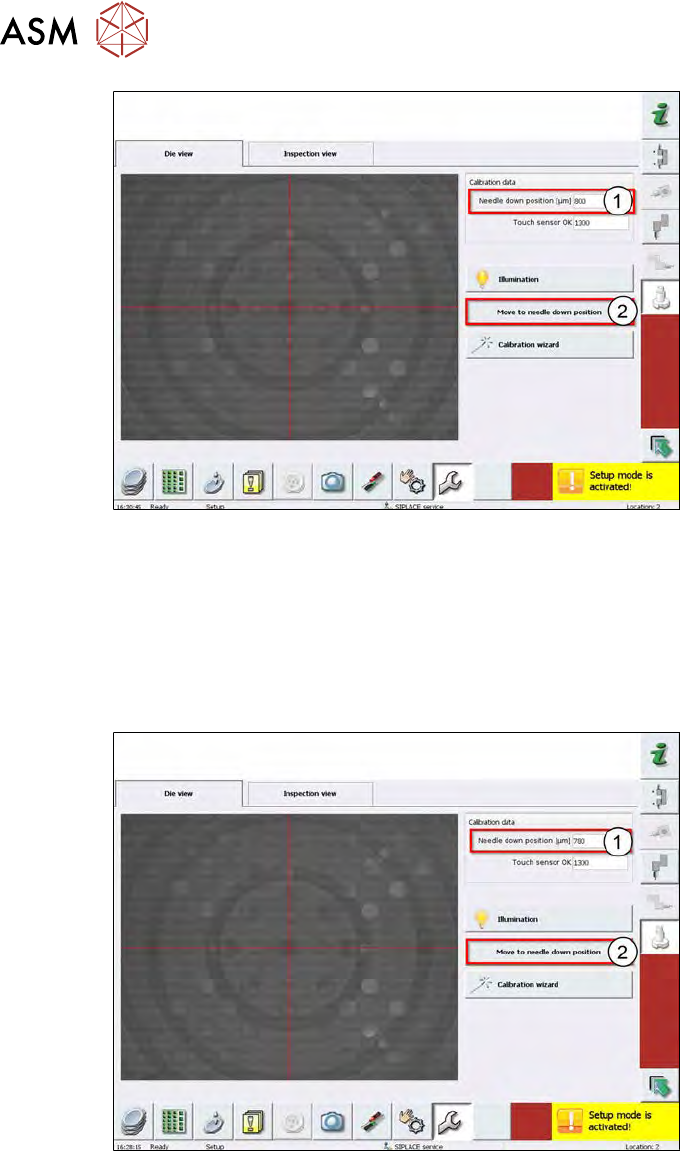
Fig.562:
► Enter a value lower than 1000µm → in example here 800µm (1).
► Choose Move to needle down position (2).
► Check the needle position with your fingertip.
► If you can´t feel anything, the needle position is too low. In that case, adjust the value between
800µm – 1000µm.
► If the scratching is too strong, minimize the value again.
Fig.563:
► Enter a lower value, for example 780µm (1).
► Choose Move to needle down position (2).
► Check the needle position with your fingertip.
► Repeat this sequences again and again, until you can´t feel any scratching and then until you
feel a scratching again.
► This is finally the needle down value!
► Move the die ejector down using the software!
15 Calibration
15.4 Calibration of the complete wafer handling
Service Manual SIPLACE Wafer System (SWS) 11/2018 389
15.3.2.6 Calibration – calibration station (not used on SWS)
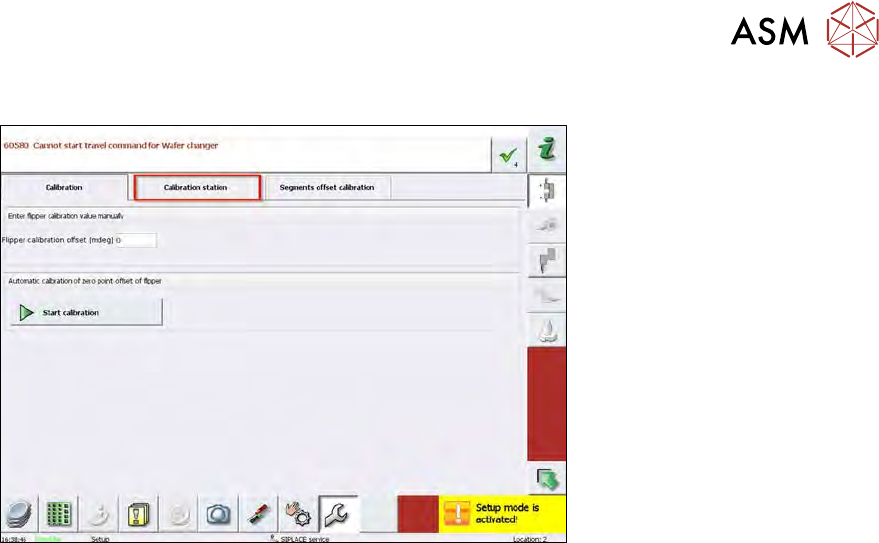
Fig.564:
Calibration station is a page which is normally used on the external flipper calibration station with
a different wafer camera position to adjust the flip unit. This is only used in manufacturing.
On the SWS, this page cannot be used because there is no possibility to the check the position
of the segments with the normal wafer camera position.
The calibration menu Calibration station is active in the Setup mode but it is not used!
This calibration can´t be performed in the machine.
This type of calibration is used during the assembly of a completely new SWS in order to detect the
correct position of the centering pin bore holes for mounting the flip unit.
15.4 Calibration of the complete wafer handling
Precondition
The SWS must be completely initialized!
If the initialization is not successful, refer to section 17 "Tips and tricks" [}471].
Procedure
The calibration is split into three modules and must be done in the sequence below:
●
15.4.1 "Calibrating the wafer lift" [}390]
●
15.4.1.1 "Calibrating the magazine lift limit positions" [}390]
●
15.4.1.2 "Calibrating the magazine slot scan position" [}391]
●
15.4.1.3 "Calibrating the wafer transfer position of the magazine with respect to the wafer
table" [}394]
●
15.4.2 "Wafer table calibration menu" [}398]
●
15.4.3 "Calibration wafer changer menu" [}405]
15 Calibration
15.4 Calibration of the complete wafer handling
390 Service Manual SIPLACE Wafer System (SWS) 11/2018
15.4.1 Calibrating the wafer lift
HIGH RISK OF SERIOUS INJURIES
► Setup mode must be activated!
The calibration is split into three modules and must be done in the sequence below:
●
15.4.1.1 "Calibrating the magazine lift limit positions" [}390]
●
15.4.1.2 "Calibrating the magazine slot scan position" [}391]
●
15.4.1.3 "Calibrating the wafer transfer position of the magazine with respect to the wafer
table" [}394]
15.4.1.1 Calibrating the magazine lift limit positions
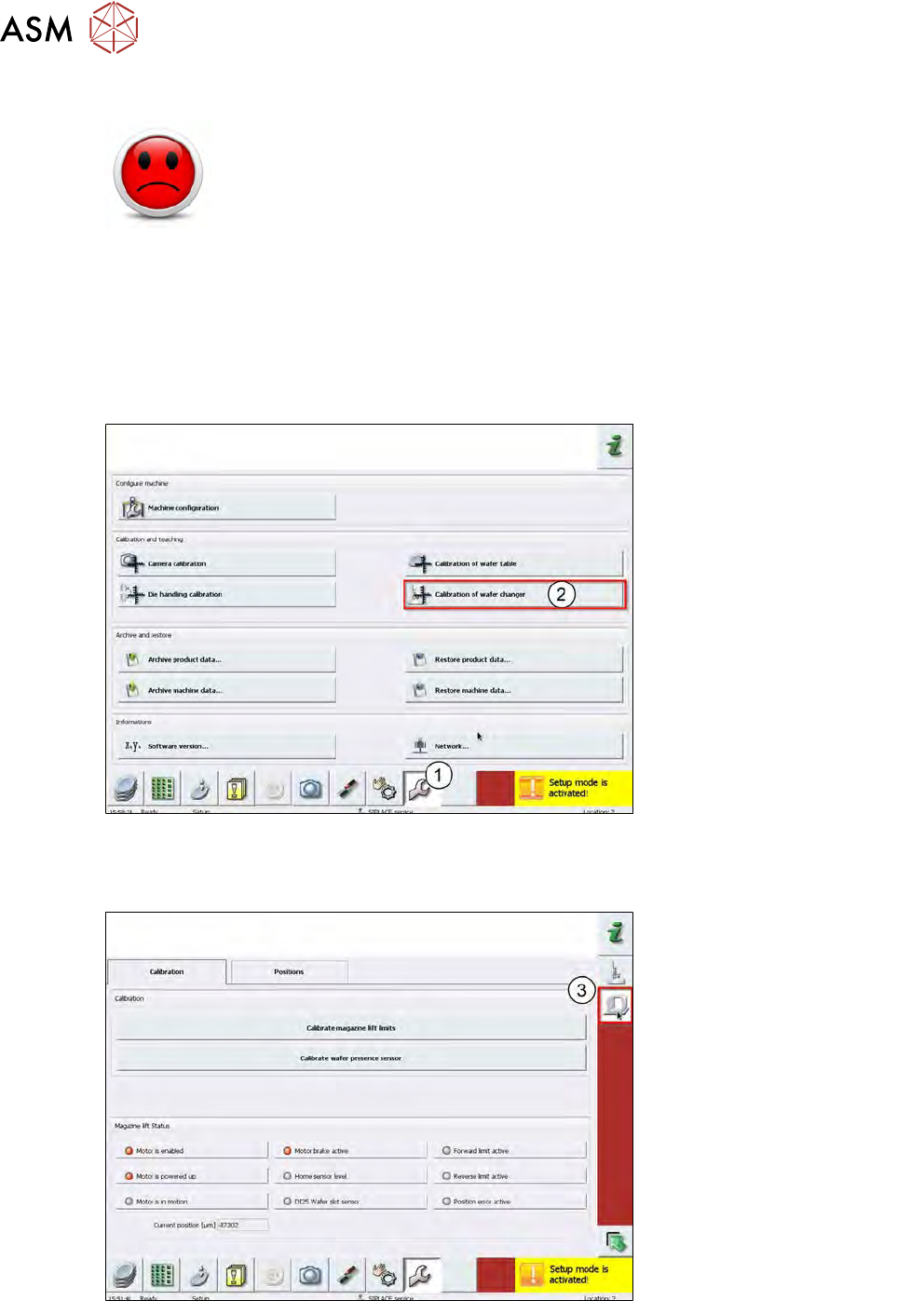
Fig.565:
► Choose Calibration (1).
► Choose Calibration of wafer changer (2).
Fig.566:
► Choose Wafer lift calibration (3).