00195982-03_SM_SWS_EN.pdf - 第194页
9 Wafer change system 9.1 Magazine lift 194 Service Manual SIPLACE Wafer System (SWS) 11/2018 9.1.1.3 Replacing the proximity switch The two proximity switches monitor the top and bottom end position stops for the liftin…
9 Wafer change system
9.1 Magazine lift
Service Manual SIPLACE Wafer System (SWS) 11/2018 193
9.1.1.2 Replacing the motor
DANGER
Increased risk of injury when loosening the motor brake.
The lift is heavy (approx. 80 kg) and secured with a motor brake. When the motor is cur-
rent-free and the grub screw is loosened on the motor shaft coupling, the lift will move down
on the spindle without braking.
► Remove the magazine plate in the lift, if present.
► Support the lift with a suitable object (e.g. a stable wooden block) so that it can not
move downwards.
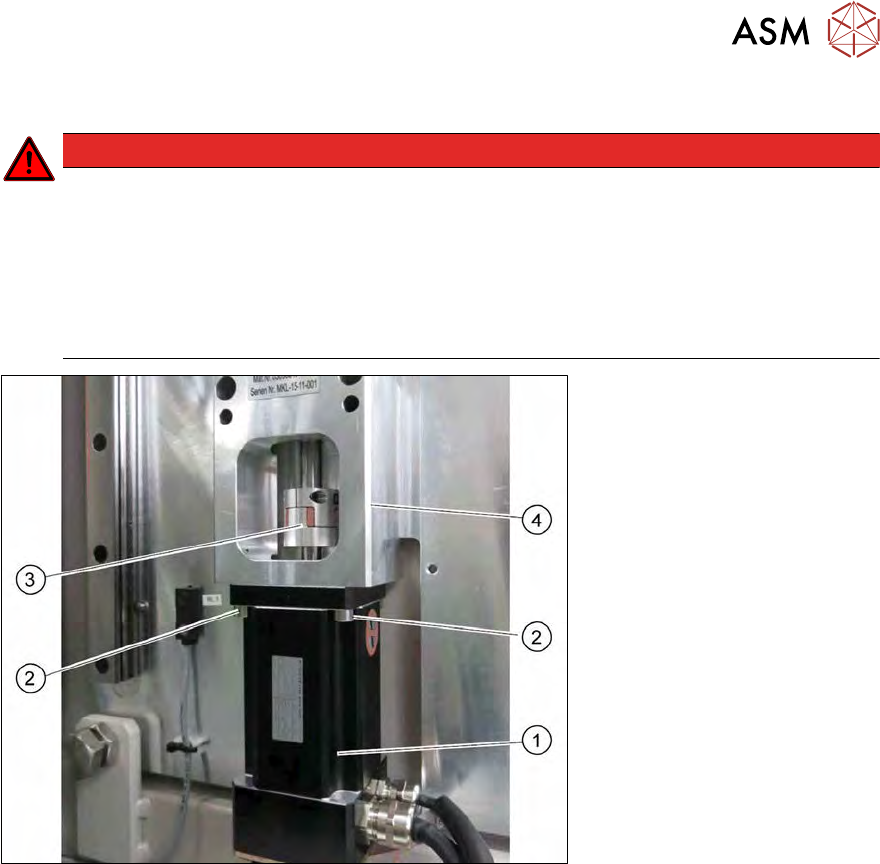
Fig.252: Motor with magazine lift coupling (short recirculating ball screw fitted)
Removal
► Unplug the motor and encoder cables from the motor (1).
► Loosen the grub screw holding the coupling (3) on the motor shaft.
► Remove the four screws (2) on the mounting unit (4) and pull the motor (1) down and out.
► Check the coupling for damage and replace if necessary.
Installation
► Push the motor and mounting plate into the spindle coupling.
► Align the motor and shaft on the spindle so that they are in line.
► Loosely tighten the four screws (2) on the mounting unit (4).
► The coupling may not have any offset. Check the concentricity. There is otherwise a risk that
the coupling could break.
► Tighten the grub screw on the coupling (3).
► Tighten the four screws (2) on the mounting unit (4).
► Plug the motor and encoder cables into the motor (1).
► Fix and gather the cables together with cable ties, where necessary. Make sure that the
cables do not rub against any part or get trapped.
9 Wafer change system
9.1 Magazine lift
194 Service Manual SIPLACE Wafer System (SWS) 11/2018
9.1.1.3 Replacing the proximity switch
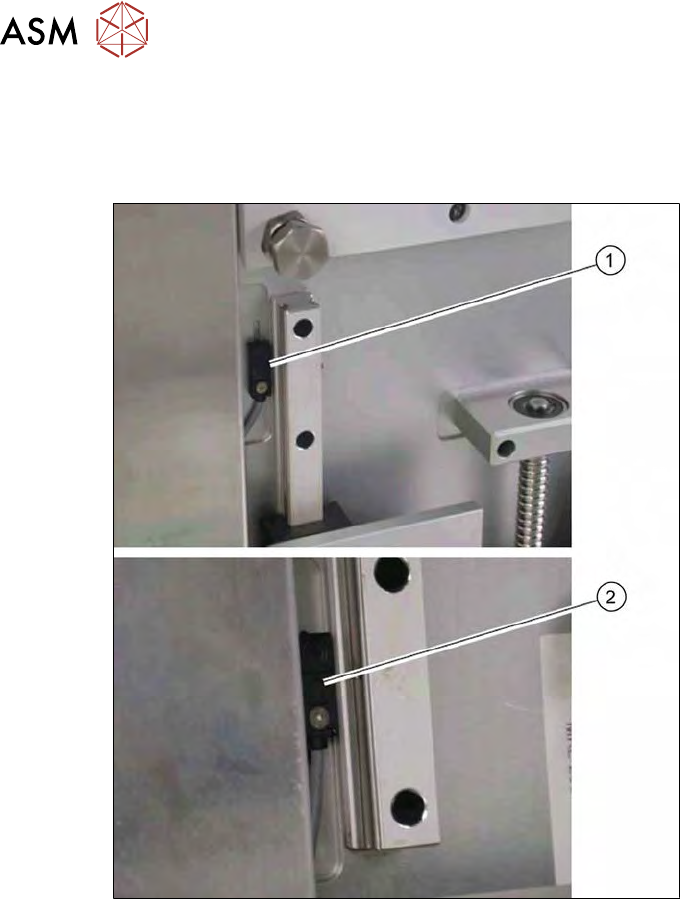
The two proximity switches monitor the top and bottom end position stops for the lifting axis of the
magazine lift. The cable for the relevant proximity switch is connected to the DMC board in the
lower section of the magazine lift.
Fig.253: Proximity switch for lifting axis of magazine lift (detailed view)
●
The proximity switch (1) for the top lifting axis position is located next to the linear guide at the
top.
●
The proximity switch (2) for the lower lifting axis position is located next to the linear guide at
the bottom.
► Remove the screw on the relevant proximity switch.
► Unthread the connection cable as far as the DMC board (see also9.1.2 "Electrical sys-
tem" [}200]).
► Fit the new proximity switch.
► Run the connection cable to the DMC board.
► Connect the connection cable to the relevant terminal strip.
► Fix and gather the cables together with cable ties, where necessary. Make sure that the
cables do not rub against any part or get trapped.
► Check the input signals for the proximity switch.
9 Wafer change system
9.1 Magazine lift
Service Manual SIPLACE Wafer System (SWS) 11/2018 195
9.1.1.4 Crash sensor and slot query
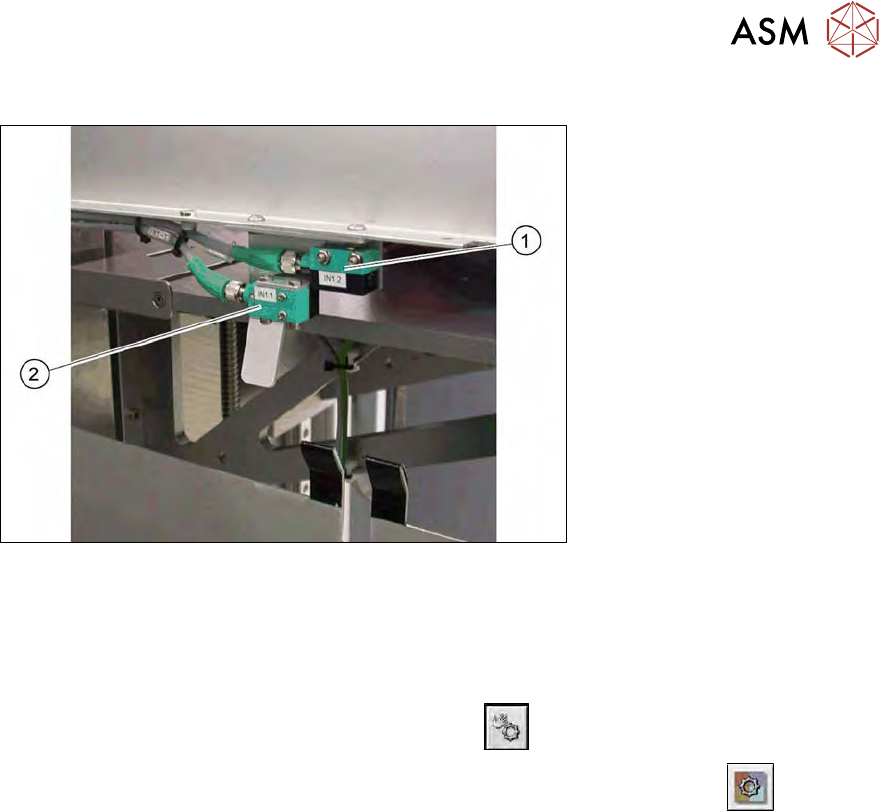
Fig.254: Crash sensor and slot query on the magazine lift
●
The crash sensor (1) monitors whether the lift is free. This makes sure that there are no
wafers in the lifting axis travel range.
●
The slot query (2) checks each magazine unit to see whether their is a wafer in it.
► Check the input signals for the proximity switch.
► In the toolbar, select the button Manual Settings
.
► Go to the Manual Settings view and select the button Manual Subsystems
and then
select IOs (see 14.2 "Manual settings" [}358]).
► Select the Wafer Changertab .
ð The displays shine:
– DI25 Wafer slot sensor
– DI26 Lift crash sensor