RS-1_instruction manual.pdf - 第100页
Part 1 B asic O peration Chapter 1 Overv iew of the Machine 1- 82 (1) Machine Data Acquisition Sett ings The follow ing shows t he content s to be obta ined w ith the [Get and Save Machi ne Data] comm and . W hen the “ M…
Part 1 Basic Operation Chapter 1 Overview of the Machine
1-81
④ When the machine information files have been obtained and compressed successfully, the
screen display is changed as follows.
To close this dialog box, press the <Close> button.
If you check off the desired information check boxes in the “Machine Data Acquisition Settings”
area, you can get more information.
(For more information, see the item (1) “Machine Data Acquisition Settings” of Section 1.9.6
“Machine Data Acquisition Settings”.)
If you click the <Advanced Settings> button, you can make more selections of the information
you have set in the “Machine Data Acquisition Settings” area to obtain necessary information.
(For more information, see the item (2) “Advanced Settings of Machine Data Acquisition Settings”
of Section 1.9.6 “Advanced Setting of Machine Data Acquisition Settings”.)
Part 1 Basic Operation Chapter 1 Overview of the Machine
1-82
(1) Machine Data Acquisition Settings
The following shows the contents to be obtained with the [Get and Save Machine Data]
command.
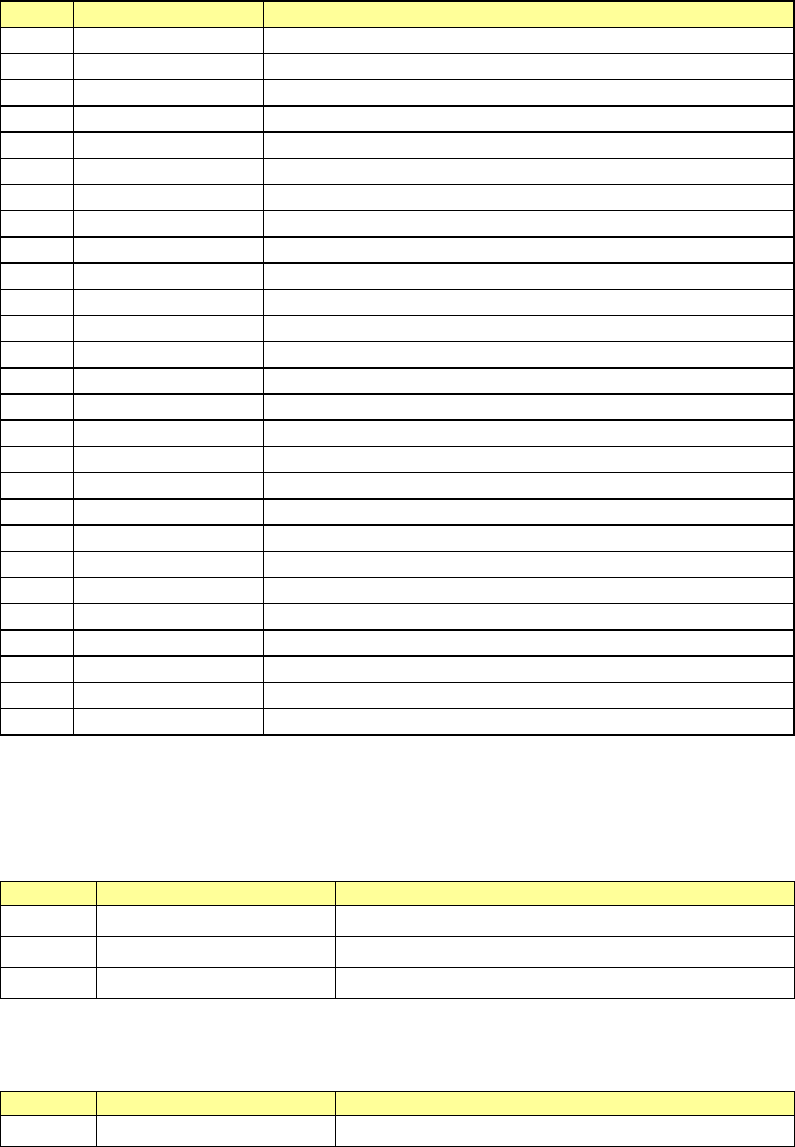
When the “Machine Data” check box is checked on in the “Machine Data Acquisition Settings”
area, the system gets the following machine information, compresses it, and saves it into the
folder shown below.
Save destination folder: D:¥JUKI¥LOG¥MACHINE
No.
File name
Contents
1
ComputerName.log
Current runtime log
2
InfoApp.txt
Dump of InfoApp
3
InfoAsyn.txt
Dump of InfoAsyn
4
InfoDebug.txt
Dump of InfoDebug
5
InfoDrv.txt
Dump of InfoDrv
6
InfoMark.txt
Dump of InfoMark
7
InfoProd.txt
Dump of InfoProd
8
InfoSystem.txt
Dump of InfoSystem
9
process.txt
Information on what process is currently running
10
cnvrstat.txt
Transport sensor status
11
axispos.txt
Current position of axis
12
OperationLog.log
Operation log (Maintenance log)
13
EventLog.log
Event log (Maintenance log)
14
posboard.txt
Information on position board and each amplifier
15
AppEvent.Evt
Application log for event viewer
16
SecEvent.Evt
Security log for event viewer
17
SysEvent.Evt
System log for event viewer
18
DrWtsn32.log
Dr. Watson log
19
CTL_RS1.dat
Mechanical control parameter information
20
DSN_RS1.dat
Information on the designed values
21
MPD_RS1.dat
Information on the designed mechanical coordinate values
22
MSP_RS1.dat
MS parameter information
23
OPT_RS1.dat
Operation option information
24
POS_RS1.dat
Information on the measured mechanical coordinate values
25
SUP_RS1.dat
Setup information
26
NZL_RS1.dat
Nozzle information
27
SFC_RS1.dat
Self-test information
When the “Error Logs” check box is checked on in the “Machine Data Acquisition Settings” area,
the system gets the following error log files, compresses them, and saves it into the folder
shown below.
Save destination folder: D:¥JUKI¥LOG¥ ErrHist
Various error log files
No.
File name
Contents
1
ErrLog_Yxxxx_Mxx.err
Error log files in xx month, xxxx year.
2
MixLog ¥ xxxx.err
Various operation and event error log files
3
20161104 ¥ xxxx.log
Error log files by date folder
When the “Image Data” check box is checked on in the “Machine Data Acquisition Settings”
area, the system gets the following file, compresses it, and saves it into the folder shown below.
Save destination folder: D:¥JUKI¥LOG¥ VRAM
No.
File name
Contents
1
xxxx.img
Image file

Part 1 Basic Operation Chapter 1 Overview of the Machine
1-83
When you check off the “Special logs” check box in the “Machine Data Acquisition Settings”
area, the following folders are compressed, and then saved.
Saving target folder: D:¥JUKI¥LOG¥SpclLog
No.
File name
Contents
1 xxxx_spcl.log Special log file
2 xxxx_.s01x Production program file
3
Productivity_xxxx.log
Operation information file
A “nozzle operation information file” is displayed only when an individual nozzle management
system” is attached on the machine. When you check off the “Nozzle operation information
file” check box in the “Machine Data Acquisition Settings” area, the following folder is
compressed, and then saved.
Saving target folder: D:¥JUKI¥Data¥NozzleManage
No.
File name
Contents
1
xxxx.bin
Nozzle operation information file